
1. Киришүү
This manual provides essential information for the safe and efficient installation, operation, and maintenance of your GEYA TUYA WIFI Smart Circuit Breaker, model GWS9-W. This device allows for remote control and monitoring of your electrical circuits via the Tuya application, offering advanced protection features and energy management capabilities.
2. Коопсуздук маалыматы
WARNING: Electrical shock hazard. Installation and servicing should only be performed by qualified personnel. Always disconnect power before working with electrical circuits.
- Ensure the main power supply is turned off before installation or maintenance.
- Бардык зымдардын туташууларынын бекем жана туура экенин зым схемасына ылайык текшериңиз.
- Эгер аппарат бузулуп калса, аны иштетпеңиз.
- This device is designed for indoor use in dry environments.
- Бардык жергиликтүү электр кодекстерине жана эрежелерине баш ийиңиз.
3. Продукт бүтүп калдыview
The GEYA GWS9-W is a smart WIFI circuit breaker designed for home automation and enhanced circuit protection. It integrates seamlessly with the Tuya app, providing remote control, energy monitoring, and various safety features.
Негизги өзгөчөлүктөрү:
- Алыстан башкаруу жана мониторинг: Manage your circuit breaker from anywhere using the Tuya app.
- Комплекстүү коргоо: Ашыкча жүктөөдөн коргоону камтыйтtage, undervolvoltage, overcurrent, and high temperatures.
- Adjustable Load Control: Customize current settings (1A-63A) and power (50W-11KW) for optimal energy management.
- Energy Efficiency Tracking: Monitor real-time energy consumption and power usage.
- Custom Scenarios: Define personalized switching states for various home automation needs.
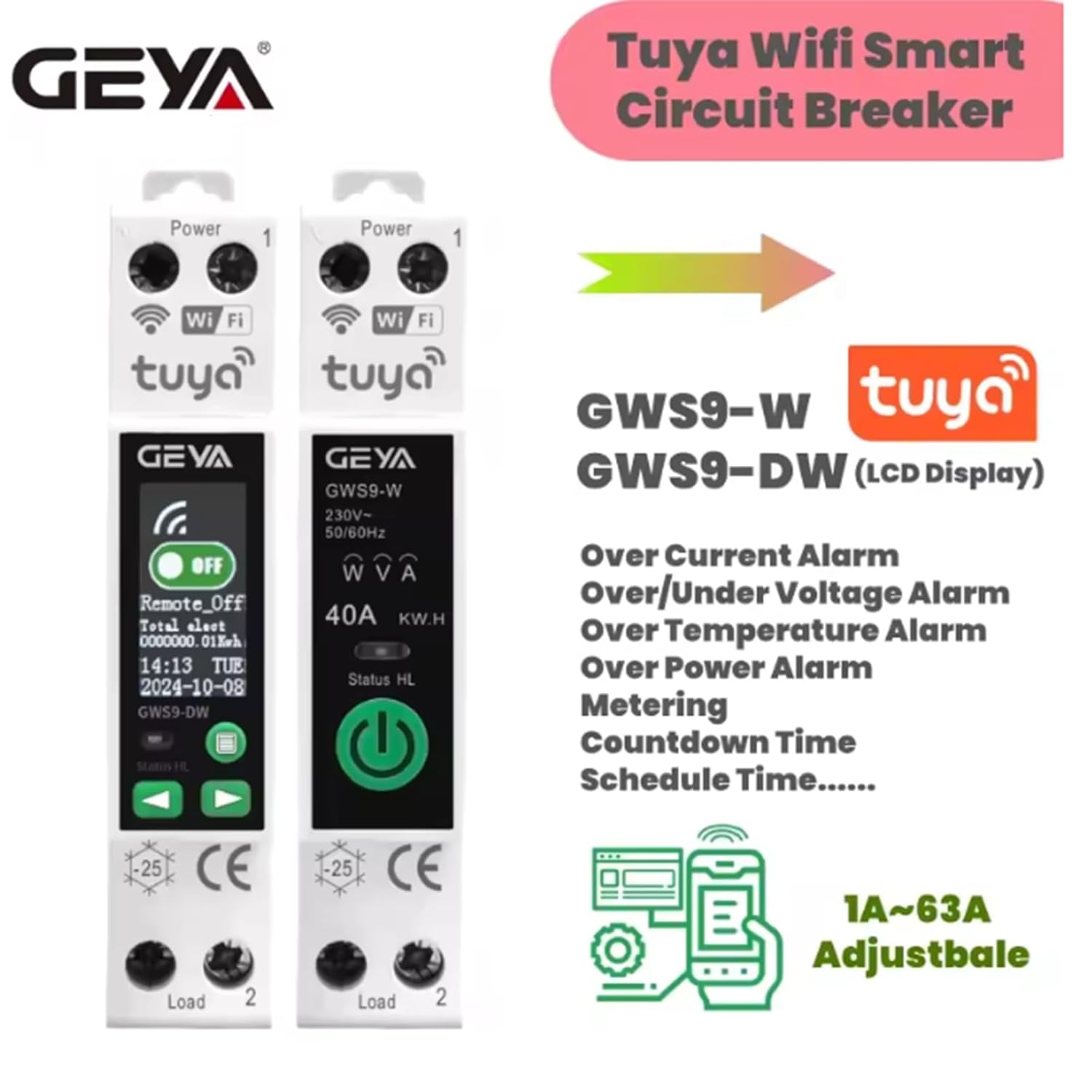
Сүрөт: бүттүview of GWS9-W and GWS9-DW models, highlighting features like overcurrent, over/under voltage alarm, over temperature alarm, over power alarm, metering, countdown, and schedule time.
4. Техникалык шарттар

Image: Detailed product parameters for GWS9-W and GWS9-DW models, including voltage, current, and communication methods.
| Параметр | Нарк |
|---|---|
| Rated Working Voltage Диапазон | 90V-240V |
| Поляктардын саны | 1P+N |
| Max Overcurrent | 63A (3-10s) |
| Номиналдуу ток | 1-63A жөнгө салынуучу |
| Байланыш ыкмасы | TUYA WiFi |
| Иштеп жаткан айлана-чөйрөнүн температурасы | -25°C~70°C |
| Ultimate Short-Circuit Capacity | 500A |
| Electrical Lifespan | ≥10000 операциялар |
| Механикалык өмүр | ≥100000 операциялар |
| Жабуу убактысы | <20 мс |
| Ачылыш убактысы | <20 мс |
| Экранды көрсөтүү | None (GWS9-DW has LCD) |
| Өлчөмдөрү (болжол менен) | 10.2 x 7.5 x 2.2 см |
| Салмагы (болжол менен) | 110 грамм |
5. Орнотуу (Орнотуу)
The GWS9-W smart circuit breaker is designed for DIN rail mounting. Follow these steps for proper installation:
- Кубатты өчүрүү: Before starting any electrical work, ensure the main power supply to the circuit is completely disconnected at the main breaker or fuse box. Use a voltagэлектр кубаты жок экенин ырастоо үчүн сыноочуну колдонуңуз.
- Аппаратты орнотуу: Snap the GWS9-W onto a standard 35mm DIN rail in your electrical panel.
- Зымдарды туташтыруу: Refer to the wiring diagram below. Connect the main power supply (Line and Neutral) to the input terminals (marked 'Power' or '1'). Connect the load (the device or circuit you want to control) to the output terminals (marked 'Load' or '2'). Ensure all connections are tight and secure.
- Зымдарды текшерүү: Double-check all connections against the diagram to prevent short circuits or damage.
- Күчтү калыбына келтирүү: Бардык туташуулар текшерилип, коопсуз болгондон кийин, чынжырдын кубатын калыбына келтириңиз.

Image: Wiring diagram showing connections for main power supply, standby power supply, and load for the GWS9-W circuit breaker.
6. Иштөө нускамалары
6.1. Колдонмону орнотуу жана жупташтыруу
- Tuya тиркемесин жүктөп алыңыз: Издөө "Tuya Smart" or "Smart Life" in your smartphone's app store (iOS or Android) and download it.
- Катталуу/Кирүү: Колдонмону ачып, жаңы аккаунт түзүңүз же бар аккаунт менен кириңиз.
- Түзмөк кошуу: Tap the "+" icon in the top right corner of the app to add a new device. Select "Electrical Engineer" > "Circuit Breaker (Wi-Fi)" or use the auto-scan feature.
- Wi-Fi чоо-жайын киргизиңиз: Телефонуңуз 2.4 ГГц Wi-Fi тармагына туташкандыгын текшериңиз. Суралганда Wi-Fi сырсөзүңүздү киргизиңиз.
- Жупташтыруу режими: The circuit breaker should automatically enter pairing mode (Wi-Fi indicator light blinking rapidly). If not, press and hold the reset button on the device for 5-10 seconds until the Wi-Fi indicator blinks rapidly.
- Толук жупташтыруу: Follow the on-screen instructions in the app to complete the pairing process. Once connected, the Wi-Fi indicator light will become solid.

Image: Tuya app interface displaying real-time monitoring of voltage, current, power, and total consumption, along with settings for voltage (90V-240V) and current (1A-63A).
6.2. Daily Operation and Advanced Settings
- Алыстан күйгүзүү/өчүрүү: Use the main switch icon in the Tuya app to remotely turn the circuit breaker ON or OFF.
- Энергия мониторинги: View реалдуу убакыттагы көлөмtage, current, active power, and total energy consumption within the app.
- Коргоо жөндөөлөрү: Access the device settings in the app to configure protection parameters such as overvoltage, undervolvoltage, overcurrent, and high-temperature thresholds. You can set these to trigger a trip or an alarm.
- График жана таймерлер: Set schedules for automatic ON/OFF operations at specific times or create countdown timers.
- Custom Scenarios: Create smart scenes to automate actions based on conditions like time, weather, or other smart devices.

Image: Tuya app interface demonstrating how to add schedules for automatic operation and configure various protection functions like over voltage, томдун астындаtage, over load, high power, and high temperature.

Image: Visual representation of the key benefits: remote control via smartphone, comprehensive circuit protection, and timing control for connected devices.
7. Техникалык тейлөө
The GEYA GWS9-W smart circuit breaker requires minimal maintenance. Follow these guidelines to ensure optimal performance and longevity:
- үзгүлтүксүз тазалоо: Түзмөктүн сыртын мезгил-мезгили менен кургак, жумшак чүпүрөк менен тазалап туруңуз. Абразивдүү тазалоочу каражаттарды же эриткичтерди колдонбоңуз.
- Байланыштарды текшерүү: Annually, or if you suspect an issue, have a qualified electrician inspect the wiring connections to ensure they remain tight and free from corrosion.
- Программалык камсыздоонун жаңыртуулары: Keep the Tuya app updated to the latest version to receive any firmware updates for the device, which may include performance improvements or new features.
- Экологиялык шарттар: Ensure the device operates within its specified ambient temperature range (-25°C to 70°C) and avoid exposure to excessive moisture or dust.
8. Кыйынчылыктарды
| Көйгөй | Мүмкүн себеп | Чечим |
|---|---|---|
| Түзмөк күйбөй жатат. | Автоматтык өчүргүчкө электр энергиясы жок; зымдар туура эмес туташтырылган. | Check main power supply. Verify wiring connections according to the diagram. |
| Wi-Fi indicator not blinking during pairing. | Түзмөк жупташтыруу режиминде эмес. | Press and hold the reset button for 5-10 seconds until the Wi-Fi indicator blinks rapidly. |
| Tuya колдонмосуна туташуу мүмкүн эмес. | Incorrect Wi-Fi password; 5GHz Wi-Fi network; poor signal. | Ensure correct 2.4GHz Wi-Fi password. Move device closer to router. Disable 5GHz band temporarily if necessary. |
| Автоматтык өчүргүч тез-тез иштен чыгат. | Ашыкча жүктөө, ашыкчаtage, or other protection triggered. | Check connected load for excessive current draw. Verify voltage stability. Adjust protection thresholds in the app if appropriate, or consult an electrician. |
| Алыстан башкаруу пульту жооп бербей жатат. | No internet connection; app issue; device offline. | Check home Wi-Fi and internet connection. Restart the Tuya app. Check if the device is showing as 'offline' in the app. |
9. Кепилдик жана колдоо
GEYA products are manufactured to high-quality standards. For warranty information, please refer to the terms and conditions provided at the point of purchase or contact GEYA customer support directly. Keep your purchase receipt as proof of purchase.
For technical support or further assistance, please visit the official GEYA webсайтка же кардарларды тейлөө бөлүмүнө кайрылыңыз. Байланыш маалыматтары, адатта, продуктунун таңгагында же өндүрүүчүнүн дарегинде тапса болот webсайт.