
1. Киришүү
This manual provides essential information for the proper setup, operation, and maintenance of your TUOPUONE 10.2inch e-Paper (G) display. Please read these instructions carefully before use to ensure optimal performance and longevity of the product.
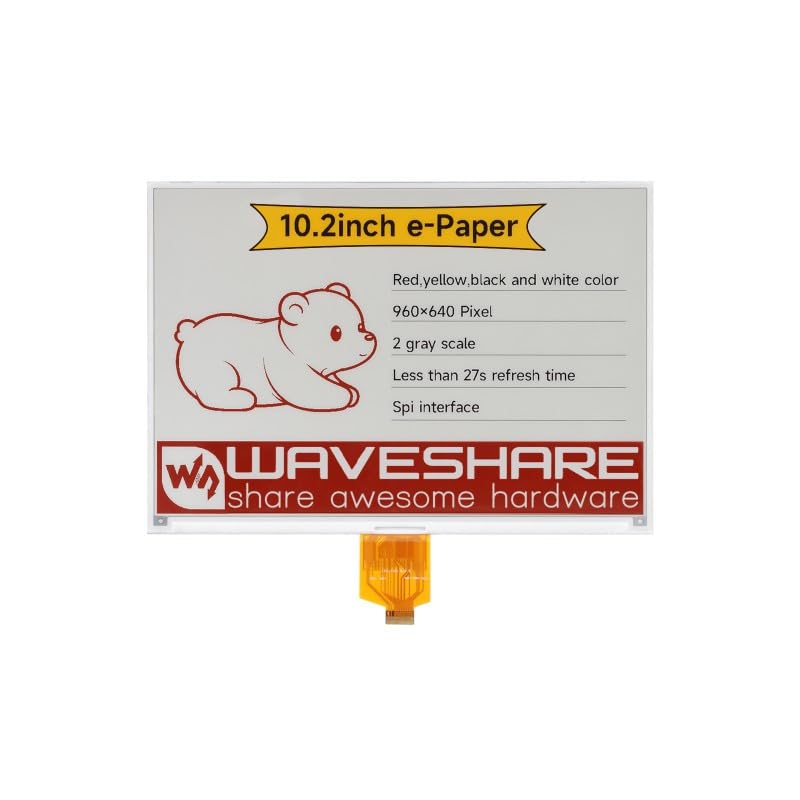
Сүрөт 1.1: Алдыңкы view of the TUOPUONE 10.2inch e-Paper (G) display, showing the screen and flexible PCB connector.
2. Продукт бүтүп калдыview жана өзгөчөлүктөрү
The TUOPUONE 10.2inch e-Paper (G) is an E-Ink display module designed for low-power applications requiring persistent display content. It features a 960x640 resolution and supports Red, Yellow, Black, and White display colors.
Негизги өзгөчөлүктөрү:
- Арткы жарыктын кереги жок: The display retains its content indefinitely without power, offering excellent readability in ambient light.
- Өтө аз энергия керектөө: Power is primarily consumed only during display refresh cycles.
- Көп түстүү дисплей: Capable of displaying Red, Yellow, Black, and White colors.
- Жогорку чечим: 960x640 pixels for clear text and graphics.
- SPI интерфейси: Utilizes a 3-wire or 4-wire SPI interface for communication with host microcontrollers.
- Wide Viewбурч: Сунуштар а viewing angle greater than 170 degrees.

Image 2.1: Diagram highlighting the key characteristics of the 10.2-inch e-Paper display.
3. Пакеттин мазмуну
Пакетиңизде бардык буюмдар бар экенин текшериңиз:
- 1 x TUOPUONE 10.2inch e-Paper (G) Display
4. Setup and Hardware Connection
The 10.2inch e-Paper (G) display is a raw display module. It requires a compatible driver board or direct connection to a microcontroller (MCU) with appropriate voltage translation for operation.
4.1 Энергияга талаптар:
- Raw Display: Operates at 3.3V.
- With Driver Board: Typically 3.3V or 5V, depending on the driver board used. Ensure your power supply matches the requirements of your driver board and display.
4.2 Interface Connection (SPI):
The display communicates via a Serial Peripheral Interface (SPI). It supports both 3-wire and 4-wire SPI configurations. Refer to the specific pinout of your driver board or microcontroller for correct connections.
- Connect the display's flexible PCB (FPC) to the corresponding connector on your driver board or directly to your MCU.
- Ensure proper alignment and secure connection of the FPC to prevent damage.
- If connecting to a microcontroller directly, ensure appropriate level shifters are used if the MCU operates at a different voltage than the display (e.g., 5V MCU to 3.3V display).
4.3 Online Development Resources:
The manufacturer provides online development resources, including e-Paper Driver HAT circuit diagrams and example code for popular platforms such as Raspberry Pi, Jetson Nano, Arduino, and STM32. These resources are crucial for software setup and initial display testing.
It is recommended to consult these resources for detailed wiring diagrams and programming examples specific to your chosen development platform.
5. Иштөө принциптери
E-paper displays utilize electrophoretic technology to create images. Microcapsules containing charged white and black particles are suspended in a fluid. Applying an electric field causes the particles to move to the surface, making the pixel appear white or black. For multi-color displays like this model, additional colored particles (red, yellow) are used.
5.1 Display Refresh:
Unlike traditional LCDs, e-paper displays require a full refresh cycle to change content. During a refresh, the display consumes power to rearrange the particles. The full refresh time for this model is approximately 27 seconds. After a refresh, the image remains stable without consuming power.
5.2 Энергияны керектөө:
The display exhibits ultra-low power consumption. Power is primarily drawn during the refresh process. In standby mode, the current consumption is extremely low, typically less than 0.01uA, making it suitable for battery-powered applications.
6. Кароо жана тейлөө
Proper care ensures the longevity and performance of your e-Paper display.
6.1 Тазалоо:
- Дисплейдин бетин жумшак, мамыксыз чүпүрөк менен акырын сүртүңүз.
- өжөр белгилери үчүн, бир аз гampen the cloth with distilled water. Avoid harsh chemicals, abrasive cleaners, or excessive moisture.
- Do not apply pressure directly to the display surface.
6.2 Сактоо:
- Store the display in a cool, dry environment, away from direct sunlight and extreme temperatures.
- Ийилүүдөн же крелден качыңызasing the flexible PCB connector.
- Keep the display protected from dust and static discharge.
7. Кыйынчылыктарды
If you encounter issues with your e-Paper display, refer to the following common problems and solutions:
7.1 Display Not Refreshing or Blank:
- Кубат менен камсыздоону текшерүү: Ensure the display and driver board (if used) are receiving the correct voltage (3.3V for raw display, or 3.3V/5V with driver board).
- Байланыштарды текшерүү: Confirm that the flexible PCB is securely connected and all SPI pins (CS, DC, RST, BUSY, CLK, DIN) are correctly wired to your microcontroller or driver board.
- Review Код: Ensure your software initializes the display correctly, sends valid image data, and triggers the refresh command. Check for any errors in the SPI communication protocol.
- Busy Pin: The BUSY pin indicates when the display is refreshing. Your code should wait for the BUSY signal to clear before sending new commands or data.
7.2 Incorrect Colors or Partial Display:
- Маалымат форматы: Ensure the image data being sent matches the display's expected color format (e.g., byte order, color depth for red/yellow/black/white).
- Чечимдин дал келбегендиги: Verify that the image resolution matches the display's native resolution (960x640 pixels).
- Жаңыртуу цикли: A complete refresh cycle is necessary for proper color rendering. Ensure the full refresh sequence is executed.
7.3 Display Damage:
- Physical damage (cracks, pressure marks) can permanently affect the display. Handle with care.
- Туура эмес томtage or reverse polarity can damage the display's internal circuitry.
8. Техникалык шарттар
Detailed technical specifications for the TUOPUONE 10.2inch e-Paper (G) display:

Сүрөт 8.1: Бүттүview of display features and specifications.
| Спецификация | Нарк |
|---|---|
| Operating Voltage (Raw Display) | 3.3V |
| Operating Voltage (With Driver Board) | 3.3V/5V |
| Display Color | Red/Yellow/Black/White |
| Интерфейс | 3-зым SPI, 4-зым SPI |
| Боз шкала | 2 |
| Outline Dimensions (Raw Display) | 224.00 × 157.00 × 1.00 (мм) |
| Outline Dimensions (Driver Board) | 65.00 × 30.50 (мм) |
| Толук жаңыртуу убактысы | 27с |
| Дисплей өлчөмү | 215.52 × 143.68 (мм) |
| Refresh Power | <100мВт |
| Dot Pitch | 0.2245 × 0.2245 (мм) |
| Күтүү агымы | <0.01uA (almost none) |
| Резолюция | 960 × 640 пиксел |
| Viewбурч | >170° |
| Screen Size | 10.2 дюйм |
| Аспект катышы | 1.50:1 |
| Дисплей түрү | Электрондук кагаз |
| Элемент Салмагы | 0.06 килограмм |
| Байланыш технологиясы | Ethernet (Note: This refers to the general category, actual display uses SPI) |

Image 8.2: Outline dimensions of the 10.2inch e-Paper (G) display.
9. Кепилдик маалыматы
Specific warranty terms for the TUOPUONE 10.2inch e-Paper (G) display are typically provided by the seller or manufacturer at the time of purchase. Please retain your proof of purchase for any warranty claims.
For detailed warranty information, please contact the retailer or TUOPUONE directly.
10. Техникалык колдоо
For technical assistance, development resources, or further inquiries regarding your TUOPUONE 10.2inch e-Paper (G) display, please refer to the following:
- Online Development Resources: Access the provided online documentation, circuit diagrams, and code examples for various microcontrollers (Raspberry Pi, Jetson Nano, Arduino, STM32).
- Өндүрүүчүнүн Webсайт: Visit the official TUOPUONE website for product updates, FAQs, and support contact information.
- Сатуучуну колдоо: Contact the seller through your purchase platform for product-specific support.