
SHARK X82 PRO HEге кол салуу
ATTACK SHARK X82 PRO HE Gaming Keyboard User Manual
Wireless Rapid Trigger RGB Mechanical Gaming Keyboard
1. Продукт бүтүп калдыview
The ATTACK SHARK X82 PRO HE is a high-performance 75% layout mechanical gaming keyboard designed for competitive gaming and efficient daily use. It features Hall Effect magnetic switches, rapid trigger technology, adjustable actuation points, and versatile tri-mode connectivity (wired, 2.4GHz wireless, and Bluetooth). With an 8000Hz polling rate and a 5000mAh battery, it delivers ultra-low latency and extended usage.
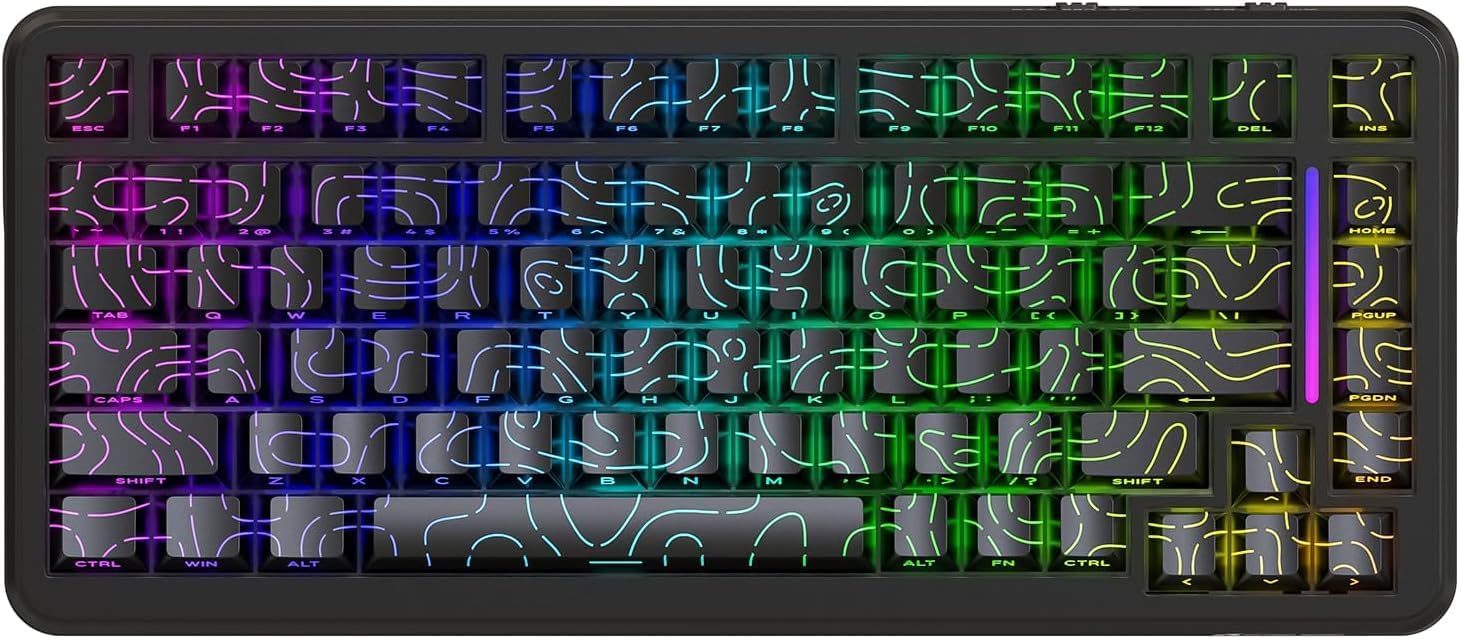
Сүрөт 1: Алдыңкы view of the ATTACK SHARK X82 PRO HE Gaming Keyboard, showcasing its RGB lighting and compact 75% layout.

Figure 2: Visual summary of key features including 75% TKL layout, magnetic switches, web driver, tri-mode connectivity, long battery life, full RGB, 8000Hz polling rate, and low latency.
2. Орнотуу жана туташуу
The X82 PRO HE keyboard offers three versatile connection methods:
2.1. Зымдуу туташуу (USB-C)
Connect the provided USB-C cable from the keyboard to an available USB port on your computer. The keyboard will be automatically recognized and ready for use. This mode supports the full 8000Hz polling rate.
2.2. 2.4 ГГц зымсыз туташуу
- Locate the 2.4GHz USB receiver, typically stored in a compartment on the keyboard.
- USB ресиверди компьютериңиздеги жеткиликтүү USB портуна сайыңыз.
- Switch the keyboard to 2.4GHz wireless mode. Refer to the keyboard's physical switch or key combination for mode selection (e.g., FN + R).
- The keyboard should automatically pair with the receiver.
2.3. Bluetooth 5.0 туташуу
- Switch the keyboard to Bluetooth mode. Refer to the keyboard's physical switch or key combination for mode selection (e.g., FN + Q/W/E for different Bluetooth profileс).
- On your device (computer, phone, tablet), enable Bluetooth and search for new devices.
- Select "ATTACK SHARK X82 PRO HE" from the list of available devices to pair.
- Жупташтыруу процессин аяктоо үчүн экрандагы көрсөтмөлөрдү аткарыңыз.

Figure 3: Illustration of the three connectivity modes: USB-C wired, 2.4GHz wireless, and Bluetooth, with corresponding key combinations for switching.
2.4. Баштапкы заряддоо
Before first use, it is recommended to fully charge the keyboard using the provided USB-C cable. The 5000mAh battery provides extended usage time.
3. Иштөө режимдери жана функциялары
3.1. Polling Rate and Latency
The X82 PRO HE supports an 8000Hz polling rate in wired mode, ensuring ultra-low latency of 0.1ms and a 128K scanning rate. This provides immediate response to keystrokes, crucial for competitive gaming. In 2.4GHz wireless mode, the polling rate is 1000Hz.

Figure 4: Visual representation of the 8000Hz polling rate in wired mode and 1000Hz in wireless mode, highlighting the ultra-low latency.
3.2. Hall Effect Magnetic Switches
Equipped with self-developed Hall Effect magnetic switches, the keyboard offers 0.01mm actuation precision. These switches are hot-swappable, allowing for easy replacement with other N-pole downward magnetic switches.
3.3. Rapid Trigger and Adjustable Actuation
Rapid Trigger (RT) technology allows keys to register actuation and reset based on movement distance rather than a fixed point, enabling faster repeated inputs. The adjustable actuation point feature allows users to customize the key travel distance required for a keystroke to register, from 0.1mm to 3.4mm, providing personalized responsiveness.

Figure 5: Diagram illustrating the difference between a regular switch and a rapid trigger switch, emphasizing improved accuracy and zero dead zone for gaming.

6-сүрөт: Детальдуу view of the magnetic switch and its specifications, including actuation range and operation force, highlighting the adjustable actuation point.
3.4. RGB жарыкты башкаруу
The keyboard features south-facing RGB lighting with over 20 dynamic backlight effects and side-bar effects, offering 16.8 million colors. Use the following key combinations to control the lighting:
- FN + \|: Жарык режимин которуштуруу
- FN + A: Switch light bar color
- FN + ↑: Арткы жарыктын жарыктыгы +
- FN + ↓: Backlight brightness -
- FN + ←: Backlight speed -
- FN + →: Backlight speed +
- FN + Enter: Switch light color
- FN + Caps: Switch light bar mode

Figure 7: Visual guide to the full RGB light effects and the key combinations for controlling various lighting parameters.
3.5. WIN and Mac Compatibility
The keyboard supports one-key switching between Windows and Mac operating systems, enhancing versatility for different user environments.
4. Настройка жана программалык камсыздоо
The ATTACK SHARK X82 PRO HE keyboard offers extensive customization options through its web-based software. This allows users to fine-tune various settings to match their preferences and optimize performance for different applications.
4.1. кирүү Web Айдоочу
Ыңгайлаштыруу программасына кирүү үчүн, төмөнкүгө өтүңүз qmk.top сенин web browser. This network-driven platform provides a comprehensive interface for managing your keyboard settings.
4.2. Customization Features
- Rapid Trigger (RT) Settings: Adjust the sensitivity and behavior of the rapid trigger function for individual keys.
- SOCD (Кардиналдык багыттардын карама-каршысында бир убакта): Configure how simultaneous opposing inputs are handled, useful for fighting games.
- Өркүндөтүлгөн функциялар: Utilize features like DKS (Dynamic Keystroke), MT (Macro Toggle), and TGL (Toggle) for complex key behaviors.
- Key Remapping and Macros: Freely remap any key and create custom macros for automated sequences of commands.
- Deadzones: Define deadzones for key actuation to prevent accidental inputs.
- Жарыктандырууну ыңгайлаштыруу: Personalize RGB lighting effects, colors, and patterns beyond the onboard controls.
- Profiles: Create and save unlimited profiles for different games, work applications, or user preferences, allowing quick switching between configurations.

Figure 8: Interface of the web-based driver, showing options for rapid trigger settings, key personalization, and RGB lighting control.
5. Техникалык тейлөө
Proper maintenance ensures the longevity and optimal performance of your ATTACK SHARK X82 PRO HE keyboard.
5.1. Тазалоо
- Жалпы тазалоо: Бир аз жумшак, түксүз кездемени колдонуңуз dampбаскычтоптун капкактарын жана клавиатуранын алкагын сүртүү үчүн суу же жумшак тазалоочу эритме менен эритиңиз. Ашыкча нымдуулуктан алыс болуңуз.
- Чаңды тазалоо: Баскыч капкактары менен өчүргүчтөрдүн ортосундагы чаңды жана калдыктарды тазалоо үчүн кысылган абаны колдонуңуз.
- Клавиатураны тазалоо: For deeper cleaning, keycaps can be carefully removed. Use a keycap puller to avoid damage. Clean keycaps with mild soap and water, then ensure they are completely dry before reattaching.
5.2. Ыкчам алмаштыруучу которгучтар
The X82 PRO HE features hot-swappable Hall Effect magnetic switches. This allows for easy replacement or customization of switches without soldering. Use a switch puller to carefully remove switches. Ensure replacement switches are compatible N-pole downward magnetic switches.

Figure 9: Close-up of the Doubleshot PBT keycaps, highlighting their contour design and OEM profile, which are durable and easy to clean.
6. Кыйынчылыктарды
If you encounter issues with your ATTACK SHARK X82 PRO HE keyboard, refer to the following common solutions:
| Көйгөй | Мүмкүн себеп | Чечим |
|---|---|---|
| Баскычтоп жооп бербей жатат (Зымдуу) | Кабель туташуу бош, USB порту туура эмес. | USB-C кабелинин бекем туташканын текшериңиз. Башка USB портун же кабелин колдонуп көрүңүз. |
| 2.4GHz Wireless not connecting | Ресивер сайылган эмес, клавиатура туура эмес режимде, батареясы аз. | Ensure receiver is plugged in. Switch keyboard to 2.4GHz mode (FN + R). Charge the keyboard. |
| Bluetooth жупташкан жок | Баскычтоп жупташтыруу режиминде эмес, түзмөктүн Bluetooth'у өчүк, тоскоолдук бар. | Switch keyboard to Bluetooth mode (FN + Q/W/E). Ensure device Bluetooth is on. Try re-pairing. |
| RGB жарыктандыруу иштебей жатат/туура эмес | Incorrect lighting mode, software settings override. | Жарыктандыруу режимдери аркылуу айланыңыз FN + \|. Check lighting settings in the web айдоочу (qmk.top). |
| Ачкычтар катталбайт же эки жолу терилбейт | Switch issue, software calibration needed. | Ensure switches are properly seated. Calibrate actuation points and deadzones using the web айдоочу. |
| Keyboard feels unstable (uneven feet) | Manufacturing variance. | If the issue persists and affects usability, contact customer support. |
For advanced troubleshooting or issues not listed here, please refer to the official ATTACK SHARK support resources or the web-based customization software.
7. Техникалык шарттар
| Өзгөчөлүк | Деталь |
|---|---|
| Модел | SHARK X82 PRO HEге кол салуу |
| Макет | 75% (83 ачкыч) |
| Которуу түрү | Hall Effect Magnetic Switches (Hot-swappable) |
| Байланыш | USB-C зымдуу, 2.4 ГГц зымсыз, Bluetooth 5.0 |
| Добуш берүү көрсөткүчү | 8000Hz (Wired), 1000Hz (2.4GHz Wireless) |
| Кечигип калуу | 0.1мс (зымдуу) |
| Actuation Precision | 0.01мм |
| Иштетүү диапазону | 0.1 мм - 3.4 мм (Жөнгө салынуучу) |
| Батарея сыйымдуулугу | 5000mAh |
| Баскыч капкактары | Doubleshot PBT (Contour Design) |
| Арткы жарыктандыруу | Full RGB (South-facing, 20+ effects, 16.8M colors) |
| N-Key Rollover | Толук N-Key Rollover |
| Курулуш | Top Mounted, Aluminum Alloy Positioning Plate, Dual-layer PORON foam |
| Программалык камсыздоо | Web-based Driver (qmk.top) |
| Операциялык системанын шайкештиги | Windows, macOS |
| Элемент Салмагы | 1.16 кг |
| Пакеттин өлчөмдөрү | 36.79 x 19.3 x 5.3 см |
8. Кепилдик жана колдоо
For warranty information, technical support, or service inquiries, please contact ATTACK SHARK customer support through their official webсайтына же сиз продуктуну сатып алган сатуучуга кайрылыңыз. Кепилдик талаптары үчүн сатып алгандыгыңызды тастыктаган документти сактап коюңуз.
Официалдуу Webсайт: Amazon'догу ATTACK SHARK дүкөнү
Ask a question about this manual
Ask about setup, troubleshooting, compatibility, parts, safety, or missing instructions. Manuals+ will review the question and use this page’s manual context to help answer it.