
1. Киришүү
The Thermal Master Thor 002 is a high-performance handheld thermal camera designed for precise temperature measurement and thermal imaging. Featuring advanced X³IR Resolution technology, a 2MP visual camera, and a 3.5-inch IPS display, this device is suitable for various professional applications including electrical, HVAC, mechanical, and building inspections. This manual provides essential information for the safe and effective operation of your Thor 002 thermal camera.
2. Пакеттин мазмуну
Пакетте бардык буюмдар бар экенин текшериңиз:
- Thor 002 Thermal Camera × 1
- Explosion-Proof Case × 1
- 100cm USB Data Cable × 1
- 32GB Memory Card (pre-installed or included separately)

Image: The Thor 002 thermal camera, its protective case, a USB data cable, and a 32GB memory card.
3. Продукт бүтүп калдыview
The Thor 002 features a robust design with intuitive controls and advanced imaging capabilities.

Image: The Thor 002 thermal camera shown alongside its protective carrying case.
Негизги компоненттер:
- Thermal Camera Lens: Captures infrared radiation for thermal imaging.
- Visible Light Camera (2MP): Captures standard visual images.
- 3.5-inch 640x480 IPS Display: ачык-айкын камсыз кылат viewing of thermal and visual images.
- Laser Targeting System: Assists in precise aiming for measurements.
- LED жарык: Illuminates dark areas for the visible light camera.
- Башкаруу баскычтары: For navigation, settings, and capturing images/videos.
- Ызы-чууну азайтуучу микрофон: For adding voice notes to recordings.
- USB-C порту: Заряддоо жана маалыматтарды өткөрүү үчүн.
- Alloy Base & Reinforced ABS Body: Ensures durability and ergonomic handling.
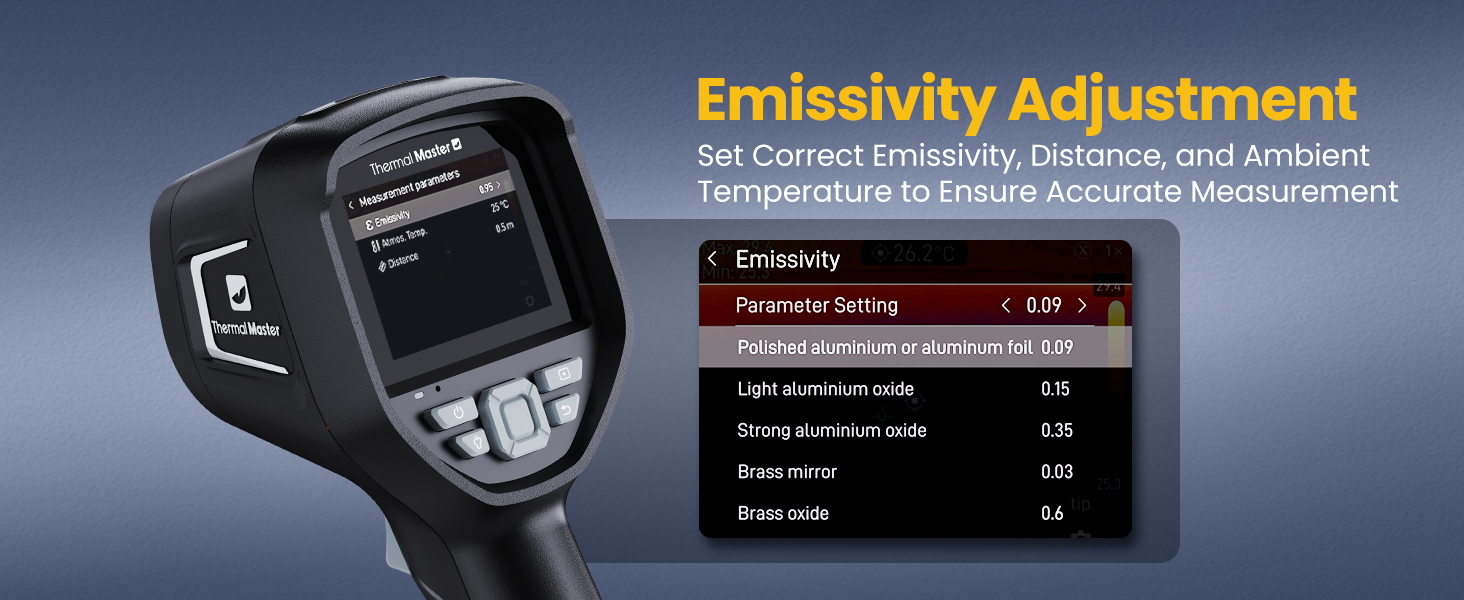
Image: Labeled diagram of the Thor 002 highlighting its key external features and components.
4. Орнотуу
4.1 Аппаратты заряддоо
The Thor 002 is powered by a 5000mAh lithium battery. Before first use, fully charge the device.
- Connect the provided USB data cable to the camera's USB-C port.
- Connect the other end of the USB cable to a compatible 18W fast charger (not included) or a computer's USB port.
- The charging indicator will show the charging status. A full charge provides up to 10.5 hours of operation.
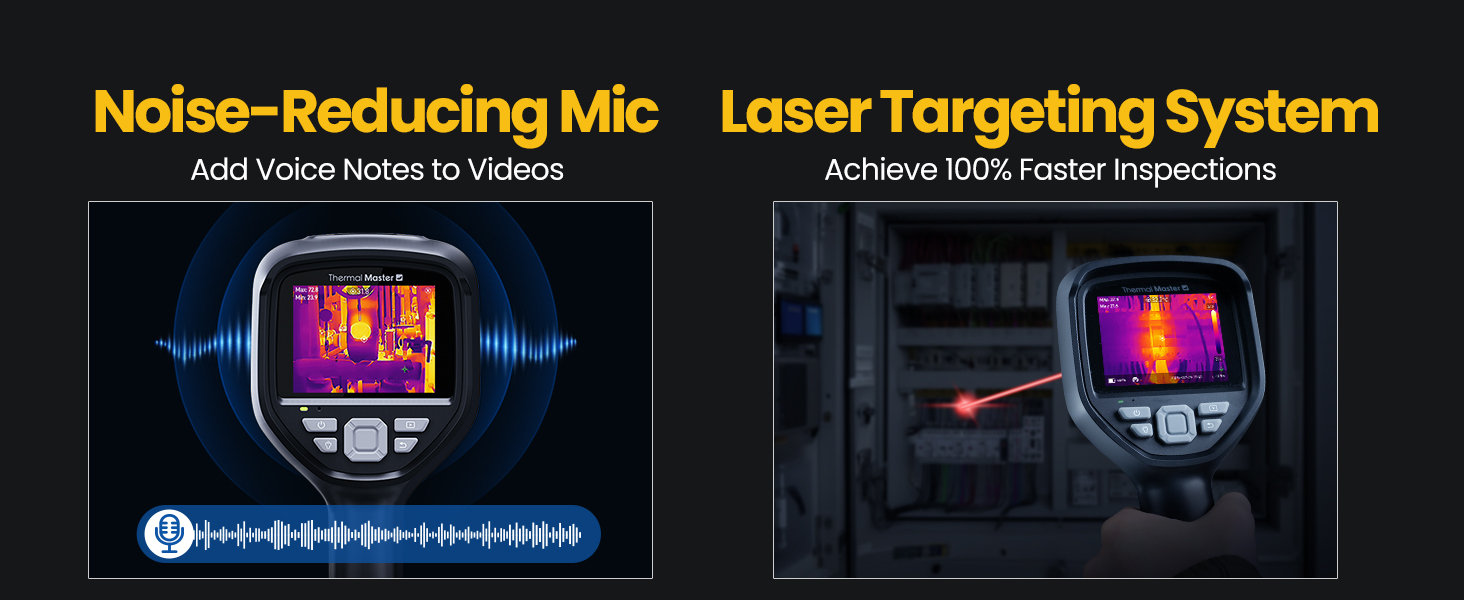
Image: Visual representation of the Thor 002's battery capacity, fast charging capability, and operational runtime.
4.2 Күйгүзүү/өчүрүү
- Күйгүзүү үчүн: Экран жарык кылганга чейин кубат баскычын басып, кармап туруңуз.
- Өчүрүү үчүн: Өчүрүү буйругу чыкканга чейин кубат баскычын басып, кармап туруңуз, андан кийин ырастаңыз.
5. Иштөө нускамалары
5.1 Thermal Imaging and Display
The Thor 002 utilizes X³IR Resolution technology to enhance thermal image clarity, effectively boosting resolution from 256x192 to 512x384. The 60Hz refresh rate ensures smooth, real-time thermal video, and the 40mK sensitivity detects subtle temperature differences.

Image: A side-by-side comparison demonstrating the improved clarity of thermal images when X³IR Resolution is activated, showing a higher effective resolution of 512x384.
5.2 Температураны өлчөө
The camera offers a wide measurement range from -4℉ to 1022℉ (-20℃ to 550℃) with an accuracy of ±3.6℉ (±2℃) or ±2% of reading.
- Multiple Measurement Points: Measure up to six points simultaneously, including center, hottest, coldest, and three user-defined spots.
- Эмиссивдүүлүктү жөндөө: Customize emissivity settings for various surfaces to ensure accurate temperature readings. Access this setting in the camera's menu.

Image: The Thor 002 display indicating its temperature measurement capabilities, including range and accuracy.

Image: The emissivity adjustment interface on the Thor 002, allowing users to select appropriate emissivity values for various materials to improve measurement accuracy.

Image: The Thor 002 display demonstrating its 9-point temperature scanning feature, including center, maximum, minimum, and six customizable measurement points, alongside alarm indicators.
5.3 Санарип Zoom
The device supports 4X digital zoom for detailed inspection of distant objects.
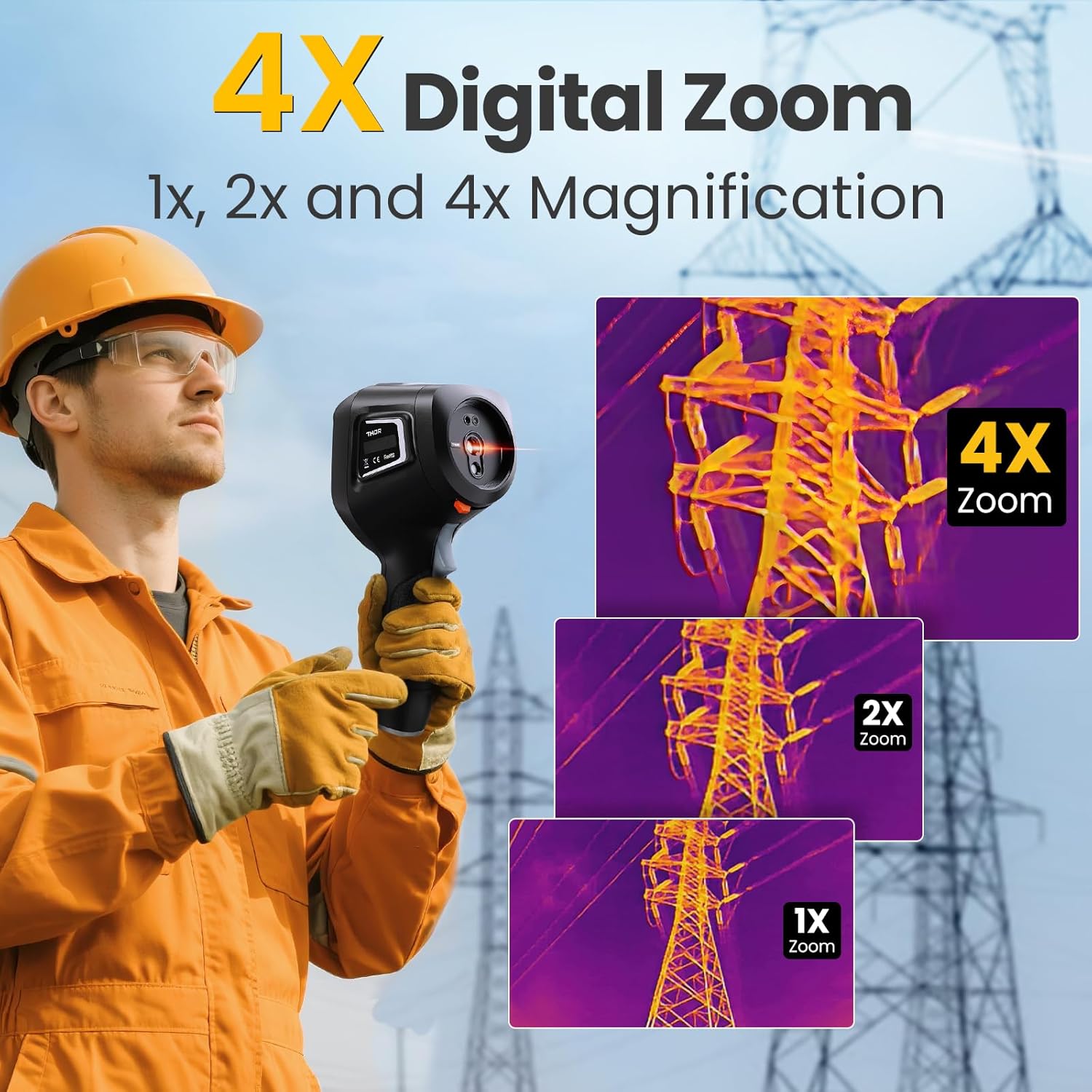
Image: A series of thermal images demonstrating the 1x, 2x, and 4x digital zoom capabilities of the Thor 002, focusing on an electrical tower.
5.4 Smart Temperature Alarms
Configure high and low temperature alarms to receive visual flash alerts and automatically capture images when thresholds are exceeded.

Image: The Thor 002 interface showing temperature alarm settings, including options for maximum, minimum, and center spot alarms, with visual flash alerts and auto-capture functionality.
5.5 IR-Fuse Dual-Light Fusion Technology
This technology combines thermal and visible light images to provide a clearer understanding of the scene, allowing for easier identification of problem areas.

Image: A comparison showing the benefits of IR-Fuse Dual-Light Fusion Technology, presenting both fusion imaging and picture-in-picture views for enhanced scene interpretation.
5.6 Recording and Documentation
- Сүрөт жана видео тартуу: The camera supports both photo and video recording.
- Үн жазуулары: Utilize the noise-reducing microphone to add voice notes to your recordings for detailed documentation.
- QR коду File Башкаруу: Simplifies on-site documentation and post-inspection reporting.

Image: The Thor 002 demonstrating its noise-reducing microphone for voice notes and the laser targeting system for efficient inspections.
6. Байланыш
The Thor 002 offers both wired and wireless connectivity options for data transfer and analysis.
6.1 Зымдуу туташуу (USB)
Connect the camera to a PC via the USB cable for real-time thermal analysis and data review on a larger screen.
6.2 Зымсыз байланыш (Wi-Fi)
The device supports Wi-Fi pairing with smartphones and iPads for flexible operation and post-capture thermal analytics using the 'Thermal Smart' application.

Image: The Thor 002 demonstrating both wireless connectivity to a smartphone and wired connection to a laptop for thermal data analysis and reporting.

Image: The 'Thermal Smart' application interface on a smartphone, displaying thermal images and analysis tools.
7. Техникалык шарттар
Detailed technical specifications for the Thermal Master Thor 002.
| Өзгөчөлүк | Спецификация |
|---|---|
| Термикалык чечкиндүүлүк | 512×384 (X³IR enhanced from 256×192) |
| Көрүнүүчү жарык камерасы | 2MP |
| Дисплей | 3.5" 640×480 IPS Screen |
| Жаңыртуу ылдамдыгы | 60Hz |
| Жылуулук сезгичтиги (NETD) | 40мК |
| Температура диапазону | -4℉ден 1022℉ге чейин (-20℃ден 550℃ге чейин) |
| Тактык | ±3.6℉ (±2℃) or ±2% |
| Digital Zoom | 4X |
| Батарея | 5000mAh литий-ион (кошулган) |
| Батареянын иштөө мөөнөтү | 10.5 саатка чейин |
| Заряддоо | 18W тез заряддоо |
| Сактагыч | 8GB RAM, 32GB internal storage (supports video/photo) |
| Байланыш | USB, Wi-Fi |
| Коргоо рейтинги | IP54 |
| Drop Resistance | 2 метрге чейин |
| Продукциянын өлчөмдөрү | 10.24 x 4.33 x 4.13 дюйм |
| Салмагы | 4.32 фунт |
8. Техникалык тейлөө
Туура тейлөө сиздин термикалык камераңыздын узак мөөнөттүү жана оптималдуу иштешин камсыз кылат.
- Тазалоо: Use a soft, dry cloth to clean the camera body. For lenses, use a specialized lens cleaning cloth and solution. Avoid abrasive materials or harsh chemicals.
- Сактагыч: Store the camera in its explosion-proof case when not in use to protect it from dust, moisture, and physical damage. Store in a cool, dry place.
- Батареяга кам көрүү: For long-term storage, ensure the battery is charged to approximately 50%. Recharge periodically if stored for extended periods to prevent deep discharge.
9. Кыйынчылыктарды
This section addresses common issues you might encounter with your Thor 002 thermal camera.
| Көйгөй | Мүмкүн себеп | Чечим |
|---|---|---|
| Түзмөк күйбөйт | Батареянын аздыгы; Кубат баскычы туура басылган жок | Charge the device fully. Press and hold the power button for a few seconds. |
| Баскычтар жооп бербейт | Software glitch; Device frozen | Perform a soft reset by holding the power button for an extended period (e.g., 10-15 seconds) until it restarts. If issue persists, contact support. |
| Температураны туура эмес көрсөткүчтөр | Incorrect emissivity setting; Distance too far; Lens obstruction | Adjust emissivity for the target material. Ensure measurement distance is within optimal range. Clean the thermal lens. |
| Wi-Fi/Колдонмого туташуу мүмкүн эмес | Wi-Fi disabled; Incorrect password; App not installed | Ensure Wi-Fi is enabled on the camera and smartphone. Verify Wi-Fi password. Download and install the 'Thermal Smart' app. |
10. Кепилдик жана колдоо
Thermal Master is committed to providing reliable products and excellent customer service.
- Кепилдик: The Thor 002 thermal camera comes with a 2-year warranty from the date of purchase, covering manufacturing defects.
- Техникалык колдоо: Thermal Master offers lifetime technical support for the Thor 002. For assistance, please contact our support team via email.

Image: A visual representation of Thermal Master's commitment to customer support, highlighting lifetime technical support, 24/7 email assistance, and a 2-year warranty.