
Introduction
The Surfans F28 is a high-fidelity portable music player designed to deliver an immersive audio experience. Featuring dual ESS9018 DACs, a 4.4mm balanced output, and comprehensive Bluetooth 5.2 support including LDAC and aptX HD, the F28 supports a wide range of lossless audio formats. This manual provides detailed instructions for setting up, operating, maintaining, and troubleshooting your device to ensure optimal performance and longevity.

Сүрөт 1: Алдыңкы жана арткы view of the Surfans F28 HiFi Music Player.
Пакеттин мазмуну
Төмөндө тизмеленген нерселердин баары пакетиңизде бар экенин текшериңиз:
- 1x Surfans F28 HiFi Music Player
- 1x USB-C заряддоо кабели
- 1x 128GB Micro SD Card (pre-installed or included separately)
- 1x Колдонуучунун колдонмосу (бул документ)

Figure 2: Illustration of typical package contents.
Продукт бүттүview
Familiarize yourself with the various components and controls of your F28 music player.
Негизги өзгөчөлүктөрү:
- Dual ESS9018 DACs: For high-resolution audio decoding and minimal distortion.
- 4.4мм салмактуу чыгаруу: Provides enhanced audio quality and power for demanding headphones.
- 3.5 мм бир учтуу чыгаруу: Standard audio output for common headphones.
- Bidirectional Bluetooth 5.2: Supports LDAC and aptX HD for high-quality wireless audio transmission and reception.
- 3.5 дюймдук IPS сенсордук экран: Интуитивдик навигация жана башкаруу үчүн.
- ALPS Analog Volume Knob: For precise volume adjustments.
- Кеңейтүүчү сактагыч: 512 ГБ чейинки Micro SD карталарын колдойт.
- USB-C порту: Заряддоо жана маалыматтарды өткөрүү үчүн.

Figure 3: The F28 player showcasing its display and audio capabilities.

Figure 4: The dual ESS9018K2M DAC chips, central to the F28's high-fidelity audio.

Figure 5: Top panel with 4.4mm balanced and 3.5mm single-ended audio outputs, and the ALPS analog volume knob.
Жайгашуу
1. Аппаратты заряддоо
Before first use, fully charge the F28. Connect the included USB-C cable to the player's USB-C port and the other end to a USB power adapter (5V/1A recommended) or a computer's USB port. The charging indicator will show the charging status. A full charge typically takes several hours.
2. Micro SD картаны салуу
The F28 supports Micro SD cards up to 512GB. Locate the Micro SD card slot on the bottom of the device. Gently insert the Micro SD card with the gold contacts facing down until it clicks into place. To remove, push the card in slightly until it springs out.

Figure 6: Inserting the Micro SD card and connecting via USB-C for data transfer.
3. Музыканы өткөрүп берүү Files
Connect the F28 to your computer using the USB-C cable. The player will appear as a removable storage device. You can then drag and drop your music files directly into the Micro SD card's folders. The F28 supports various lossless formats including DSD (DSF/DFF), FLAC/WAV (up to 384kHz), AIFF/APE, as well as MP3/AAC.

Figure 7: Supported audio file formats for the F28 player.
Иштөө нускамалары
1. Күйгүзүү/өчүрүү
- Күйгүзүү: Экран күйгөнгө чейин кубат баскычын (капталында жайгашкан) басып, кармап туруңуз.
- Өчүрүү: Өчүрүү буйругу чыкканга чейин кубат баскычын басып, кармап туруңуз, андан кийин ырастаңыз.
2. Негизги навигация
The F28 features a 3.5-inch IPS touchscreen for primary navigation. Swipe gestures and taps are used to select options and move between menus. Physical buttons on the side provide additional control for playback (play/pause, next/previous track) and menu navigation.
3. Музыканы ойнотуу
From the main menu, select "My Music" or "Folder" to browse your audio files. Tap on a song to begin playback. The playback screen displays track information, progress, and playback controls.
4. Үндү башкаруу
Adjust the volume using the gold-colored ALPS analog knob located on the top right of the device. Rotate clockwise to increase volume and counter-clockwise to decrease. The volume level will be displayed on the screen.
5. Bluetooth байланышы
The F28 supports Bidirectional Bluetooth 5.2 with LDAC and aptX HD codecs for high-quality wireless audio. To pair with Bluetooth headphones or speakers:
- Go to "System Settings" and select "Bluetooth".
- Bluetooth күйгүзүңүз.
- Ойноткуч жеткиликтүү түзмөктөрдү сканерлейт. Жупташтыруу үчүн тизмеден түзмөгүңүздү тандаңыз.
The F28 can also act as a Bluetooth receiver, allowing you to stream audio from your phone or PC to the player.

Figure 8: The F28 features a Bluetooth 5.2 chip for stable and high-quality wireless connections.
6. Эквалайзер орнотуулары
The F28 includes an equalizer to customize your sound. Navigate to the "Equalizer" option in the settings. You can choose from various presets or create a custom sound profile by adjusting the frequency bands.
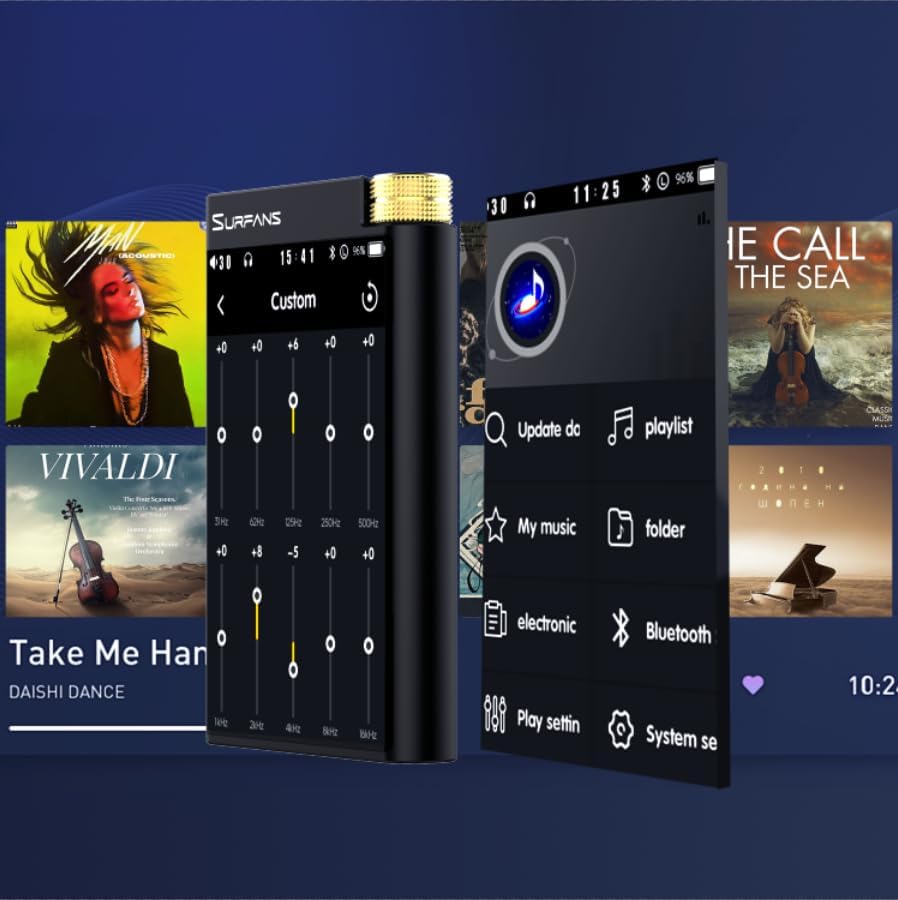
Figure 9: Customizing audio with the built-in equalizer.
7. Тышкы түзмөктөргө туташуу
Use the 4.4mm balanced or 3.5mm single-ended output to connect to headphones, amplifiers, or speakers. The USB-C port also supports USB DAC functionality, allowing the F28 to act as an external sound card for your computer.

Figure 10: The F28 can be connected to various audio systems, including acting as a USB DAC for computers.
Техникалык тейлөө
- Тазалоо: Аппаратты тазалоо үчүн жумшак, кургак чүпүрөктү колдонуңуз. Абразивдүү тазалагычтарды же эриткичтерди колдонуудан алыс болуңуз.
- Сактагыч: Ойноткучту салкын, кургак жерде, күн нуру түз тийбеген жана өтө жогорку температурадан алыс сактаңыз.
- Батареяга кам көрүү: Батареянын иштөө мөөнөтүн узартуу үчүн, батареяны тез-тез толук зарядсыздандырбаңыз. Эгер узак убакытка сактасаңыз, аны бир нече ай сайын 50% га чейин кубаттаңыз.
Проблемаларды чечүү
| Көйгөй | Мүмкүн себеп | Чечим |
|---|---|---|
| Түзмөк күйбөйт. | Батареянын аздыгы; аппарат катып калган. | Charge the device for at least 30 minutes. If still unresponsive, try holding the power button for 10-15 seconds for a hard reset. |
| Touchscreen is unresponsive or slow. | Убактылуу программалык камсыздоонун катасы; экран коргоочу кийлигишүү. | Restart the device. Ensure the screen is clean and free of debris. If using a screen protector, ensure it is properly applied and not too thick. |
| Bluetooth жупташуу көйгөйлөрү. | Device not in pairing mode; distance; interference. | Ensure both devices are in pairing mode and within range. Turn off and on Bluetooth on both devices. Clear previous pairings if necessary. |
| Low volume via Bluetooth. | Volume settings on both devices; codec compatibility. | Increase volume on both the F28 and the connected Bluetooth device. Ensure optimal codec (LDAC/aptX HD) is selected if supported by the receiving device. |
| Музыка files not recognized or played in incorrect order. | Бузулган files; file system indexing issue. | камсыз кылуу files are in supported formats. Re-scan the music library from the player's settings. If issues persist, try reformatting the Micro SD card (backup data first) and re-transferring files. Note: Some players may sort by filename alphabetically rather than track number metadata. |
Техникалык шарттар
| Өзгөчөлүк | Деталь |
|---|---|
| Модель аты | F28 128G |
| Продукциянын өлчөмдөрү | 0.7 x 2.6 x 4.7 дюйм |
| Элемент Салмагы | 9.6 унция |
| DAC чип | Dual ESS9018K2M |
| Колдоого алынган аудио форматтары | DSD (DSF/DFF), FLAC/WAV (up to 384kHz/32-bit), AIFF/APE, MP3/AAC, WMA Lossless |
| Bluetooth версиясы | 5.2 (Bidirectional, supports LDAC/aptX HD) |
| Screen Size | 3.5 дюймдук IPS сенсордук экран |
| Ички сактагыч | 128GB (included Micro SD card) |
| Кеңейтүүчү сактагыч | Up to 512GB via Micro SD card |
| Батарея | 1x 12V battery (included), approx. 12-hour playback |
| Output Ports | 4.4 мм тең салмактуу, 3.5 мм бир учтуу |
| Байланыш технологиясы | Aux, Bluetooth 5.2, USB-C |
| Өзгөчө өзгөчөлүк | Эквалайзер |
Кепилдик жана колдоо
For warranty information and technical support, please refer to the official Surfans webсайтка же түздөн-түз кардарларды тейлөөгө кайрылыңыз. Сатып алуу квитанциясын кепилдик дооматтары үчүн сатып алуунун далили катары сактаңыз.
You can visit the official Surfans Store on Amazon for more information and support: Surfans Audio Store