
1. Продукт бүтүп калдыview
The Acer PM161QJbmiuux is a lightweight and ultra-thin 15.6-inch portable monitor designed to extend your display capabilities wherever you go. Featuring a Full HD (1920x1080) IPS anti-glare panel, it delivers clear visuals with a 60Hz refresh rate and 6ms response time. Its versatile connectivity options and ergonomic design make it suitable for various applications, from professional use to entertainment.
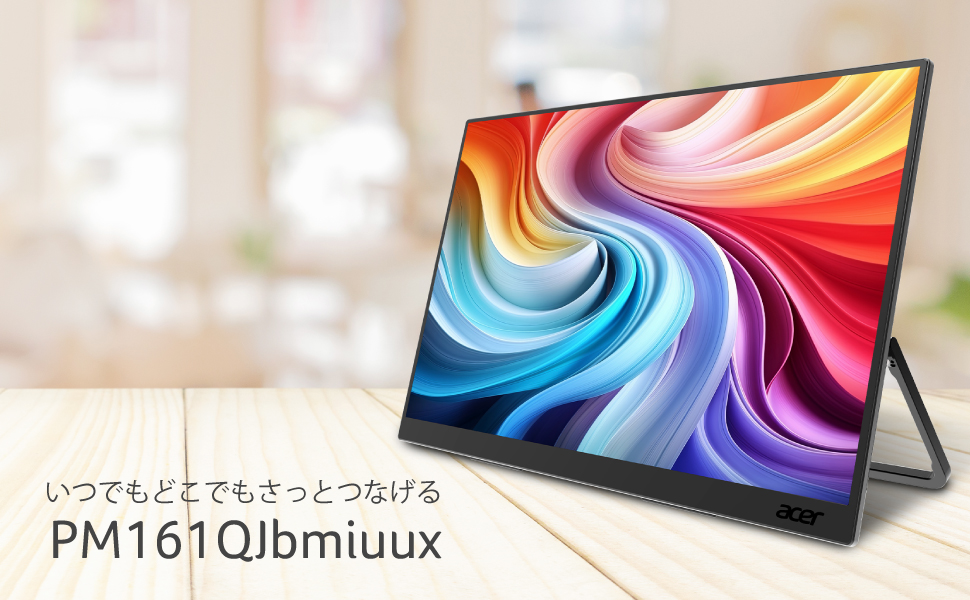
Image: The Acer PM161QJbmiuux portable monitor showcasing its 15.6-inch IPS display, 60Hz refresh rate, and USB-C/mini HDMI connectivity.
Негизги өзгөчөлүктөрү:
- Дисплей: 15.6-inch Full HD (1920x1080) IPS Anti-Glare Panel
- Көчүрүү мүмкүнчүлүгү: Approximately 700g weight, 13mm ultra-thin profile
- Аткаруу: 60Hz Refresh Rate, 6ms (GTG) Response Time
- Байланыш: 1x mini HDMI 2.0, 2x USB 3.2 Type-C (Gen1, Max 5Gbps, PD compatible)
- Визуалдык жакшыртуулар: Adaptive-Sync, HDR10 support, NTSC 45% color reproduction
- Көзгө кам көрүү: Blue Light Shield, Flicker-less technology
- Аудио: Интеграцияланган кош спикерлер
- Эргономика: Stepless tilt adjustment from 0 to 90 degrees
2. Орнотуу нускамалары
2.1 Пакеттин мазмуну
Before proceeding with the setup, ensure all items are present in the package:
- Acer PM161QJbmiuux Portable Monitor
- mini HDMI to HDMI Cable (1m)
- USB Type-C кабели (1 м)
- Орнотуу колдонмосу
- Safety Precautions Document
- Кепилдик картасы
- Оңдоо арызынын формасы
2.2 Мониторду туташтыруу
The monitor supports connectivity via USB Type-C and mini HDMI. Choose the appropriate cable based on your source device.
- USB Type-C туташуу: Connect one end of the provided USB Type-C cable to a USB Type-C port on your laptop, smartphone, or other compatible device. Connect the other end to one of the USB 3.2 Type-C ports on the monitor. This connection can transmit video, data, and power simultaneously. If your device does not supply sufficient power, an external USB AC adapter may be required (not included).
- mini HDMI Connection: Connect one end of the provided mini HDMI to HDMI cable to the mini HDMI 2.0 port on the monitor. Connect the other end (standard HDMI) to the HDMI port on your laptop, game console, or other compatible device. For power, connect a USB Type-C cable from a power source (e.g., a USB AC adapter or a device with Power Delivery) to one of the monitor's USB Type-C ports.

Сүрөт: деталдуу view of the monitor's connectivity ports, including mini HDMI and two USB Type-C ports.
3. Иштөө нускамалары
3.1 Күйгүзүү/өчүрүү
Once connected to a power source and a video input, the monitor should power on automatically. If not, locate the power button (usually on the side or back) and press it to turn on the display. To power off, press and hold the power button.
3.2 Стендди тууралоо
The integrated kickstand allows for stepless tilt adjustment from 0 to 90 degrees. Gently adjust the stand to achieve your desired viewing angle for optimal comfort and productivity.

Image: The monitor's kickstand allows for flexible tilt adjustments.
3.3 Экрандагы дисплей (OSD) менюсу
The OSD menu provides access to various display settings. Use the control buttons (typically located on the side or back of the monitor) to navigate and adjust settings such as brightness, contrast, color modes, and input source selection.
3.4 Өзгөчөлүктөр
- Adaptive-Sync: This technology synchronizes the monitor's refresh rate with the graphics card's frame rate to eliminate screen tearing and stuttering, providing a smoother visual experience. Ensure your source device supports Adaptive-Sync and it is enabled in your system settings.
- HDR10: High Dynamic Range 10 offers enhanced contrast and color accuracy for compatible content. Activate HDR settings through your connected device's display options.
- Blue Light Shield & Flicker-less: These features are designed to reduce eye strain during prolonged use. Blue Light Shield filters out harmful blue light, while Flicker-less technology eliminates screen flickering. These are typically enabled by default or can be adjusted via the OSD menu.

Image: The Acer VisionCare™ technology, including Blue Light Shield, helps reduce eye fatigue.
4. Техникалык тейлөө
4.1 Мониторду тазалоо
Монитордун экранын тазалоо үчүн аны жумшак, түксүз чүпүрөк менен акырын сүртүңүз. өжөр белгилери үчүн, жеңил гampкездемени суу же жумшак, абразивдүү эмес экран тазалагыч менен сүртүңүз. Катуу химиялык заттарды, спиртти же абразивдүү материалдарды колдонуудан алыс болуңуз, анткени алар экрандын бетине зыян келтириши мүмкүн.
4.2 Жалпы кам көрүү
- Мониторго оор нерселерди коюудан алыс болуңуз.
- Мониторду өтө жогорку температурага, нымдуулукка же түз күн нуруна дуушар кылбаңыз.
- Keep the monitor away from liquids and dust.
- When transporting the monitor, use appropriate protective packaging.
5. Кыйынчылыктарды
If you encounter issues with your Acer PM161QJbmiuux monitor, refer to the following common troubleshooting steps:
- Дисплей жок/Кара экран:
- Ensure the monitor is properly connected to a power source and the video input cable is securely attached to both the monitor and the source device.
- Verify that the source device is powered on and outputting a video signal.
- Башка видео кабелин же мүмкүн болсо, портту колдонуп көрүңүз.
- If using USB-C, ensure the port on your device supports video output (DisplayPort Alternate Mode) and Power Delivery.
- Кубат жок:
- Check if the USB-C power source is functioning correctly.
- Ensure the USB-C cable is capable of power delivery.
- Сүрөттүн сапатындагы көйгөйлөр (бүдөмүк, бурмаланган, туура эмес түстөр):
- Adjust the resolution and refresh rate settings on your source device to match the monitor's native resolution (1920x1080) and refresh rate (60Hz).
- Reset the monitor's OSD settings to factory defaults.
- Видео кабелдин бузулбагандыгын текшериңиз.
- Динамиктерден үн жок:
- Монитордогу (OSD аркылуу) жана баштапкы түзмөгүңүздөгү үн жөндөөлөрүн текшериңиз.
- Аудио чыгышы булак түзмөгүңүздүн үн жөндөөлөрүндө мониторго багытталганын текшериңиз.
If these steps do not resolve the issue, please contact Acer customer support.
6. Техникалык шарттар
Detailed technical specifications for the Acer PM161QJbmiuux portable monitor:
| Өзгөчөлүк | Спецификация |
|---|---|
| Модель номери | PM161QJbmiuux |
| Screen Size | 15.6 дюйм |
| Панел түрү | IPS |
| Резолюция | Full HD (1920 x 1080 пиксель) |
| Аспект катышы | 16:9 |
| Screen Surface | Жарыкка каршы |
| Жаңыртуу ылдамдыгы | 60 Гц |
| Жооп убактысы | 6 мс (GTG) |
| Жарыктык | 250 CD/㎡ |
| Контраст катышы (типтүү) | 800:1 |
| Contrast Ratio (Max) | 100,000,000:1 |
| Color Reproduction | NTSC 45%, Approx. 16.77 million colors |
| Видео киргизүү | 1x mini HDMI 2.0 |
| USB порттору | 2x USB 3.2 Type-C (Gen1, Max 5Gbps, PD compatible) |
| Баяндамачылар | Dual Speakers (1W + 1W Stereo) |
| Өлчөмдөр (D x W x H) | 1.3 см х 35.5 см х 21.1 см |
| Салмагы | 0.7 кг |
| Өзгөчөлүктөр | HDR10, Blue Light Shield, Flicker-less, Adaptive-Sync |

Image: Physical dimensions and port layout of the monitor.
7. Кепилдик жана колдоо
7.1 Кепилдик маалыматы
The Acer PM161QJbmiuux portable monitor comes with a 3 жылдык өндүрүүчү кепилдик. Please note that the display panel itself is covered by a 1-year warranty. Retain your purchase receipt and warranty card for service claims.
7.2 Кардарларды колдоо
For technical assistance, troubleshooting, or warranty inquiries, please contact Acer customer support:
- Support Information Page: https://www.acer.com/jp-ja/support/
- Иш убактысы: 10:00 - 19:00 JST, 365 days a year (excluding company-specified holidays)


