
Yitouniu TYM12-RF
Yitouniu TYM12-RF Smart WiFi/Bluetooth DC Motor Controller User Manual
Model: TYM12-RF | Brand: Yitouniu
1. Киришүү
This manual provides detailed instructions for the installation, operation, and maintenance of your Yitouniu TYM12-RF Smart WiFi/Bluetooth DC Motor Controller. Please read this manual thoroughly before using the device to ensure proper functionality and safety.
The Yitouniu TYM12-RF is a versatile DC motor controller designed for smart home and office applications. It supports both WiFi and Bluetooth connectivity, allowing for remote control via the Tuya Smart APP, voice control through Alexa and Google Assistant, and integration into smart ecosystems. It features a 10A maximum load capacity and wide voltage compatibility (DC 7-32V), making it suitable for controlling various low-voltage motors, electric actuators, and other devices requiring forward/reverse control.
2. Продукт бүтүп калдыview
2.1 Пакеттин мазмуну
- 1 X Wifi Smart Switch Controller
- 1 X 433Mhz three-key Remote Control (Note: Requires 23A, 12V battery, but not included)
- 1 X Instruction Manual (this document)
2.2 Негизги өзгөчөлүктөрү
- Global Remote Control & Multi-User Access: Control via Tuya APP over 2.4GHz Wi-Fi from anywhere with internet. Share device access, set timers (2-3,600s), and automate smart home/office devices.
- 10A High Power & Wide Voltage Шайкештик: Handles 10A max load and DC 7-32V input, compatible with low-voltage motors. 433MHz RF ensures stable signals for precision in, desks, curtains, and medical beds.
- Dual-Mode Flexibility: Switch between momentary (2s min) and self-locking modes. Customize runtime via APP for mm-level accuracy in industrial or smart furniture applications.
- Smart Ecosystem Integration: Works with Alexa/Google Assistant for voice control. Bluetooth + Wi-Fi enables seamless IoT integration, syncing with lights, sensors, etc., for automation.
- Durable ABS Design: ABS fire-resistant housing withstands -20°C~70°C extremes. Compact (82x50x32mm) with heat dissipation and overload protection for safe 10A operation in garages/outdoors.
2.3 Аппараттын компоненттери
The controller features input/output terminals, a reset button, and indicator lights. The remote control has three keys for operation.

2.3.1-сүрөт: Yitouniu TYM12-RF DC Motor Controller and included 433MHz remote control. The controller shows input/output terminals and model information. The remote has three buttons: up arrow, square, and down arrow.
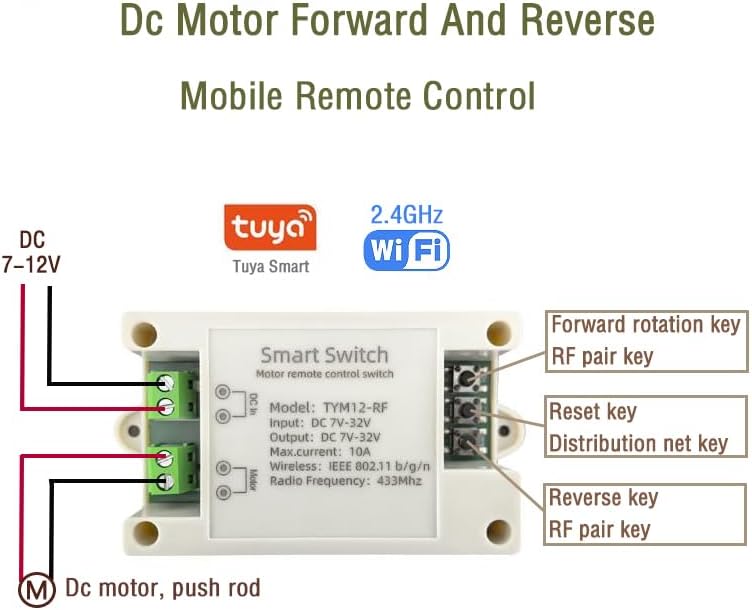
2.3.2-сүрөт: Деталдаштырылган view of the Yitouniu TYM12-RF Smart Switch, highlighting the "Forward rotation key", "RF pair key", "Reset key", "Distribution net key", and "Reverse key" buttons on the device. It also shows the DC input (7-12V) and DC motor/push rod connections.
3. Техникалык шарттар
| Параметр | Нарк |
|---|---|
| Модел | TYM12-RF |
| Working Voltage | DC 7-32V |
| Максималдуу жүктөө агымы | 10A |
| Wireless протоколу | WiFi + Bluetooth |
| WiFi стандарты | 2.4G b/g/n |
| Радио жыштыгы (RF) | 433 МГц |
| Иштөө температурасы | -20°C ~ 70°C |
| Shell Material | ABS |
| Өлчөмдөр | 82 x 50 x 32 мм |
| Салмагы | 49.8 г |
4. Орнотуу
4.1 Электр өткөргүч схемасы
The controller outputs control signals only; an external power supply is needed for driving the linear actuator or DC motor. Ensure correct polarity when connecting the power input and motor output.

4.1.1-сүрөт: Wiring diagram showing the connection of a DC 7-32V input power supply to the controller and the controller's output connected to a DC motor. Red wires typically indicate positive, and black/blue wires indicate negative.

4.1.2-сүрөт: Wiring diagram illustrating the connection of a DC 7-32V input power supply to the controller and the controller's output connected to an electric push rod (linear actuator).
Зымдарды орнотуу кадамдары:
- Connect the DC 7-32V power supply to the "DC In" terminals on the controller. Observe polarity (positive to positive, negative to negative).
- Connect the DC motor or electric push rod to the "Motor" terminals on the controller.
- Түзмөктү күйгүзүүдөн мурун бардык туташуулар коопсуз экенин текшериңиз.
Видео 4.1.1: Demonstration of wiring the motor controller to a DC motor and using the remote control. This video shows the physical connection process and basic operation with the remote.
4.2 Tuya Smart APP Pairing
To control the device via your smartphone, you need to pair it with the Tuya Smart APP.
- Ensure your phone's location services and Bluetooth are enabled.
- Connect your mobile phone to a 2.4G WiFi network. (5G WiFi is not supported)
- Power on the device. The network distribution indicator light should flash (twice per second). If it doesn't, press and hold the reset button for 5-7 seconds until it flashes.
- Open the Tuya Smart APP, click the "+" icon to add a device. The system should automatically detect the controller.
- Follow the on-screen prompts to complete the pairing process. The first-time device addition may take approximately 15-20 seconds.
Видео 4.2.1: Step-by-step guide on pairing the Yitouniu 2CH WiFi Tuya Smart Control Relay Switch Module with the Tuya Smart Life app. This video demonstrates the app interface and the pairing process.
5. Иштөө нускамалары
5.1 Алыстан башкаруунун иштеши
The included 433MHz remote control allows for direct operation of the motor controller.
- Press the "Up Arrow" button to activate forward rotation.
- Press the "Down Arrow" button to activate reverse rotation.
- Press the "Square" button to stop the motor.
Ensure the remote control has a 23A, 12V battery installed (not included).
5.2 Tuya Smart APP Operation
Once paired, you can control the device from the Tuya Smart APP.

5.2.1-сүрөт: Screenshot of the Tuya Smart APP interface showing controls for a DC motor, including "Up", "Pause", and "Down" buttons. This illustrates remote control functionality without distance limits via mobile internet.
- Негизги башкаруу: Use the "ON" and "OFF" buttons within the app to control the motor.
- Interlock Setting: In the Tuya APP, set interlock to control forward and reverse rotation separately. This prevents simultaneous activation of both directions.
- Jogging Time (Momentary Mode): To set running time for both rotations, configure jogging time between 1 and 3600 seconds with a minimum interval of 1 second. This is useful for precise movement (e.g., mm-level accuracy).
- Өзүн-өзү кулпулоо режими: The device also supports a self-locking mode where it remains in its last state until another command is received.
- Убакыт/Пландоо: Set single, repeat, or loop timers to automate device operation.

5.2.2-сүрөт: Screenshot of the Tuya Smart APP displaying timing settings, allowing users to schedule operations like "Open automatically at 8 p.m." This feature supports single, repeat, or loop functions.
5.3 Үн менен башкаруу
The controller integrates with smart ecosystems like Alexa and Google Assistant for voice control.
- Link your Tuya Smart account to your Alexa or Google Home app.
- Жаңы түзмөктөрдү табыңыз.
- Use voice commands such as "Alexa, turn on [device name]" or "Hey Google, open [device name]".
6. Колдонуу сценарийлери
The Yitouniu TYM12-RF controller is suitable for a variety of applications:

6.1.1-сүрөт: Visual representation of various applications for the smart motor switch, including electric push rods, electric lifting tables, electric roller shutters, electric medical beds, and electric pigeon cages. This highlights the versatility of the controller.
- Electric push rods
- Electric lifting tables
- Electric roller shutters
- Electric medical beds
- Electric pigeon cages
- Other DC motor-driven devices
7. Техникалык тейлөө
- Аппаратты таза жана чаңдан алыс кармаңыз.
- Avoid exposing the device to extreme temperatures or humidity outside its specified operating range (-20°C to 70°C).
- Аппаратты өз алдынча бөлүүгө же оңдоого аракет кылбаңыз. Жардам алуу үчүн кардарларды колдоо бөлүмүнө кайрылыңыз.
- Regularly check wiring connections for security and signs of wear.
8. Кыйынчылыктарды
| Көйгөй | Мүмкүн себеп | Чечим |
|---|---|---|
| Түзмөк күйбөй жатат. | Электр менен камсыздоо жок же зымдар туура эмес туташтырылган. | Check power connections and ensure the DC power supply is within the 7-32V range. Verify polarity. |
| Indicator light not flashing during pairing. | Түзмөк жупташтыруу режиминде эмес. | Press and hold the reset button for 5-7 seconds until the light flashes twice per second. |
| Cannot find device in Tuya APP. | Bluetooth/Location off, 5G WiFi, or device too far. | Ensure phone's Bluetooth and location services are enabled. Connect to a 2.4G WiFi network. Bring the device closer to your phone/router. |
| Пульт иштебей жатат. | Battery low/missing or not paired. | Install a new 23A, 12V battery. If still not working, refer to the remote control pairing instructions (if provided separately or on the device). |
| Motor not responding to commands. | Incorrect motor wiring, overloaded, or app issue. | Check motor connections and ensure the load does not exceed 10A. Restart the Tuya APP or re-pair the device. |
9. Кепилдик жана колдоо
For warranty information or technical support, please contact Yitouniu customer service through the platform where you purchased the product. Please have your model number (TYM12-RF) and purchase details ready when contacting support.
Manufacturer: Yitouniu
Place of Business: china,he nan sheng xu chang shi wei du qu jie fang lu shui an jin cheng 4 hao lou 602 shi,tel(86)17803742078
Ask a question about this manual
Ask about setup, troubleshooting, compatibility, parts, safety, or missing instructions. Manuals+ will review the question and use this page’s manual context to help answer it.