
Introduction
Thank you for choosing the OREiN Smart LED Motion Sensor Outdoor Floodlight. This manual provides essential information for the safe and efficient installation, operation, and maintenance of your new floodlight. Please read these instructions thoroughly before use and retain them for future reference.
Коопсуздук маалыматы
- Орнотуудан же тейлөөдөн мурун ар дайым электр кубатынан ажыратыңыз.
- Орнотуу жергиликтүү электр эрежелерине ылайык квалификациялуу электрик тарабынан аткарылышы керек.
- Продукцияны өзгөртүүгө аракет кылбаңыз. Ар кандай өзгөртүүлөр кепилдикти жокко чыгарып, коопсуздукка коркунуч келтириши мүмкүн.
- Продукциянын кулап түшпөшү үчүн бекем орнотулганын текшериңиз.
- Жарыктанган кезде жарык булагына түздөн-түз көз тийбеңиз.
- This product is designed for outdoor use and is IP65 rated for water and dust resistance.
Пакеттин мазмуну
Орнотууну баштоодон мурун бардык компоненттер бар экендигин текшериңиз:
- OREiN Smart LED Motion Sensor Outdoor Floodlight
- Кронштейн орнотуу
- Орнотуу бурамалары жана дубал сайгычтары
- User Manual
Продукт бүттүview
The OREiN Smart LED Motion Sensor Outdoor Floodlight features a 28W LED light source providing 3000 lumens of illumination. It includes an integrated motion sensor with a 180-degree detection angle and a range of up to 12 meters. The color temperature is adjustable from 2700K (warm white) to 6500K (cool white), and brightness is dimmable. Control is available via the free Aidot app (Bluetooth connectivity) or manual rotary buttons on the unit.

Figure 1: OREiN Smart LED Motion Sensor Outdoor Floodlight (Model Smart-Blanc).
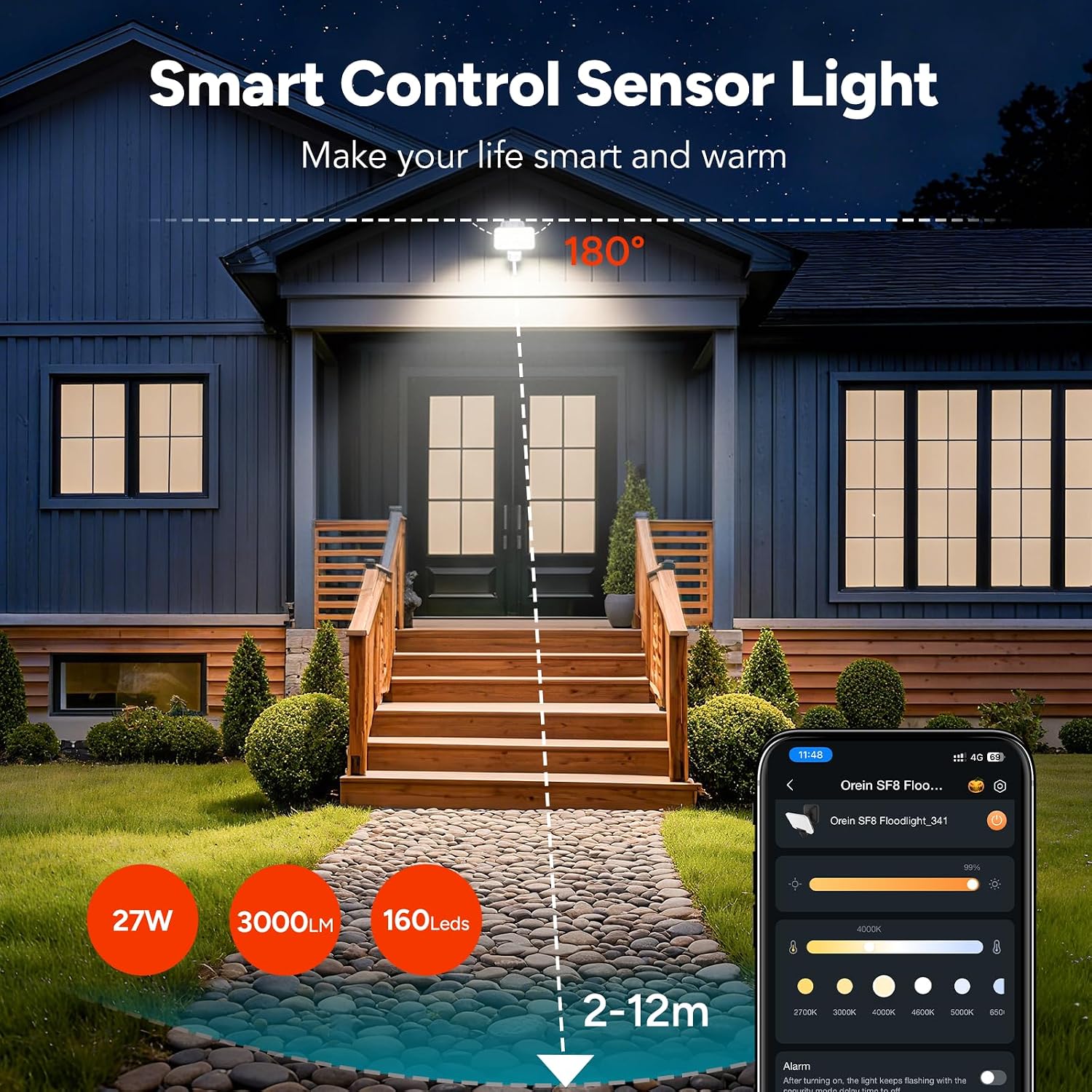
Figure 2: ашыкview of the floodlight's smart control and sensor capabilities, highlighting 27W power, 3000 lumens, 160 LEDs, and a 2-12m detection range with a 180-degree angle.
Жайгашуу
The OREiN Smart LED Motion Sensor Outdoor Floodlight is designed for improved installation. No assembly is required for the light unit itself.
Орнотуу кадамдары:
- Жайгашкан жерди тандоо: Select a suitable outdoor location for wall mounting. The recommended installation height is between 1.8 to 2.5 meters for optimal motion detection.
- Кубатты өчүрүү: Ensure the power supply to the installation area is turned off at the circuit breaker before proceeding.
- Монтаждык кронштейн: Secure the mounting bracket to the wall using the provided screws and wall plugs. Ensure it is firmly attached.
- Зым туташуу: Connect the electrical cable to the floodlight's wiring. Follow standard electrical wiring practices (Live, Neutral, Earth). Ensure all connections are secure and insulated.
- Floodlight тиркөө: Hang the floodlight unit onto the mounted bracket. Secure it in place with any provided fasteners.
- Күчтү калыбына келтирүү: Орнотуу аяктагандан жана бардык туташуулар коопсуз болгондон кийин, чынжырга электр энергиясын калыбына келтириңиз.
Иштөө нускамалары
The floodlight offers both manual and app-based control options.
Manual Control (Rotary Buttons):
On the back of the floodlight, there are three rotary buttons to adjust the infrared motion sensor settings:
- TIME: Adjusts the lighting duration after motion is detected.
- СЕНСЕ: Adjusts the motion detection distance (sensitivity).
- LUX: Adjusts the light sensitivity, determining at what ambient light level the sensor becomes active.
Switching Lighting Modes (Manual):
The floodlight supports three lighting modes, which can be cycled by a quick double-click of the manual control button (if present, or via the app):

Figure 3: Illustration of the three available lighting modes: Motion Mode, Light Mode, and Security Mode.
- Кыймыл режими: The light turns on in dark conditions when motion is detected.
- Жарык режими: The light automatically turns on at dusk and off at dawn, providing continuous illumination.
- Коопсуздук режими: Provides instant visual alerts (flashing) for motion detected in the dark.
App Control (Aidot App)
The OREiN floodlight can be controlled via the free Aidot app, available for download on the App Store and Google Play. The app connects to the floodlight via Bluetooth, eliminating the need for a separate gateway or hub.
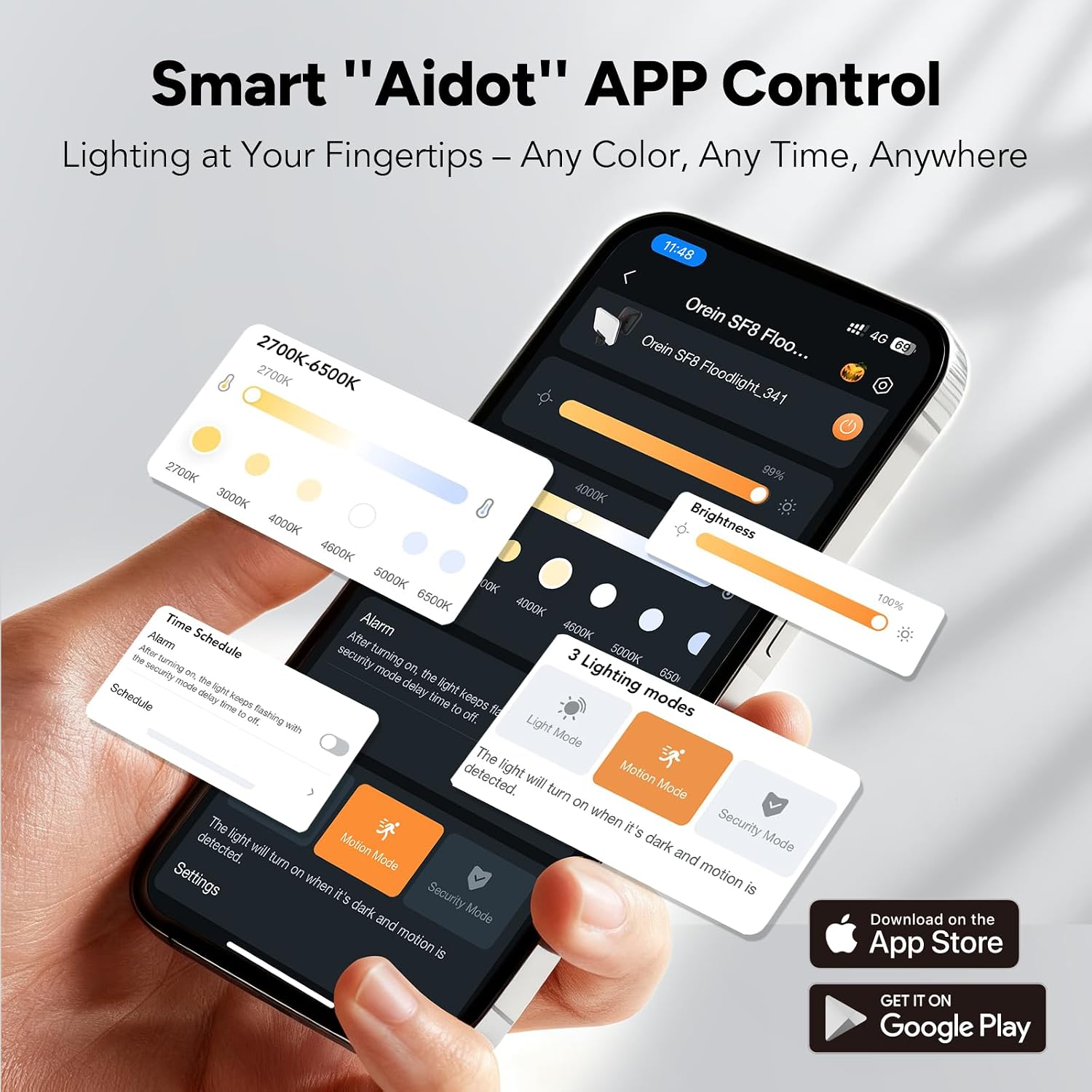
Figure 4: Aidot App interface showing controls for color temperature, brightness, and lighting modes.
Колдонмонун өзгөчөлүктөрү:
- Күйгүзүү/өчүрүү башкаруу: Remotely turn the light on or off.
- Жарыктыкты жөндөө: Adjust the light intensity (dimmable).
- Түс температурасын жөндөө: Change the light color from warm white (2700K) to cool white (6500K).
- Жарык режимин тандоо: Easily switch between Motion, Light, and Security modes.
- Акылдуу пландаштыруу: Set custom schedules for the light to operate based on time or motion detection.
- Топтук көзөмөл: Control multiple OREiN smart floodlights simultaneously by adding them to the same group within the app. This allows for synchronized adjustments of illumination time, brightness, and lighting mode.

5-сүрөт: Мисample of group control, showing multiple floodlights linked for synchronized operation.
Колдонмого туташуу:
- Download the "Aidot" app from your device's app store.
- Смартфонуңузда Bluetooth иштетилгенин текшериңиз.
- Power on the OREiN floodlight.
- Open the Aidot app and follow the on-screen instructions to add a new device. The app will detect nearby OREiN devices.
- Once connected, you can customize settings and control the light.
Акылдуу пландаштыруу
The Aidot app allows you to create flexible schedules for your floodlight's operation. This feature enables you to automate lighting based on your preferences and security needs.
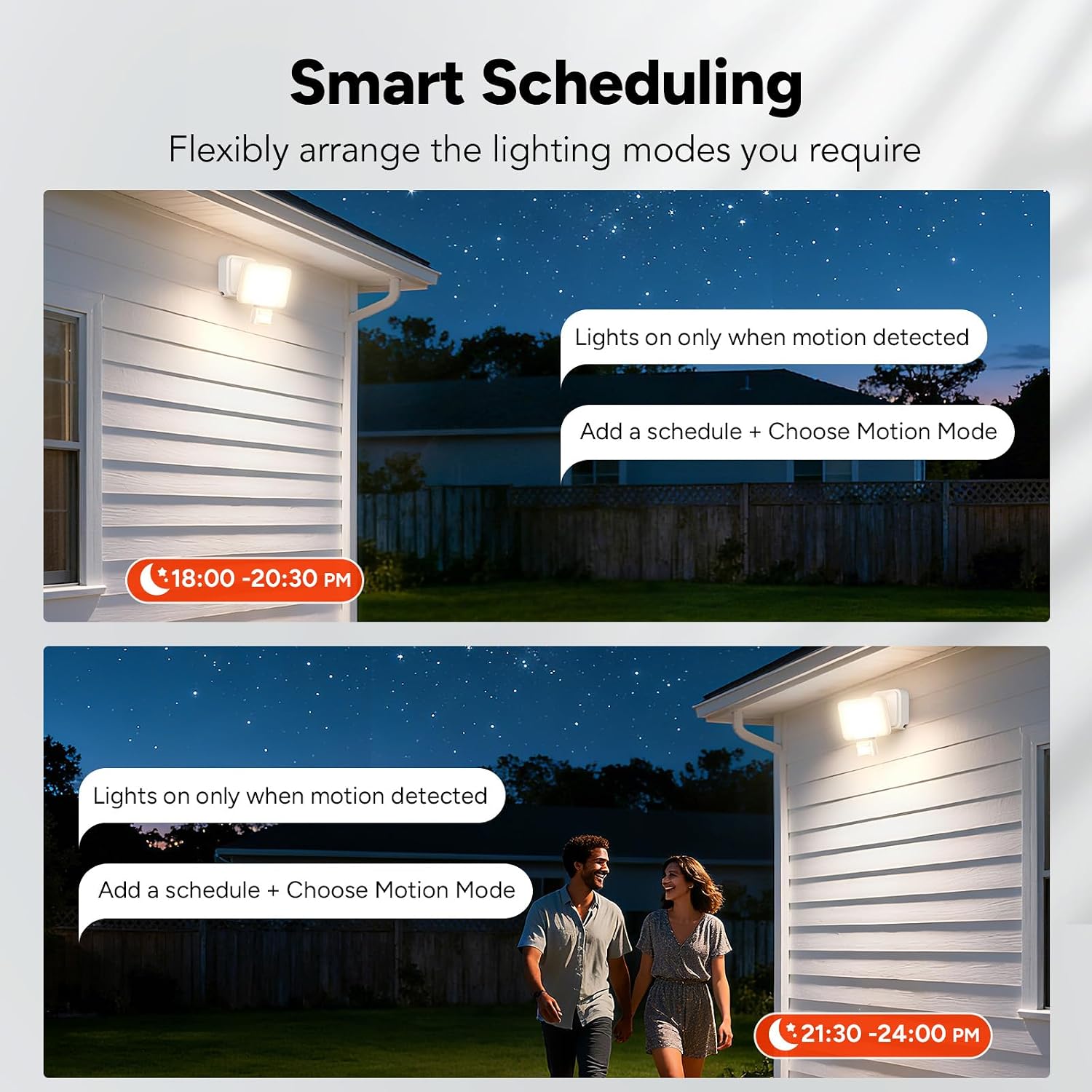
6-сүрөт: Мисamples of smart scheduling, setting lights to activate only when motion is detected during specific timeframes.
Графикти орнотуу:
- Open the Aidot app and select your floodlight.
- "График" же "Таймер" бөлүмүнө өтүңүз.
- Tap to add a new schedule.
- Set the desired start and end times for the schedule.
- Choose the lighting mode (e.g., Motion Mode) and other settings (brightness, color temperature) for that schedule.
- Save the schedule. The light will now operate according to your programmed settings.
Техникалык тейлөө
The OREiN Smart LED Motion Sensor Outdoor Floodlight requires minimal maintenance. Regular cleaning and inspection will ensure optimal performance and longevity.
- Тазалоо: Periodically clean the floodlight's surface with a soft, damp Абразивдүү тазалоочу каражаттарды же эриткичтерди колдонбоңуз, анткени алар каптамага же электрондук компоненттерге зыян келтириши мүмкүн.
- Текшерүү: Regularly check the mounting and wiring for any signs of damage, corrosion, or loosening. Ensure the motion sensor lens is clear of obstructions (e.g., dirt, spiderwebs) to maintain detection accuracy.
- Электр энергиясын өчүрүү: Тазалоо же текшерүү жүргүзүүдөн мурун ар дайым электр кубатынан ажыратыңыз.
Проблемаларды чечүү
| Көйгөй | Мүмкүн себеп | Чечим |
|---|---|---|
| Жарык күйбөйт. | Электр энергиясы жок. Туура эмес зым. Light sensor setting (LUX) too high. | Электр байланышын жана өчүргүчтү текшериңиз. Зымдарды байланыштарды текшериңиз. Adjust LUX setting to a lower sensitivity for darker conditions. |
| Жарык тынымсыз күйүп турат. | Continuous Light Mode selected. Motion sensor constantly triggered. УБАКЫТ жөндөөсү өтө узун. | Switch to Motion Mode or Security Mode via app or manual control. Check for obstructions or constant movement in sensor's field of view. УБАКЫТ жөндөөсүн азайтыңыз. |
| Кыймыл сенсору аныкталбай жатат. | SENSE setting too low. Obstruction on sensor lens. Installation height incorrect. | Increase SENSE setting. Сенсор линзасын тазалаңыз. Ensure installation height is within 1.8-2.5 meters. |
| Cannot connect to Aidot app. | Bluetooth off. Light not powered on. Колдонмого уруксаттар берилген жок. | Түзмөгүңүздө Bluetooth иштетилгенин текшериңиз. Verify the floodlight is powered on. Телефонуңуздун жөндөөлөрүнөн колдонмолордун уруксаттарын текшериңиз. |
Техникалык шарттар
- Бренд: OREiN
- Модел: Smart-Blanc
- Бөлүмдүн номери: 1075225019
- Кубат булагы: Электр зымдары
- Тtage: 220 вольт
- Ватtage: 28 Ватт
- Жарык агымы: 3000 Lumens
- Жарык булагы түрү: LED
- Түс температурасы: 2700K-6500K (жөнгө салынуучу)
- Өзгөчөлүктөр: Adjustable Color Temperature, Dimmable, Motion Sensor, Waterproof
- Motion Sensor Detection Angle: 180 градус
- Motion Sensor Detection Distance: Up to 12 meters (Adjustable)
- Башкаруу ыкмасы: App (Bluetooth), Manual Push Button
- Туташуу протоколу: Bluetooth
- Ички/тышкы колдонуу: Сыртта
- Сууга туруктуулук деңгээли: IP65
- Материал: Акрилонитрил бутадиен стирол (ABS)
- Түсү: Ак
- Продукциянын өлчөмдөрү (L x W x Y): 13 см х 10 см х 11 см
- Иштөө температурасы: -20°Cден 45°Cге чейин
- Сунушталган орнотуу бийиктиги: 1.8дөн 2.5 метрге чейин
- Ассамблея талап кылынат: Жок
Кепилдик жана колдоо
For warranty information and technical support, please refer to the documentation included with your purchase or visit the official OREiN webсайт. Кепилдик дооматтар үчүн сатып алганыңыздын далилин сактаңыз.