
1. Киришүү
Thank you for choosing the NIMO 17.3" IPS FHD Laptop. This manual provides essential information for setting up, operating, maintaining, and troubleshooting your device. Please read it carefully to ensure optimal performance and longevity of your laptop.
The NIMO N171 laptop features a 17.3-inch Full HD IPS display, powered by an Intel Core i3-1215U processor, 8GB of DDR4 RAM, and a 256GB PCIe SSD. It comes pre-installed with Windows 11 Home and includes a backlit keyboard with a fingerprint reader for enhanced security and convenience.

Image: NIMO 17.3 inch IPS FHD Laptop, showcasinанын чоң дисплейи жана жарашыктуу дизайны.
2. Орнотуу
2.1 Кутудан чыгаруу жана алгачкы текшерүү
Бардык компоненттерди таңгактан кылдаттык менен алып салыңыз. Төмөнкү нерселердин бар экенин текшериңиз:
- 1 x Nimo N171 Laptop
- 1 x Type-C 65W PD Fast Charger
- 1 х Колдонуучунун колдонмосу (бул документ)
- Windows 11 Home (pre-installed)
Ноутбуктун физикалык бузулууларын текшериңиз. Эгерде кандайдыр бир бузулуу табылса, дароо кардарларды колдоо кызматына кайрылыңыз.
2.2 Charging the Laptop
Before first use, fully charge the laptop battery. Connect the provided 65W Type-C PD Fast Charger to the laptop's Type-C charging port and then to a power outlet. The charging indicator light will illuminate.

Image: The 65W Type-C PD Charger, illustrating its compact design and compatibility with various devices.
2.3 Баштапкы күйгүзүү жана Windows орнотуу
Press the power button located on the laptop. The laptop will boot up and guide you through the Windows 11 Home setup process. Follow the on-screen instructions to configure language, region, network, and user accounts.
3. Иштөө нускамалары
3.1 Дисплей жана визуалдык көрүнүштөр
The NIMO N171 features a 17.3-inch Full HD (1920x1080) IPS anti-glare display, offering wide viewing angles and vibrant colors. Adjust brightness using the function keys (Fn + Fx keys, refer to keyboard layout for specific keys).

Image: The 17.3-inch FHD IPS display, highlighting its immersive viewing experience with narrow bezels.
3.2 Баскычтоп жана киргизүү
The laptop is equipped with a full-size backlit keyboard and a numeric keypad. The backlight can be toggled or adjusted using dedicated function keys. The touchpad supports multi-touch gestures for navigation.

Image: Close-up of the backlit keyboard and integrated fingerprint reader on the touchpad.
3.3 Манжа изин окугуч
For secure and quick login, utilize the built-in fingerprint reader located on the touchpad. Configure your fingerprint in Windows Settings > Accounts > Sign-in options.
3.4 Webcam Privacy Shield
интеграцияланган webcam features a physical privacy shield. Slide the cover to the left to open the camera and to the right to close it, ensuring your privacy when the camera is not in use.
3.5 Байланыш порттору
The laptop offers a variety of ports for connecting peripherals and external displays:
- USB 3.2 1-муун: Жогорку ылдамдыктагы маалыматтарды өткөрүп берүү.
- USB 2.0: Стандарттык USB туташуу.
- USB Type-C: For data transfer and charging (65W PD).
- Standard HDMI 1.4: Тышкы мониторлорго же сыналгыларга туташуу.
- Микро SD карта слоту: Expand storage or transfer fileэстутум карталарынан.
- Аудио Jack: Наушниктерди же тышкы динамиктерди туташтырыңыз.
- Kensington Lock Slot: Физикалык коопсуздук үчүн.

Image: Diagram illustrating the various connectivity ports on the NIMO laptop.
3.6 Батареяны башкаруу
The laptop is equipped with a large capacity battery, providing up to 7 hours of usage. For optimal battery health, avoid frequently draining the battery completely and store the laptop in a cool, dry place.

Image: Visual representation of the laptop's battery capacity and typical usage scenarios.
4. Техникалык тейлөө
4.1 Тазалоо
Экранды жана сырткы беттерди тазалоо үчүн жумшак, түксүз чүпүрөктү колдонуңуз. Кежир тактар үчүн, гampкездемени суу же экранга тийбей турган тазалоочу каражат менен бир аз сүртүңүз. Катуу химиялык заттардан же абразивдүү материалдардан алыс болуңуз.
4.2 Программалык камсыздоо жаңыртуулары
Regularly check for and install Windows updates to ensure your system has the latest security patches and performance improvements. You can find updates in Windows Settings > Windows Update.
4.3 Сактагычты башкаруу
Мезгил-мезгили менен кайраview жана 256 ГБ SSD сактагычыңызды башкарыңыз. Керексизин жок кылыңыз fileс, пайдаланылбаган колдонмолорду алып салыңыз жана чоң көлөмдө булут сактагычты карап көрүңүз fileсистеманын оптималдуу иштешин сактоо үчүн.
5. Кыйынчылыктарды
This section addresses common issues you might encounter with your NIMO laptop.
- Ноутбук күйбөйт: Ensure the charger is properly connected and the battery has sufficient charge. Try holding the power button for 10-15 seconds to perform a hard reset.
- Экран бош же бүлбүлдөп жатат: Restart the laptop. If connected to an external display, try disconnecting and reconnecting the HDMI cable.
- Wi-Fi же Bluetooth байланышындагы көйгөйлөр: Check if Wi-Fi/Bluetooth is enabled in Windows settings. Restart your router or the laptop. Update network drivers if necessary.
- Жай аткаруу: Close unnecessary applications. Check for background processes consuming high resources (Task Manager). Ensure sufficient free storage space on the SSD.
- Баскычтоп же сенсордук такта жооп бербей жатат: Restart the laptop. Ensure no external devices are interfering.
If you encounter persistent issues not covered here, please refer to the Warranty and Support section for assistance.
6. Техникалык шарттар
Detailed technical specifications for the NIMO N171 Laptop:
| Өзгөчөлүк | Спецификация |
|---|---|
| Бренд | NIMO |
| Модель аты | Nimo N171G |
| Screen Size | 17.3 дюйм |
| Screen Resolution | 1920 x 1080 пиксел (FHD) |
| Процессор | Intel Core i3-1215U (6 ядро, 4.4 ГГц чейин) |
| RAM | 8 ГБ DDR4 (3200 МГц) |
| Катуу диск | 256 ГБ PCIe SSD |
| Графикалык сопроцессор | Интеграцияланган графика (Intel) |
| Операция системасы | Windows 11 Home |
| Зымсыз түрү | 802.11a/b/g/n/ac (Wi-Fi 6) |
| Bluetooth | Bluetooth 5.2 |
| USB порттору | 1x USB 2.0, 3x USB 3.0, 2x USB Type-C (1 for PD charging) |
| HDMI порту | HDMI 2.1 |
| Webcam | 2 МП арткы Webcam Resolution (with privacy shield) |
| Өзгөчөлүктөр | Fingerprint Reader, Backlit Keyboard, HD Audio, Memory Card Slot, Numeric Keypad |
| Батареянын орточо иштөө мөөнөтү | 5-7 саат |
| Элемент Салмагы | 4.6 фунт |
| Продукциянын өлчөмдөрү | 15.66 x 9.99 x 0.74 дюйм |
7. Кепилдик жана колдоо
NIMO is committed to providing high-quality products and customer satisfaction.
7.1 Өндүрүүчүнүн кепилдиги
Your NIMO laptop is covered by a comprehensive 2 жылдык Өндүрүүчүнүн Кепилдиги from Nimo Direct Inc. This warranty covers defects in materials and workmanship under normal use. Please retain your proof of purchase for warranty claims.

Image: Illustration of NIMO's 2-year support commitment.
7.2 90-Day Hassle-Free Returns
Nimo Direct Inc. offers a 90 күндүк кайтаруу саясаты. If you are not satisfied with your purchase, you may return the product within 90 days from the date of purchase. Please refer to the return policy details provided at the time of purchase or contact customer support.
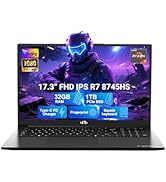
Image: Visual representation of the 90-day return policy.
7.3 Кардарларды колдоо
For any product-related questions, technical support, or warranty claims, please contact our professional customer service team:
- Электрондук почта: service@nimopc.com
- Телефон: Refer to your product packaging or NIMO's official website for current phone support numbers.
- Онлайн: Visit the official NIMO webКөп берилүүчү суроолор жана кошумча колдоо ресурстары үчүн сайт.
Our dedicated support team is available to assist you and resolve any issues promptly.

Image: Depiction of NIMO's professional customer assistance team.