
1. Киришүү
Сатып алганыңыз үчүн рахматasing the FYDEE A9 Record Player. This manual provides essential information for the safe and efficient operation of your new device. Please read these instructions thoroughly before use and retain them for future reference.
2. Коопсуздук маалыматы
- Кубат булагы: Use only the provided AC adapter. Ensure the voltage сиздин жергиликтүү электр камсыздооңузга дал келет.
- Суу жана ным: Do not expose the unit to rain, moisture, or liquids. Avoid placing objects filled with liquids, such as vases, on the unit.
- Жылуулук: Аппаратты радиаторлор, жылуулук регистрлери, мештер же башка аппараттар (анын ичинде) сыяктуу жылуулук булактарынан алыс кармаңыз. ampкөтөргүчтөр) жылуулукту пайда кылуучу.
- Вентиляция: Туура желдетүүнү камсыз кылыңыз. Эч кандай желдетүүчү тешиктерди жаап албаңыз.
- Тазалоо: Тазалоодон мурун түзмөктү розеткадан сууруп алыңыз. Жумшак, кургак чүпүрөктү гана колдонуңуз.
- Тейлөө: Агрегатты өзүңүз тейлөөгө аракет кылбаңыз. Бардык тейлөөлөрдү квалификациялуу тейлөө кызматкерлерине тапшырыңыз.
- Жайгашкан жери: Place the unit on a stable, flat surface to prevent damage from falling.
3. Пакеттин мазмуну
- FYDEE A9 Record Player
- AC адаптер
- Transparent Acrylic Dust Cover
- RCA кабели
- Instruction Manual
- 45 RPM адаптери
4. Продукт бүтүп калдыview
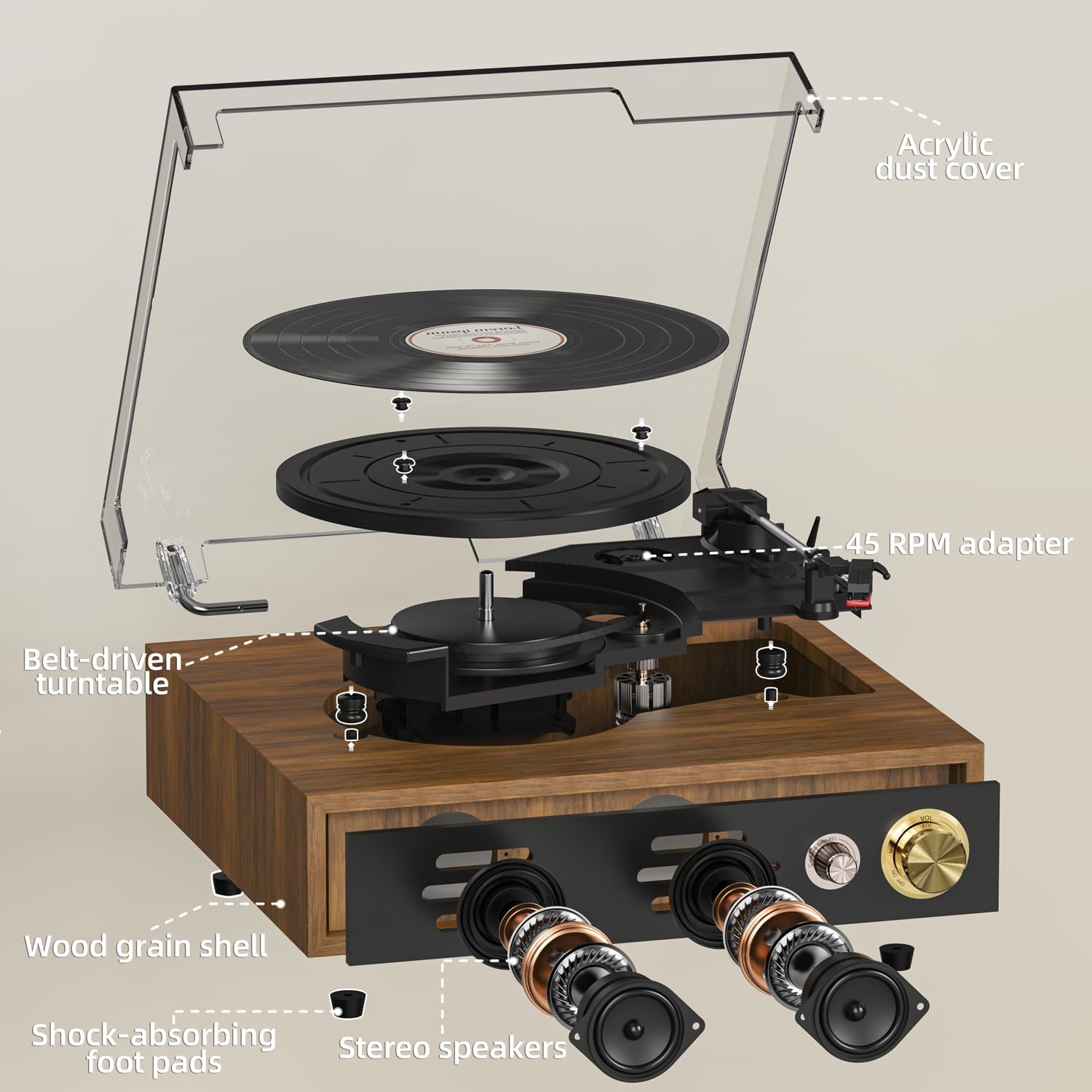
Familiarize yourself with the main components of your FYDEE A9 Record Player.
- Бурулма табак: Where vinyl records are placed for playback.
- Тонарм: Стилусту кармап, рекорддук оюктарды байкайт.
- Стилус (Ийне): Жаздырылган аудио маалыматты окуйт.
- Чаң капкагы: Айланма табакты жана пластинкаларды чаңдан коргойт.
- Ылдамдык тандагыч: 33, 45 же 78 RPM тандоого мүмкүндүк берет.
- Auto-Stop Switch: Enables or disables automatic stopping of the platter at the end of a record.
- Кубат/үн баскычы: Аппаратты күйгүзөт/өчүрүп, үнүн тууралайт.
- Режим баскычы: Selects between LP (Vinyl), Bluetooth Receiving (BT RX), Bluetooth Transmission (BT TX), and USB modes.
- Гарнитура уячасы: Наушник менен жеке угуу үчүн.
- USB порт: USB ойнотуу жана жаздыруу үчүн.
- RCA чыгаруу: Тышкы динамиктерге же ampөмүрлүү.
- DC 5V киргизүү: Кубат туташтыруу порту.
5. Орнотуу
- Пакеттен чыгаруу: Бардык компоненттерди таңгактан кылдаттык менен алып салыңыз. Келечектеги ташуу же сактоо үчүн таңгактарды сактаңыз.
- Чаң капкагын орнотуу: Align the hinges of the transparent acrylic dust cover with the slots on the back of the record player and gently slide it into place. This cover protects the turntable and records from dust when not in use.
- Кубат туташуу: Connect the provided AC adapter to the DC 5V input port on the back of the record player and then plug it into a wall outlet.
- Стилусту коргоо: Remove the clear plastic stylus protective cap from the stylus assembly before playing any record.
- Optional: External Speaker Connection: If you wish to connect external speakers or an amplifier, use the provided RCA cable. Connect the red plug to the 'R' (Right) output and the white plug to the 'L' (Left) output on the record player. Connect the other end to the corresponding input on your external audio system.
For a visual guide on setting up the dust cover and initial connections, please refer to the video below:
Видео 1: Unboxing and initial setup of the FYDEE Record Player, including dust cover installation and cable connections.
6. Иштөө
6.1 Винил пластинкаларын ойнотуу
- Күйгүзүү: Turn the Power/Volume knob clockwise to turn on the record player. The indicator light will illuminate.
- Select LP Mode: Turn the Mode knob to 'LP' for vinyl playback.
- Рекорд: Place a vinyl record on the turntable platter. If playing a 45 RPM single, use the included 45 RPM adapter.
- Ылдамдыкты тандоо: Adjust the speed selector switch (located near the tonearm) to match the record's speed (33, 45, or 78 RPM).
- Enable/Disable Auto-Stop: Set the Auto-Stop switch to 'ON' if you want the platter to stop spinning automatically at the end of the record. Set to 'OFF' for continuous play or if your record has a non-standard run-out groove.
- Тонеармдын абалы: Gently lift the tonearm using the cueing lever. Move the tonearm over the desired starting track of the record.
- Төмөнкү Тонеарм: Кийүү рычагын колдонуп, тонерди жай пластинкага түшүрүңүз. Музыка ойной баштайт.
- Үндү тууралоо: Үндү Кубат/Үн баскычын колдонуп тууралаңыз.

See the record player in action, including playing a vinyl record:
Видео 2: Demonstration of the FYDEE Turntable playing a 3-speed vinyl record, showcasing its operation and sound output.
6.2 Bluetooth Functionality (Bidirectional)
The FYDEE A9 supports Bluetooth 5.4 for both receiving and transmitting audio.
6.2.1 Bluetooth Receiving Mode (Turntable as Speaker)
- Күйгүзүү: Turn the Power/Volume knob clockwise to turn on the record player.
- Select BT RX Mode: Turn the Mode knob to 'BT RX'. The blue indicator light will flash, indicating it's ready for pairing.
- Түзмөктү жупташтыруу: On your smartphone or other Bluetooth device, enable Bluetooth and search for 'A9'. Select it to pair. Once connected, the blue indicator light will stop flashing and remain solid.
- Аудио ойнотуу: Play music from your connected device. The audio will play through the record player's built-in speakers.
- Үндү тууралоо: Control the volume using the Power/Volume knob on the record player or from your connected device.
6.2.2 Bluetooth Transmission Mode (Turntable to External Bluetooth Speaker)
- Күйгүзүү: Turn the Power/Volume knob clockwise to turn on the record player.
- Select BT TX Mode: Turn the Mode knob to 'BT TX'. The red indicator light will flash, indicating it's searching for an external Bluetooth speaker.
- Activate External Speaker: Тышкы Bluetooth динамигиңизди же кулакчыныңызды жупташтыруу режимине коюңуз.
- Автоматтык туташуу: The record player will automatically connect to the nearest discoverable Bluetooth speaker. Once connected, the red indicator light will stop flashing and remain solid.
- Play Vinyl: Play a vinyl record as described in section 6.1. The audio will be transmitted wirelessly to your external Bluetooth speaker.
- Үндү тууралоо: Control the volume primarily from your external Bluetooth speaker.
For a detailed guide on Bluetooth setup, watch this video:
Видео 3: A quick guide to setting up Bluetooth on the FYDEE Turntable, demonstrating both receiving and transmission modes.
6.3 USB ойнотуу жана жаздыруу
The USB port allows for both playing digital audio files and recording your vinyl collection.
6.3.1 USB ойнотуу
- USB дискти салыңыз: MP3 аудиосу бар USB флэш-дискти салыңыз fileUSB портуна киргизиңиз.
- USB режимин тандаңыз: Turn the Mode knob to 'USB'. The unit will automatically detect and begin playing MP3 files USB дискинен.
- Үндү тууралоо: Үндү Кубат/Үн баскычын колдонуп тууралаңыз.
6.3.2 USB Recording (Vinyl to MP3)
- USB дискти салыңыз: USB флэш-дискти USB портуна салыңыз.
- Select LP Mode: Turn the Mode knob to 'LP'.
- Жаздырууну баштоо: While a record is playing, press and hold the 'MODE' knob for a few seconds until the indicator light changes (refer to product specific light indicators for recording). The record player will begin recording the audio from the vinyl to the USB drive as MP3 files.
- Жаздырууну токтотуу: Press the 'MODE' knob again to stop recording. The recorded files will be saved on the USB drive.

7. Техникалык тейлөө
7.1 Тазалоо
- Чаң капкагы: Wipe the dust cover gently with a soft, dry cloth. Do not use abrasive cleaners or solvents.
- Калем: Use a soft brush (not included) to gently clean the stylus from back to front. Do not brush from side to side.
- Жазуулар: Keep your records clean by wiping them with an anti-static record brush (not included) before each play.
- Бөлүмдүн сырткы көрүнүшү: Аппараттын сыртын жумшак, кургак чүпүрөк менен сүртүңүз.
7.2 Стилусту алмаштыруу
The stylus is a consumable part and should be replaced after approximately 300-500 hours of use to maintain optimal sound quality and prevent damage to your records. Contact FYDEE customer support for replacement stylus information.
8. Кыйынчылыктарды
| Маселе | Мүмкүн себеп | Чечим |
|---|---|---|
| Күч жок | Кубат адаптери туташтырылган эмес; Розетка иштебейт; Түзмөк күйгөн эмес. | Ensure AC adapter is securely connected and plugged into a live outlet. Turn the Power/Volume knob clockwise to power on. |
| Динамиктерден үн жок | Volume too low; Incorrect mode selected; Stylus protective cap still on. | Increase volume. Ensure 'LP' mode is selected for vinyl. Remove stylus cap. |
| Үндүн бурмаланышы же секирип өтүшү | Record is dirty or damaged; Stylus is worn or dirty; Incorrect speed selected; Unit not on a stable surface. | Clean record. Clean or replace stylus. Select correct RPM. Place unit on a stable, level surface. |
| Bluetooth жупташуу көйгөйлөрү | Incorrect Bluetooth mode; Device too far; Interference. | Ensure correct BT mode (RX or TX) is selected. Keep devices within range (approx. 10m). Reduce interference from other electronic devices. |
| USB not playing/recording | Incorrect mode; USB drive not formatted correctly or unsupported file type; USB drive faulty. | Ensure 'USB' mode is selected. Use FAT32 formatted USB drives with MP3 fileс. Башка USB дискти колдонуп көрүңүз. |
9. Техникалык шарттар
| Өзгөчөлүк | Деталь |
|---|---|
| Бренд | FYDEE |
| Модел | A9 |
| Колдоого алынган ылдамдыктар | 33 1/3, 45, 78 RPM |
| Drive Type | Кур менен айдалган |
| Байланыш | Bidirectional Bluetooth 5.4, USB, RCA Output, Headphone Jack |
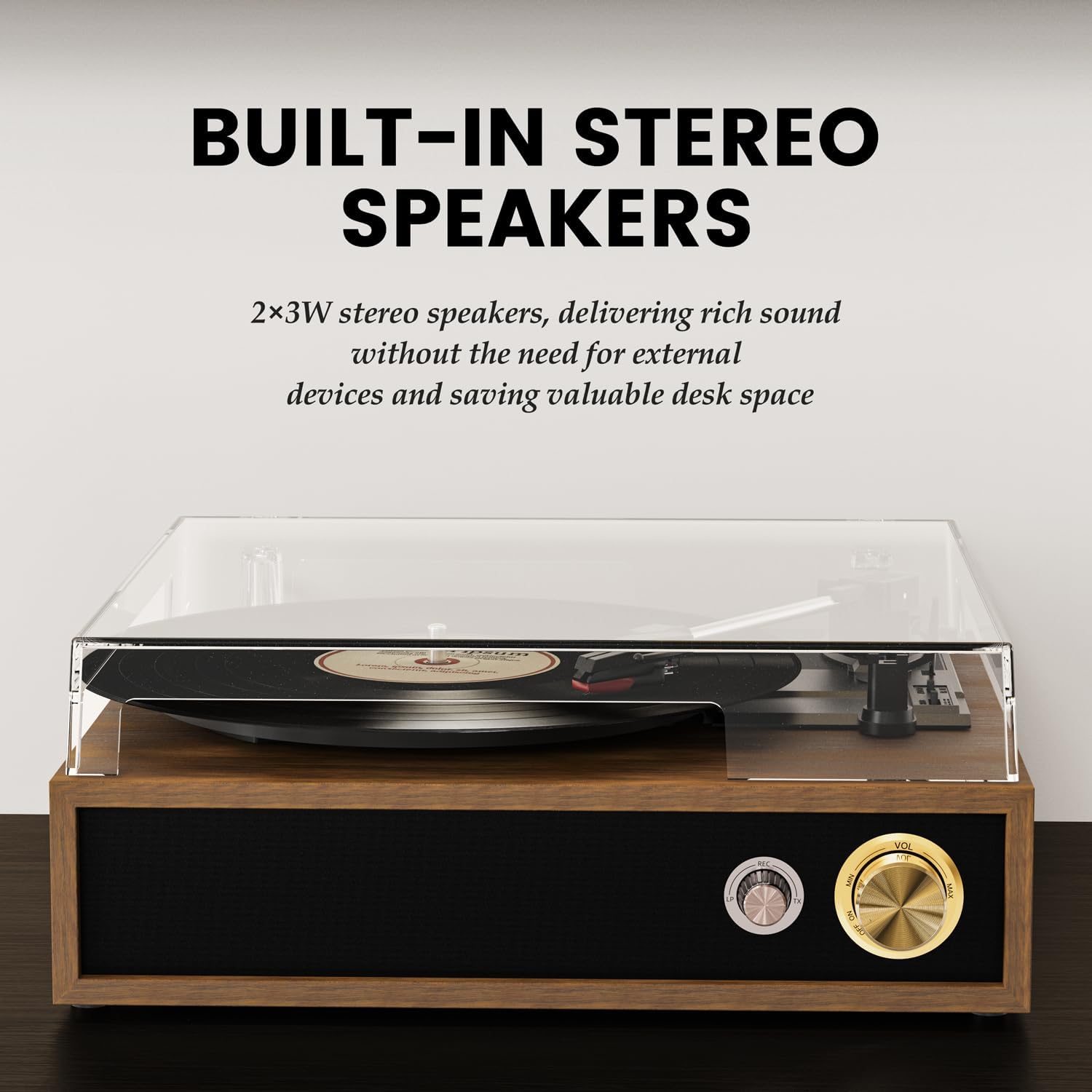
| Баяндамачылар | Built-in Stereo Speakers (2x3W) |
| Өзгөчөлүктөр | USB Recording (Vinyl to MP3), USB Playback, Auto-Stop Function, Acrylic Dust Cover |
| Power Source | AC адаптер (DC 5V) |
| Өлчөмдөр | 32 x 29 x 13 см (12.6 x 11.4 x 5.1 дюйм) |
| Салмагы | 2.62 кг (5.78 фунт) |
| Материал | Acrylic, Engineered Wood, Metal |
10. Кепилдик жана колдоо
FYDEE is committed to providing quality products and customer satisfaction. Your FYDEE A9 Record Player comes with a standard manufacturer's warranty. For specific warranty details, please refer to the warranty card included in your package or contact our customer support.
Our dedicated support team is available to assist you with any setup, operational, or troubleshooting questions you may have. We also offer repair and replacement services as needed.
For assistance, please visit our official website or contact us via the email address provided in your product documentation.