
Introduction
Thank you for choosing the PUTORSEN Triple Monitor Stand Desk Mount. This manual provides detailed instructions for the safe and proper installation, operation, and maintenance of your new monitor stand. Please read this manual thoroughly before assembly and retain it for future reference.
Коопсуздук маалыматы
- Салмак сыйымдуулугу: Do not exceed the maximum weight capacity for each arm. The central arm supports up to 20 kg (44 lbs) for monitors between 17-49 inches. Each side arm supports up to 12 kg (26.4 lbs) for monitors between 17-35 inches. Exceeding these limits may result in instability and potential damage or injury.
- VESA шайкештиги: Ensure your monitors are VESA compatible (75x75mm or 100x100mm).
- Үстөлдүн калыңдыгы: Verify your desk thickness is within the specified range for the chosen mounting method (C-clamp: 10-45mm; Grommet: 10-40mm).
- Ассамблея: Follow all assembly instructions carefully. Improper installation can lead to product failure or personal injury.
- Кыймылдуу бөлүктөр: Be aware of pinch points when adjusting the arms.
- Газ булагы жөндөө: Adjust the gas spring tension only after the monitor is mounted to prevent the arm from springing up unexpectedly.
Пакеттин мазмуну
Please check that all components are present and undamaged before proceeding with assembly. If any parts are missing or damaged, contact PUTORSEN customer support.
- Негизги полюс ассамблеясы
- Central Fixed Monitor Arm
- Two Pneumatic Gas Spring Monitor Arms
- C-Clamp Монтаждык база
- Grommet Mounting Base
- VESA плиталары (3x)
- Аппараттык комплект (буроолор, шайбалар, бөлгүчтөр)
- Tools (Allen keys)
- Кабелдик башкаруу клиптери
Техникалык шарттар
| Өзгөчөлүк | Спецификация |
|---|---|
| Модель номери | IMAUWTDS-10-T03V |
| Материал | Алюминий |
| Түс | Кара |
| Монтаж түрү | Tabletop Mount (C-clamp же Громмет) |
| Кыймыл түрү | Articulating (Pneumatic Arms) |
| VESA шайкештиги | 75x75мм, 100x100мм |
| Central Arm Screen Size | 17-49 дюйм |
| Central Arm Weight Capacity | 20 кг (44 фунт) |
| Side Arms Screen Size (each) | 17-35 дюйм |
| Side Arms Weight Capacity (each) | 12 кг (26.4 фунт) |
| Үстөлдүн калыңдыгы (C-clamp) | 10mm - 45mm (0.39" - 1.77") |
| Үстөлдүн калыңдыгы (Grommet) | 10mm - 40mm (0.39" - 1.57") |
| Уюлдун бийиктиги | 800мм (31.5") |
| Max Arm Extension | 543мм (21.37") |
Жайгашуу
1. Орнотууга чейинки текшерүү
- Ensure your desk can support the combined weight of the stand and all monitors.
- Confirm your monitors meet the VESA compatibility and weight/size requirements.
2. Монтаждоо ыкмасын тандаңыз
The stand offers two installation methods: C-clamp or Grommet mount. Select the method suitable for your desk.
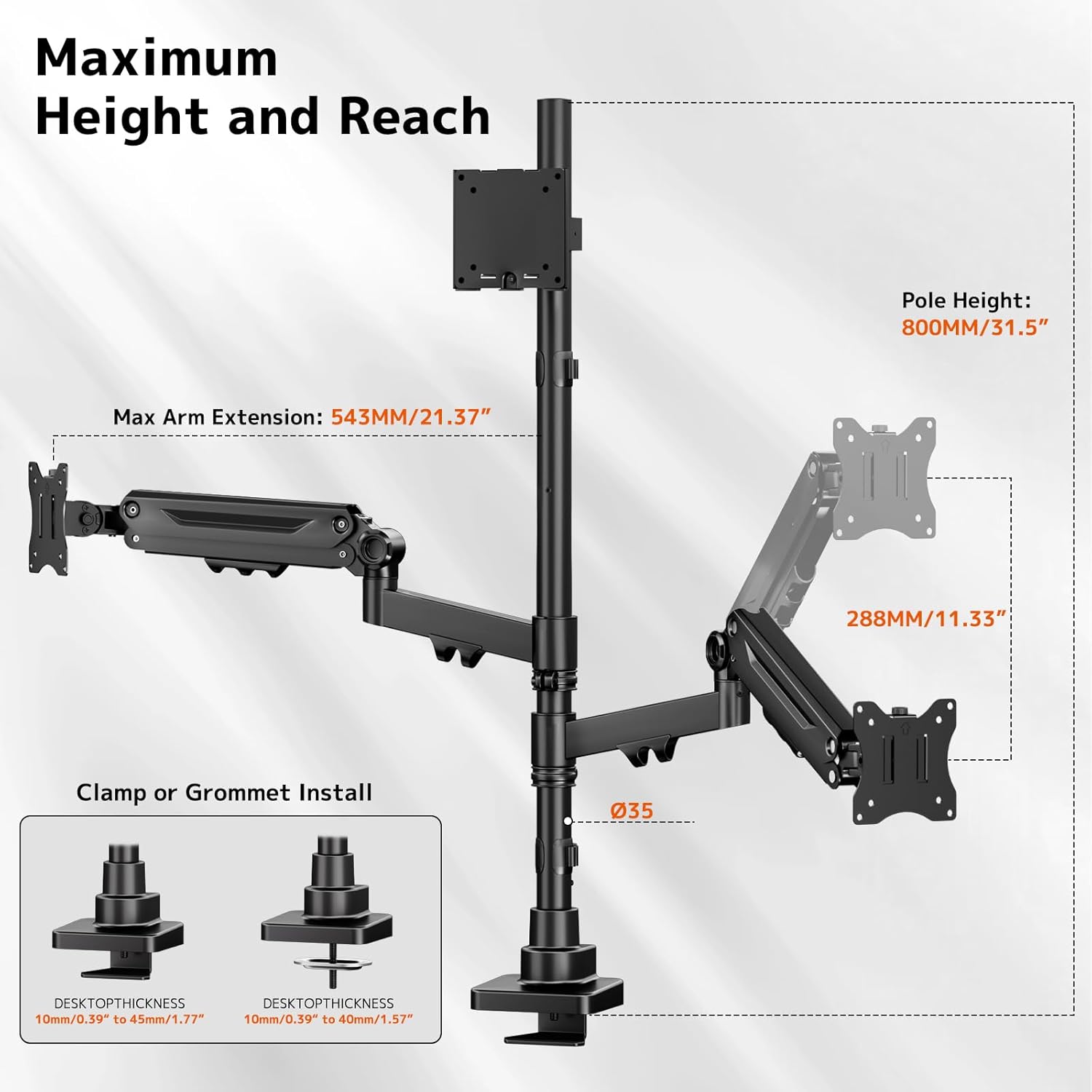
Technical diagram showing the maximum arm extension (543mm/21.37 inches) and pole height (800mm/31.5 inches). It also details the C-clamp and grommet installation options, compatible with desktop thicknesses from 10mm/0.39 inches to 45mm/1.77 inches (C-clamp) or 40mm/1.57 inches (grommet).
C-Clamp Орнотуу:
- C-cl тиркеңизamp негизи негизги уюлдун түбүнө чейин.
- Position the stand on the edge of your desk and tighten the C-clamp screw until secure.
Громмет орнотуу:
- If your desk has a grommet hole, attach the grommet base to the bottom of the main pole.
- Insert the pole through the grommet hole and secure it from underneath the desk using the provided plate and nut.

Illustration of the C-clamp and grommet mounting options for the monitor stand, along with the extended 31.5-inch pole, suitable for various desk setups and vertical screen arrangements.
3. VESA пластинкаларын мониторлорго бекитиңиз
- Мониторуңузду кылдаттык менен жумшак, таза бетке ылдый караңыз.
- Attach a VESA plate to the back of each monitor using the appropriate screws and spacers from the hardware kit. Ensure they are securely fastened.
4. Mount Monitors to Arms
- Slide the VESA plate with the attached monitor onto the arm's mounting head. Ensure it clicks into place or is secured with the locking screw.
- Repeat for all three monitors.

Деталдаштырылган view of the gas spring arm mechanism and integrated cable management. The image also shows the quick and easy installation process with a detachable VESA plate.
5. Газдын жазгы чыңалуусун жөнгө салуу
- After mounting the monitors, use the provided Allen key to adjust the gas spring tension on the pneumatic arms.
- Turn clockwise to increase tension for heavier monitors (arm stays up).
- Turn counter-clockwise to decrease tension for lighter monitors (arm moves down easily).
- Adjust until the monitor arm can hold its position freely.
6. Кабелдик башкаруу
- Route your monitor cables through the integrated cable management clips on the arms and pole to maintain a tidy workspace.
Иштеп жатат
The PUTORSEN Triple Monitor Stand offers extensive adjustability for an optimal viewтажрыйбасы.
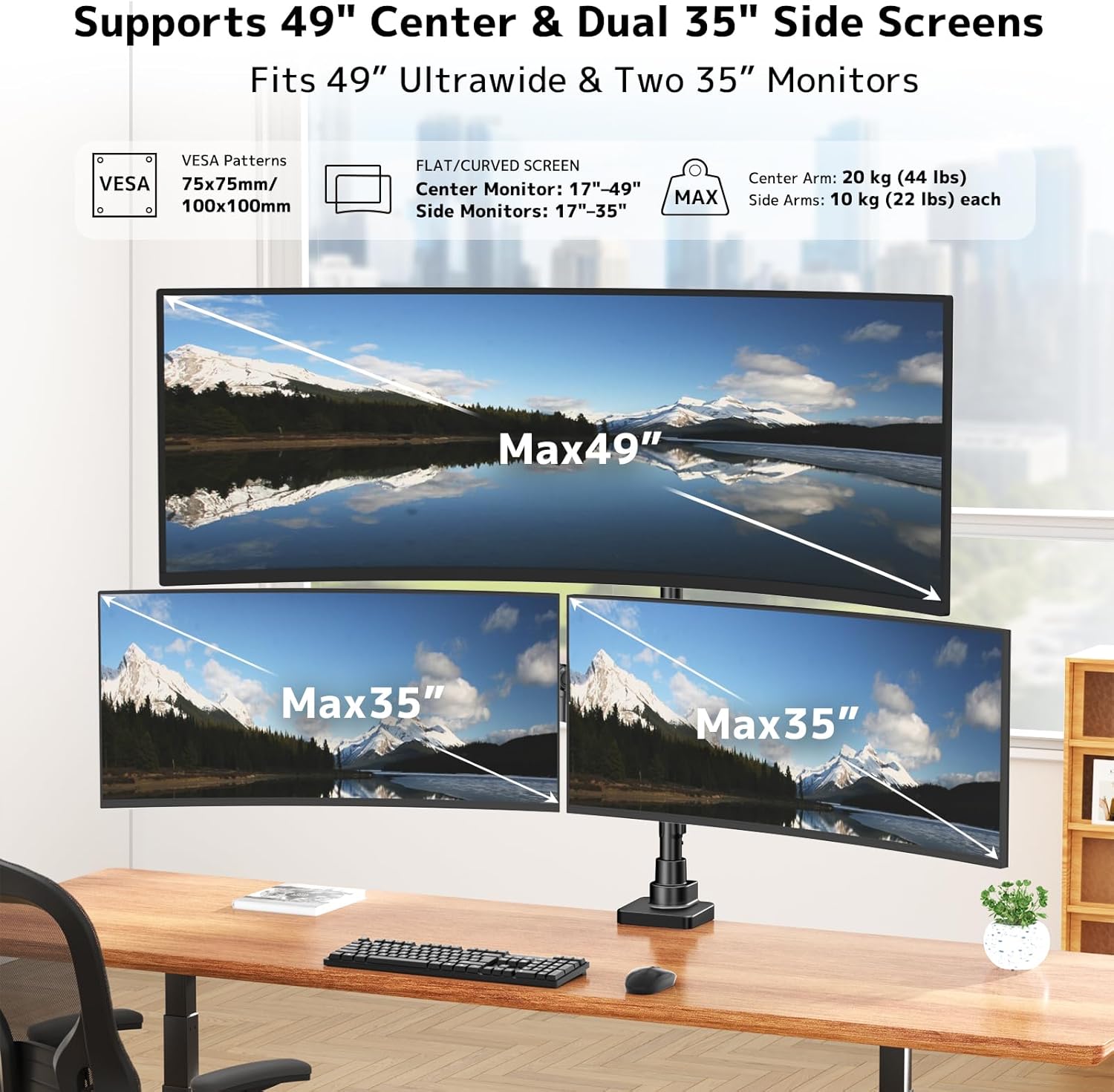
PUTORSEN Triple Monitor Stand supporting one 49-inch ultrawide monitor and two 35-inch side monitors. This image illustrates the maximum screen sizes and VESA compatibility (75x75mm, 100x100mm) for the center arm (17-49 inches, up to 20kg/44lbs) and side arms (17-35 inches, up to 10kg/22lbs each).
Monitor Adjustments:
- Бийиктигин тууралоо: The central screen is height-adjustable along the pole. The gas spring arms allow smooth, dynamic height positioning for the side monitors.
- Россия: Adjust the vertical angle of your monitors. The central arm tilts -20° to +50°, and side arms tilt -35° to +35°.
- Айлануучу: Rotate your monitors horizontally up to ±90° to share your screen or change viewбурчтар.
- Айлануу: Rotate your monitors 360° (±180°) to switch between landscape and portrait orientations.

Diagram illustrating the full adjustability of the monitor arms. The center monitor tilts -20° to +50°, side monitors tilt -35° to +35°, all arms swivel ±90°, and rotate ±180°.
Multiple Layout Options:
The flexible design allows for various monitor configurations to suit your workflow.

Examples of multiple monitor layout options using the PUTORSEN Triple Monitor Stand, including horizontal arrangements with a 49-inch center and two 35-inch side monitors, and a vertical arrangement with a 49-inch center and two 35-inch side monitors.
Техникалык тейлөө
- Тазалоо: Стендди жумшак менен сүртүңүз, гamp кездеме. Абразивдүү тазалагычтардан же эриткичтерден качыңыз.
- Мезгилдүү текшерүүлөр: Бардык бурамалар менен байланыштарды дайыма текшерип туруңуз, алар бекем жана коопсуз бойдон калууда. Керек болсо кайра тартыңыз.
- Газ булагы: If the gas spring tension changes over time, re-adjust it according to the 'Setup' section.
Проблемаларды чечүү
Monitor is sagging or not holding position:
- Чечим: The gas spring tension may be too low for the monitor's weight. Increase the gas spring tension by turning the adjustment screw clockwise.
- Чечим: Ensure the monitor's weight does not exceed the arm's maximum capacity.
Monitor is difficult to move or springs up too quickly:
- Чечим: The gas spring tension may be too high. Decrease the gas spring tension by turning the adjustment screw counter-clockwise.
Stand feels unstable or wobbles:
- Чечим: C-cl камсыз кылууamp or grommet mount is securely tightened to the desk.
- Чечим: Check all connections on the pole and arms to ensure they are fastened correctly.
- Чечим: Verify that the desk surface is stable and level.
Мониторлор тегиз эмес:
- Чечим: Adjust the tilt and height of individual monitor arms to align them. Some VESA plates may also have a small leveling adjustment.
Кепилдик жана колдоо
For warranty information, technical support, or any questions regarding your PUTORSEN Triple Monitor Stand Desk Mount, please contact PUTORSEN customer service through the retailer where you purchased the product or visit the official PUTORSEN webколдоо булактары үчүн сайт.