
Маанилүү коопсуздук маалыматы
Бул продуктуну колдонуудан мурун бардык коопсуздук көрсөтмөлөрүн кунт коюп окуп чыгыңыз. Бул көрсөтмөлөрдү аткарбоо электр тогуна урунууга, өрткө же башка коркунучтарга алып келиши мүмкүн.
- Power bankты өтө жогорку температурага (45°C жогору же -10°C төмөн) дуушар кылбаңыз.
- Электр банкын сууга же башка суюктуктарга тийгизбеңиз.
- Do not disassemble, modify, or attempt to repair the power bank yourself. Contact qualified service personnel.
- Балдар жетпеген жерде сактаңыз.
- Power bank жана түзмөктөрүңүздү кубаттоо үчүн оригиналдуу же сертификатталган кабелдерди гана колдонуңуз.
- Power банкты кулап же катуу таасирлерге дуушар кылуудан качыңыз.
- Жергиликтүү эрежелерге ылайык кубат банкын жоопкерчилик менен жок кылыңыз. Аны тиричилик таштандыларына таштабаңыз.
Продукт бүттүview
The Grundig Power Bank 20000 mAh is a portable external battery designed to charge your electronic devices on the go. It features a high capacity of 20,000 mAh, allowing multiple charges for smartphones, tablets, and other gadgets. The power bank is equipped with multiple input and output ports for versatile compatibility.
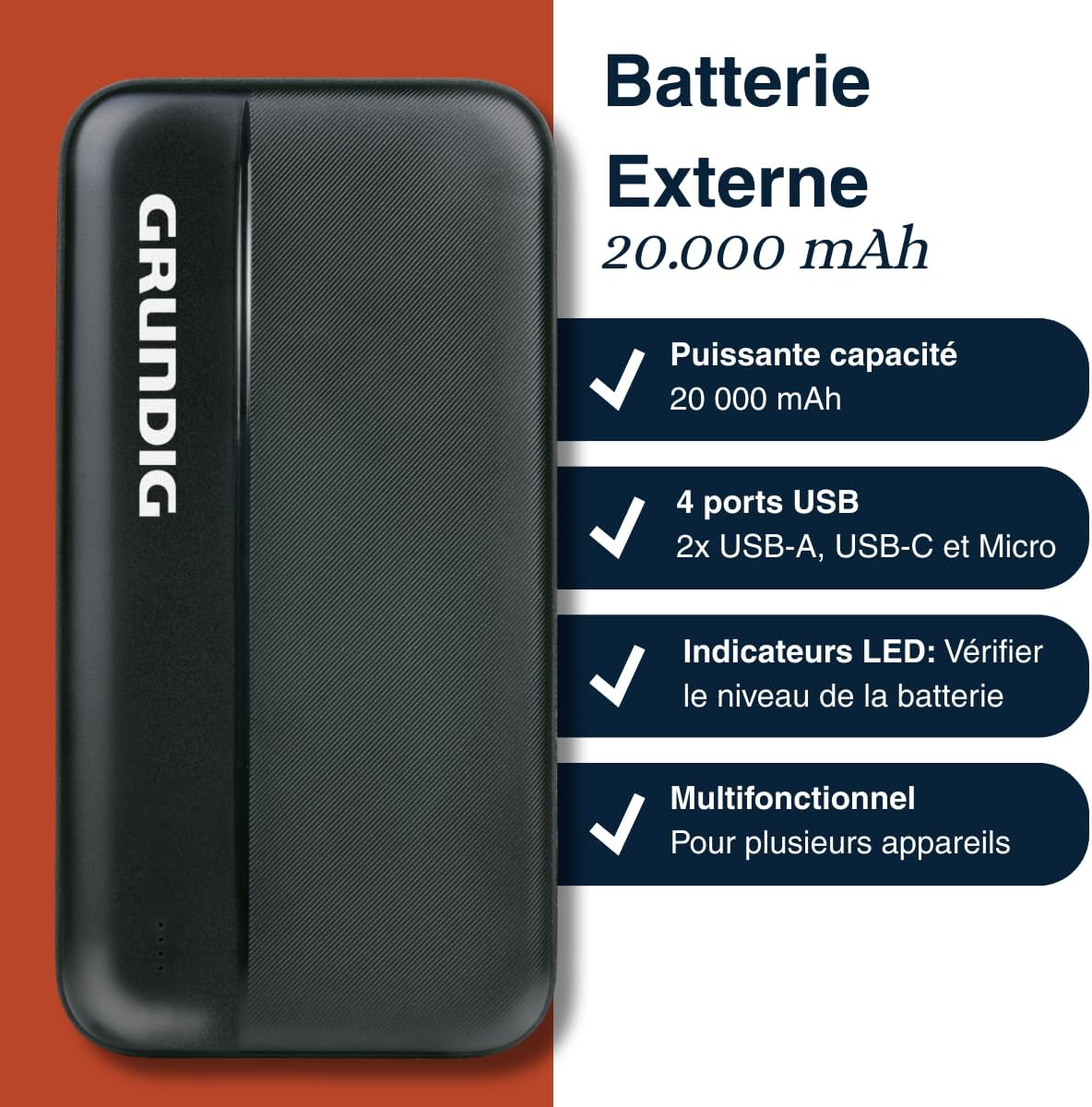
Image 1: Grundig Power Bank highlighting its 20,000 mAh capacity, four USB ports (including USB-A, USB-C, and Micro-USB), LED battery indicators, and multi-device compatibility.
Пакеттин мазмуну
Сураныч, пакетте төмөнкү нерселерди текшериңиз:
- Grundig Power Bank 20000 mAh
- USB Charging Cable (Micro USB or USB-C, depending on model variant)
- Көрсөтмө (бул документ)
Техникалык шарттар
| Бренд | Аккумулятор |
| Модель номери | 8711252572383 |
| Кубаттуулугу | 20000 мАч |
| Киргизүү порттору | Микро USB, USB-C |
| Output Ports | 2x USB-A, 1x USB-C |
| Түс | Кара |
| Өлчөмдөрү (болжол менен) | 14 cm x 7 cm (based on product image) |
| Power Source | Кол менен иштейт |

Image 2: The Grundig Power Bank displayed with approximate dimensions of 14 cm by 7 cm, shown alongside a smartphone for scale.
Жайгашуу
Power Bank заряддоо
Before initial use, fully charge your Grundig Power Bank. This ensures optimal performance and battery longevity.
- Locate the Micro USB or USB-C input port on the power bank.
- Connect one end of the provided USB charging cable to the power bank's input port.
- Connect the other end of the USB cable to a USB wall adapter (not included) or a computer's USB port.
- The LED indicators on the power bank will illuminate to show the charging status. They will typically blink while charging and become solid when fully charged.
- Толук заряддалгандан кийин, кубат банкын кубат булагынан ажыратыңыз.

Сүрөт 3: деталдуу view of the power bank's various ports, including USB-A, USB-C, and Micro-USB, used for both charging the power bank and charging external devices.
Батарея деңгээлин текшерүү
To check the remaining battery level of your power bank, briefly press the power button (if available, otherwise the LEDs will light up automatically when a device is connected or charging starts). The LED indicators will light up, showing the current charge level. Typically, each LED represents a percentagжалпы кубаттуулуктун e.
Иштөө нускамалары
Тышкы түзмөктөрдү заряддоо
The Grundig Power Bank can charge a wide range of USB-powered devices.
- Use your device's original charging cable or a certified compatible cable.
- Кубаттоочу кабелдин бир учун түзмөгүңүзгө туташтырыңыз.
- Connect the other end of the charging cable to one of the USB-A or USB-C output ports on the power bank.
- The power bank should automatically begin charging your device. If not, press the power button on the power bank to initiate charging.
- Monitor your device's screen to confirm it is charging.
- Түзмөгүңүз толук кубатталгандан кийин, аны кубат банкынан ажыратыңыз.

Image 4: The Grundig Power Bank actively charging a smartphone, demonstrating its use for portable device charging.
Бир нече түзмөктү заряддоо
The power bank features multiple output ports (2x USB-A, 1x USB-C), allowing you to charge up to three devices simultaneously. Note that charging multiple devices at once may affect the charging speed for each device and will deplete the power bank's battery faster.
Техникалык тейлөө
- Тазалоо: Power банктын бетин тазалоо үчүн жумшак, кургак чүпүрөктү колдонуңуз. Суюк тазалагычтарды же аэрозолдорду колдонбоңуз.
- Сактагыч: Store the power bank in a cool, dry place away from direct sunlight and extreme temperatures. For long-term storage, it is recommended to charge the power bank to about 50-75% every three months to maintain battery health.
- Кабельге кам көрүү: Always handle charging cables by the plug, not the cable itself, to prevent damage.
Проблемаларды чечүү
| Көйгөй | Мүмкүн себеп | Чечим |
|---|---|---|
| Power банк заряддалбай жатат | Cable is faulty; power adapter is not working; power bank is fully charged. | Try a different charging cable and/or power adapter. Ensure the power bank is not already full. |
| Түзмөк кубат банкынан кубатталбай жатат | Power bank battery is empty; cable is faulty; device is incompatible; power bank is off. | Charge the power bank. Try a different charging cable. Ensure the power bank is turned on (press power button). Check device compatibility. |
| Жай кубаттоо | Cable is low quality; multiple devices charging; device requires higher input. | Use a high-quality cable. Try charging one device at a time. Ensure the device's charging requirements match the power bank's output. |
| LED көрсөткүчтөрү иштебейт | Power bank is completely discharged; internal fault. | Attempt to charge the power bank for an extended period. If problem persists, contact customer support. |
Кепилдик жана колдоо
This Grundig Power Bank is covered by a standard manufacturer's warranty. Please refer to the warranty card included in your original packaging for specific terms and conditions, including the warranty period and coverage details.
For technical support, service, or warranty claims, please contact your retailer or visit the official Grundig website for customer service contact information. Please have your model number (8711252572383) and proof of purchase ready when contacting support.
Онлайн ресурстар: For additional information and FAQs, you may visit the Grundig official webсайт.