
1. Киришүү
Thank you for choosing the Attoe F-18 Wireless Vertical Gaming Mouse. This ergonomic mouse is designed to provide a comfortable user experience, reducing wrist strain during extended use, while offering advanced features for gaming and productivity. It features tri-mode connectivity (2.4GHz wireless, Bluetooth 5.0, and wired USB-C), 12 programmable buttons, a 5-direction rocker, and adjustable DPI up to 24000.

Image 1.1: Attoe F-18 Wireless Vertical Gaming Mouse with USB receiver.
2. Пакеттин мазмуну
- Attoe F-18 Vertical Gaming Mouse
- USB-C заряддоо кабели
- 2.4GHz USB кабылдагычы
- User Manual
3. Орнотуу жана туташуу
3.1 Чычканды заряддоо
The Attoe F-18 mouse is equipped with a built-in 800mAh ternary lithium battery. Before first use, or when the low battery warning activates, charge the mouse using the provided USB-C cable.
- Connect the USB-C end of the cable to the mouse and the USB-A end to a power source (e.g., computer USB port, USB wall adapter).
- During charging, the four indicator lights on the mouse will illuminate in sequence.
- All four lights will turn off when the mouse is fully charged.
- A red light flashing quickly indicates the battery level has dropped to 25%, signaling the need for charging.

Image 3.1: Illustration of the 800mAh battery and charging indicators.
3.2 Чычканды туташтыруу
The Attoe F-18 supports three connection modes: 2.4GHz Wireless, Bluetooth 5.0, and Wired USB-C.
3.2.1 2.4 ГГц зымсыз туташуу
- Төмөндө жайгашкан кубат которгучу менен чычканды күйгүзүңүз.
- Press the bottom Bluetooth button briefly to select 2.4G mode (red indicator light).
- Remove the USB receiver from its storage slot on the bottom of the mouse.
- Insert the USB receiver into an available USB port on your computer. The mouse will automatically connect.

Image 3.2: Steps for connecting via 2.4GHz USB wireless.
3.2.2 Bluetooth 5.0 туташуу
- Төмөндө жайгашкан кубат которгучу менен чычканды күйгүзүңүз.
- Press the bottom Bluetooth button briefly to select Bluetooth mode (blue indicator light). The mouse can pair with up to two Bluetooth devices.
- Компьютериңизде же түзмөгүңүздө Bluetooth иштетип, жаңы түзмөктөрдү издеңиз.
- Select "F-18" or "Attoe Mouse" from the list of available devices to pair.
3.2.3 Зымдуу USB-C туташуусу
Берилген USB-C кабелин колдонуп, чычканды түз эле компьютериңизге туташтырыңыз. Чычкан зымдуу түзмөк катары иштейт жана бир эле учурда кубатталат.
3.3 Программаны орнотуу (Windows гана)
To customize the 12 programmable buttons and macro settings, download the dedicated software driver. This software is compatible with Windows operating systems only; Mac OS lacks programming features.
- Продукциянын таңгагына же өндүрүүчүнүн версиясына кайрылыңыз website for the software download link.
- Download and run the installer. If your security program flags the installer, approve the action (e.g., select "Trust") to proceed.
- Орнотууну аяктоо үчүн экрандагы нускамаларды аткарыңыз.
- Once installed, launch the software to customize button functions, lighting, and macros. Programmable data is saved directly to the mouse, so settings persist even when connected to a new computer.

Image 3.3: Screenshot of the custom driver programming software interface.
4. Иштөө нускамалары
4.1 Эргономикалык дизайн
The vertical design of the Attoe F-18 mouse promotes a natural handshake position, which helps alleviate wrist pain, shoulder fatigue, and tendinitis often associated with traditional horizontal mice. This design is ideal for right-handed users and supports various hand sizes for comfortable extended use.

Image 4.1: Visual comparison of vertical mouse grip versus common horizontal mouse grip.
4.2 Button Functions and 5-Direction Rocker
The mouse features 12 programmable buttons, including a unique 5-direction rocker for enhanced control.
- Сол/оң баскычтары: Стандарттуу чычкан чыкылдатуулары.
- Жылдыруу дөңгөлөгү: Вертикалдуу сыдыруу жана орто баскычты чыкылдатуу функциясы үчүн.
- Алга/Артка баскычтары: Located on the left side for navigation.
- DPI баскычы: Adjusts sensitivity (see section 4.3).
- 5-Direction Rocker: Located near the thumb, this rocker replaces five traditional keys (W, A, S, D, and Space/Click) for agile in-game navigation. It allows movements forward, backward, left, right, and a central click.
- BT/2.4G Button: For switching between connectivity modes.
All buttons, except the BT/2.4G button, can be customized using the programming software.

Image 4.2: Close-up of the 5-way joystick, curved buttons, and side function keys.

Image 4.3: Keystroke analysis chart detailing button assignments.
4.3 DPI жөндөө
The mouse features 5 adjustable DPI presets (1600/2400/3200/4800/24000) powered by a high-precision PMW3325 sensor. Press the DPI button to cycle through the settings. The DPI indicator lights will change to reflect the current setting:
- 1st light: 1600 DPI
- 2nd light: 2400 DPI
- 3rd light: 3200 DPI
- 4th light: 4800 DPI
- All 4 lights: 24000 DPI

Image 4.4: DPI indicators and RGB lighting on the mouse.
4.4 RGB жарыктандыруу
The side RGB strips feature 5 dynamic effects (Neon, Marquee, Streamer, etc.) to enhance your gaming atmosphere. Lighting modes can be customized via the software.
4.5 Device/Mode Switching
To switch between connected devices or modes:
- Briefly press the Bluetooth button on the bottom of the mouse.
- The indicator light will show red for 2.4GHz mode and blue for Bluetooth mode.
- The mouse can switch between up to two paired Bluetooth devices and one 2.4GHz receiver connection.

Image 4.5: Diagram illustrating the device/mode switching function on the mouse bottom.
5. Техникалык тейлөө
To ensure the longevity and optimal performance of your Attoe F-18 mouse, follow these maintenance guidelines:
- Тазалоо: Чычкандын бетин сүртүү үчүн жумшак, кургак чүпүрөктү колдонуңуз. өжөр кир үчүн, бир аз гampчүпүрөктү суу же жумшак тазалоо эритмеси менен жууп салыңыз. Катуу химиялык заттардан же абразивдүү материалдардан алыс болуңуз.
- Сактагыч: When not in use for extended periods, turn off the mouse to conserve battery life. Store it in a cool, dry place away from direct sunlight and extreme temperatures.
- Тайгалоого каршы жабдыктар: Ensure the protective film is removed from the Teflon anti-slip pads on the bottom of the mouse for smooth movement.
6. Кыйынчылыктарды
If you encounter issues with your Attoe F-18 mouse, refer to the following common solutions:
- Чычкан жооп бербей жатат:
- Чычкан күйгүзүлгөнүн текшериңиз.
- Батареянын деңгээлин текшерип, керек болсо заряддаңыз.
- Verify the correct connection mode (2.4GHz, Bluetooth, or Wired) is selected.
- For 2.4GHz, ensure the USB receiver is securely plugged into a working USB port. Try a different USB port.
- For Bluetooth, ensure Bluetooth is enabled on your device and the mouse is paired correctly.
- If using wired mode, ensure the USB-C cable is properly connected.
- Курсордун кечигиши же туруксуз кыймыл:
- Чычкандын таза, чагылбаган бетте турганын текшериңиз.
- Interference can affect wireless performance. Move the mouse closer to the receiver or try a different USB port for the receiver.
- Check for other wireless devices operating on the same frequency.
- Батарея жетиштүү заряддалганын текшериңиз.
- Программалоочу баскычтар иштебейт:
- Ensure the customization software is installed and running on a Windows PC.
- Verify that the buttons have been correctly programmed and saved within the software.
- Remember that Mac OS does not support programming features for this mouse.
- DPI өзгөрбөйт:
- Press the DPI button firmly to cycle through the settings. Observe the indicator lights.
7. Техникалык шарттар
| Өзгөчөлүк | Спецификация |
|---|---|
| Бренд | Attoe |
| Модель номери | F-18 |
| Байланыш технологиясы | 2.4 ГГц зымсыз, Bluetooth 5.0, USB-C зымдуу |
| Кыймылды аныктоо технологиясы | Оптикалык (PMW3325 сенсор) |
| DPI деңгээли | 1600 / 2400 / 3200 / 4800 / 24000 |
| баскычтардын саны | 12 (Программалануучу) |
| Батарея сыйымдуулугу | 800mAh Ternary Lithium Battery |
| Продукциянын өлчөмдөрү | 4.3 x 2.8 x 0.04 дюйм (110 x 72 x 76.5 мм) |
| Элемент Салмагы | 3.88 унция (105 ± 5 г) |
| Баскычтын иштөө мөөнөтү | ≥20 миллион чыкылдатуу |
| Scroll Wheel Lifespan | ≥1.2 million rotations |
| Натыйжалуу диапазон | ≥10м |
| Operating Voltage/Current | 3.7V === 15мА |
| 2.4GHz Rolling Rate | 125-1000 Гц |
| Bluetooth Rolling Rate | 133Hz |
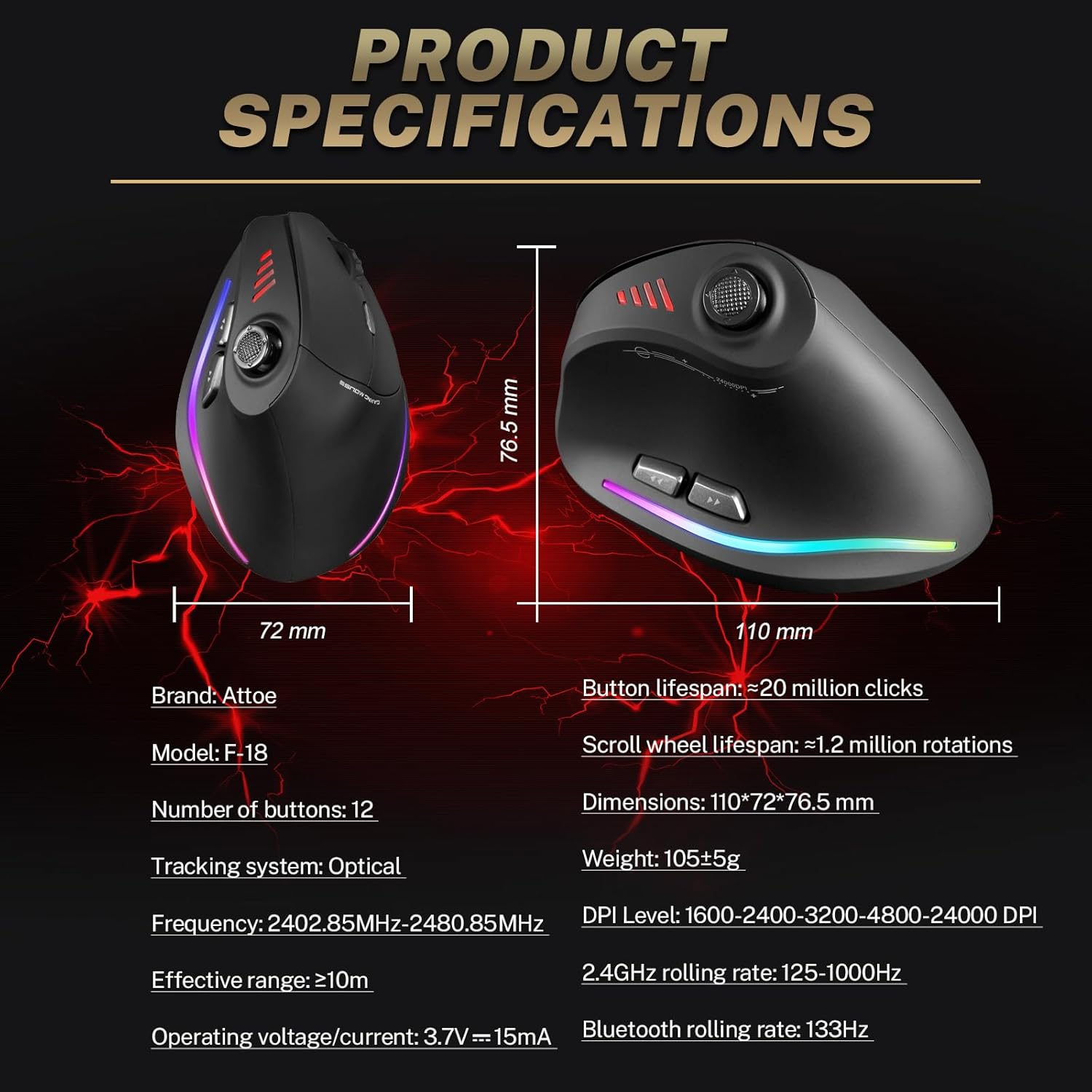
Image 7.1: Diagram showing product dimensions and key specifications.
8. Кепилдик жана колдоо
For warranty information or technical support, please refer to the documentation included with your product or visit the official Attoe website. If you require further assistance, contact Attoe customer service.