
1. Киришүү
The NYXI Warrior Wireless Switch Controller is a versatile gaming peripheral designed for enhanced gameplay across multiple platforms. It features advanced technologies such as Hall Effect Joysticks and Triggers for precision and longevity, micro mechanical switch buttons for rapid response, HD Rumble for immersive feedback, and a 6-axis gyroscope for motion sensing. This controller is compatible with Nintendo Switch, Nintendo GameCube (NGC), Wii, and PC.

Image: NYXI Warrior controllers in various colors, highlighting the product line.
2. Пакеттин мазмуну
- NYXI Warrior Wireless Switch Controller
- USB зымсыз кабыл алгыч
- USB-C заряддоо кабели
- Колдонуучунун Колдонмосу (бул документ)

Image: The NYXI Warrior controller and its wireless receiver.
3. Орнотуу колдонмосу
3.1 Контроллерди заряддоо
Before first use, fully charge the controller. Connect the supplied USB-C charging cable to the controller's USB-C port and the other end to a USB power source (e.g., console, PC, or USB wall adapter). The indicator lights on the controller will show charging status and turn off when fully charged. A full charge typically takes approximately 2-3 hours.
3.2 Түзмөктөргө туташуу
3.2.1 Nintendo Switch туташуусу
- Nintendo Switch консолуңузду күйгүзүңүз.
- HOME Менюсунан тандаңыз Контроллер, анда Катуу/Тартипти өзгөртүү.
- басып, кармап туруңуз Жупташтыруу баскычы on the top of the NYXI Warrior controller for 3 seconds until the indicator lights begin to flash rapidly.
- Once connected, the corresponding player indicator light(s) on the controller will remain solid.
3.2.2 PC/NGC/Wii Connection (via USB Wireless Receiver)
- Insert the USB Wireless Receiver into an available USB port on your PC, NGC, or Wii console.
- Ensure the NYXI Warrior controller is powered on.
- The controller should automatically connect to the receiver. The indicator light on the receiver and controller will become solid once a connection is established.
- For PC, additional driver installation may be required depending on the operating system. Refer to your PC's documentation for USB device setup.

Image: The NYXI Warrior controller connected to a laptop via its USB receiver, demonstrating PC compatibility.

Image: The NYXI Warrior controller with a Nintendo Wii console, illustrating Wii compatibility.
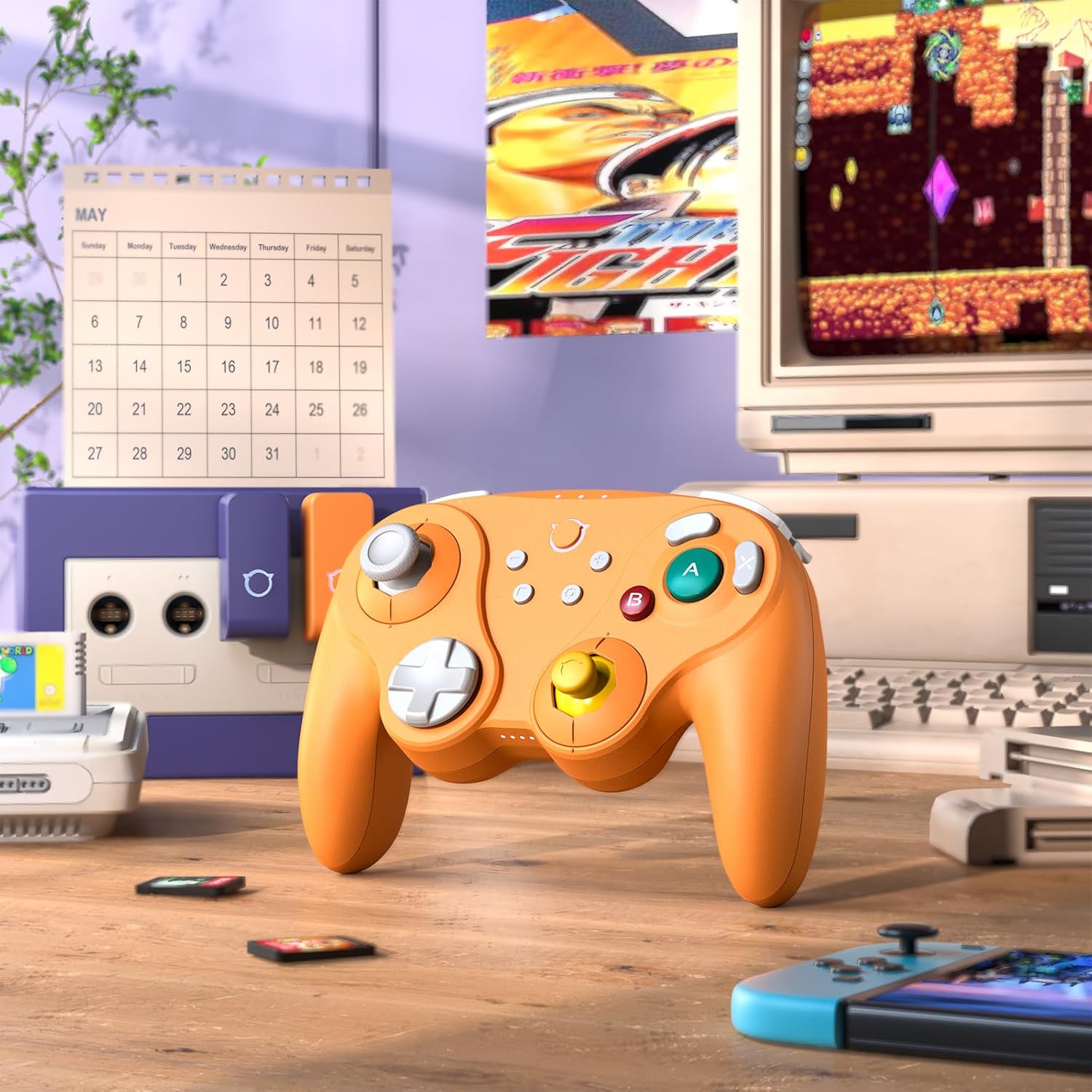
Image: The NYXI Warrior controller with a retro gaming setup, illustrating GameCube compatibility.
4. Иштөө нускамалары
4.1 Баскычтын жайгашуусу жана функциялары
The NYXI Warrior controller features a comprehensive button layout for various gaming needs:
- Сол аналогдук таякча: Кыймылды жана камераны башкаруу үчүн.
- D-Pad: Багыттуу киргизүү.
- Оң аналогдук таякча: For camera control or specific in-game actions.
- A/B/X/Y баскычтары: Action buttons with micro mechanical switches for precise and rapid input.
- Сол/Оң баскычтар: Ийин баскычтары.
- ZL/ZR Triggers: Hall Effect analog triggers for precise input, adjustable for different gameplay styles.
- +/- баскычтары: Start/Select or Menu functions.
- Үй баскычы: Returns to the console's home screen.
- Скриншот баскычы: Скриншотторду тартат.
- Programmable Back Paddles (M1/M2): Located on the underside, these can be assigned to various button functions.

Сүрөт: алдыңкы view of the NYXI Warrior controller, illustrating its button layout.

Сүрөт: Артка view of the NYXI Warrior controller, highlighting the programmable back paddles.

Сүрөт: Үстүңкү бети view of the NYXI Warrior controller, showing triggers and charging port.

Image: Two users playing with NYXI Warrior controllers, demonstrating in-game use.
4.2 Өркүндөтүлгөн функциялар
4.2.1 Холл эффектисинин джойстиктери жана триггерлери
The controller utilizes Hall Effect technology for its joysticks and triggers. This magnetic sensing technology prevents stick drift and ensures precise, long-lasting input. The triggers are also adjustable, allowing users to fine-tune their activation distance based on personal preference or game requirements.

Image: Illustration of the Hall Effect Joystick technology.

Image: Adjustable Hall Sensing Triggers feature.
4.2.2 Micro Mechanical Switch Buttons
The A/B/X/Y buttons and D-pad utilize micro mechanical switches, offering a short travel distance of approximately 0.3mm and a response speed of 0.2ms. This design provides tactile feedback and minimal latency, crucial for competitive gaming.

Image: Microswitches for A/B/X/Y buttons and D-pad.
4.2.3 6-октуу гироскоп
The integrated 6-axis gyroscope supports motion sensing, particularly useful for games on the Nintendo Switch that utilize tilt or motion controls.

Image: 6-Axis Gyroscope feature illustration.
4.2.4 HD Rumble
The controller features HD Rumble, providing enhanced vibration feedback that can convey a wider range of sensations, from subtle tremors to powerful impacts, enriching the gaming experience.

Image: HD Rumble feature illustration.
4.2.5 Programmable Back Paddles and Turbo Function
The interchangeable back paddles (M1 and M2) can be programmed to replicate other button inputs, offering additional customization and ergonomic advantages. The controller also supports a turbo function for rapid, repeated button presses. Refer to the specific programming instructions provided with the controller for detailed steps on assigning functions to the back paddles and activating turbo mode.

Image: Interchangeable Back Paddle Design.
5. Техникалык тейлөө
- Тазалоо: Контроллердин бетин тазалоо үчүн жумшак, кургак чүпүрөктү колдонуңуз. Өжөр кир үчүн, бир азampчүпүрөктү суу менен. Катуу химиялык заттарды же абразивдүү материалдарды колдонуудан алыс болуңуз.
- Сактагыч: Контроллерди түз күн нурунан жана экстремалдык температурадан алыс салкын, кургак жерде сактаңыз.
- Батареяга кам көрүү: To prolong battery life, avoid fully discharging the controller frequently. If storing for an extended period, charge the battery to approximately 50% every few months.
- Колдонуу: Башкаргычты түшүрүп алуудан же ага катуу сокку уруудан алыс болуңуз, анткени бул ички компоненттерге зыян келтириши мүмкүн.
6. Кыйынчылыктарды
6.1 Контроллер туташпай жатат
- Контроллер жетиштүү заряддалганын текшериңиз.
- Verify the USB Wireless Receiver is securely plugged into the console/PC.
- For Switch, ensure you are in the "Change Grip/Order" menu.
- Try re-pairing the controller by pressing the pairing button.
- Restart your console/PC and the controller.
6.2 Киргизүүнүн кечигиши же жооп бербей жаткан баскычтар
- Ensure there are no strong wireless interference sources nearby (e.g., Wi-Fi routers, other wireless devices).
- Консолго/компьютерге жакындаңыз.
- Контроллердин батареясынын заряды аз экенин текшериңиз.
- Perform a controller reset (refer to manufacturer's specific reset procedure if available, typically a small pinhole button).
6.3 Джойстикти калибрлөө
While Hall Effect joysticks are designed to prevent drift, if you experience any unusual behavior, you may need to recalibrate them through your console's system settings (e.g., Nintendo Switch System Settings > Controllers and Sensors > Calibrate Control Sticks).
7. Техникалык шарттар
| Модель номери | Warrior |
| ASIN | B0FB9577L9 |
| Пакеттин өлчөмдөрү | 7.64 x 7.52 x 3.58 дюйм |
| Элемент Салмагы | 1.54 фунт |
| Батареялар | 1 литий-иондук батарейка (кошулган) |
| Дата биринчи жеткиликтүү | 24-март, 2025-жыл |
8. Кепилдик жана колдоо
For information regarding warranty coverage, technical support, or replacement parts, please refer to the official NYXI website or contact the retailer from whom the product was purchased. Keep your proof of purchase for warranty claims.
Official NYXI Store: NYXI Store on Amazon