Introduction
Thank you for choosing the Nexbyte JH-ANC930Plus Wireless Headphones. These headphones are designed to provide an immersive audio experience with advanced active noise cancellation, an intuitive LED touch screen, and versatile connectivity options. This manual will guide you through the features and functions of your new headphones to ensure optimal performance and enjoyment.
Кутуда эмне бар

Image: The Nexbyte JH-ANC930Plus headphones, a hard-shell carrying case, a USB-C charging cable, and a 3.5mm audio cable, along with a user manual.
- Nexbyte JH-ANC930Plus Headphones
- LCD Screen (integrated)
- C түрүндөгү кубаттоочу кабель
- AUX кабели (3.5 мм)
- Storage Pack / Carrying Case
Продукт бүттүview
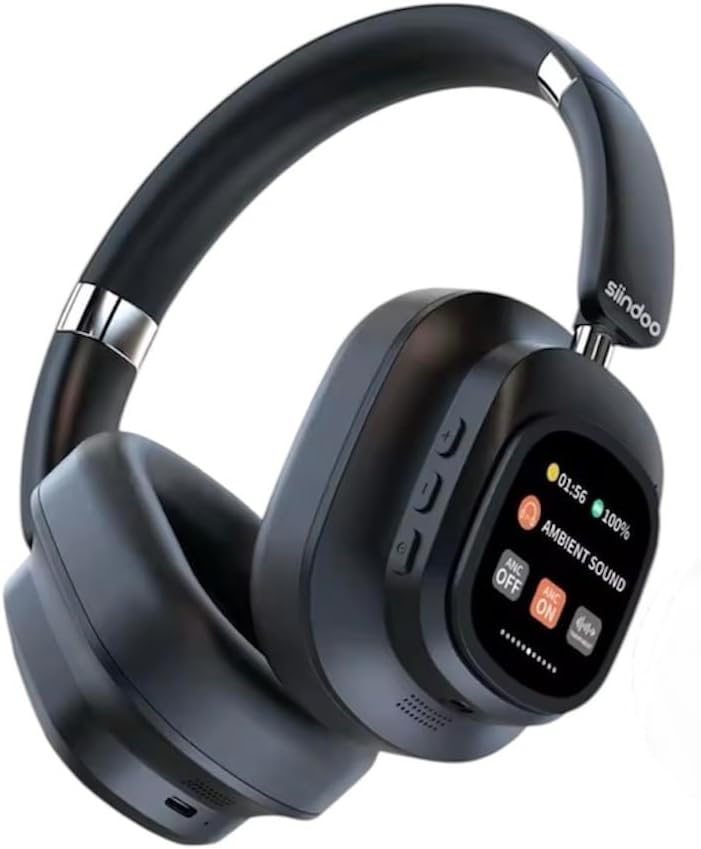
Image: A pair of black Nexbyte JH-ANC930Plus over-ear headphones, showcasing the sleek design and the integrated LED touch screen on the left earcup.
The JH-ANC930Plus headphones feature a robust design with comfortable earcups and an adjustable headband. The left earcup integrates an innovative LED touch screen for easy control of various functions. Physical buttons are also present for essential controls.

Image: A hand holding the magnetic LED touch screen module, detached from the headphone, displaying music playback controls and battery status.
The magnetic touch control LED screen provides a user-friendly interface for managing your audio experience, settings, and more.
Жайгашуу
1. Наушниктерди заряддоо
Before first use, fully charge your headphones. Connect the supplied Type-C charging cable to the charging port on the headphones and the other end to a USB power adapter (not included) or a computer's USB port.
- Кубаттоо убактысы: Толук заряддоо үчүн болжол менен 2-2.5 саат.
- Battery Indicator: The LED screen will display the charging status.
2. Күйгүзүү / Өчүрүү
Press and hold the Power button (usually located on one of the earcups) for a few seconds until the LED screen illuminates. To power off, press and hold the Power button again until the screen turns off.
3. Bluetooth Жупташтыруу
The JH-ANC930Plus headphones utilize Bluetooth 5.3 for stable wireless connectivity.
- Ensure the headphones are powered on and in pairing mode (indicated by a blinking Bluetooth icon on the LED screen).
- Түзмөгүңүздө (смартфон, планшет, компьютер) Bluetooth жөндөөлөрүнө өтүп, Bluetooth'ду иштетиңиз.
- Издөө available devices. Select "ANC930" or "JH-ANC930Plus" from the list.
- Once connected, the LED screen will show a stable Bluetooth icon.
4. Зымдуу туташуу (AUX)
For a wired connection, use the supplied 3.5mm AUX cable. Plug one end into the headphone's audio jack and the other end into your audio source's 3.5mm port. The headphones will automatically switch to wired mode.
Иштөө нускамалары
1. LED Touch Screen Functions

Image: The LED touch screen displaying various icons for functions such as music playback, volume adjustment, ANC mode, equalizer settings, alarm, brightness, language switch, screen lock, date/time, photo capture, and more.
The LED touch screen provides intuitive control over numerous features:
- Музыка ойнотуу: Play/Pause, Skip Forward/Backward.
- Үндү тууралоо: Үнүн жогорулатуу же азайтуу.
- ANC режими: Toggle between Active Noise Cancellation, Transparency Mode, and ANC Off.
- Эквалайзерди (EQ) жөндөө: Select from various preset audio profiles (Normal, Rock, Pop, Classic, Jazz).
- Тил которуштуруу: Choose from 18 language options.
- Ойготкуч орнотуулары: Set alarms directly from the screen.
- Жарыктык: Экран жарыктыгын тууралаңыз.
- Күн жана убакыт жөндөөсү: Configure current date and time.
- Экран кулпусу: Lock the screen to prevent accidental touches.
- Сүрөт тартуу: Control photo capture on a connected device (if supported).
- JJoy Audio QR Code: Scan to download the companion app for additional features. Download JJoy Audio App
2. Активдүү ызы-чууну жокко чыгаруу (ANC) жана тунуктук режими

Image: A visual representation showing how Hybrid Active Noise Cancellation reduces ambient noise, with a waveform comparison of sound before and after ANC activation.
The headphones feature Hybrid Active Noise Cancellation, reducing ambient noise by up to 33dB. Use the ANC mode control on the LED screen to switch between:
- ANC күйүк: Сырткы ызы-чууну бөгөттөп, тереңирээк угуу тажрыйбасын тартуулайт.
- Ачыктык режими: Айлана-чөйрөңүздү угууга мүмкүндүк берет, ошол эле учурда аудиоңуздан ырахат алып, кырдаалды түшүнүү үчүн пайдалуу.
- ANC өчүк: Ызы-чууну жокко чыгарбастан стандарттуу угуу режими.
3. Чакыруу функциялары
When connected via Bluetooth, you can manage calls directly from your headphones:
- Чалууга жооп берүү/аяктоо: Tap the designated area on the touch screen or press the multi-function button.
- Чакырууну четке кагуу: Press and hold the designated area or button.
- Үн жардамчысы: Triple-tap the multi-function button to activate your device's voice assistant (Siri, Google Assistant, etc.).
4. Customisable EQ Settings / Listening Modes

Image: Icons and descriptions for five distinct audio modes: Normal, Rock, Pop, Classic, and Jazz, each with an illustrative background.
Tailor your audio experience with five professional-level EQ presets:
- Кадимки режим: Тең салмактуу үн проfile жалпы угуу үчүн.
- Рок режими: Enhanced bass and treble for rock music.
- Поп режими: Optimized for vocal clarity and energetic pop tracks.
- Classic Mode: Rich and detailed sound for classical music.
- Джаз режими: Smooth and mellow tones for jazz.
Select your preferred mode via the EQ adjustment option on the LED touch screen.
5. Ыңгайлуулук жана дизайн өзгөчөлүктөрү

Image: Three diagrams illustrating the ergonomic features: earcups that swivel 90 degrees, a foldable design for portability, and an adjustable headband for a custom fit.
The JH-ANC930Plus headphones are designed for extended comfort and portability:
- 90° Swirling Earcups: Earcups can rotate for a comfortable fit and flat storage.
- Бүктөлүүчү Дизайн: Compact folding mechanism for easy storage in the included carrying case.
- Жөнгө салынуучу баш боосу: Protein leather cushioning on the headband ensures a snug yet comfortable fit for various head sizes.
6. Superior Sound Quality

Image: A man with his eyes closed, wearing the black Nexbyte JH-ANC930Plus headphones, appearing to enjoy the audio, with musical notes overlaid.
Equipped with 40mm drivers, these headphones deliver powerful sound with deep bass and crystal-clear audio across all frequencies, providing a rich and immersive listening experience.
Техникалык тейлөө
- Тазалоо: Наушниктерди тазалоо үчүн жумшак, кургак чүпүрөктү колдонуңуз. Абразивдүү тазалагычтарды же эриткичтерди колдонбоңуз.
- Сактагыч: Колдонулбай турган учурда, кулакчындарды чаңдан жана бузулуудан коргоо үчүн берилген сумкада сактаңыз.
- Батареяга кам көрүү: Батареянын иштөө мөөнөтүн узартуу үчүн, кулакчындарды бат-баттан толук кубаттап турбаңыз. Узак мөөнөткө колдонулбаса да, аларды дайыма заряддап туруңуз.
- Экстремалдуу шарттарды болтурбоо: Наушниктерди экстремалдык температурага, нымдуулукка же тике күн нуруна калтырбаңыз.
Проблемаларды чечүү
| Көйгөй | Мүмкүн себеп | Чечим |
|---|---|---|
| Кулакчындар күйбөй жатат | Батарея аз | Наушниктерди толук заряддаңыз. |
| Bluetooth аркылуу жупташтыруу мүмкүн эмес | Кулакчындар жупташтыруу режиминде эмес; түзмөктүн Bluetooth'у өчүрүлгөн; тоскоолдуктар бар | Ensure headphones are in pairing mode. Turn device Bluetooth off/on. Move closer to the device. |
| Үн жок | Volume too low; incorrect source; loose cable (wired) | Increase volume. Check Bluetooth connection or AUX cable. Ensure correct audio output on device. |
| АНК эффективдүү иштебей жатат | ANC өчүк; туура эмес дал келди | Ensure ANC is enabled on the LED screen. Adjust headphones for a snug fit over your ears. |
| LED screen unresponsive | Temporary software glitch; screen lock enabled | Restart the headphones. Check if screen lock is active and disable it. |
Техникалык шарттар
- Модель аты: JH-ANC930Plus
- Бренд: Generic (Nexbyte)
- Кулак жайгаштыруу: Кулак үстүндө
- Форма фактору: Кулак үстүндө
- Түсү: Кара
- Ызы-чууну көзөмөлдөө: Гибриддик ызы-чууну жокко чыгаруу (33 дБ чейин)
- Айдоочунун көлөмү: 40мм
- Импеданс: 32 Ом
- Жыштык жообу: 20 Hz - 20 kHz (typical range)
- Сезимталдуулук: 108 дБ
- Bluetooth версиясы: 5.3
- Зымсыз диапазон: 10 метрге чейин
- Батарея сыйымдуулугу: 600mAh
- Ойнотуу убактысы: Up to 70 hours (standard mode), 45 hours (with ANC at 70% volume)
- Заряддоо убактысы: 2-2.5 саат
- Гарнитура уячасы: 3.5 Millimeter (for wired connection)
- Микрофон: Камтылган жогорку сапаттагы микрофон
- Пакеттин өлчөмдөрү: 21 x 17.5 x 1 см
- Элемент Салмагы: 300 г
Кепилдик жана колдоо
Кепилдик маалыматы жана кардарларды колдоо үчүн, сатып алуу учурунда берилген документтерди караңыз же сатуучуга кайрылыңыз. Ар кандай кепилдик дооматтары үчүн сатып алганыңыздын далилин сактаңыз.


