
1. Киришүү
This manual provides detailed instructions for the installation, operation, and maintenance of your Cuifati Triple Lens 2MP Wireless Outdoor Security Camera. Please read this manual thoroughly before using the product to ensure proper functionality and safety. Keep this manual for future reference.
2. Продукциянын өзгөчөлүктөрү
- Triple Lens Security Camera: Equipped with three 2MP HD lenses, supporting simultaneous recording from three screens for wide coverage in large areas like orchards and farmlands.
- Efficient Video Encoding: Utilizes H.265 video encoding technology, significantly reducing storage space usage. Supports cloud storage and local storage with up to 128GB memory cards (not included), ensuring data security and reliability.
- Акылдуу сигнализация системасы: Integrated motion detection and human detection functions provide real-time alarm image pushes. Supports two-way voice communication and voice alarms for easy remote communication and emergency handling.
- Ички жана тышкы колдонуу: Features external antennas for stronger, more stable signal. Includes a bracket and power supply for easy installation. Excellent water and dustproof performance makes it suitable for both indoor and outdoor environments.
- Бир нече туташуу параметрлери: The WiFi security camera supports 2.4G WiFi, AP Hotspot, and Ethernet connections to suit various network environments. Allows remote viewing of footage via a mobile application, providing control over the situation anytime, anywhere.

Figure 2.1: ашыкview of camera features including triple lens, real-time viewing, easy setup, motion detection, two-way audio, and 2.4G WiFi connectivity.

Figure 2.2: The camera's water and dustproof design ensures reliable outdoor performance.
3. Пакеттин мазмуну
Before installation, please verify that all items listed below are present in your package:
- Cuifati Triple Lens Security Camera
- Кронштейн орнотуу
- Кубат адаптери (ЕБ сайгычы)
- Монтаждоо бурамалар жана дубал сайгычтар
- Суу өткөрбөйт туташтыргычтар
- Колдонуучунун Колдонмосу (бул документ)
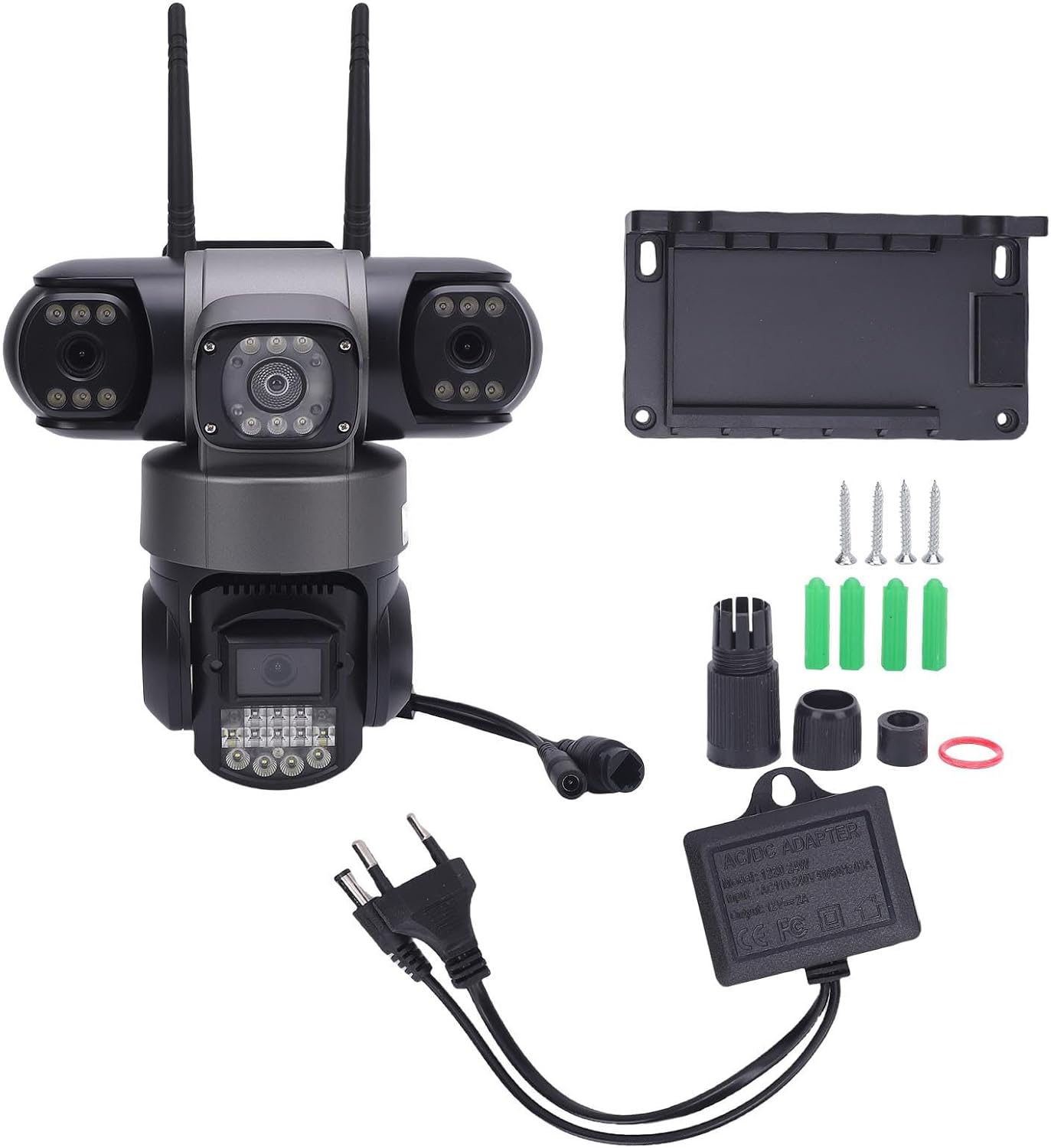
3.1-сүрөт: Продукттун пакетине камтылган компоненттер.
4. Орнотуу жана орнотуу
4.1 Физикалык орнотуу
- Жайгашкан жерди тандаңыз: Select a suitable outdoor or indoor location that provides the desired viewing angle and is within range of your 2.4G WiFi network or Ethernet connection. Ensure the location allows for power access.
- Кронштейнди орнотуу: Берилген бурамалар менен дубал сайгычтарын колдонуп, бекитүүчү кронштейнди тандалган бетке бекем бекитиңиз.
- Камераны тиркөө: Securely attach the camera to the mounting bracket. Adjust the camera's angle for optimal coverage.
- Туташуу кубаты: Connect the power adapter to the camera and plug it into a power outlet. Ensure the connection is secure and waterproof if installed outdoors.
4.2 Тармактык туташуу
The camera supports 2.4G WiFi, AP Hotspot, and Ethernet connections.
- Колдонмону жүктөп алыңыз: Download the designated mobile application (refer to packaging or quick start guide for app name) from your device's app store.
- Катталуу/Кирүү: Create an account or log in to the application.
- Түзмөк кошуу: Жаңы камераңызды кошуу үчүн колдонмодогу көрсөтмөлөрдү аткарыңыз. Бул, адатта, камерадагы QR кодун сканерлөөнү же анын идентификаторун кол менен киргизүүнү камтыйт.
- Тармакты конфигурациялоо: Select your preferred connection method (WiFi, AP Hotspot, or Ethernet) and follow the prompts to connect the camera to your network. For WiFi, enter your 2.4G WiFi network name and password.
- Баштапкы орнотуу: Complete any initial setup steps within the app, such as setting a device password or adjusting basic settings.
5. Иштөө нускамалары
5.1 Real-time Viewing
Open the mobile application and select your camera from the device list to view жаша фооtage. The triple lens design allows for simultaneous viewing of three distinct areas.

Figure 5.1: The camera's three lenses provide simultaneous monitoring of multiple areas.
5.2 Motion and Human Detection
The camera is equipped with advanced motion and human detection capabilities. When motion or a human figure is detected, the camera can trigger an alarm and send real-time notifications to your mobile device.
- Иштетүү/Өчүрүү: Access the camera settings in the app to enable or disable motion and human detection.
- Сезимталдуулук: Adjust the detection sensitivity to minimize false alarms.
- Эскертме жөндөөлөрү: Configure how you receive alerts (e.g., push notifications, email).

Figure 5.2: The camera's motion and humanoid detection system.

Figure 5.3: Real-time motion detection alerts sent to your mobile device.
5.3 Эки тараптуу аудио
Utilize the two-way audio feature to communicate with individuals near the camera. This is useful for deterring intruders or communicating with visitors.
- Микрофонду иштетүү: Түз эфирде view Колдонмонун интерфейсинде, камеранын динамиги аркылуу сүйлөө үчүн микрофон сүрөтчөсүн таптаңыз.
- Угуу: Камеранын орнотулган микрофоны сизге камеранын жанынан аудио угууга мүмкүндүк берет.
5.4 Видеону ойнотуу
Жазылган footage кирүүгө жана кайра алууга болотviewed through the mobile application. The camera supports both cloud storage and local storage (via a microSD card, not included).
- Жаздырууларга кирүү: Navigate to the 'Playback' or 'Recordings' section within the app.
- Дата/убакыт тандоо: Choose the desired date and time to review жаздырылган окуялар.
- Жүктөп алуу/Бөлүшүү: Options to download clips or share them may be available within the app.

5.4-сүрөт: Review foo жазылганtagмобилдик түзмөгүңүздө.
6. Техникалык тейлөө
Үзгүлтүксүз техникалык тейлөө камераңыздын оптималдуу иштешин жана узак мөөнөттүү иштешин камсыз кылат.
- Линзаны тазалоо: Periodically clean the camera lenses with a soft, dry cloth to remove dust, dirt, or water spots that may obstruct the view. Абразивдүү тазалагычтардан алыс болуңуз.
- Турак жай инспекциясы: Check the camera housing and mounting bracket for any signs of damage or loosening. Ensure all connections are secure.
- Программалык камсыздоо жаңыртуулары: Check the mobile application regularly for firmware updates for your camera. Keeping the firmware updated can improve performance and security.
- Электр камсыздоо: Кубат адаптеринин жана кабелинин бузулбагандыгын текшериңиз.
7. Кыйынчылыктарды
Эгер камераңызда көйгөйлөргө туш болсоңуз, төмөнкү жалпы көйгөйлөрдү жана чечимдерди караңыз:
| Көйгөй | Мүмкүн себеп | Чечим |
|---|---|---|
| Camera offline/No video feed | No power; Weak WiFi signal; Network disconnection | Check power connection; Move camera closer to router or use Ethernet; Restart camera and router. |
| Кыймылды аныктоо иштебей жатат | Detection disabled; Incorrect sensitivity; Obstruction in view | Enable detection in app settings; Adjust sensitivity; Clear any obstructions. |
| Видеонун сапаты начар | Dirty lens; Low bandwidth; Poor lighting | Clean lenses; Ensure stable internet connection; Check lighting conditions. |
| WiFiга туташпай жатат | Incorrect WiFi password; 5G WiFi network; Out of range | Verify 2.4G WiFi password; Ensure router is 2.4G compatible; Move camera closer to router. |
8. Техникалык шарттар
| Бренд | Cuifati |
| Модель номери | Cuifati432dc1swh5-11 |
| Продукциянын өлчөмдөрү | 22 x 22 x 15.98 см |
| Салмагы | 893 грамм |
| Линзанын конфигурациясы | Triple 2MP HD Lenses |
| Видеону коддоо | H.265 |
| Байланыш | 2.4G WiFi, AP Hotspot, Ethernet |
| Сактагыч параметрлери | Cloud Storage, Local Storage (up to 128GB microSD card, not included) |
| Өзгөчөлүктөр | Motion Detection, Human Detection, Two-Way Audio, Voice Alarm |
| Экологиялык рейтинг | Суу жана чаң өткөрбөйт |
| Электр камсыздоо | Included Power Adapter (EU Plug) |

Figure 8.1: Camera dimensions and rotation capabilities.
9. Кепилдик жана колдоо
Specific warranty information for this product is not available in the provided data. Please refer to the product packaging or contact the retailer/manufacturer directly for warranty details and customer support. For technical assistance, consult the mobile application's help section or the manufacturer's official webсайт.