
1. Киришүү
The Radioddity GM-30 PRO is a versatile GMRS handheld radio designed for reliable communication. It features 8-band reception, including GMRS, VHF, UHF, NOAA, FM, Airband, 220MHz, and 350MHz, offering broad frequency coverage for various applications. With 1000 programmable channels and wireless app programming, this radio provides flexibility and ease of use for both beginners and experienced users.
2. Коопсуздук маалыматы
Please read and understand all safety instructions before operating the radio. Failure to do so may result in personal injury or damage to the radio.
- FCC шайкештиги: This device complies with FCC regulations. Operation is subject to the condition that this device does not cause harmful interference.
- Батареянын коопсуздугу: Use only approved batteries and chargers. Do not short-circuit, incinerate, or disassemble the battery. Avoid exposing the battery to extreme temperatures.
- Антеннага кам көрүү: Do not touch the antenna during transmission. Ensure the antenna is properly attached before use.
- Угуу коргоо: Keep the volume at a comfortable level to avoid hearing damage.
- Жарылуучу чөйрөлөр: Do not operate the radio in potentially explosive atmospheres unless it is certified for such use.
3. Пакеттин мазмуну
Пакетиңизде бардык буюмдар бар экенин текшериңиз:
- 2 x Radioddity GM-30 Pro GMRS Radio
- 2 x Li-ion Battery (with one screw)
- 2 x Динамик микрофон
- 2 Антеннаны х
- 2 x Belt Clip
- 2 Билек боонун х
- 2 х USB-C кубаттоо кабели
- 2 х адаптер
- 1 x User Manual

4. Орнотуу
4.1 Батарейканы орнотуу
- Батарея блогун радионун арткы жагындагы оюктар менен тегиздеңиз.
- Батарея блогун ордуна чыкылдаган үн чыкканча өйдө жылдырыңыз.
- Secure the battery with the provided screw if desired.
4.2 Антеннаны бекитүү
Screw the antenna clockwise into the connector on the top of the radio until it is finger-tight.
4.3 Attaching the Belt Clip and Wrist Strap
Attach the belt clip to the designated slot on the back of the radio. Thread the wrist strap through the loop on the top of the radio for secure carrying.
4.4 Батареяны заряддоо
The GM-30 PRO features a USB-C charging port on the battery pack, allowing for convenient charging. You can charge the battery directly via the radio or separately.
- Connect the USB-C charging cable to the battery pack or the radio.
- Plug the other end of the USB-C cable into the wall adapter, power bank, or car charger.
- The LED indicator will show charging status (typically red for charging, green for fully charged).


4.5 Installing Additional Speaker Microphone (Optional)
Open the rubber K-type connector cover on the side of the radio. Plug the speaker microphone into the jack.
5. Иштөө нускамалары
5.1 Күйгүзүү/өчүрүү
Rotate the Power/Volume knob clockwise to turn the radio on. Rotate counter-clockwise until it clicks to turn the radio off.
5.2 Дисплейview
The 1.77" TFT color display provides clear visibility of channels, frequencies, and settings. The backlight is adjustable for optimal viewар кандай жарык шарттарында.

5.3 Негизги навигация
колдонуу МЕНЮ button to access the main menu. The ЧЫГУУ button returns to the previous screen or exits the menu. The arrow keys (Up/Down) navigate through menu options or adjust values. P1 жана P2 are programmable side keys for quick access to functions.
5.4 Channel Mode and Frequency Mode (VFO)
The radio operates in two main modes: Channel Mode (MR) and Frequency Mode (VFO).
- Канал режими (MR): Allows selection from up to 1000 pre-programmed channels across 10 zones.
- Жыштык режими (VFO): Allows direct frequency input and scanning.
5.5 Selecting a Channel/Zone
The GM-30 PRO supports 1000 channels organized into 10 zones. Use the navigation keys to scroll through channels or zones. You can also directly input channel numbers using the keypad.

5.6 8-Band Reception
The radio can receive across a wide range of frequencies:
- GMRS (General Mobile Radio Service)
- VHF (өтө жогорку жыштык)
- UHF (Ультра Жогорку жыштык)
- NOAA Weather Radio (National Oceanic and Atmospheric Administration)
- FM радиосу
- Airband
- 220 МГц диапазону
- 350 МГц диапазону


5.7 Wireless Programming via App
The GM-30 PRO can be programmed wirelessly using the "Walkie-talkie tool" app, available for iOS and Android devices. This eliminates the need for a PC or programming cable.
- Download the "Walkie-talkie tool" app from your device's app store.
- Open the app and select "RADIODDITY" as the brand and "GM-30 PRO" as the model.
- Connect to the radio via Bluetooth and begin programming channels, frequencies, and zones.


5.8 One-Key Frequency Copy
The SK2 side key can be programmed for one-key frequency copy, allowing you to quickly scan and copy active frequencies.

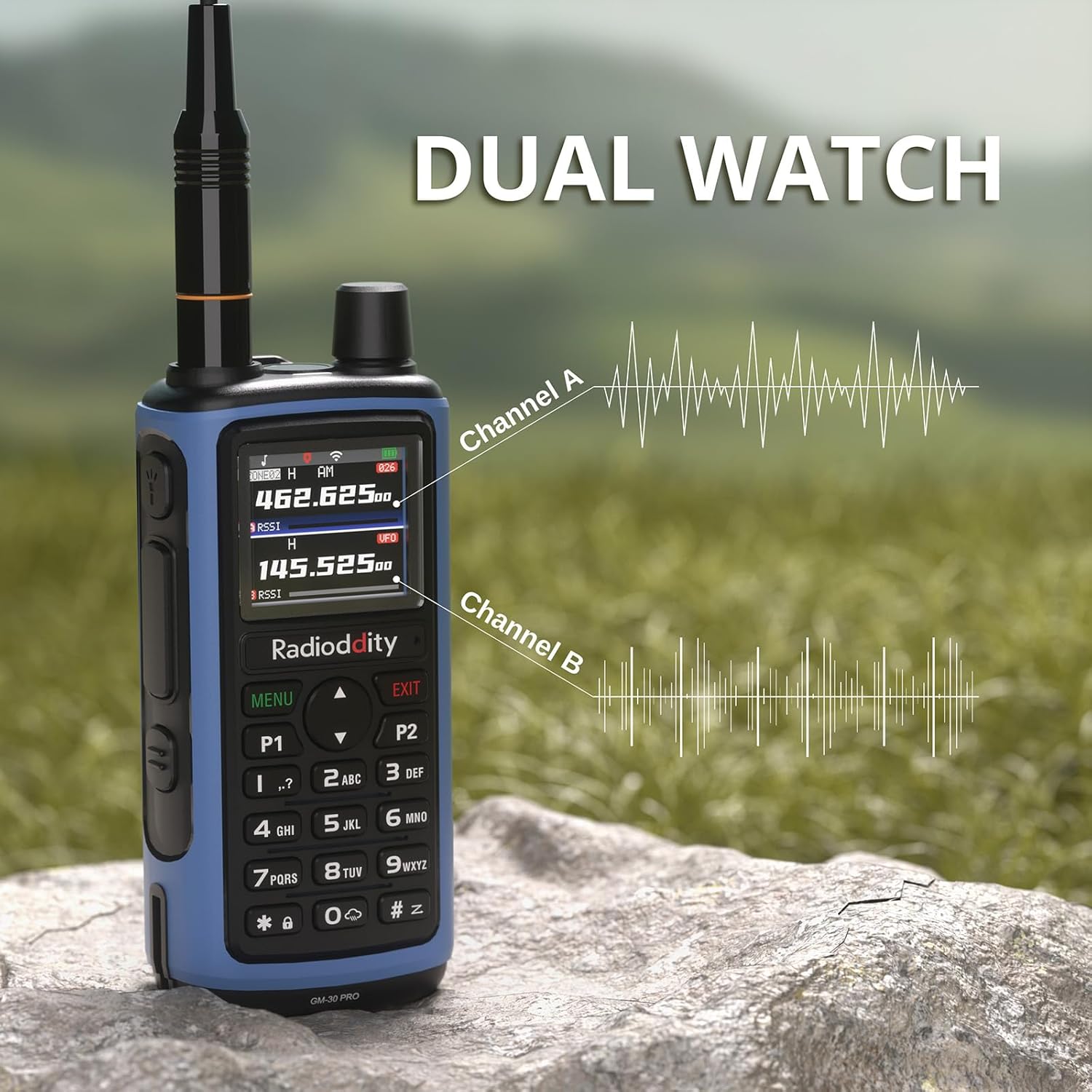
5.9 Кош саат
The Dual Watch function allows you to monitor two channels simultaneously, ensuring you don't miss important communications.
5.10 VOX Hands-Free Operation
VOX (Voice Operated Exchange) allows for hands-free transmission when your voice is detected, eliminating the need to press the PTT button.

5.11 Advanced Scanning
The radio supports various scanning modes, including channel scan, frequency scan (with adjustable range), and CTCSS/DCS tone scan. These functions can be accessed directly from the radio's menu.
5.12 Фонарды колдонуу
The built-in LED flashlight on top of the radio can be activated for illumination in low-light conditions. This feature is useful for emergencies or general utility.

5.13 Чалуу
To transmit, press and hold the Push-To-Talk (PTT) button on the side of the radio. Speak clearly into the microphone. Release the PTT button to receive.
5.14 Өзгөчө кырдаалдар жөнүндө эскертүү
The radio includes an emergency alert function. Refer to the manual for specific instructions on how to activate and use this feature in an emergency.
6. Техникалык тейлөө
6.1 Батареяны тейлөө
- Баштапкы төлөм: Биринчи колдонуудан мурун батареяны толук заряддаңыз.
- Кадимки заряддоо: Avoid overcharging. Charge the battery when the low battery indicator appears.
- Сактагыч: For long-term storage, charge the battery to 50% and store in a cool, dry place. Recharge every 3-6 months to prevent deep discharge.
6.2 Радиону тазалоо
жумшак колдонуу, damp cloth to clean the radio's exterior. Do not use harsh chemicals or solvents. Ensure the radio is dry before use.
7. Кыйынчылыктарды
If you encounter issues with your Radioddity GM-30 PRO, refer to the following common problems and solutions:
- Радио күйбөй жатат: Ensure the battery is correctly installed and charged. Check the Power/Volume knob.
- No reception/transmission: Verify antenna connection. Check channel settings and frequency. Ensure you are within range of other radios or repeaters.
- Аудио сапаты начар: Adjust squelch level. Check speaker mic connection if applicable.
- Программалоо маселелери: Ensure the "Walkie-talkie tool" app is updated and connected via Bluetooth. Refer to the app's instructions for detailed programming steps.
For further assistance, please contact Radioddity customer support.
8. Техникалык шарттар
| Өзгөчөлүк | Спецификация |
|---|---|
| Бренд | Radioioddity |
| Модель номери | GM-30 Pro |
| Каналдардын саны | 1000 |
| Жыштык диапазону | GMRS (Transmit), 8-Band Receive (GMRS, VHF, UHF, NOAA, FM, Airband, 220MHz, 350MHz) |
| Дисплей | 1.77" TFT түстүү дисплей |
| Батарея сыйымдуулугу | 2500mAh Li-ion |
| Заряддоо порту | USB-C |
| Зымсыз программалоо | Via "Walkie-talkie tool" App (iOS & Android) |
| Өзгөчөлүктөр | VOX, Dual Watch, One-Key Frequency Copy, Advanced Scanning, Built-in LED Flashlight |
| Сүйлөшүү диапазону максималдуу | 5 миля |
| Сууга туруктуулук деңгээли | Сууга чыдамдуу эмес |
| FCC ID | 2AN62-GM30PRO |
9. Кепилдик жана колдоо
9.1 Кепилдик маалыматы
The Radioddity GM-30 PRO GMRS Radio comes with an 18 айлык кепилдик сатып алынган күндөн тартып. Бул кепилдик өндүрүштүк кемчиликтерди камтыйт жана өнүмдүн кадимки колдонууда максатка ылайыктуу иштешин камсыздайт. Кепилдик дооматтары үчүн сатып алгандыгыңызды тастыктаган документти сактап коюңуз.
9.2 Кардарларды колдоо
For technical assistance, troubleshooting, or warranty inquiries, please contact Radioddity customer support through their official website or the retailer where the product was purchased. Radioddity aims to provide excellent customer service and support for its products.