
Monster MH22262
Monster N-Lite 216 Wireless Earbuds Колдонуучунун колдонмосу
Модел: MH22262
Introduction
Thank you for choosing the Monster N-Lite 216 Wireless Earbuds. This manual provides essential information for setting up, operating, and maintaining your earbuds to ensure optimal performance and longevity. Please read this manual thoroughly before use.

Image: Monster N-Lite 216 Wireless Earbuds and their charging case, displayed in white.
Кутуда эмне бар
Пакетиңизде бардык буюмдар бар экенин текшериңиз:
- Monster N-Lite 216 Earbuds
- Зымсыз кубаттоо кутусу
- S/M/L кулак кеңештери
- USB-C Cable
- Тез баштоо боюнча колдонмо (колдонуучунун колдонмосу)

Image: A flat lay of all included components: the earbuds, charging case, USB-C cable, and user manual.
Продукт бүттүview
Дизайн жана Комфорт
The Monster N-Lite 216 earbuds feature an ergonomic ear hook design for a stable and comfortable fit, especially during physical activities. The ear hooks are made of soft silicone material, ensuring a non-slip fit and reducing discomfort during extended wear.

Image: A man wearing the Monster N-Lite 216 earbuds, highlighting the flexible ear hook design for a secure fit.

Image: A woman smiling while wearing the earbuds, illustrating the all-day comfort and ultimate sound experience.
Audio and Call Quality
Experience premium audio with powerful deep bass and crisp treble, delivered by a 14.2mm dynamic driver unit. The earbuds are equipped with built-in high-performance ENC (Environmental Noise Cancelling) microphones, ensuring crystal-clear calls by reducing background noise in various environments.

Image: An exploded diagram showing the internal components of the earbud, emphasizing the 14.2mm dynamic driver for powerful bass.
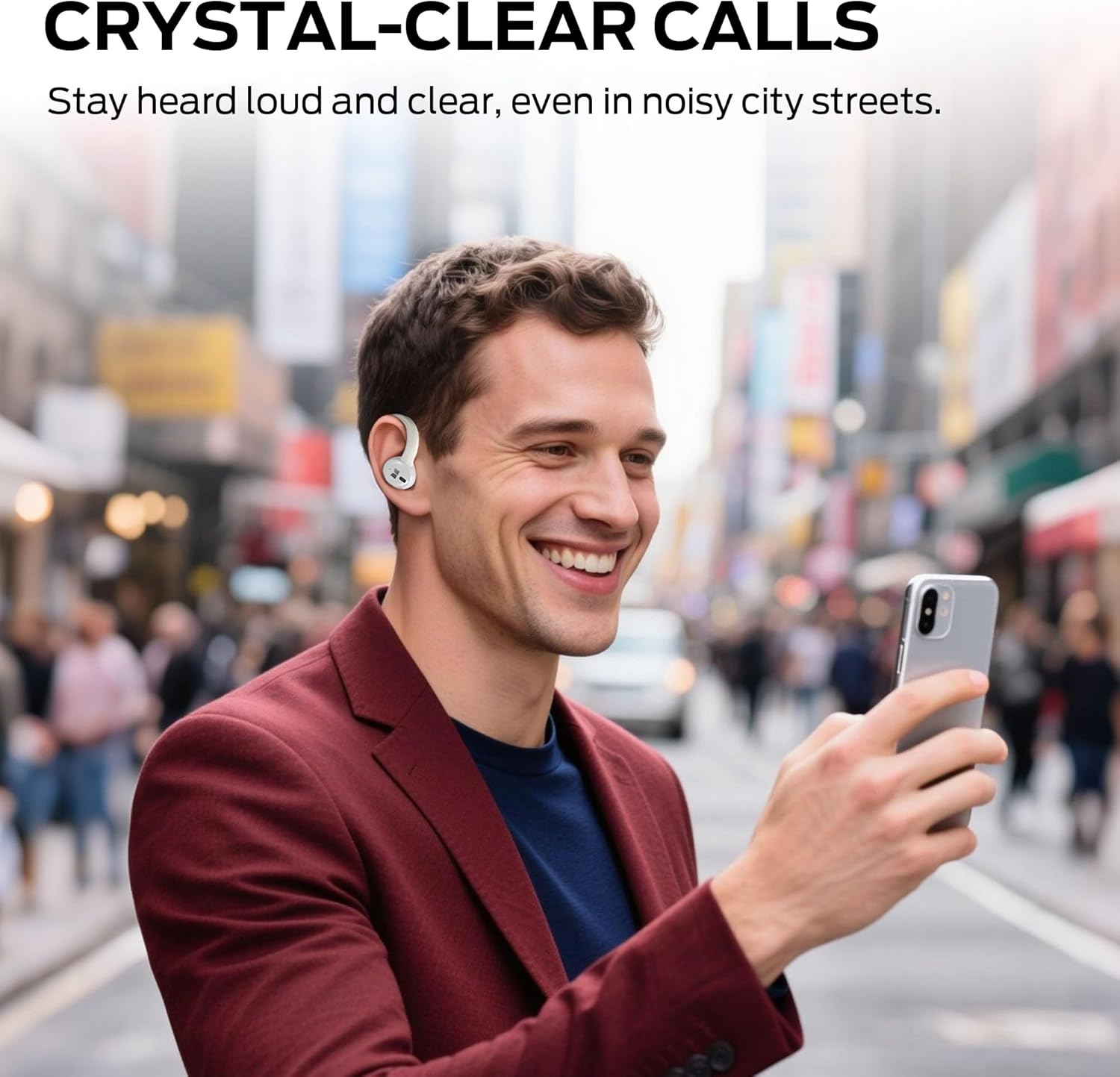
Image: A man using the earbuds to make a call in a busy city street, illustrating the crystal-clear call feature.
Connectivity and Battery Life
Featuring advanced Bluetooth 5.4 technology, the earbuds provide instant pairing and stable transmission with a connection distance of up to 50ft. The earbuds offer up to 15 hours of continuous use on a single charge, and the portable charging case provides an additional 3 charges, extending total playtime to approximately 45 hours. The charging case features a dual LED display to accurately show the remaining power of the case and the charging progress of the earbuds. A full charge of the case takes approximately 1.5 hours via Type-C quick charge.

Image: A visual representation of the earbuds charging inside the case, highlighting the 48-hour total playtime.
Туруктуу
The earbuds are equipped with IPX5 waterproof technology, protecting them from splash damage caused by sweat and raindrops, making them suitable for workouts, running, and gym use.

Image: A man running outdoors, showcasing the earbuds' suitability for sports with icons indicating ergonomic design, flexible earhooks, and IPX6 waterproof rating.
Жайгашуу
Кулакчындарды жана кутуну кубаттоо
- Кулакчындарды заряддоо кутусуна салыңыз. Алардын тиешелүү уячаларына туура отургузулганын текшериңиз.
- USB-C кубаттоочу кабелин корпустагы кубаттоо портуна, ал эми экинчи учун USB кубат булагына (мисалы, дубал адаптери, компьютердин USB порту) туташтырыңыз.
- The LED display on the charging case will indicate the charging status. Allow approximately 1.5 hours for a full charge of the case.
Кулакчын тагынуу
Үндүн сапатын жана ыңгайлуулугун оптималдаштыруу үчүн, кулакчындарды туура тагынып жатканыңызды текшериңиз.

Image: A two-step diagram illustrating the correct way to wear the earbuds: first, place the earbud above the ear, then rotate it backward along the auricle to the proper position.
- Take out the earbud from the charging case.
- Place the earbud above your ear, then gently rotate it backward along the auricle until it sits comfortably and securely in your ear.
Түзмөк менен жупташтыруу
- Заряддоо кутучасын ачыңыз. Кулакчындар жупташтыруу режимине автоматтык түрдө кирет.
- Түзмөгүңүздө (смартфон, планшет, ноутбук) Bluetooth иштетиңиз.
- Издөө available Bluetooth devices and select "Monster N-Lite 216" from the list.
- Туташтырылгандан кийин, кулакчындар ийгиликтүү жупташууну билдирет (мисалы, үн буйругу же LED индикаторунун өзгөрүшү).
- Эгер түзмөктө Bluetooth иштетилген болсо, кулакчындар кутудан чыгарылганда акыркы жупташтырылган түзмөккө автоматтык түрдө кайра туташат.
Иштөө нускамалары
The Monster N-Lite 216 earbuds feature smart touch controls for easy management of music and calls.

Сүрөт: жакын план view of the earbud highlighting the touch-sensitive area for smart control.

Image: A visual guide to the touch controls, showing icons for skipping tracks, adjusting volume, and answering calls.
Музыканы ойнотуу
- Ойнотуу/тындыруу: Кулакчындарды бир жолу таптаңыз.
- Кийинки трек: Оң кулакчынды эки жолу таптаңыз.
- Мурунку трек: Сол кулакчынды эки жолу таптаңыз.
- Көлөмү: Оң кулакчынды үч жолу таптаңыз.
- Үнүн азайтуу: Сол кулакчынды үч жолу таптаңыз.
Чалууларды башкаруу
- Чалууга жооп берүү/аяктоо: Кулакчындарды бир жолу таптаңыз.
- Чакырууну четке кагуу: Кулакчындардын бирин 2 секунд басып туруңуз.
Үн жардамчысы
- Үн Жардамчысын жандыруу: Чалуу учурунда эмес болсоңуз, кулакчындын бирин 3 секунд басып туруңуз.
Техникалык тейлөө
- Тазалоо: Кулакчындарды жана заряддоо кутусун жумшак, кургак, түксүз чүпүрөк менен дайыма тазалап туруңуз. Катуу химиялык заттарды же абразивдүү материалдарды колдонбоңуз.
- Кулак кеңештери: Remove the ear tips and clean them with water and mild soap if necessary. Ensure they are completely dry before reattaching.
- Заряддоо байланыштары: Эгер кубаттоо маселеси жаралса, кулакчындардагы жана кутудагы заряддоо контакттарын кебез менен акырын тазалаңыз.
- Сактагыч: Колдонулбаганда, кулакчындарды чаңдан жана бузулуудан коргоо үчүн кубаттоочу кутуга салып сактаңыз. Салкын, кургак жерде, экстремалдык температурадан алыс сактаңыз.
- Суу таасири: IPX5 рейтингине ээ болсо да, кулакчындарды сууга салбаңыз. Аларды кайра заряддоо кутусуна коюудан мурун терден же жамгырдан ным болуп калса, жакшылап кургатып алыңыз.
Проблемаларды чечүү
| Көйгөй | Мүмкүн себеп | Чечим |
|---|---|---|
| Кулакчындар жупташкан жок | Кулакчындар жупташтыруу режиминде эмес; түзмөктө Bluetooth өчүк; мурда жупташтырылган түзмөк тоскоолдук жаратууда. | Ensure earbuds are in case and lid is open to enter pairing mode. Turn off and on Bluetooth on your device. Forget previous pairings on your device. |
| Бир гана кулакчын иштейт | Low battery on one earbud; earbuds not properly synced. | Place both earbuds back in the charging case, close the lid for 5 seconds, then open to reset and resync. Ensure both earbuds are charged. |
| Үн жок же үнү төмөн | Volume too low on device or earbuds; ear tips not sealed; earbud dirty. | Increase volume on both your device and the earbuds. Adjust earbud position for a better seal. Clean ear tips and earbud mesh. |
| Заряддоо куту заряддалбай жатат | Faulty cable or power source; dirty charging port. | Try a different USB-C cable and power adapter. Clean the charging port on the case. |
| Кулакчындар заряддалбай жатат | Кулакчындар туура эмес орнотулган; кубаттоочу контакттар кир. | Ensure earbuds are firmly seated in the case. Clean the charging contacts on both earbuds and inside the case. |
Техникалык шарттар
| Өзгөчөлүк | Деталь |
|---|---|
| Модель аты | MH22262 |
| Байланыш технологиясы | Зымсыз (Bluetooth) |
| Bluetooth версиясы | 6.0 (as per title, 5.4 as per feature bullets) |
| Кулак жайгаштыруу | Кулактагы кулак илгичтери менен |
| Noise Control | Экологиялык ызы -чууну жокко чыгаруу (ENC) |
| Суу өткөрбөйт рейтинги | IPX5 |
| Ойнотуу убактысы (Бир кубаттоо) | 15 саатка чейин |
| Жалпы ойноо убактысы (Кеп менен) | 45 саатка чейин |
| Заряддоо порту | USB-C |
| Башкаруу түрү | Touch Control |
| Элемент Салмагы | 0.19 килограмм (6.7 унция) |
| Материал | Пластик |
Кепилдик жана колдоо
At Monster, customer satisfaction is a priority. Our professional customer service team is available to assist with any inquiries or feedback regarding your product. Please do not hesitate to reach out for support.
For dedicated after-sales support, please visit the official Monster website or contact their customer service directly through the contact information provided on the product packaging or quick start guide.
Ask a question about this manual
Ask about setup, troubleshooting, compatibility, parts, safety, or missing instructions. Manuals+ will review the question and use this page’s manual context to help answer it.