
1. Киришүү
This manual provides detailed instructions for the installation, operation, and maintenance of your PHORUS 48-inch Tropical Palm Leaf Ceiling Fan. Please read this manual thoroughly before installation and retain it for future reference. This ceiling fan is designed for both indoor and outdoor covered areas, offering a unique tropical aesthetic with modern functionality.
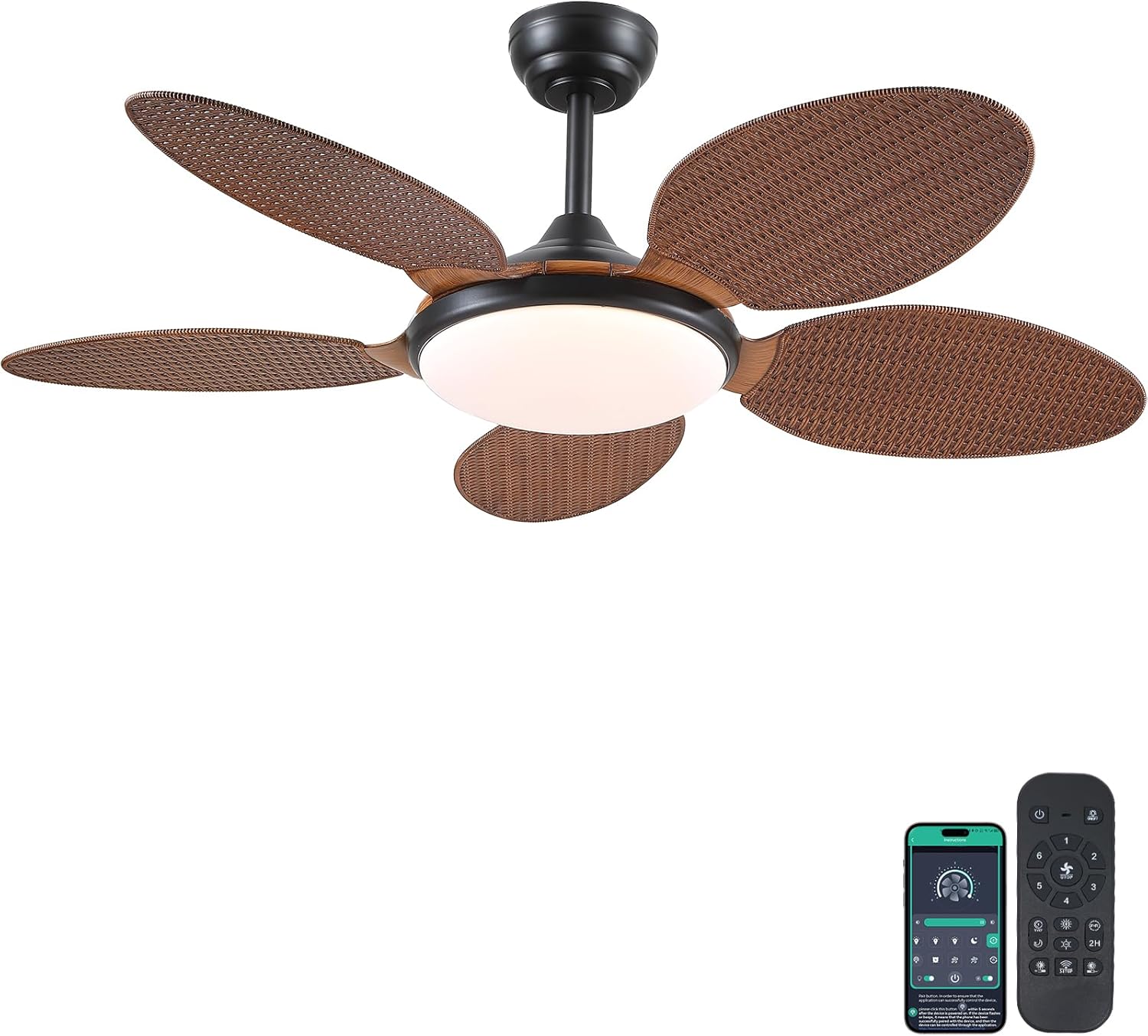
Image 1.1: PHORUS 48-inch Tropical Palm Leaf Ceiling Fan.
2. Коопсуздук маалыматы
- Орнотуудан, техникалык тейлөөдөн же тазалоодон мурун негизги электр булагынан ажыратылганын текшериңиз.
- All electrical connections must comply with local codes and ordinances, as well as national electrical codes. If you are unfamiliar with electrical wiring, consult a qualified electrician.
- The mounting structure must be capable of supporting the weight of the fan (approximately 12.58 pounds) plus the dynamic load during operation.
- Орнотуу же тазалоо учурунда бычак кармагычтарды ийбеңиз.
- Ensure there is adequate clearance between the fan blades and any obstacles.
- This fan is suitable for use in damp locations but should not be directly exposed to water.
3. Пакеттин мазмуну
Төмөндө саналып өткөн бардык компоненттер пакетиңизге камтылганын текшериңиз. Эгерде кандайдыр бир бөлүктөрү жок же бузулуп калса, кардарларды колдоо менен байланышыңыз.

Сүрөт 3.1: Бүттүview of included components and fan dimensions.
- Күйөрман корпусунун жыйындысы
- 5 Palm Leaf Blades
- Чатыр
- Төмөнкү таякчалар (4 дюймдук жана 8 дюймдук варианттар)
- Lamp Shade
- Алыстан башкаруу
- Remote Receiver
- Кронштейн орнотуу
- Аппараттык камсыздоо топтому (бурамалар, зым гайкалар ж.б.)
- Instruction Manual
4. Орнотуу жана орнотуу
Follow these steps carefully for proper installation. For a visual guide, please refer to the installation video provided below.
4.1. Орнотуу боюнча видео көрсөтмө
Video 4.1: Detailed installation guide for the PHORUS 48-inch Palm Leaf Ceiling Fan with lights.
4.2. Кадам-кадам орнотуу
- Prepare the Fan Body: Attach the LED light board to the fan body assembly using the provided screws.
- Желдетүүчү бычактарды тиркөө: Secure each of the five palm leaf blades to the fan body. Ensure the correct side of the blade is facing upwards as indicated in the video.
- Төмөнкү таякчаны чогултуңуз: Insert the downrod through the canopy and secure it to the fan body. Feed the electrical wires through the downrod.
- Монтаждык кронштейнди орнотуу: Secure the mounting bracket to your ceiling junction box. Ensure it is firmly attached and can support the fan's weight.
- Зымдарды туташтыруу: Connect the fan's electrical wires to your household wiring. Typically, this involves connecting the black live wire, white neutral wire, and yellow ground wire. Refer to the wiring diagram in the installation video for precise connections.
- Желдеткичти илиңиз: Вентилятор топтомун этияттык менен көтөрүп, орнотуу кронштейнине илип коюңуз.
- Remote Receiver орнотуу: Place the remote receiver within the canopy, ensuring wires are not pinched. Connect the receiver to the fan and household wiring as per the diagram.
- Коопсуз чатыр: Slide the canopy up to the ceiling and secure it to the mounting bracket with screws.
- Орнотуу Л.amp Көлөкө: l тиркеңизamp shade to the bottom of the fan body.
The fan is equipped with 4-inch and 8-inch downrods to accommodate various ceiling heights. It can also be used with sloped ceilings up to 15 degrees.
5. Иштөө нускамалары
Your PHORUS ceiling fan can be controlled via the included remote control or a smart application on your mobile device.
5.1. Алыстан башкаруу операциясы

Image 5.1: Remote control layout with function descriptions.
The remote control allows you to adjust the following settings:
- Күйгүзүү/өчүрүү: Вентиляторду жана жарыкты күйгүзүңүз же өчүрүңүз.
- желдеткич ылдамдыгы: Select from 6 wind speeds (1-6).
- Жарык күйгүзүү/өчүрүү: Control the integrated LED light independently.
- Түс температурасы: Adjust between 3 light colors: 3000K (Warm Light), 4500K (Natural Light), and 6000K (White Light).
- Жарыктыкты жөндөө: Жарыкты 10% дан 100% га чейин күңүрт же жарык кылыңыз.
- Тескери функция: Change the direction of the fan blades for summer (downdraft) or winter (updraft) modes. Press the F\R key and wait 5-8 seconds for the fan to stop completely and then automatically reverse.
- Таймер: Set a 2-hour timer for automatic shutdown.
Remote Code Pairing:
If your remote control is not responding, you may need to pair it with the fan. Follow these steps:
- Turn off the main power supply to the fan for one minute.
- Turn on the main power supply and simultaneously long-press the code key on the remote control for 3-5 seconds.
- The fan light will blink 2-3 times to indicate successful code matching.
Video 5.2: Instructions for remote code pairing.
5.2. Акылдуу тиркемелерди башкаруу
The fan supports control via a smart application. Scan the QR code in Image 5.1 or visit https://www.jasonghost.com/fanlamppro/ "Fan L" жүктөп алуу үчүнamp "Pro" колдонмосу.
Video 5.3: Guide for setting up and using the smart app control.
The app provides comprehensive control over fan speeds, light settings (color temperature and brightness), and the reverse function, similar to the remote control. All settings will be remembered after power cycling.

Image 5.4: Customizable light effects and dimming range.

Image 5.5: Fan airflow modes (summer/winter) and 6-speed settings.
6. Техникалык тейлөө
Үзгүлтүксүз тейлөө сиздин шыптын желдеткичиңиздин оптималдуу иштешин жана узак иштөөсүн камсыз кылат.
- Тазалоо: Periodically clean the fan blades and light cover with a soft, damp кездеме. Финишке зыян келтирүүчү абразивдүү тазалагычтарды же эриткичтерди колдонбоңуз.
- бекиткичтерди бекемдөө: Check all screws and fasteners on the fan body and mounting bracket annually. Tighten any loose connections to prevent wobbling or noise.
- Чаңдандыруу: Dust the fan motor housing and canopy regularly to prevent dust buildup, which can affect performance.
7. Кыйынчылыктарды
Эгер күйөрманыңызда көйгөйлөргө туш болсоңуз, төмөнкү жалпы көйгөйлөрдү жана чечимдерди караңыз:
| Көйгөй | Мүмкүн себеп | Чечим |
|---|---|---|
| Күйөрман иштебейт | No power supply; Loose wire connections; Remote not paired. | Check circuit breaker/wall switch; Verify all wire connections are secure; Perform remote code pairing (refer to Section 5.1). |
| Жарык иштебейт | Зымдардын байланышы бошоп калды; LED драйверинде көйгөй жаралды. | Check light wiring connections; Contact customer support if LED driver is suspected. |
| Күйөрман солкулдайт | Бош бычактар же бекитүүчү жабдыктар; Тең салмаксыз бычактар. | Ensure all blade screws and mounting bracket screws are tight; Use a balancing kit (not included) if necessary. |
| Алыстан башкаруу жооп бербей жатат | Батарея аз; Пульт жупташтырылган эмес. | Replace AAA batteries (2 required, included); Perform remote code pairing (refer to Section 5.1). |
| Ашыкча ызы-чуу | бош бурамалар; Мотор маселеси. | Check and tighten all screws; Ensure blades are securely attached. If noise persists, contact customer support. |
8. Техникалык шарттар
- Бренд: ФОРУС
- Модел: B0FC1SY1B2
- Түсү: 48" Dark Brown
- Материал: Акрил, Пластик
- Стиль: Тропикалык
- Бөлмө түрү: Bedroom, Dining Room, Garage, Kids Room, Kitchen
- Ички/тышкы колдонуу: Indoor (suitable for damp жайгашкан жерлер)
- Кубат булагы: DC
- Өзгөчөлүктөр: Колдонмо иштейт, LED жарыгы, тынч иштөө, алыстан башкарылуучу, таймер
- Башкаруу ыкмасы: Колдонмо, алыстан
- Жарык булактарынын саны: 1
- Камтылган компоненттер: Light Kit, Remote Control
- Элемент Салмагы: 12.58 фунт
- Элементтердин саны: 1
- Ватtage: 60 ватт
- Контроллердин түрү: Колдонмо башкаруу, алыстан башкаруу
- Бирдик саны: 1.0 Сан
- Монтаж түрү: Шыпка орнотуу
- Ассамблея талап кылынат: Ооба
- Өлчөмү: Medium (48 inches)
- Продукт үчүн сунушталган колдонуулар: Аба циркуляциясы
- Продукциянын өлчөмдөрү: 48 x 48 x 15.15 дюйм
- Батареялар: 2 AAA батарейка талап кылынат (кошулган)
9. Кепилдик жана колдоо
PHORUS provides a one-year quality warranty for this product. We also offer free replacement service for any damage and quality problems encountered during the warranty period. If you have any questions or require assistance, please contact PHORUS customer support for a satisfactory answer within 24 hours.