
1. Киришүү
This manual provides comprehensive instructions for the operation and maintenance of your BAOFENG UV-32 Ham Radio. Please read this manual thoroughly before using the device to ensure proper function and safety.

Image: The BAOFENG UV-32 Ham Radio, showcasing its display and robust design.
2. Продукциянын өзгөчөлүктөрү
- Dual GPS/BeiDou Tracking: Share and request location coordinates in real-time, essential for off-grid communication.
- Bluetooth APP Programming: Wirelessly configure up to 1000 channels using a mobile application.
- Жөнгө салынуучу кубаттуулугу: Select between 10W, 5W, or 1W to optimize range and battery life.
- One-touch Frequency Scan: Quickly clone channels for efficient setup.
- HD аудио: Equipped with a 40mm speaker for clear communication in noisy environments.
- Multi-band Monitoring: Supports AM/FM/VHF/UHF bands, including 108-136MHz for aviation.
- 1000-Channel Storage: Organize channels across 10 zones for various operational needs.
- USB-C заряддоо: Convenient charging via USB-C ports, power banks, or car adapters.
- Dual Display/Dual Guard: Бир эле учурда эки жыштыкты көзөмөлдөңүз.

Image: Visual representation of the BAOFENG UV-32's key functions and features.
3. Пакеттин мазмуну
Пакетиңизде бардык буюмдар бар экенин текшериңиз:
- BAOFENG UV-32 Radio Unit
- Антенна
- Battery (Nonstandard Battery)
- Charger (Desktop Dock and AC Adapter)
- Lanyard
- Колдонуучунун Колдонмосу (бул документ)
- Back Clip (for "1 Pack Black+Back Clip" variant)

Image: The BAOFENG UV-32 radio with its back clip, demonstrating portability.
4. Орнотуу колдонмосу
4.1 Батареяны орнотуу
- Батарея блогун радионун арткы жагындагы оюктар менен тегиздеңиз.
- Батареяны ордунан чыккыча өйдө жылдырыңыз.
- Чыгаруу үчүн, батареяны чыгаруу илгичин басып (эгер бар болсо) жана батареяны ылдый жылдырыңыз.
4.2 Антеннаны бекитүү
- Антеннаны саат жебеси боюнча радионун үстүнкү жагындагы туташтыргычка манжаңыз менен бекем кысылганча бурап коюңуз. Ашыкча бекемдебеңиз.
4.3 Батареяны заряддоо
The UV-32 supports two charging methods:
- Үстөл үстүндөгү кубаттагыч: Place the radio (with battery installed) into the charging dock. Ensure the charging contacts align. The indicator light will show charging status.
- USB-C Direct Charging: Connect a USB-C cable to the port on the side of the radio and to a power source (e.g., computer, wall adapter, power bank, car charger).
Charge the battery fully before first use. A full charge typically takes several hours.

Image: Demonstrates the versatility of Type-C charging for the BAOFENG UV-32.
5. Иштөө нускамалары
5.1 Күйгүзүү/өчүрүү жана Көлөмү
- Күйгүзүү: айлантыңыз POWER/VOLUME чыкылдаган үн чыкканга чейин баскычын саат жебеси боюнча басыңыз.
- Үндү тууралоо: Continue rotating the knob to increase or decrease the volume.
- Өчүрүү: Rotate the knob counter-clockwise until you hear a click.
5.2 Канал тандоо
колдонуу ЖОГОРУ/ТӨМӨН arrow keys or the numeric keypad to select a channel. The display will show the current channel number and frequency.
5.3 Transmitting (PTT)
Өткөрүш үчүн басып, кармап туруңуз PTT (Push-To-Talk) button on the side of the radio. Speak clearly into the microphone. Release the PTT button to receive.
5.4 Dual Display / Dual Guard
The UV-32 can monitor two frequencies simultaneously. Activate the Dual Guard function through the radio's menu or a dedicated button (refer to the on-screen interface for specific options).

Image: The radio's screen displaying the Dual Watch feature, allowing simultaneous monitoring of two channels.
5.5 APP Programming (Bluetooth)
- Download the "Radio Frequency Programmer" mobile application from your device's app store.
- Enable Bluetooth on your mobile device and the UV-32 radio.
- Open the app and follow the on-screen instructions to connect to your radio.
- You can then wirelessly edit channel information, frequencies, and other settings.

Image: The BAOFENG UV-32 in programming mode, with a smartphone displaying the channel programming application.
5.6 One-touch Frequency Scan / Copy Frequency
This feature allows for quick cloning of frequencies from another radio. Press and hold the designated scan button (e.g., SK1) to initiate the smart scan and copy process. The radio will detect and store the active frequency.

Image: Illustration of the one-key frequency pairing feature between two BAOFENG UV-32 radios.
5.7 Adjustable Power Output
Access the menu to select your desired power output: 10W (High), 5W (Mid), or 1W (Low). Higher power provides greater range but consumes more battery. Lower power conserves battery for shorter distances.
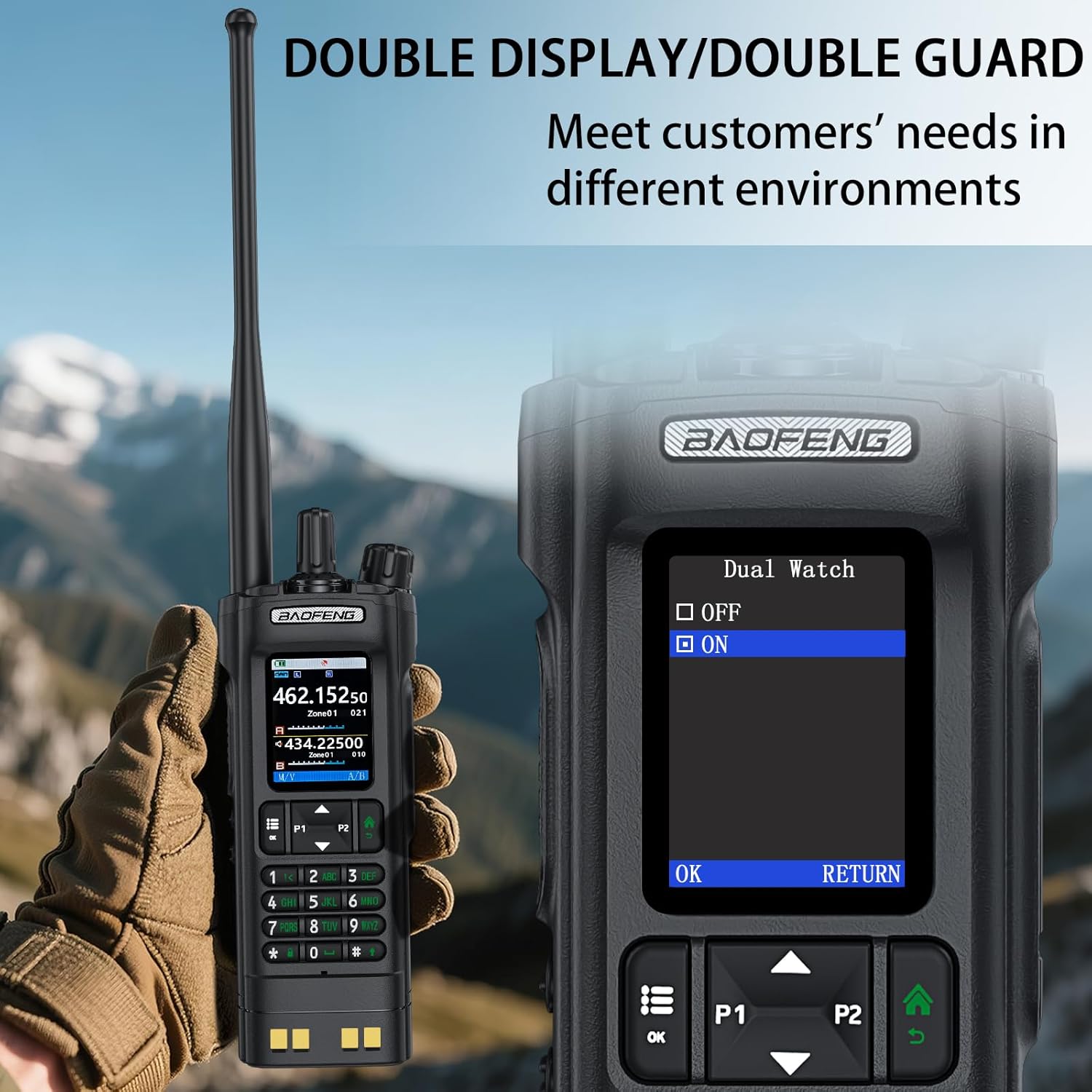
Image: The BAOFENG UV-32's power adjustment menu, showing options for 10W, 5W, and 1W output.
5.8 GPS/BeiDou Tracking
The integrated GPS/BeiDou module allows for real-time location sharing. Refer to the radio's menu for GPS functions, including sending your coordinates and requesting those of other UV-32 users.
6. Техникалык тейлөө
- Тазалоо: жумшак колдонуу, damp Радионун сыртын тазалоо үчүн кездеме колдонуңуз. Катуу химиялык заттарды же эриткичтерди колдонбоңуз.
- Батареяга кам көрүү: Avoid fully discharging the battery frequently. Store the radio and battery in a cool, dry place when not in use for extended periods.
- Антенна: Ensure the antenna is securely attached but not overtightened. Avoid bending or stressing the antenna.
- Суу каршылык: Бул аппарат болуп саналат Сууга чыдамдуу эмес. Protect it from rain, splashes, and immersion in water.
7. Кыйынчылыктарды
| Көйгөй | Мүмкүн себеп | Чечим |
|---|---|---|
| Радио күйбөйт. | Батарея аз же туура орнотулган эмес. | Батареяны кубаттаңыз же аны коопсуз кайра орнотуңуз. |
| Өткөрүп же кабыл албайт. | Incorrect frequency/channel, low battery, or antenna issue. | Verify frequency, charge battery, check antenna connection. Ensure you are within range of other radios. |
| Аудио сапаты начар. | Low signal strength, interference, or incorrect squelch setting. | Move to an area with better signal, adjust squelch level, check for sources of interference. |
| APP programming fails to connect. | Bluetooth not enabled, app not updated, or radio not in programming mode. | Ensure Bluetooth is on for both devices, update the app, and follow app instructions to put the radio in programming mode. |
8. Техникалык шарттар
| Бренд | БАОФЕНГ |
| Модель номери | UV-32 |
| Каналдардын саны | 1000 |
| Жыштык диапазону | UHF350-390/400-520MHz, VHF136-174MHz/220-260MHz |
| Сүйлөшүү диапазону максималдуу | 10 Kilometer (approx. 6.2 miles) |
| Power Output | 10W / 5W / 1W (Adjustable) |
| Тtage | 7.4 вольт (ток) |
| Сууга туруктуулук деңгээли | Сууга чыдамдуу эмес |
| Connectivity Protocol | Bluetooth |
| Заряддоо түрү | USB-C, Desktop Dock |
| Өлчөмдөрү (болжол менен) | Height: 6.26", Width: 2.28", Depth: 1.57" |
| Салмагы (болжол менен) | 13.58 унц |

Image: Detailed dimensions and weight of the BAOFENG UV-32 radio.
9. Кепилдик жана колдоо
Your BAOFENG UV-32 Ham Radio comes with a 1 жылдык кепилдик сатып алынган күндөн тартып. Бул кепилдик нормалдуу колдонуудагы өндүрүш кемчиликтерин камтыйт.
For technical support, warranty claims, or service inquiries, please contact BAOFENG customer service through their official webсайтына же продукт сатып алынган сатуучуга кайрылыңыз. Кепилдикти жарактуулук мөөнөтү үчүн сатып алгандыгыңызды тастыктаган документти сактап коюңуз.