
1. Киришүү
Welcome to the user manual for your new boAt Rockerz 413 Bluetooth Over-Ear Headphones. These headphones are designed to provide a superior audio experience with features such as 60 hours of playback, powerful 40mm drivers, ENx Technology for clear calls, Dual Pairing for seamless device switching, and a low-latency BEAST Mode for gaming.
Please read this manual carefully to ensure proper use and to maximize the performance and longevity of your headphones.
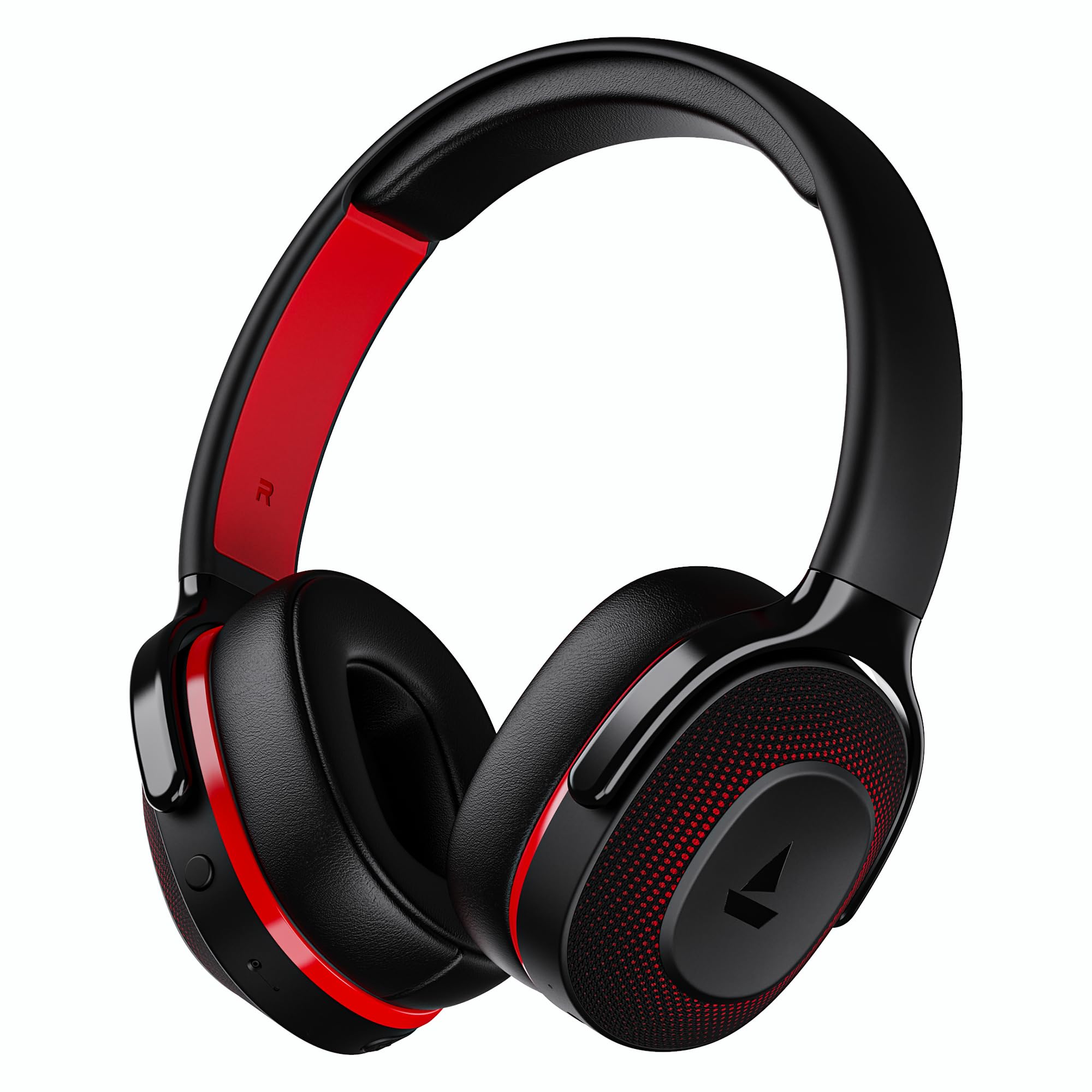
Image: boAt Rockerz 413 Bluetooth Headphones in Black & Red.
2. Кутуда эмне бар
Upon opening your boAt Rockerz 413 package, you should find the following items:
- BoAt Rockerz 413 наушниктери
- Заряддоо кабели
3. Продукт бүтүп калдыview жана Controls
Familiarize yourself with the physical components and controls of your headphones.

Сүрөт: Жакын план view of the right ear cup, highlighting the easy access control buttons for power, volume, and mode selection. The headphones feature an adaptive fit design and support dual pairing with Bluetooth v5.2.
Башкаруу баскычтары:
- Кубат баскычы: Күйгүзүү/өчүрүү үчүн басып туруңуз. Ойнотуу/тындыруу үчүн кыска басыңыз.
- Үнүн жогорулатуу (+): Үнүн жогорулатуу үчүн кыска басыңыз. Кийинки трекке көпкө басыңыз.
- Үнүн төмөндөтүү (-): Үндү азайтуу үчүн кыска басыңыз. Мурунку трек үчүн көпкө басыңыз.
- Көп функциялуу баскыч: (Specific function may vary, often for call management or voice assistant).
- Режим баскычы: Activates BEAST Mode for low latency gaming.
4. Орнотуу
4.1 Күйгүзүү/өчүрүү
- Күйгүзүү үчүн: Press and hold the Power Button for approximately 3 seconds until the LED indicator lights up.
- Өчүрүү үчүн: Press and hold the Power Button for approximately 5 seconds until the LED indicator turns off.
4.2 Bluetooth жупташтыруу
- Биринчи колдонуудан мурун наушниктердин толук заряддалганын текшериңиз.
- Power on the headphones. They will automatically enter pairing mode, indicated by a flashing LED light (e.g., blue and red alternating).
- Түзмөгүңүздө (смартфон, планшет, ноутбук) Bluetooth иштетиңиз.
- Издөө available Bluetooth devices and select "boAt Rockerz 413" from the list.
- Once connected, the LED indicator will show a steady blue light or flash slowly.
4.3 Кош жупташтыруу
The Rockerz 413 supports dual pairing, allowing you to connect to two devices simultaneously (e.g., a smartphone and a laptop). This enables seamless switching between audio sources without manual disconnection.
- Кулакчындарды биринчи түзмөккө 4.2-бөлүмдө сүрөттөлгөндөй туташтырыңыз.
- Биринчи түзмөктө Bluetooth'ду өчүрүңүз. Кулакчындар жупташтыруу режимине кайра кирет.
- Кулакчындарды экинчи түзмөккө туташтырыңыз.
- Биринчи түзмөктө Bluetooth'ту кайра иштетиңиз. Кулакчындар эки түзмөккө тең автоматтык түрдө туташат.
- Audio will play from the device that is actively playing content.
Image: The boAt Rockerz 413 headphones demonstrating their adaptive fit and the capability for dual pairing with Bluetooth v5.2.
5. Иштөө нускамалары
5.1 Аудио ойнотуу
- Ойнотуу/тындыруу: Кубат баскычын кыска басыңыз.
- Кийинки трек: Үндү жогорулатуу (+) баскычын көпкө басыңыз.
- Мурунку трек: Үндү азайтуу (-) баскычын көпкө басыңыз.
- Үндү көзөмөлдөө: Үндү катуулатуу (+) же үндү азайтуу (-) баскычтарын кыска басыңыз.
5.2 Чалууларды башкаруу (ENx технологиясы)
The boAt Rockerz 413 features ENx Technology, which enhances your voice and cancels surrounding noise for clear call quality.
- Чалууга жооп берүү/аяктоо: Көп функциялуу баскычты кыска басыңыз.
- Чакырууну четке кагуу: Көп функциялуу баскычты көпкө басып туруңуз.
- Үн жардамчысы: Double press the Multi-function Button (if supported by your device).

Image: The boAt Rockerz 413 headphones showcasing ENx Technology for enhanced call clarity.
5.3 BEAST режими (аз кечигүү менен ойноо)
Activate BEAST Mode for a low-latency audio experience, ideal for gaming. This mode reduces audio delay to 60ms, providing synchronized sound with your gameplay.
- Activate BEAST Mode: Press the dedicated Mode Button. You may hear an audio prompt confirming activation.
- Deactivate BEAST Mode: Press the Mode Button again.

Image: boAt Rockerz 413 headphones shown alongside a smartphone displaying a game, emphasizing the 60ms low latency BEAST Mode for an immersive gaming experience.
5.4 boAt Signature Sound with 40mm Drivers
Experience rich and balanced audio with the boAt Signature Sound, delivered through powerful 40mm dynamic drivers. These drivers are engineered to provide clear highs, detailed mids, and deep bass for an enjoyable listening experience across various genres.

Image: An exploded diagram of the boAt Rockerz 413 ear cup, illustrating the internal 40mm drivers and components responsible for delivering boAt Signature Sound.
6. Заряддоо
Your boAt Rockerz 413 headphones offer an impressive 60 hours of playback on a single charge.
- Берилген заряддоо кабелин гарнитурадагы заряддоо портуна туташтырыңыз.
- Кабелдин экинчи учун USB кубат булагына туташтырыңыз (мисалы, дубал адаптери, компьютердин USB порту).
- The LED indicator will show a red light during charging.
- Once fully charged, the LED indicator will turn blue or off, depending on the model.
- Avoid using fast chargers or chargers with voltage exceeding 5V to prevent damage.

Image: Close-up of the boAt Rockerz 413 headphone ear cup, highlighting its 60 hours of playback capability.
7. Техникалык тейлөө
Кулакчындарыңыздын узак убакытка кызмат кылуусун жана оптималдуу иштешин камсыз кылуу үчүн, төмөнкү техникалык тейлөө көрсөтмөлөрүн аткарыңыз:
- Keep the headphones dry. Do not expose them to water or excessive moisture.
- Кулакка илинүүчү жаздыкчаларды жана баш боону жумшак, кургак чүпүрөк менен үзгүлтүксүз тазалап туруңуз.
- Ашыкча температурадан сактаныңыз.
- Наушниктерди колдонбогондо салкын, кургак жерде сактаңыз.
- Кулакчындарды бөлүктөргө бөлүүгө же өзгөртүүгө аракет кылбаңыз, анткени бул кепилдикти жокко чыгарат.
8. Кыйынчылыктарды
| Көйгөй | Мүмкүн чечим |
|---|---|
| Наушник күйбөй жатат | Наушниктердин заряддалганын текшериңиз. Кубат булагына туташып, кайра аракет кылыңыз. |
| Түзмөк менен жупташтыруу мүмкүн эмес |
|
| Үн жок же үнү төмөн |
|
| Call quality issues (ENx Tech) |
|
| Latency in gaming (BEAST Mode) |
|
9. Техникалык шарттар
| Өзгөчөлүк | Деталь |
|---|---|
| Бренд | кайык |
| Модель аты | Рокерз |
| Модель номери | PB0019 |
| Кулак жайгаштыруу | Кулак үстүндө |
| Форма фактору | Кулак үстүндө |
| Noise Control | Активдүү ызы-чууну жокко чыгаруу |
| Bluetooth версиясы | 5.2 |
| Зымсыз технология | Bluetooth |
| Аудио драйвер түрү | Динамикалык драйвер |
| Айдоочунун өлчөмү | 40 мм |
| Батареянын иштөө мөөнөтү (орточо) | 60 саат |
| Башкаруу ыкмасы | Push Button |
| Продукт өзгөчөлүктөрү | ENx Technology, BEAST Mode, Dual Pairing |
| Шайкеш түзмөктөр | Tablets, Desktops, Telephones, Cellphones, Laptops, Smart Speaker, Television |
| Өзгөчө колдонуулар | Оюн-зоок, музыка, саякат |
| Материал | Кездеме |
| Элемент Салмагы | 300 грамм |
| Келип чыккан өлкө | Кытай |
10. Кепилдик
The boAt Rockerz 413 headphones come with a 1 жылдык кепилдик Сатып алынган күндөн тартып. Кепилдик дооматтары үчүн сатып алганыңызды тастыктаган документти сактап коюңуз. Кепилдик өндүрүштөгү кемчиликтерди камтыйт, бирок туура эмес колдонуудан, кырсыктардан, уруксатсыз өзгөртүүлөрдөн же кадимки эскирүүдөн келип чыккан зыянды камтыбайт.
For detailed warranty terms and conditions, please refer to the official boAt webсайтка же кардарларды колдоо менен байланышыңыз.
11. Колдоо
For further assistance, technical support, or warranty claims, please contact boAt customer service:
- Өндүрүүчүнүн байланышы: Imagine Marketing Ltd
- Электрондук почта: info@imaginemarketingindia.com
boAt Hearables колдонмосу
Enhance your experience by downloading the boAt Hearables App. Scan the QR code below or visit the provided link to access additional features, stream music, listen to audiobooks, and find user help guides.
Image: A smartphone screen displaying a QR code for the boAt Hearables App, which allows users to stream music, listen to audiobooks, and access user guides.
Колдонмону бул жерден жүктөп алыңыз: boAt Hearables App Link