
AJAZZ 308i
AJAZZ 308i Wireless Bluetooth Keyboard User Manual
Модели: 308i
Introduction
Сатып алганыңыз үчүн рахматasing the AJAZZ 308i Wireless Bluetooth Keyboard. This manual provides detailed instructions on how to set up, operate, and maintain your keyboard. Please read this manual carefully before use to ensure optimal performance and longevity of your device.
Продукт бүттүview
The AJAZZ 308i is a compact 84-key wireless Bluetooth keyboard featuring a unique typewriter-inspired design with round keycaps. It offers multi-system compatibility and a comfortable typing experience.

Figure 1: AJAZZ 308i Wireless Bluetooth Keyboard (Gradient Green)
Негизги өзгөчөлүктөрү:
- Typewriter-Inspired Design: Round keycaps provide a retro aesthetic and comfortable typing feel.
- Компакт 84 ачкыч жайгашуусу: Lightweight and portable, measuring 32cm x 13.6cm x 3cm, making it easy to carry.
- Зымсыз Bluetooth байланышы: Stable connection up to 10 meters, compatible with various devices.
- Көп системалуу шайкештик: Supports Windows, Mac OS, iOS, and Android operating systems.
- Акылдуу энергияны үнөмдөө: Батареяны үнөмдөө үчүн 15 мүнөт аракетсиз тургандан кийин автоматтык түрдө уйку режимине өтөт.
- Тынч терүү: Soft chocolate keys ensure a smooth and silent typing experience.
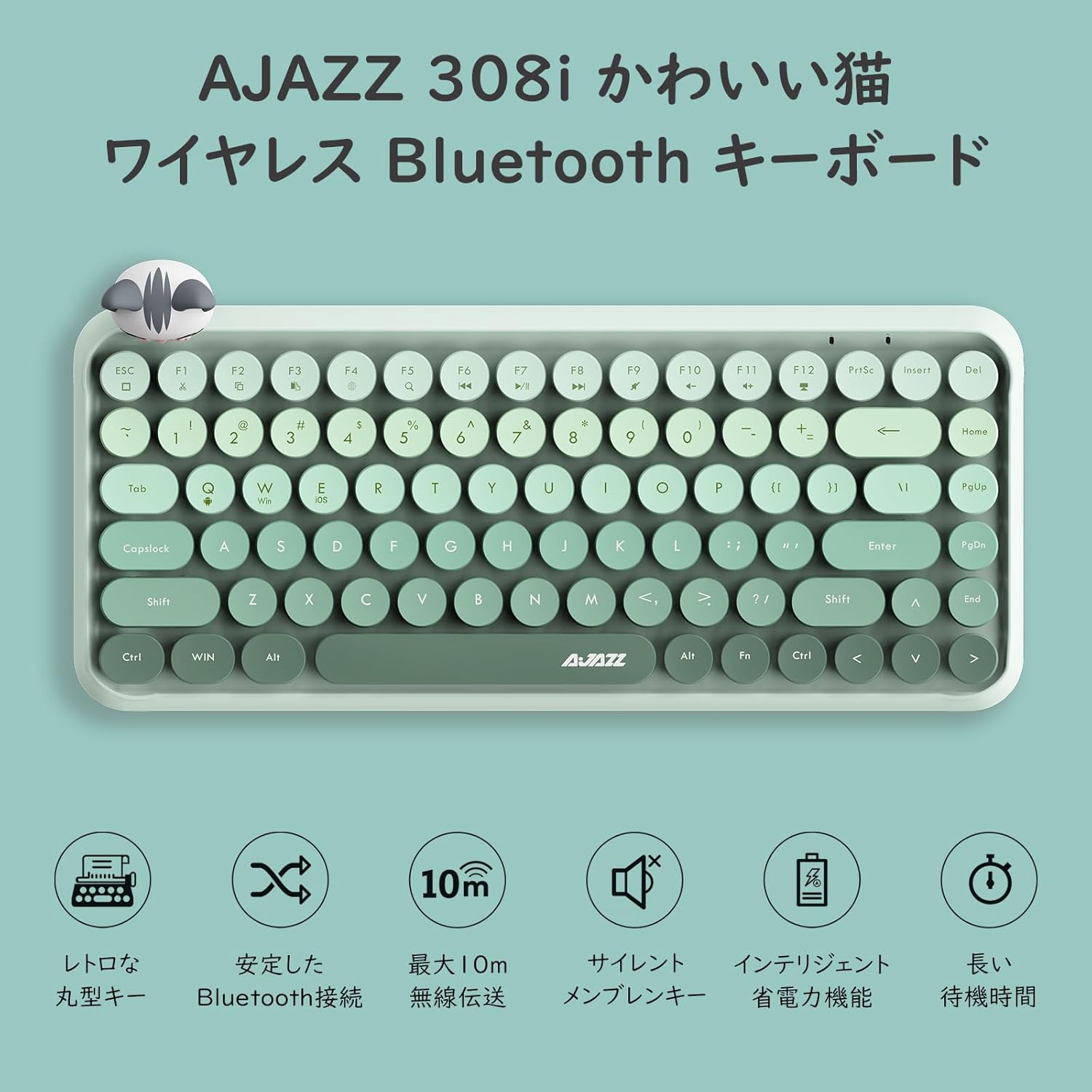
Figure 2: ашыкview of AJAZZ 308i Keyboard Features
Орнотуу: Bluetooth жупташтыруу
Follow these steps to connect your AJAZZ 308i keyboard via Bluetooth:
- Ensure your device's Bluetooth is turned ON.
- Бурул ON the power switch on the keyboard.
- басып, кармап туруңуз FN + C keys simultaneously on the keyboard. The keyboard will enter Bluetooth device search mode.
- On your device (tablet, smartphone, computer), search for Bluetooth devices.
- When "AJAZZ BLUETOOTH 5.0 KEYBOARD" appears in the list of available devices, tap or click on it to initiate pairing.
- A code will be displayed on your device's screen. Type this code using the AJAZZ 308i keyboard and press ENTER.
- The keyboard is now successfully connected to your device.

Figure 3: Multi-device compatibility and connection example
Иштөө нускамалары
Медиа ачкычтары:
The keyboard includes dedicated media function keys, accessible by pressing the FN баскычты F баскычтары менен айкалыштыруу:
- FN + F1: Кесүү
- FN + F2: Көчүрүү
- FN + F3: Паста
- FN + F5: издөө
- FN + F6: Мурунку трек
- FN + F7: Ойнотуу/Тыныгуу
- FN + F8: Кийинки трек
- FN + F9: Үнсүз
- FN + F10: Үндү төмөндөтүү
- FN + F11: Үндү көтөрүү
- FN + F12: Кулпу
Note: On some devices like iPad, certain F-keys (e.g., F2, F3) might function directly without the FN key for copy/paste. Experimentation may be required depending on your operating system.
Кубатты үнөмдөө режими:
The AJAZZ 308i features a smart power-saving mechanism. If there is no key operation for more than 15 minutes, the keyboard will automatically enter sleep mode. To reactivate it, simply double-click any key.
Техникалык тейлөө
Батареяны орнотуу жана алмаштыруу:
The keyboard is powered by two AAA alkaline batteries. To install or replace batteries:
- Баскычтоптун астыңкы жагындагы батарея бөлүкчөсүн табыңыз.
- Батарея уясынын капкагын ачыңыз.
- Туура полярдуулукту (+/-) камсыз кылып, эки жаңы AAA щелочтуу батарейканы салыңыз.
- Батарея уясынын капкагын бекем жабыңыз.
With smart power-saving technology, two AAA alkaline batteries can last for several months under normal use. Avoid using rechargeable lithium batteries as their performance degradation can lead to keyboard malfunction.
Проблемаларды чечүү
Key Layout Differences (English vs. Japanese Input):
The AJAZZ 308i keyboard has an English layout. When using Japanese input, some characters output may not match the characters printed on the keycaps. In such cases:
- Switch your device's input method to English and type according to the characters displayed on the keycaps.
- Alternatively, for Japanese input, refer to the standard Japanese keyboard layout for character mapping.
If you encounter any other issues or have questions, please refer to the warranty and support section for assistance.
Техникалык шарттар
| Өзгөчөлүк | Деталь |
|---|---|
| Бренд | AJAZZ |
| Модель номери | 308i |
| Байланыш технологиясы | Bluetooth 5.0 |
| Шайкеш түзмөктөр | Windows, Mac OS, iOS, Android (Bluetooth function required) |
| Ачкычтардын саны | 84 |
| Баскычтоптун жайгашуусу | QWERTY (English Layout) |
| Ачкычтын которуштуруу түрү | Membrane (Chocolate Key) |
| Зымсыз диапазон | 10 метрге чейин |
| Power Source | 2 х AAA щелочтук батарейкалар |
| Элемент Салмагы | 590 грамм |
| Өлчөмдөр | 32cm x 13.6cm x 3cm |
| Камтылган компоненттер | Magnetic Cat Figurine |
| Түс | Градиент жашыл |
Кепилдик жана колдоо
The AJAZZ 308i Wireless Bluetooth Keyboard comes with a 12 айлык кепилдик сатып алынган күндөн тартып.
If you have any questions, concerns, or require technical assistance, please do not hesitate to contact our customer support. Contact details can typically be found on the product packaging or the retailer's webсиз сатып алган сайт.
Ask a question about this manual
Ask about setup, troubleshooting, compatibility, parts, safety, or missing instructions. Manuals+ will review the question and use this page’s manual context to help answer it.