
1. Introduction and Overview
The TUOPUONE ESP32-S3-LCD-1.47B is a versatile microcontroller development board designed for a wide range of applications, particularly Human-Machine Interface (HMI) and Internet of Things (IoT) projects. It integrates an ESP32-S3 chip with a 1.47-inch IPS LCD display, offering 172x320 resolution and 262K colors. This board supports 2.4GHz Wi-Fi and BLE 5 connectivity, features a high-performance Xtensa 32-bit LX7 dual-core processor, and includes various peripheral interfaces for enhanced functionality.
This manual provides essential information for setting up, operating, and understanding the capabilities of your ESP32-S3-LCD-1.47B development board.
2. Негизги өзгөчөлүктөрү
The ESP32-S3-LCD-1.47B development board is equipped with the following features:
- Процессор: High-performance Xtensa 32-bit LX7 dual-core processor, operating up to 240MHz.
- Зымсыз туташуу: Supports 2.4GHz Wi-Fi (802.11 b/g/n) and BLE 5, with an onboard antenna.
- Эстутум: Built-in 512KB SRAM and 384KB ROM, with onboard 16MB Flash and 8MB PSRAM.
- Дисплей: Integrated 1.47-inch IPS LCD display with 172x320 pixel resolution and 262K color depth.
- I/O Interfaces: Multiple adaptable IO interfaces, supporting full-speed USB standard.
- ӨИК: Onboard QMI8658 6-axis IMU (3-axis accelerometer and 3-axis gyroscope) for motion detection.
- LED: Built-in RGB LED with a clear acrylic sandwich panel for customizable lighting effects.
- Сактагыч: Onboard TF card slot for external storage of data, images, or files.
- Энергияны башкаруу: Integrated battery charging management module, supporting Lithium battery power supply via the GPIO header.
- Төмөн кубаттуулук: Supports flexible clock and multiple power modes for optimized low power consumption.

Figure 2.1: ашыкview of the ESP32-S3-LCD-1.47B Development Board, showcasing its main features such as the LX7 Dual-core Processor, 2.4 GHz Wi-Fi, BLE 5, Onboard Antenna, 1.47-inch display, 172x320 Resolution, 262K Color, 16MB Flash, TF Card Slot, QMI8658 6-Axis IMU, Lithium Battery Header, and Multiple Interfaces.
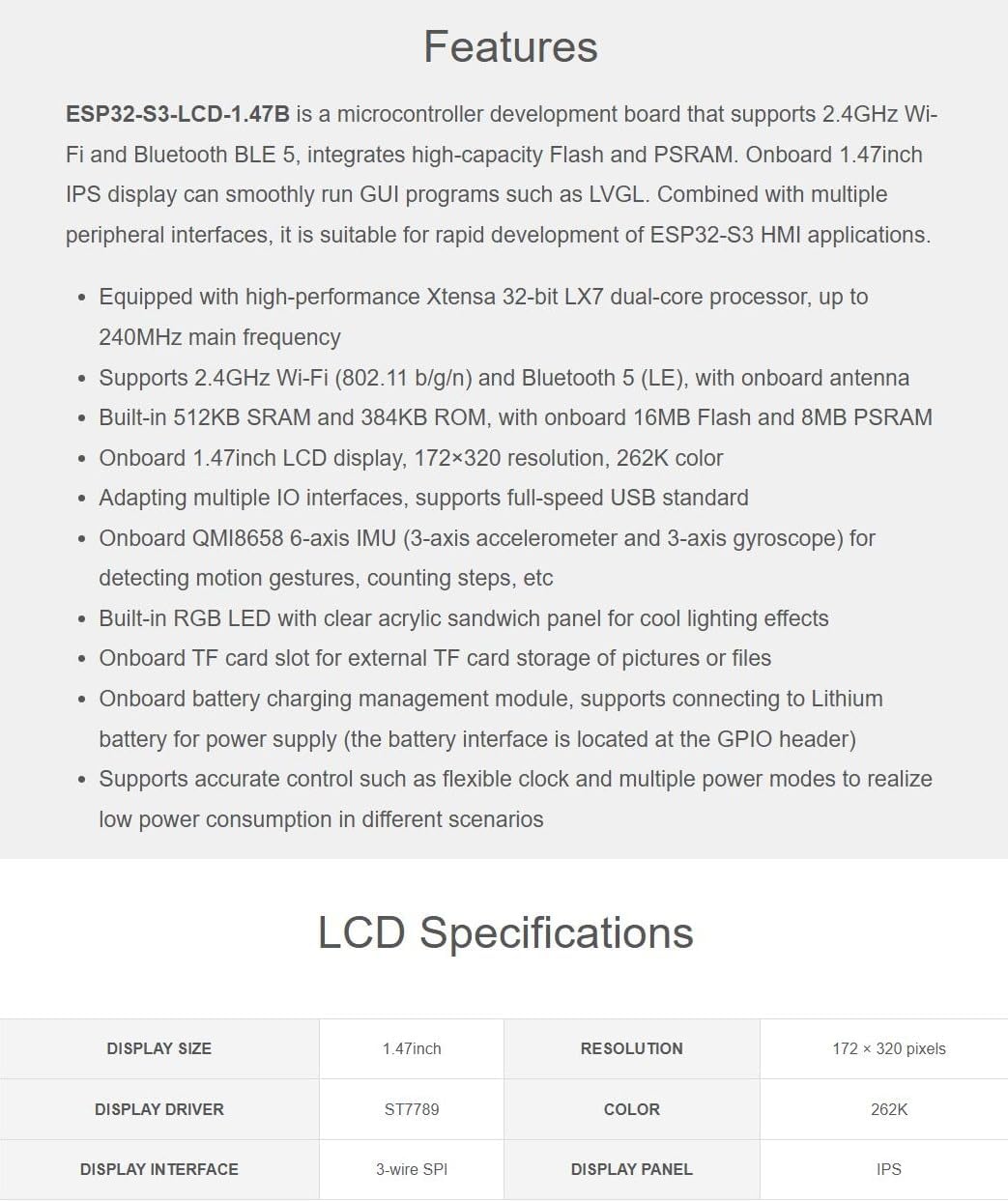
Figure 2.2: Detailed list of features and LCD specifications for the ESP32-S3-LCD-1.47B, including processor type, wireless support, memory, display characteristics, and peripheral integrations.
3. What's On Board (Component Identification)
This section identifies the key components and interfaces on the ESP32-S3-LCD-1.47B development board.

3.1-сүрөт: жогорудан ылдыйга view of the ESP32-S3-LCD-1.47B board, with numbered labels indicating various components and interfaces.
- ESP32-S3R8: Dual-core processor, up to 240MHz running frequency.
- 16MB Flash: Onboard flash memory.
- RGB LED: Built-in RGB LED with clear acrylic sandwich panel for color effects.
- ME6217C33M5G: Low dropout regulator, 800mA output (Max.).
- QMI8658: 6-Axis IMU (Inertial Measurement Unit).
- Charging management circuit: Батареяны заряддоо үчүн.
- Onboard ceramic antenna: Зымсыз байланыш үчүн.
- System battery interface: For connecting 3.7V Lithium battery, supports charging and discharging.
- TF карта уячасы: For external storage.
- КАЛЫПКА КАЛТЫРУУ баскычы: Тактаны баштапкы абалга келтирүү үчүн.
- ЖҮКТӨӨ баскычы: For entering bootloader mode.
- Type-C интерфейси: For power supply, USB communication, and firmware downloading.
4. Pin аныктамасы
The ESP32-S3-LCD-1.47B board provides a comprehensive set of GPIO pins for expanding its functionality with various peripherals. Understanding the pinout is crucial for proper integration and development.
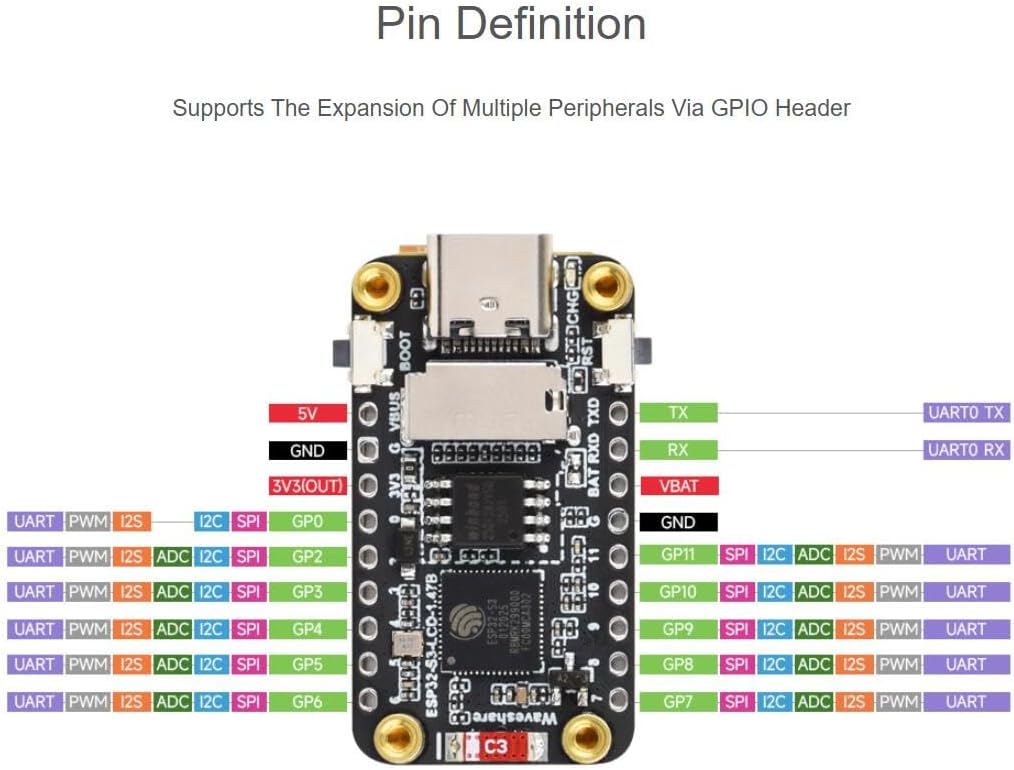
Figure 4.1: Pin definition diagram for the ESP32-S3-LCD-1.47B, illustrating the various GPIOs and their functions, including UART, PWM, I2S, I2C, ADC, and SPI capabilities.
Refer to the diagram above for the specific pin assignments and their corresponding functions. This allows for the expansion of multiple peripherals via the GPIO header.
5. Техникалык шарттар
Detailed technical specifications for the ESP32-S3-LCD-1.47B development board:
Жалпы мүнөздөмөлөрү:
- Бренд: TUOPUONE
- Модель номери: ESP32-S3-LCD-1.47B
- Өндүрүүчү бөлүгүнүн номери: TP131501
- Процессор: Xtensa 32-bit LX7 dual-core, up to 240MHz
- Зымсыз: 2.4GHz Wi-Fi (802.11 b/g/n), BLE 5
- Эстутум: 512KB SRAM, 384KB ROM, 16MB Flash, 8MB PSRAM
- ӨИК: QMI8658 6-axis (accelerometer and gyroscope)
- USB: Type-C, full-speed USB standard
- Кубат киргизүү: USB Type-C (5V) or Lithium battery (3.7V)
- Салмагы: Болжол менен 0.01 килограмм
LCD Specifications:
| Параметр | Нарк |
|---|---|
| Дисплей өлчөмү | 1.47 дюйм |
| Резолюция | 172 × 320 пиксел |
| Дисплей драйвери | ST7789 |
| Түс тереңдиги | 262K түстөр |
| Дисплей интерфейси | 3-зымдуу SPI |
| Дисплей панелинин түрү | IPS |
6. Орнотуу колдонмосу
Follow these general steps to set up your ESP32-S3-LCD-1.47B development board:
- Пакеттен чыгаруу: Иштеп чыгуу тактасын таңгагынан этияттык менен чыгарыңыз. Көрүнүп турган кандайдыр бир бузулууларды текшериңиз.
- Кубат туташуу: Connect the board to a computer using a USB Type-C cable. The board will draw power from the USB port. Alternatively, connect a 3.7V Lithium battery to the system battery interface (GPIO header) if portable operation is desired.
- Драйверди орнотуу: Your operating system may automatically install necessary USB drivers. If not, you might need to manually install drivers for the ESP32-S3 chip, typically available from Espressif's official documentation or your chosen IDE's setup guide.
- Иштеп чыгуу чөйрөсүн орнотуу: Install a suitable Integrated Development Environment (IDE) such as Arduino IDE or Espressif IDF. Configure the IDE to support ESP32-S3 boards. This usually involves adding board URLs to the board manager and installing the ESP32-S3 core.
- Биринчи программа (милдеттүү эмес): Load a simple example program (e.g., a 'blink' sketch for the RGB LED or a 'Hello World' for the LCD) to verify the board's functionality and your development environment setup.
7. Иштөө нускамалары
Operating the ESP32-S3-LCD-1.47B involves programming and interacting with its various features:
- Программалоо: Use your configured IDE to write and upload code to the board via the USB Type-C port. Ensure the correct board and COM port are selected in your IDE.
- LCD дисплей: Utilize libraries like LVGL (Light and Versatile Graphics Library) to create graphical user interfaces on the 1.47-inch IPS display. The ST7789 driver is used for display control.
- Wi-Fi and BLE: Implement Wi-Fi for network connectivity and BLE 5 for short-range communication with other devices. Refer to Espressif's documentation for specific API usage.
- IMU Usage: Access data from the QMI8658 6-axis IMU to detect motion, orientation, or steps. Libraries are typically available for interfacing with this sensor.
- TF картасы: Integrate an external TF card for data logging, storing images, or other large files.
- RGB LED: Control the onboard RGB LED programmatically to provide visual feedback or aesthetic effects.
- Энергияны башкаруу: When using a Lithium battery, monitor its charge level and manage power consumption through software to extend battery life.
8. Колдонуу сценарийлери
The ESP32-S3-LCD-1.47B development board is suitable for a variety of applications due to its integrated display, powerful processor, and connectivity options.

8.1-сүрөт: Мисamples of application scenarios for the ESP32-S3-LCD-1.47B, such as Human-Machine Interfaces, LVGL GUI development, and RGB lighting effects.
- Адам-машина интерфейси (HMI): Develop interactive user interfaces for smart home devices, industrial control panels, or wearable technology.
- LVGL GUI Development: Leverage the LVGL library for creating rich, embedded graphical user interfaces with visual effects, even with limited memory.
- IoT Devices: Build connected devices that require a display for status updates, sensor readings, or user interaction, utilizing Wi-Fi and BLE.
- Wearable Technology: Its compact size and IMU make it suitable for prototypes of smartwatches, fitness trackers, or other body-worn sensors.
- Educational Projects: An excellent platform for learning about embedded systems, microcontrollers, GUI development, and wireless communication.
- RGB жарык эффекттери: Utilize the built-in RGB LED for visual indicators, mood lighting, or artistic displays.
9. Техникалык тейлөө
Proper maintenance ensures the longevity and reliable operation of your development board:
- Колдонуу: Always handle the board by its edges to avoid touching components, especially the display surface or sensitive pins. Electrostatic discharge (ESD) can damage electronic components, so use appropriate precautions.
- Тазалоо: Use a soft, dry, anti-static cloth to gently clean the board. For the LCD, use a microfiber cloth specifically designed for screens. Avoid using harsh chemicals or abrasive materials.
- Сактагыч: Store the board in a cool, dry place, away from direct sunlight, extreme temperatures, and high humidity. Keep it in an anti-static bag when not in use.
- Электр камсыздоо: Ensure you use a stable 5V power supply via USB or a compatible 3.7V Lithium battery. Incorrect voltagтактайга зыян келтириши мүмкүн.
- Программалык камсыздоонун жаңыртуулары: Regularly check for firmware updates for the ESP32-S3 chip and relevant libraries to benefit from bug fixes and new features.
10. Кыйынчылыктарды
If you encounter issues with your ESP32-S3-LCD-1.47B board, consider the following troubleshooting steps:
- Плата күйбөй жатат:
- Check USB cable connection and try a different cable or USB port.
- Ensure your power source (computer USB or battery) is providing sufficient power.
- Жүктөө каталары:
- Verify that the correct board type (ESP32-S3 Dev Module) and COM port are selected in your IDE.
- Керектүү драйверлердин орнотулганын текшериңиз.
- Try holding the BOOT button while pressing and releasing the RESET button before uploading, then release BOOT.
- Дисплей иштебейт:
- Check your code for correct display initialization (ST7789 driver, SPI settings).
- Ensure display libraries are correctly installed and configured.
- Verify physical connection of the display ribbon cable if it's detachable (though this board has an integrated display).
- Wi-Fi/BLE байланыш көйгөйлөрү:
- Double-check network credentials (SSID, password).
- Ensure the antenna is not obstructed.
- Verify that your code correctly initializes and uses the Wi-Fi/BLE modules.
- IMU Data Incorrect:
- Ensure the IMU library is correctly implemented and initialized.
- Check for any physical interference or strong magnetic fields affecting the sensor.
For more specific issues, consult the Espressif ESP32-S3 documentation, relevant library documentation, or online community forums.
11. Контурдун өлчөмдөрү
The physical dimensions of the ESP32-S3-LCD-1.47B development board are provided below for integration into projects and enclosures.

Figure 11.1: Outline dimensions of the ESP32-S3-LCD-1.47B development board, with measurements provided in millimeters (mm).
All dimensions are approximate and measured in millimeters (mm).