
Angoily MNLA5K011SC21538PB
Angoily CCTV Camera Calibration Tool Lens Test Chart User Manual
Model: MNLA5K011SC21538PB
Introduction
This user manual provides comprehensive instructions for the Angoily CCTV Camera Calibration Tool Lens Test Chart. This tool is designed to assist in the precise calibration of CCTV camera lenses, ensuring optimal focus, color accuracy, and overall image clarity for monitoring systems. Proper use of this chart minimizes the need for frequent adjustments and enhances the performance of your security camera setup.
Коопсуздук маалыматы
While this product is a passive tool, please observe the following general safety guidelines:
- Handle the chart with clean hands to avoid smudges or damage to the printed surface.
- Store the chart flat in a dry, cool place away from direct sunlight to prevent warping or fading.
- Keep out of reach of small children to prevent accidental damage or misuse.
Кутуда эмне бар
Upon unboxing, verify that the following item is present:
- 1 x Angoily CCTV Camera Calibration Tool Lens Test Chart

Image: The Angoily CCTV Camera Calibration Tool Lens Test Chart, featuring various patterns for focus and color assessment.
Продукт бүттүview жана өзгөчөлүктөрү
The Angoily Calibration Tool is a robust chart designed for precise camera adjustments. Key features include:
- Туруктуу курулуш: Designed for longevity, minimizing the need for frequent replacements and suitable for extended use.
- Lens Calibration Aid: Simplifies the lens adjustment process, enabling efficient deployment of camera equipment.
- Жакшыртылган ачыктык: Facilitates clear imaging for cameras, improving the quality of recorded footage.
- Комплекстүү камтуу: Provides accurate image assessments for both indoor and outdoor environments, adapting to different lighting conditions.
- Бекем дизайн: Built to last, reducing the frequency of replacements and suitable for long-term projects.
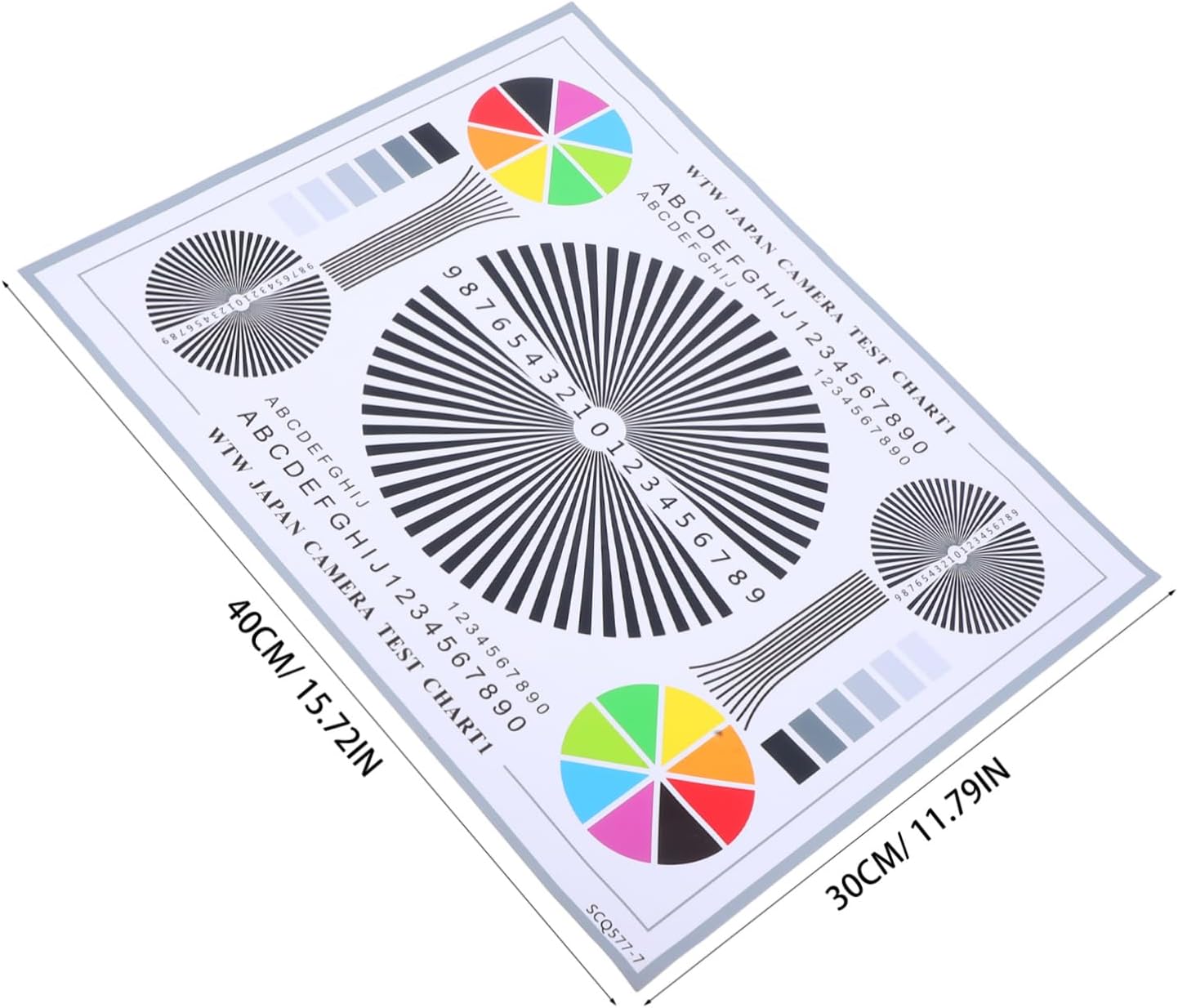
Image: The calibration chart displaying its dimensions, approximately 40cm (15.72 inches) by 30cm (11.79 inches).
Техникалык шарттар
| Атрибут | Деталь |
|---|---|
| Продукциянын өлчөмдөрү | 15.75 x 11.81 x 0.04 дюйм |
| Элемент Салмагы | 0.64 унция |
| Модель номери | MNLA5K011SC21538PB |
| Өндүрүүчү | Angoily |
| Келип чыккан өлкө | Кытай |
Жайгашуу
Before using the calibration chart, ensure it is prepared correctly:
- Unpack the Chart: Carefully remove the chart from its packaging.
- Коргоочу пленканы алып салуу: If present, gently peel off any protective film from the surface of the chart to reveal the clear patterns.
- Позициялоо: Place the chart on a flat, stable surface or mount it vertically, ensuring it is well-lit and free from glare. The chart should be positioned within the camera's field of view at the desired calibration distance.

Image: A hand gently peeling off the protective film from the surface of the calibration chart.
Иштөө нускамалары
This chart is designed to aid in the precise adjustment of CCTV camera lenses for optimal performance. Follow these steps for effective calibration:
- Камераны жайгаштыруу: Position your CCTV camera at the intended monitoring distance from the calibration chart. Ensure the chart fills a significant portion of the camera's frame.
- Фокусту тууралоо:
- Observe the central starburst pattern and the numerical scales on the chart through your camera's live feed or monitor.
- Adjust the camera's focus ring until the lines in the starburst pattern appear as sharp and distinct as possible, particularly towards the center. The numbers and letters should also be clearly legible.
- Fine-tune the focus to eliminate any blurring or softness in the image.
- Түс калибрлөө:
- Examine the color wheels and grayscale bars on the chart.
- Adjust your camera's white balance and color settings (if available) to ensure that colors are reproduced accurately and the grayscale appears neutral, without any color casts.
- Image Assessment:
- Use the various patterns (lines, circles, text) to check for distortion, chromatic aberration, or other optical imperfections.
- Repeat focus and color adjustments as necessary until the desired image quality is achieved.

Image: A CCTV camera positioned to perform a focusing test using the Angoily calibration chart.

Image: The calibration chart set up with a camera and a laptop, demonstrating its use in a monitoring system environment.
Техникалык тейлөө
To ensure the longevity and accuracy of your calibration chart, follow these maintenance guidelines:
- Тазалоо: Gently wipe the surface with a soft, lint-free cloth. For stubborn marks, a slightly damp cloth with plain water can be used, but avoid abrasive cleaners or solvents.
- Сактагыч: Store the chart flat in its original packaging or a protective sleeve to prevent bending, creasing, or scratching. Keep it away from extreme temperatures, humidity, and direct sunlight.
- Колдонуу: Always handle the chart by its edges to avoid leaving fingerprints on the patterned surface, which could affect calibration accuracy.
Проблемаларды чечүү
If you encounter issues during calibration, consider the following:
| Көйгөй | Мүмкүн себеп | Чечим |
|---|---|---|
| Сүрөт бүдөмүк же фокустан тышкары көрүнөт. | Incorrect camera focus setting; insufficient lighting; chart not flat. | Adjust camera's focus ring carefully. Ensure adequate, even lighting on the chart. Place chart on a completely flat surface. |
| Colors are inaccurate or have a tint. | Incorrect white balance or color settings on camera; poor lighting. | Adjust camera's white balance and color saturation. Ensure lighting is neutral and consistent. |
| Patterns on chart are difficult to distinguish. | Chart too far or too close to camera; glare on chart surface. | Adjust distance between camera and chart. Reposition chart or lighting to eliminate glare. |
Кепилдик маалымат
No specific warranty information is provided for this product in the available documentation. For details regarding returns or replacements, please refer to the retailer's policy where the product was purchased.
Кардарларды колдоо
For further assistance or inquiries regarding your Angoily CCTV Camera Calibration Tool, please visit the official Angoily store on Amazon or contact their customer service through the retailer's platform.
Angoily Store Link: Angoily Official Store
Ask a question about this manual
Ask about setup, troubleshooting, compatibility, parts, safety, or missing instructions. Manuals+ will review the question and use this page’s manual context to help answer it.