
Dyurwa Smart Watch T60 User Manual
Модел: T60
1. Киришүү
Thank you for choosing the Dyurwa Smart Watch T60. This manual provides essential information for setting up, operating, and maintaining your new smartwatch. Please read it thoroughly to ensure proper use and to maximize your device's potential.
2. Кутуда эмне бар
Upon opening your Dyurwa Smart Watch T60 package, you should find the following items:
- Dyurwa Smart Watch T60
- Заряддоо кабели
- Колдонуучунун Колдонмосу (бул документ)

Image: Package contents showing the Dyurwa Smart Watch T60, an extra strap, a charging cable, and the user manual.
3. Орнотуу
3.1 Колдонмону орнотуу
- Scan the QR code provided in the quick start guide or search for the "GloryFit" app in your smartphone's app store (Apple App Store for iOS, Google Play Store for Android).
- Download and install the "GloryFit" app.
- Open the app and follow the on-screen instructions to create an account and set up your personal profile.
3.2 Device Pairing (Bluetooth Connection)
To connect your Dyurwa Smart Watch T60 to your smartphone:
- Смартфонуңуздун Bluetooth күйгүзүлгөнүн текшериңиз.
- Open the "GloryFit" app.
- In the app, navigate to the device section and select "Add Device" or "Издөө Device."
- Колдонмо жеткиликтүү түзмөктөрдү издейт. Жупташтырууну баштоо үчүн тизмеден "T60" тандаңыз.
- Суралган учурда смартфонуңуздагы жана акылдуу саатыңыздагы жупташтыруу өтүнүчүн ырастаңыз.
For iOS 13.0 and above, and Android 5.0 and above, a single connection through the GloryFit app is usually sufficient for all functions. For older iOS versions (13.0 and below), an additional Bluetooth connection for audio functions (answer/make calls) may be required:
- After successful binding in the GloryFit app, go to your phone's Bluetooth settings.
- Find "T60" in the list of available devices and tap to connect.
- Once connected, you can use the watch to answer and make calls.

Image: Visual guide for connecting the smartwatch to your phone, showing app download, Bluetooth activation, device search, and binding confirmation.
4. Иштөө нускамалары
4.1 Display and Dials
The Dyurwa Smart Watch T60 features a 1.91-inch HD full touch screen. You can customize your watch face:
- Сааттын жүзүн өзгөртүү: Access over 200 designs through the "GloryFit" app.
- Ыңгайлаштырылган терүүлөр: Upload your favorite picture via the app to set it as your watch face.
- Жарыктыкты жөндөө: Manually adjust the screen brightness through the watch settings (4 levels available) for optimal visibility in various lighting conditions.

Сүрөт: Акылдуу сааттардын көргөзмөсүasing its large 1.91-inch HD display and several customizable watch face options, including data like steps, heart rate, and weather.

Image: A user customizing their watch face with a personal photo through the companion app, demonstrating the DIY dial feature.
4.2 Calling and Messaging
With Bluetooth 5.3, the watch offers stable connectivity for communication features:
- Bluetooth чалуулары: Make and receive calls directly from your watch using the built-in microphone and Hi-Fi speaker.
- Билдирүү эскертмелери: Receive alerts for text messages and notifications from social media applications (e.g., Facebook, WhatsApp, Twitter) directly on your watch.

Image: The smartwatch displaying its Bluetooth call features, including a dial pad, contact list, incoming call screen, and call history.

Image: The smartwatch displaying notifications from various social media platforms and other apps, indicating its smart notification capabilities.
4.3 Ден соолуктун мониторинги
The Dyurwa Smart Watch T60 provides comprehensive health tracking features:
- Жүрөктүн кагышын көзөмөлдөөчү: Continuously monitors your heart rate 24/7. Data is for reference only and not for medical diagnosis.
- Уйкуну көзөмөлдөөчү: Automatically measures your sleep patterns, including awake, light, and deep sleep stages, to help you understand and improve your sleep habits.
- Кандагы кычкылтектин мониторинги: Кандагы кычкылтектин деңгээлин өлчөйт.
- Аялдардын ден соолугуна көз салуу: Manage and track menstrual cycles and predict fertile periods through the app.
- Дем алуу көнүгүүлөрү: Guided breathing sessions to help with relaxation.

Image: A split image showing the smartwatch's sleep monitoring function with sleep duration, and heart rate and blood oxygen monitoring displays.

Image: A woman exercising while wearing the smartwatch, with a close-up of the watch displaying heart rate data and a corresponding app screen.

Image: Demonstrates breathing exercises and blood oxygen monitoring features of the smartwatch, showing users engaging with these functions.
4.4 Спорт режимдери
The watch supports over 110 built-in sports modes. During exercise, it records data such as steps, calories burned, distance, and heart rate.

Image: A cyclist wearing the smartwatch, with an overlay showing various sports icons and the watch displaying real-time exercise data like calories, steps, distance, and heart rate.

Image: A collage of people participating in various sports like running, cycling, yoga, and tennis, illustrating the wide range of supported sport modes.
4.5 Башка функциялар
The Dyurwa Smart Watch T60 includes several practical features:
- Үн жардамчысы: Телефонуңуздун үн жардамчысына түз сааттан кириңиз.
- Музыкалык башкаруу: Смартфонуңузда музыканы ойнотууну көзөмөлдөңүз.
- Камераны башкаруу: Смартфонуңуздун камера жапкычын алыстан иштетиңиз.
- Аба ырайы: View учурдагы аба ырайы жана божомолдор.
- Ойготкуч саат жана таймер: Ойготкучтарды коюп, таймер функциясын колдонуңуз.
- Секундомер: Убакытты эсептөө иш-аракеттери үчүн.
- Телефонуңузду табыңыз: Жоголгон смартфонуңузду шыңгыратып, табыңыз.
- Калькулятор: Basic calculation functions.
- Кол чырак: Uses the screen as a light source.

Image: A comprehensive display of the smartwatch's various utility features, including calendar, stopwatch, camera remote, weather, alarm, timer, flashlight, calculator, breathing exercises, phone finder, voice assistant, and music control.
5. Батарея жана заряддоо
The Dyurwa Smart Watch T60 is equipped with a large capacity battery, offering extended usage times:
- Заряддоо убактысы: Толук кубаттоо үчүн болжол менен 2 саат.
- үзгүлтүксүз колдонуу: 7-10 күнгө чейин.
- Күтүү убактысы: 30 күнгө чейин.
Use the provided magnetic charging cable to charge your device. Connect the magnetic end to the charging points on the back of the watch and the USB end to a standard USB power adapter (not included).
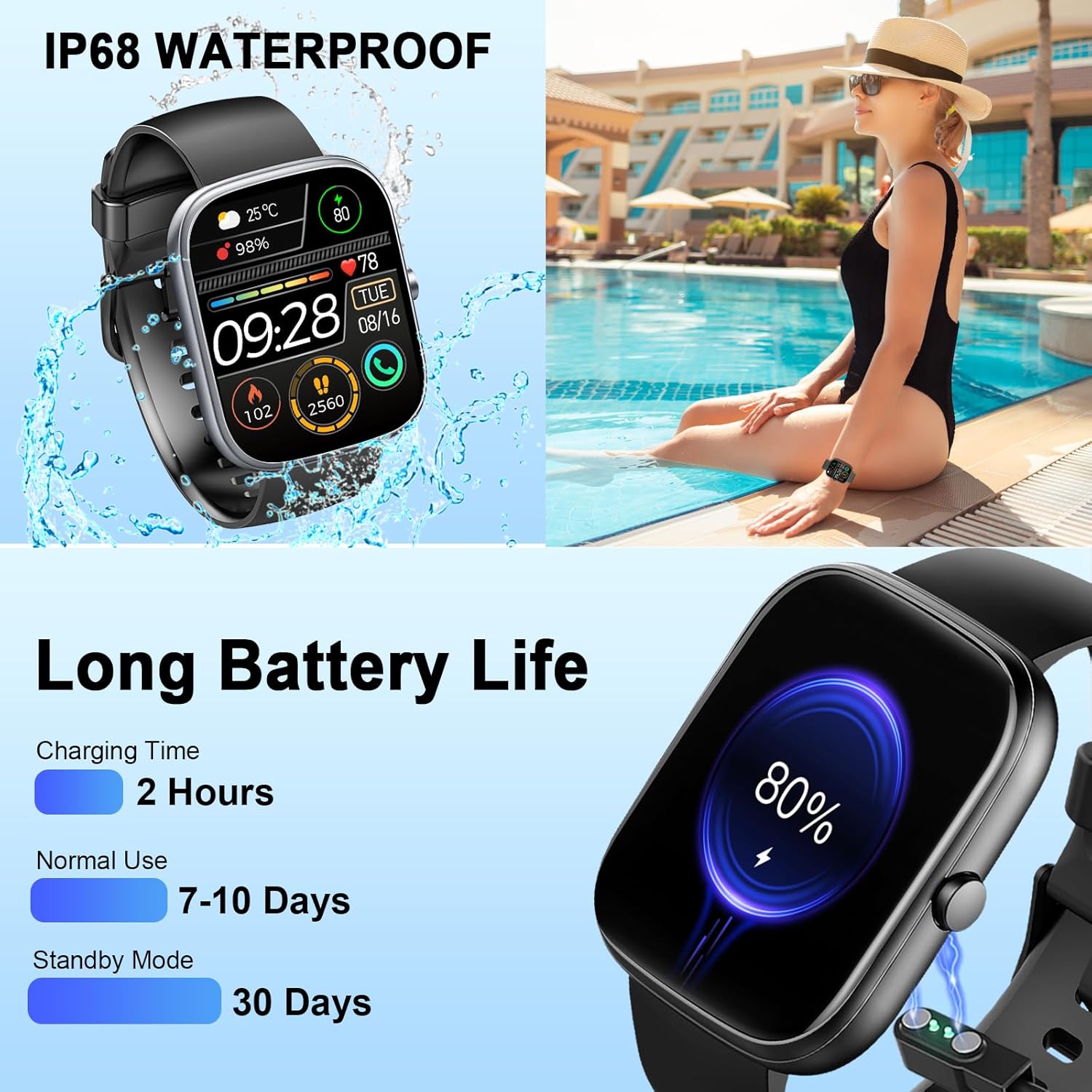
Image: The smartwatch connected to its magnetic charging cable, illustrating the charging process and highlighting its long battery life specifications.

Image: The smartwatch on its magnetic charger, with text indicating a daily use time of 7 days and a standby time of 30 days.
6. Суу өткөрбөөчү маалымат
The Dyurwa Smart Watch T60 is IP68 waterproof. This means it is resistant to dust and can withstand immersion in water up to 1.5 meters for up to 30 minutes. It is suitable for daily use, such as hand washing, bathing, and swimming.
Эскертүү:
- Not suitable for hot water, saunas, or diving.
- Avoid exposure to high humidity or corrosive liquids.
- Кадимки эскирүү жана бузулуу менен сууга туруктуулук убакыттын өтүшү менен төмөндөшү мүмкүн.

Image: The smartwatch being splashed with water, accompanied by icons indicating its IP68 waterproof rating for activities like bathing and swimming.
7. Техникалык тейлөө
- Тазалоо: Саатты жана боону жумшак, кургак чүпүрөк менен үзгүлтүксүз сүртүңүз. Зарыл болсо, бир аз нымдуу чүпүрөк колдонуңуз.amp чүпүрөк жана кылдат кургатуу.
- Химиялык заттардан алыс болуңуз: Катуу химиялык заттарды, тазалоочу эриткичтерди же күчтүү жуугучтарды колдонбоңуз, анткени алар сааттын сыртына жана пломбаларына зыян келтириши мүмкүн.
- Заряддоо байланыштары: Сааттын арткы бетиндеги заряддоочу контакттарды таза жана таштандылардан таза кармаңыз, бул туура заряддоону камсыз кылат.
- Сактагыч: Колдонулбаган убакта саатты салкын, кургак жерде сактаңыз.
8. Кыйынчылыктарды
| Көйгөй | Мүмкүн чечим |
|---|---|
| Саат күйбөйт | Саат толук заряддалганын текшериңиз. Аны заряддагычка кеминде 10 мүнөт туташтырыңыз. |
| Смартфон менен жупташтыруу мүмкүн эмес | 1. Телефонуңузда Bluetooth иштетилгенин текшериңиз. 2. Сааттын телефонуңуздун иш аралыгынын ичинде экенин текшериңиз. 3. Саатты да, телефонуңузду да өчүрүп-күйгүзүңүз. 4. Try unpairing and re-pairing the device through the GloryFit app and phone's Bluetooth settings. |
| Жүрөктүн кагышынын/уйкунун так эмес маалыматтары | Ensure the watch is worn snugly on your wrist, not too tight or too loose. Clean the sensor on the back of the watch. Note that data is for reference and not medical use. |
| Билдирмелер алынган жок | 1. Check app permissions for GloryFit on your phone (notifications, background activity). 2. Ensure Bluetooth connection is stable. 3. Verify notification settings within the GloryFit app. |
| Батареянын иштөө мөөнөтү кыска | Reduce screen brightness, limit continuous heart rate monitoring, and disable unnecessary notifications. Ensure proper charging. |
9. Техникалык шарттар
| Өзгөчөлүк | Спецификация |
|---|---|
| Модел | T60 |
| Screen Size | 1.91 inches (4.85 cm) HD Full Touch Screen |
| Байланыш | Bluetooth 5.3 |
| Операция системасы | Android Wear 1.0 (compatible with iOS 9.0+ and Android 4.0+) |
| Суу өткөрбөйт рейтинги | IP68 |
| Батарея түрү | Литий-ион (1 А батареясы камтылган) |
| Заряддоо убактысы | Болжол менен 2 саат |
| Типтүү колдонуу убактысы | 7-10 күн |
| Күтүү убактысы | 30 күнгө чейин |
| Элемент Салмагы | 3.2 унция |
| GPS | GPS жок |
10. Кепилдик жана колдоо
For warranty information and customer support, please refer to the documentation included with your purchase or contact Dyurwa customer service directly. Details for contacting support are typically available on the product packaging or the official Dyurwa webсайт.