
Introduction
This manual provides detailed instructions for the installation, operation, and maintenance of your OBDPEAK D80 4-Channel 4K Rear View Mirror Camera. Please read this manual thoroughly before using the device to ensure proper functionality and safety.
Кутуда эмне бар
Пакетте бардык компоненттер бар экенин текшериңиз:
- Арткыview Mirror with 3 cameras (Main Unit)
- Rear camera with 6M Cable
- 64G TF картасы
- Тамеки күйгүзүүчү заряддагыч
- 24-Hour Parking Monitoring Hardware Kit
- User Manual
- Rubber Strips (for mounting)

Image: Package contents for the OBDPEAK D80 dash cam system.
Продукт өзгөчөлүктөрү
1. 11" Touchscreen Display & 4K Front Camera
The device features an 11-inch full touchscreen display for intuitive control and a 4K (2160p) front camera for high-resolution video recording. The large display enhances visibility, reducing blind spots compared to standard rearview күзгүлөр.
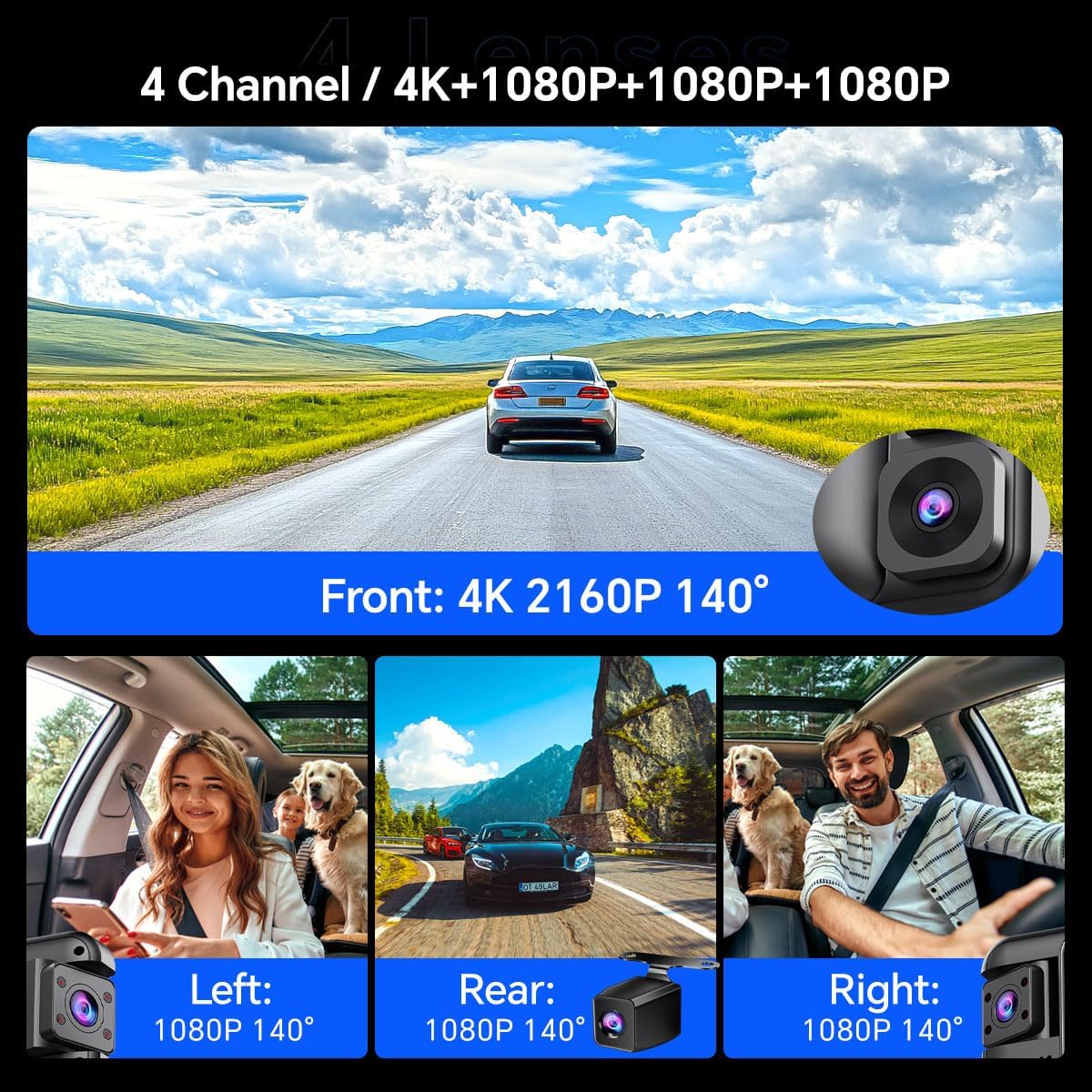
Image: The 11-inch touchscreen display of the D80 mirror camera.
2. 4-Channel Comprehensive Coverage
Equipped with four cameras (Front 4K, Rear 1080P, Left 1080P, Right 1080P), the system provides a complete 360-degree recording of your vehicle's surroundings. This ensures comprehensive evidence capture for various incidents.

Image: Visual representation of the 4-channel camera system providing 360-degree coverage.
3. Smart ADAS (Advanced Driver Assistance System)
The integrated ADAS technology provides voice alerts for critical driving situations, including front vehicle start, lane departure, forward collision, and pedestrian collision warnings. This system assists in maintaining driver awareness and safety.

Сүрөт: Мисamples of ADAS warnings for various road hazards.
4. BSD (Blind Spot Detection) Algorithm
The BSD system monitors blind spots not visible in standard mirrors. It detects vehicles in these areas and provides alerts to the driver, aiding in safer lane changes and preventing potential collisions.

Image: Illustration of the Blind Spot Detection system in action.
5. Rotating + Infrared Car Interior Lenses
The two internal cameras are equipped with infrared functionality, ensuring clear recording even in low-light conditions inside the vehicle. These lenses are rotatable, allowing adjustment to different angles or away from the interior for privacy.

Image: Detail of the rotatable interior cameras with infrared capability.
6. 64GB Memory Card Included
A 64GB memory card is included, providing ample storage for recordings and eliminating the need for a separate purchase. The dash cam supports memory cards up to 256GB.
7. Унаа токтотуучу жайды 24 саат бою көзөмөлдөө
With the included hardware kit, the D80 offers 24-hour parking monitoring. This feature utilizes all four cameras to provide continuous surveillance of your vehicle, even when parked, with ultra-low power consumption.

Сүрөт: бүттүview of 24-hour parking monitoring features.
8. Multiple Display Modes
The touchscreen supports various display modes, including single-screen, three-screen (1:1:1), and four-screen (1:1:1:1) views, allowing you to customize your monitoring preference.

Сүрөт: Мисamples of multiple camera display modes on the mirror screen.
9. Backup Camera Assist
When reversing, the system automatically displays the high-definition rear camera feed on the IPS screen with guidelines, assisting in safe parking and maneuvering.

Image: Full-screen reversing display with parking assist lines.
10. Loop жаздыруу
The device supports automatic seamless loop recording, which overwrites the oldest unlocked footagэс тутум картасы толгондо. Бул кол менен кийлигишүүсүз үзгүлтүксүз жаздырууну камсыз кылат.

Image: Explanation of loop recording process.
11. G-сенсор
The built-in G-sensor automatically detects sudden impacts or collisions. Upon detection, it locks the current video footage to prevent it from being overwritten by loop recording, preserving critical evidence.

Image: G-Sensor function locking video during an incident.
12. Super Night Vision (HDR Display)
The D80 features Super Night Vision with HDR (High Dynamic Range) display technology, providing enhanced clarity and detail in low-light conditions, improving visibility during nighttime driving and parking monitoring.

Image: Comparison of normal night vision and Super Night Vision with HDR.
13. In-App Video Download & Real-time Viewing (Wi-Fi)
The device supports both iOS and Android systems, allowing users to view and download videos in real-time via the dash cam's built-in Wi-Fi. Emergency videos are automatically locked to prevent overwriting.

Image: In-app video management via Wi-Fi.
Орнотуу жана орнотуу
Proper installation is crucial for optimal performance. It is recommended to have this device professionally installed if you are unfamiliar with vehicle electrical systems.
1. Main Unit Installation (Rearview Күзгү)
- Негизги блокту учурдагы арткы бетине бекитиңизview күзгүгө берилген резина боолор менен бекитиңиз. Ал бекем бекитилгенин жана көзүңүзгө тоскоол болбогонун текшериңиз view.
- Adjust the angle of the main unit's front camera to capture the road ahead clearly.

Image: Main unit dimensions and mounting overview.
2. Арткы камераны орнотуу
- Mount the rear camera at the back of your vehicle, typically above the license plate or inside the rear window. Ensure a clear, unobstructed view.
- Route the 6-meter rear camera cable to the main unit, tucking it neatly along the vehicle's interior trim.
- Connect the rear camera cable to the designated port on the main unit.
3. Power Connection
- Connect the cigarette lighter charger to the main unit's power input.
- Plug the charger into your vehicle's 12V cigarette lighter socket.
- For 24-hour parking monitoring, install the provided hardware kit by connecting it directly to your vehicle's fuse box. Refer to the hardware kit's specific instructions for detailed wiring.
4. Эстутум картасын киргизүү
- Insert the provided 64GB TF card into the memory card slot on the main unit. Ensure it is inserted correctly until it clicks into place.
- Format the memory card through the device's settings menu before first use to ensure compatibility and optimal performance.
Иштөө нускамалары
1. Күйгүзүү/өчүрүү
- The device will automatically power on and begin recording when your vehicle's ignition is turned on.
- Ал от алдыруу системасы өчүрүлгөндө автоматтык түрдө өчөт.
- Кол менен күйгүзүү/өчүрүү үчүн, түзмөктүн капталында жайгашкан кубат баскычын басып, кармап туруңуз.
2. Сенсордук экрандын иштеши
- Tap the screen to access menus and settings.
- Swipe left/right on the screen to switch between different camera views (front, rear, left, right, or combined viewс).
- Swipe up/down to adjust brightness or switch between display modes.
3. Жазуу режимдери
- Driving Recording: Continuous loop recording starts automatically when the device is powered on.
- Паркинг мониторинги: Activates when the vehicle is parked and ignition is off (requires hardware kit installation). Records events like impacts or motion detection.
- Өзгөчө кырдаалдарда жаздыруу (G-сенсор): Видеону автоматтык түрдө кулпулайт files upon detecting a collision or sudden movement, preventing them from being overwritten.
4. ADAS and BSD Functions
- ADAS and BSD systems are enabled by default. Voice alerts will be provided for detected hazards.
- These functions can be configured or disabled in the system settings if desired.
5. Wi-Fi жана тиркемелердин туташуусу
- Download the dedicated mobile application (search for "OBDPEAK" or refer to the manual for app name) from your device's app store.
- Enable Wi-Fi on the dash cam via the settings menu.
- Connect your smartphone to the dash cam's Wi-Fi network (SSID and password typically displayed on the dash cam screen).
- Колдонмону колдонуу үчүн view жаша фооtage, жаздырылган видеолорду ойнотуу, жүктөп алуу fileтелефонуңузга өткөрүп, жөндөөлөрдү тууралаңыз.
Техникалык тейлөө
- Тазалоо: Экранды жана камеранын линзаларын тазалоо үчүн жумшак, кургак чүпүрөктү колдонуңуз. Абразивдүү тазалоочу каражаттарды же эриткичтерди колдонбоңуз.
- Эстутум картасы: Оптималдуу иштөөсүн камсыз кылуу жана маалыматтардын бузулушунун алдын алуу үчүн эстутум картасын үзгүлтүксүз форматтап туруңуз (айына жок дегенде бир жолу). Камдык көчүрмө маанилүү. files форматтоодон мурун.
- Программалык камсыздоонун жаңыртуулары: Өндүрүүчүнү текшериңиз website periodically for firmware updates. Updates can improve performance and add new features.
- Температура: Avoid exposing the device to extreme temperatures for extended periods, as this can affect battery life and component longevity.
Проблемаларды чечүү
| Көйгөй | Мүмкүн чечим |
|---|---|
| Түзмөк күйбөйт. |
|
| Жаздыруу токтойт же катып калат. |
|
| Видеонун сапаты начар. |
|
| ADAS/BSD эскертүүлөрү иштебей жатат. |
|
| Wi-Fi туташуу маселелери. |
|
Техникалык шарттар
- Модель аты: D80
- Бренд: OBDPEAK
- Алдыңкы камеранын чечилиши: 4K (2160p)
- Арткы камеранын чечилиши: 1080p
- Ички камеранын чечилиши: 1080p (Left & Right)
- Дисплей: 11 дюймдук сенсордук экран
- талаасы View: Front 170 Degrees, Other cameras 140 Degrees
- Өзгөчөлүктөр: ADAS, BSD, 360 Degree Coverage, Automatic Incident Detection, Blind Spot Detection, Built-In Display, Parking Monitor, Super Night Vision, Loop Recording, G-Sensor, Wi-Fi
- Сактагыч: Supports up to 256GB TF Card (64GB included)
- Байланыш: USB, Wireless (Wi-Fi)
- Кубат булагы: 1 Lithium Ion battery (included), Car Charger (12V)
- Продукциянын өлчөмдөрү: 0.8 x 12.28 x 2.9 дюйм
- Элемент Салмагы: 2.97 фунт
Кепилдик жана колдоо
For warranty information and technical support, please refer to the contact details provided in the packaging or visit the official OBDPEAK webсайт. Кепилдик дооматтары үчүн сатып алуу дүмүрчөгүңүздү сактаңыз.