
OMOTON B0FCMD15TF
OMOTON Foldable Bluetooth Keyboard with Touchpad (QWERTZ Layout)
Model: B0FCMD15TF
Бренд: Омотон
1. Киришүү
Thank you for choosing the OMOTON Foldable Bluetooth Keyboard with Touchpad. This portable QWERTZ keyboard is designed for convenience and efficiency, offering multi-device connectivity and an integrated touchpad. This manual provides detailed instructions for setup, operation, and maintenance to ensure optimal performance.
2. Пакеттин мазмуну
Сураныч, пакетте төмөнкү нерселерди текшериңиз:
- OMOTON Foldable Bluetooth Keyboard
- Уюлдук телефон стенди
- C түрүндөгү кубаттоочу кабель
- Ташуу кутусу
- User Manual
3. Продукт бүтүп калдыview
The OMOTON Foldable Bluetooth Keyboard features a compact QWERTZ layout with 78 full-size keys and a multi-touch touchpad. It supports connection to up to three devices simultaneously across iOS, Android, and Windows operating systems. Its magnetic folding design makes it highly portable.
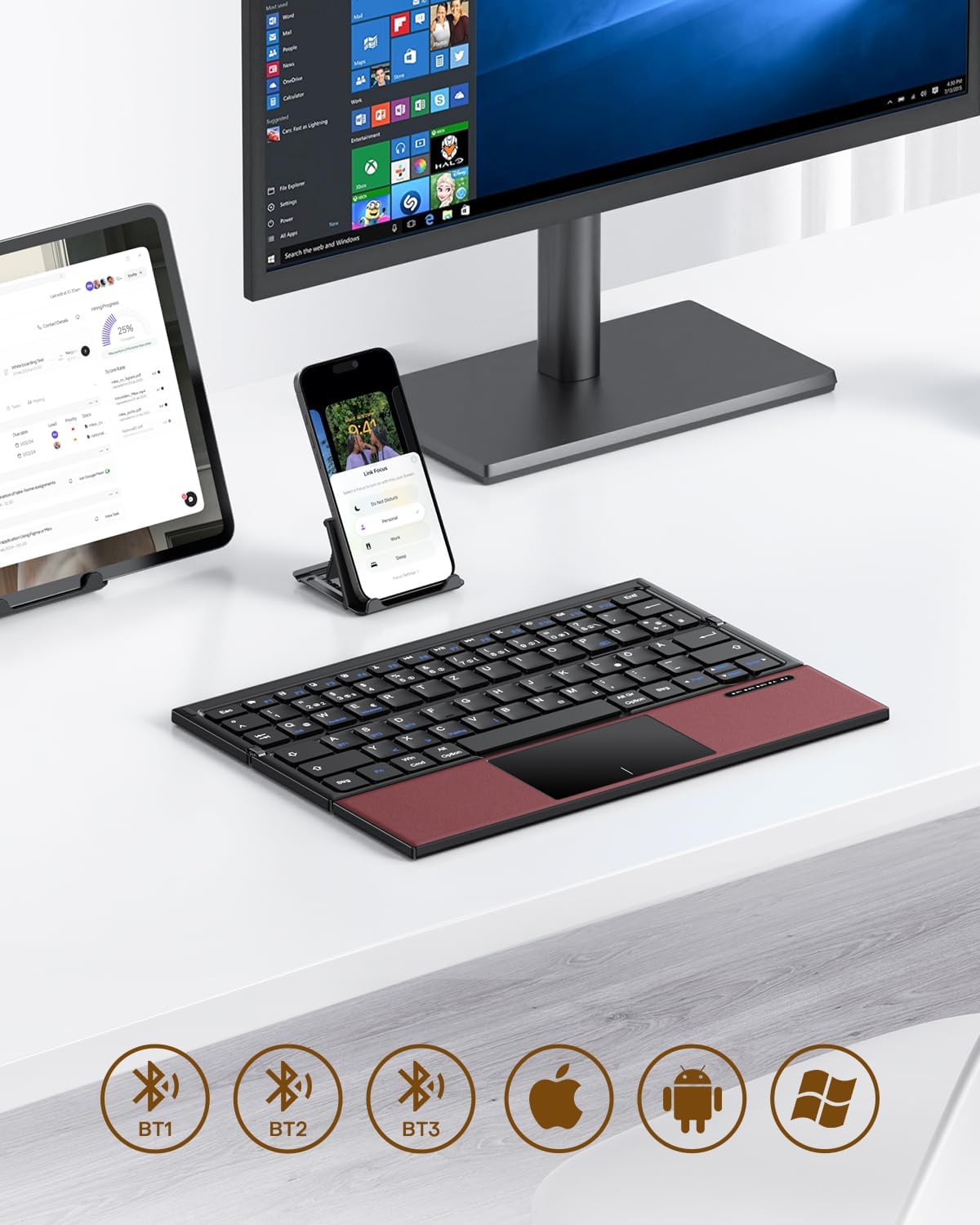
Image 3.1: The OMOTON Foldable Bluetooth Keyboard in use with a tablet, smartphone, and monitor, demonstrating multi-device connectivity via BT1, BT2, and BT3 channels.
Негизги өзгөчөлүктөрү:
- Үч кабаттуу дизайн: Compact and portable for travel.
- Интегралдык сенсордук такта: Multi-touch functionality for navigation without an external mouse.
- Көп түзмөк байланышы: Connects to up to three Bluetooth-enabled devices (BT1, BT2, BT3).
- QWERTZ Layout: Standard German keyboard layout with 78 full-size keys.
- Кайра заряддалуучу батарея: Built-in 180mAh battery with Type-C charging.

Image 3.2: Close-up details of the keyboard, highlighting its magnetic closure, indicator lights, silent scissor keys, elegant PU leather finish, and durable metal hinge.
Көчүрүү мүмкүнчүлүгү:
The keyboard's compact, tri-fold design makes it ideal for travel and on-the-go use. It easily fits into bags and pockets, making it a convenient companion for various environments.

Image 3.3: The keyboard in use in a cafe, on an airplane, and in a meeting room, demonstrating its versatility for different work and travel scenarios.

Image 3.4: The folded keyboard being placed into a carrying case inside a bag and slipped into a jacket pocket, illustrating its compact size and ease of transport.
4. Орнотуу
4.1 Баскычтопту заряддоо
Before first use, fully charge the keyboard. Use the included Type-C charging cable to connect the keyboard to a power source (e.g., computer USB port, USB wall adapter).
- The power indicator light will show charging status.
- Толук кубаттоо адатта 2-3 саатка созулат.
- The keyboard offers up to 60 hours of operating time and 90 days of standby time on a full charge.

Image 4.1: The keyboard connected via its Type-C port for charging, with icons indicating charging time, working time, and standby time.
4.2 Түзмөк менен жупташтыруу
The keyboard supports up to three Bluetooth connections (BT1, BT2, BT3). Follow these steps to pair your keyboard with a device:
- Күйгүзүү: Unfold the keyboard to automatically power it on. The indicator light will flash.
- Каналды тандоо: басыңыз Fn + BT1, Fn + BT2, же Fn + BT3 keys simultaneously to select a Bluetooth channel. The corresponding indicator light will flash slowly.
- Жупташтыруу режимине кирүү: Басыңыз Fn + C (or the Bluetooth icon key) to enter pairing mode. The selected channel indicator light will flash rapidly.
- Түзмөктө Bluetooth'ту иштетүү: Түзмөгүңүздө (смартфон, планшет, ноутбук) Bluetooth жөндөөлөрүнө өтүп, Bluetooth'ду күйгүзүңүз.
- Баскычтопту тандоо: Издөө "OMOTON Keyboard" (or similar) in the list of available devices and select it to connect.
- Байланышты ырастоо: Once connected, the indicator light on the keyboard will stop flashing and remain solid for a few seconds before turning off.
Note: The Type-C cable is for charging only and does not support wired connectivity.
4.3 Түзмөктөрдүн ортосунда которулуу
Жупташтырылган түзмөктөр арасында которулуу үчүн жөн гана басыңыз Fn + BT1, Fn + BT2, же Fn + BT3 to select the desired channel. The keyboard will automatically connect to the last paired device on that channel.
5. Иштөө нускамалары
5.1 Баскычтоптун жайгашуусу жана атайын баскычтар
The keyboard features a QWERTZ layout with 78 standard keys and 12 multimedia shortcuts. Familiarize yourself with the layout for efficient typing.

Image 5.1: The keyboard displaying its full-size keys and integrated multi-touch touchpad, designed for a laptop-like typing experience.
5.2 Сенсордук панелди колдонуу
The multi-touch touchpad supports various gestures for navigation. This eliminates the need for an external mouse.
- Бир манжа менен таптоо: Сол чыкылдатуу.
- Эки манжа менен таптоо: Чычкандын оң баскычын чыкылдатыңыз (контексттик меню).
- Эки манжа менен жылдыруу: Өйдө/төмөн же солго/оңго сыдырыңыз.
- Чоңойтуу үчүн чымчыңыз: Zoom in/out (supported on some devices/apps).
- Серпүү жаңсоолору: Specific gestures may vary by operating system (Windows, Android, iOS).
Note for iPad users: You may need to enable "AssistiveTouch" in your iPad settings for full touchpad functionality. Some gestures may vary between applications. Scrolling direction can be adjusted in your device settings.
5.3 Кубатты үнөмдөө режими
To conserve battery, the keyboard will automatically enter sleep mode after 30 minutes of inactivity. To wake it up, press any key.
5.4 Ergonomic Usage
For comfortable and ergonomic typing, ensure your screen is positioned correctly to maintain a healthy posture.

Image 5.2: A visual guide showing the recommended ergonomic posture for using the keyboard with a screen, emphasizing proper neck and back alignment.
6. Техникалык тейлөө
- Тазалоо: Use a soft, dry cloth to clean the keyboard surface. For stubborn dirt, slightly dampчүпүрөктү суу же жумшак тазалоо эритмеси менен жууп салыңыз. Ашыкча нымдуулуктан сактаныңыз.
- Сактагыч: When not in use, fold the keyboard and store it in the provided carrying case to protect it from dust and scratches.
- Батареяга кам көрүү: Avoid fully discharging the battery frequently. Charge the keyboard regularly, especially if it will be stored for an extended period.
- Экстремалдуу шарттарды болтурбоо: Баскычтопту экстремалдык температурага, түз күндүн нуруна же жогорку нымдуулукка дуушар кылбаңыз.
7. Кыйынчылыктарды
7.1 Баскычтоп туташпай жатат
- Баскычтоптун күйүп турганын (жайылганын) текшериңиз.
- Түзмөгүңүздө Bluetooth иштетилгенин текшериңиз.
- Check if the keyboard is in pairing mode (indicator light flashing rapidly after pressing Fn+C).
- Ensure you have selected the correct Bluetooth channel (BT1, BT2, or BT3).
- Түзмөгүңүздүн Bluetooth жөндөөлөрүнөн клавиатураны ажыратып, кайра жупташтырып көрүңүз.
- Баскычтоптун батареясы заряддалганын текшериңиз.
7.2 Touchpad Not Responding
- Баскычтоптун Bluetooth аркылуу туура туташканын текшериңиз.
- For iPad users, verify that "AssistiveTouch" is enabled in your iPad settings.
- Restart the keyboard and your device.
- Сенсордук панелдин бетин кирди же таштандыларды кетирүү үчүн тазалаңыз.
7.3 Incorrect Key Output (QWERTZ vs. QWERTY)
- This keyboard has a QWERTZ layout. Ensure your device's software keyboard setting is also set to QWERTZ (German layout) for correct character output.
- If your device is set to QWERTY, some keys (e.g., Y/Z, special characters) will not match the physical keyboard. Adjust your device's input language/keyboard layout settings.
7.4 Батареянын иштөө мөөнөтү кыска
- Колдонуудан мурун клавиатура толук заряддалганын текшериңиз.
- The keyboard automatically enters sleep mode after 30 minutes of inactivity to save power.
- Avoid leaving the keyboard unfolded and powered on when not in use for extended periods.
8. Техникалык шарттар
| Бренд | ОМОТОН |
| Модел | B0FCMD15TF |
| Байланыш технологиясы | Bluetooth |
| Шайкеш түзмөктөр | iPadOS, iOS, Android, Windows (Laptops, PCs, Tablets, Smartphones) |
| Баскычтоптун жайгашуусу | QWERTZ (немисче макет) |
| Ачкычтардын саны | 78 |
| Өзгөчөлүктөр | Foldable, Portable, Rechargeable, Integrated Multi-touch Touchpad |
| Материал | Пластик, полиуретан (PU) |
| Батарея сыйымдуулугу | 180 мАч Li-ion |
| Заряддоо порту | Type-C |
| Заряддоо убактысы | Болжол менен 2-3 саат |
| Иштөө убактысы | 60 саатка чейин |
| Күтүү убактысы | 90 күнгө чейин |
| Катталган өлчөмдөр | 25.3 x 6 x 2.1 см |

Image 8.1: Visual representation of the keyboard's dimensions when unfolded and folded, alongside a tablet and smartphone for scale.
9. Кепилдик жана колдоо
OMOTON products come with a standard warranty. For detailed warranty information, please refer to the warranty card included in your package or visit the official OMOTON webсайт.
If you encounter any issues or have questions regarding your OMOTON Foldable Bluetooth Keyboard, please contact OMOTON Customer Support:
- Webсайт: Amazon'догу OMOTON расмий дүкөнү
Please have your model number (B0FCMD15TF) and purchase details ready when contacting support.
Ask a question about this manual
Ask about setup, troubleshooting, compatibility, parts, safety, or missing instructions. Manuals+ will review the question and use this page’s manual context to help answer it.