1. Киришүү
Thank you for choosing the Safedoorbell T50 Beige Smart Wireless Video Doorbell Camera. This manual provides essential information for setting up, operating, and maintaining your device to ensure optimal performance and security for your home.
Пакеттин мазмуну
Төмөндө тизмеленген нерселердин баары пакетиңизге камтылганын текшериңиз:
- 1 x Safedoorbell T50 Beige Video Doorbell
- 1 x Wireless Chime (Ding Dong)
- 1 x заряддоо кабели
- Монтаждоо бурамалар
- 1 х Инструкция (бул документ)

Image 1.1: Safedoorbell T50 Beige Video Doorbell, accompanying wireless chime, and smartphone screens demonstrating live view and night vision capabilities.
2. Орнотуу жана орнотуу
2.1 Алгачкы заряддоо
Before first use, fully charge the video doorbell using the provided charging cable. Connect the cable to the doorbell's charging port and a standard USB power adapter (not included). The indicator light will show charging status and turn off when fully charged.
2.2 Колдонмону жүктөп алуу жана каттоо эсебин түзүү
Download the official Safedoorbell application from your smartphone's app store (iOS App Store or Google Play Store). Follow the on-screen instructions to create an account and log in.
2.3 Wi-Fiга туташуу
- Open the Safedoorbell app and tap "Add Device" or the "+" icon.
- Түзмөктөр тизмесинен "Видео эшиктин коңгуроосун" тандаңыз.
- Follow the app's prompts to connect the doorbell to your home's 2.4GHz Wi-Fi network. Ensure your smartphone is connected to the same Wi-Fi network during setup.
- The app will generate a QR code. Present this QR code to the doorbell camera lens at a distance of 15-20 cm (6-8 inches) until you hear a confirmation sound.
- Туташтырылгандан кийин, коңгуроонун индикатор жарыгы өзгөрөт жана колдонмо ийгиликтүү жупташууну ырастайт.
2.4 Коңгуроону орнотуу
Кире бериш эшигиңиздин жанына ылайыктуу жерди тандап, тазалыкты камсыз кылыңыз view and good Wi-Fi signal strength. Use the provided mounting screws to securely attach the doorbell to the wall or door frame. Ensure the doorbell is mounted at an appropriate height for optimal viewзыяратчыларды кабыл алуу.
2.5 Pairing the Wireless Chime
Plug the wireless chime into a standard wall outlet indoors. Press the pairing button on the chime (refer to chime's specific instructions if available). Within the Safedoorbell app, navigate to the doorbell settings and initiate chime pairing. Press the doorbell button to test the connection. The chime should ring.

Image 2.1: Key features of the Safedoorbell T50 Beige, including AI Human Detection, 1080p video, night vision, two-way audio, wide-angle lens, and cloud storage capabilities.
3. Операция
3.1 Live View
Open the Safedoorbell app and select your doorbell device to access the live video feed. This allows you to view your doorstep in real-time from anywhere.
3.2 Эки тараптуу аудио
Качан viewing the live feed or answering a doorbell press, tap the microphone icon in the app to speak to visitors at your door. Tap it again to mute. This feature enables seamless communication with anyone at your entrance.
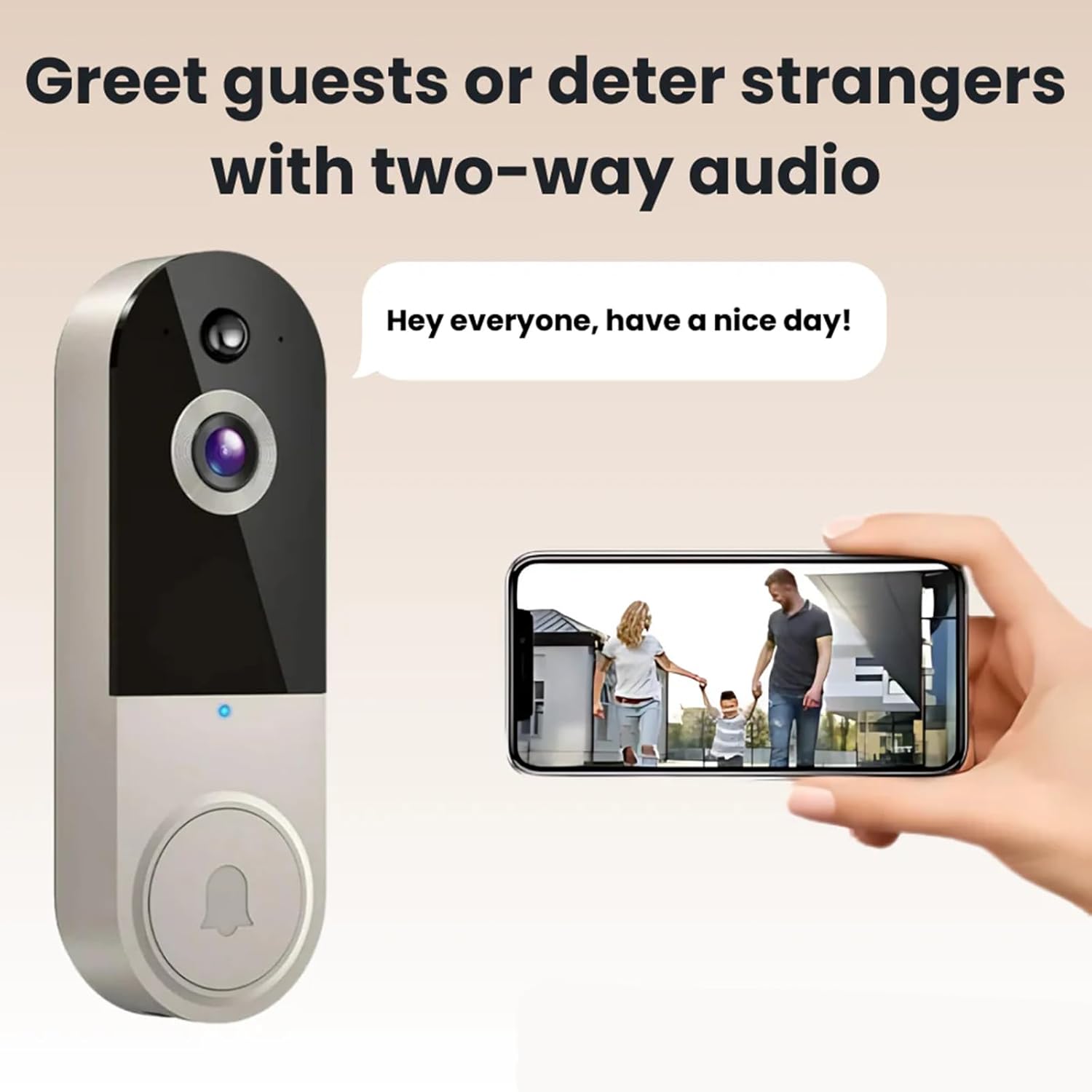
Image 3.1: The two-way audio feature allows for direct communication with visitors, as shown with a family at the door and a user speaking through the app.
3.3 Жасалма интеллект менен кыймылды аныктоо
The doorbell is equipped with advanced AI motion detection. When motion is detected, you will receive an instant notification on your smartphone. You can adjust the motion detection sensitivity and set activity zones within the app to minimize false alerts.
3.4 Түнкү көрүнүш
Эшиктин коңгуроосу жарык аз шартта автоматтык түрдө түнкү көрүү режимине өтүп, кара жана ак түстөгү так видеотасманы камсыз кылатtage. This ensures continuous monitoring of your property 24/7.

Image 3.2: Visual comparison illustrating the clarity of both Day Vision (color) and Night Vision (black-and-white) capabilities of the doorbell camera.
3.5 Видеону жазуу жана сактоо
All detected motion events and doorbell presses are recorded. These recordings are stored securely, typically in cloud storage (subscription may be required for extended storage). You can access and review past events through the app's history or event log.
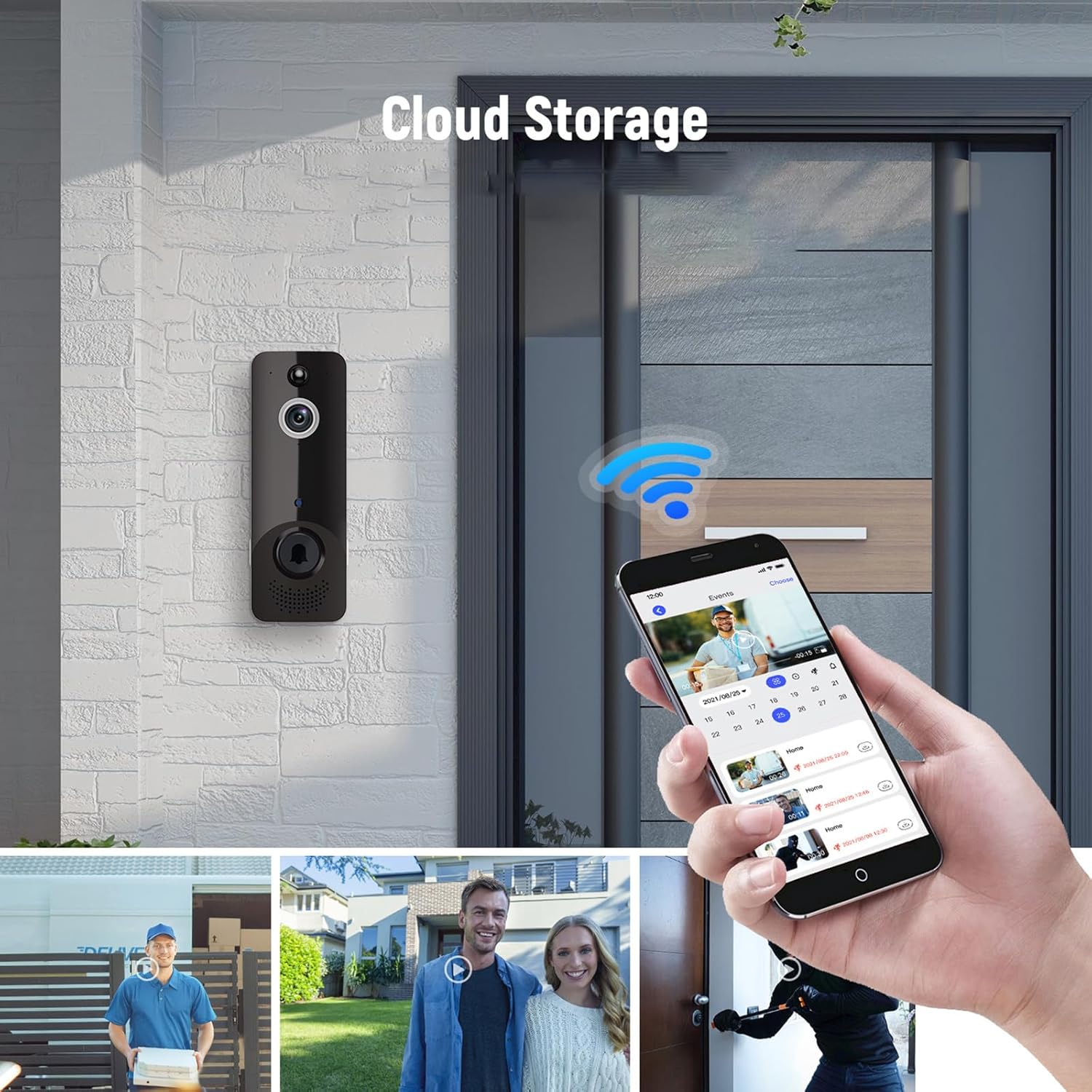
Image 3.3: The doorbell in action, showing its integration with the mobile app for cloud storage access and event review, including various scenarios captured by the camera.
4. Техникалык тейлөө
4.1 Батареяны заряддоо
The doorbell is powered by a built-in rechargeable battery. When the battery level is low, the app will send a notification. Remove the doorbell from its mounting bracket and charge it using the provided USB cable. A full charge typically takes several hours.
4.2 Тазалоо
To ensure clear video quality, periodically clean the camera lens with a soft, dry, lint-free cloth. Do not use harsh chemicals or abrasive materials, as these can damage the lens or device surface. Wipe the body of the doorbell with a slightly damp керек болсо кездеме.
5. Кыйынчылыктарды
| Көйгөй | Мүмкүн себеп | Чечим |
|---|---|---|
| Эшиктин коңгуроосу Wi-Fi'га туташпай жатат | Incorrect Wi-Fi password; Doorbell too far from router; 5GHz Wi-Fi network selected. | Ensure correct 2.4GHz Wi-Fi password is entered. Move doorbell closer to router. Ensure you are connecting to a 2.4GHz network. Restart doorbell and router. |
| Кыймылды аныктоо эскертүүлөрү жок | Motion detection disabled; Sensitivity too low; Activity zones not set correctly. | Check app settings to ensure motion detection is enabled. Increase sensitivity. Adjust activity zones to cover desired areas. |
| Эки тараптуу аудио иштебейт | Microphone/speaker muted in app; Network connectivity issues. | Ensure microphone icon is not muted in the app. Check Wi-Fi signal strength. Restart the app and doorbell. |
| Night vision is unclear | Lens is dirty; Insufficient ambient light for IR. | Clean the camera lens with a soft cloth. Ensure no obstructions are blocking the IR sensors. |
| Батарея заряддалбай жатат | Faulty charging cable/adapter; Charging port damage. | Try a different USB charging cable and power adapter. Contact customer support if the issue persists. |
6. Техникалык шарттар
| Өзгөчөлүк | Деталь |
|---|---|
| Модель аты | T50 Beige |
| Бренд | Жалпы |
| Ички/тышкы колдонуу | Сыртта |
| Шайкеш түзмөктөр | Смартфон |
| Power Source | Battery Powered (Built-in battery) |
| Connectivity Protocol | Wi-Fi (2.4 ГГц) |
| Controller Type | Push Button |
| Монтаж түрү | Дубалга орнотуу |
| Видео тартуунун резолюциясы | 1080p HD |
| Түс | T50 Beige |
| Элементтин өлчөмдөрү (L x W x Y) | 2 x 2 x 4 дюйм |
| Видео тартуу форматы | MP4 |
| Өзгөчө өзгөчөлүк | Night Vision, AI Motion Detection, Two-Way Audio |
| Өндүрүүчү | жалпы |
| Келип чыккан өлкө | Кытай |
7. Кепилдик жана колдоо
7.1 Продукциянын кепилдиги
Specific warranty details for your Safedoorbell T50 Beige device are typically provided with your purchase documentation or can be found on the manufacturer's official website. Please retain your proof of purchase for warranty claims. Optional protection plans may be available for extended coverage.
7.2 Кардарларды колдоо
For technical assistance, troubleshooting beyond this manual, or warranty inquiries, please contact the manufacturer, Generic, through their official support channels. Refer to the product packaging or the manufacturer's webбайланыш маалыматы үчүн сайт.


