
1. Киришүү
This manual provides comprehensive instructions for the installation, operation, and maintenance of your UNITOPSCI 10.1-inch Android Car Stereo. This unit is specifically designed for Honda Accord 9th Generation 2.0L models manufactured between 2013 and 2017. Please read this manual thoroughly before using the product to ensure proper functionality and safety.
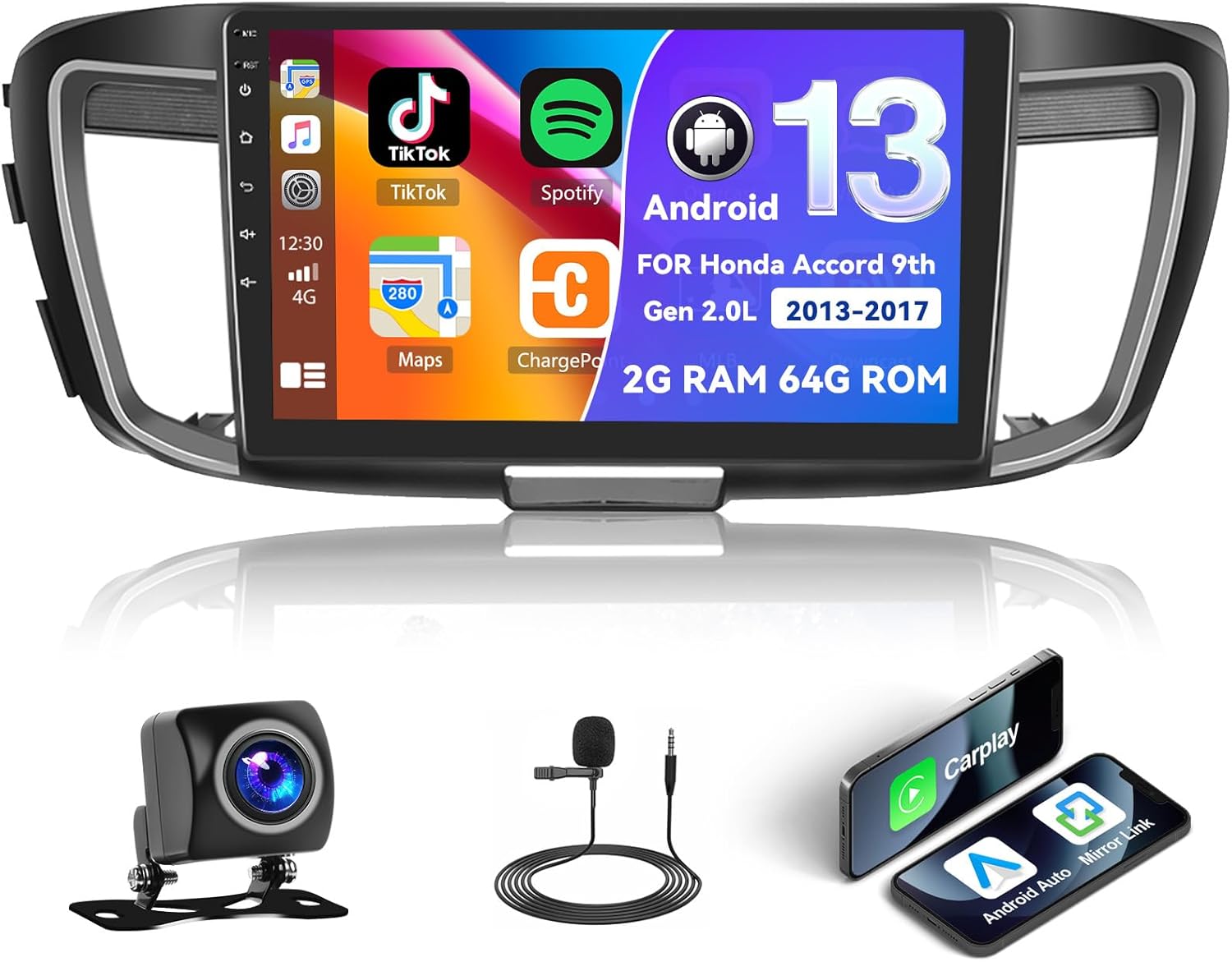
Figure 1.1: UNITOPSCI Android Car Stereo with backup camera, microphone, and smartphone mirroring icons.
2. Коопсуздук маалыматы
- Do not operate the system in a way that distracts you from driving safely. Always prioritize road safety.
- Кыска туташуулардын же бузулуулардын алдын алуу үчүн бардык зымдар туура туташтырылганын текшериңиз.
- Аппаратты экстремалдык температурага, түз күн нуруна узак убакытка же ашыкча нымдуулукка дуушар кылуудан алыс болуңуз.
- Professional installation is recommended to ensure correct wiring and functionality.
- Үндүн көлөмүн тышкы трафиктин үндөрүн угууга мүмкүндүк берген деңгээлде кармаңыз.
3. Продукт бүтүп калдыview
3.1 Негизги өзгөчөлүктөрү
- 10.1-inch Touchscreen Display (1024*600 resolution)
- Android операциялык системасы (2 ГБ RAM + 64 ГБ ROM)
- Wireless/Wired Apple CarPlay and Android Auto
- Dual Mirror Link for Android/iOS phones
- Built-in GPS Navigation with offline map support (HERE WE GO preloaded)
- WiFi туташуусу
- Bluetooth with A2DP/Hands-Free/Phone Book functions
- 18 алдын ала орнотулган станциясы бар FM/RDS радиосу
- Backup Camera Input with automatic display switching
- Рулду башкаруу (SWC) колдоосу
- Бөлүнгөн экран функциясы
- Built-in Equalizer System
- Multiple UI Themes (26 options)
3.2 Пакеттин мазмуну
- UNITOPSCI Android Car Stereo Unit
- Электр өткөргүчтөрү
- GPS антеннасы
- USB кабелдери (кош USB интерфейси)
- Тышкы микрофон
- Камера
- Колдонуучунун Колдонмосу (бул документ)
4. Орнотуу жана орнотуу
4.1 Шайкештикти текшерүү
This car stereo is compatible with Honda Accord 9th Generation 2.0L models from 2013 to 2017 (basic version). It is not compatible with high-end versions that include a large OEM screen or navigation system. Please verify your vehicle's center console and compare it with the provided installation frame images to ensure compatibility.

Figure 4.1: Dashboard compatibility for Honda Accord 9th Gen (2013-2017) 2.0L low-end version. Note: Not suitable for models with existing OEM Navi Screen.
4.2 Орнотуу кадамдары
- Даярдоо: Электрдик зыяндын алдын алуу үчүн унаанын аккумуляторун сууруп алыңыз.
- Remove OEM Unit: Carefully remove the existing car radio and dashboard trim. Refer to your vehicle's service manual for specific instructions.
- Зымдарды туташтыруу: Connect the provided wiring harness to the car stereo and the vehicle's existing wiring. Ensure all connections are secure. Connect the GPS antenna, external microphone, and backup camera cables.
- Сыноо функциясы: Before fully reassembling the dashboard, temporarily connect the battery and power on the unit to test basic functions like power, audio, and display.
- Коопсуздук бирдиги: Mount the new car stereo into the dashboard opening and secure it with screws.
- Кайра чогултуу: Куралдар тактасынын бардык тетиктерин кайра орнотуңуз.
- Акыркы байланыш: Унаанын аккумуляторун кайра туташтырыңыз.
Эскертүү: If your vehicle has an OEM Radio with a Center Navi Screen, additional wiring kits may be required. Contact customer support for assistance.
5. Иштөө нускамалары
5.1 Күйгүзүү/өчүрүү
The unit will typically power on automatically when the vehicle's ignition is turned on. To manually power off or restart, press and hold the power button on the unit or use the software controls.
5.2 Wireless CarPlay & Android Auto
This unit supports both wireless and wired Apple CarPlay and Android Auto. Connect your smartphone via Bluetooth/WiFi for wireless functionality or use a USB cable for a wired connection. Once connected, you can access phone calls, navigation, music, and other compatible apps directly from the stereo's touchscreen.

Figure 5.1: Wireless CarPlay, Android Auto, and Mirror Link interfaces.
5.3 GPS навигациясы
The stereo has built-in GPS and supports both online and offline navigation. The HERE WE GO map application is preloaded. To use offline maps, download the necessary map data via a WiFi connection. For online navigation, ensure the unit is connected to WiFi or a mobile hotspot.

Figure 5.2: GPS Navigation interface and WiFi connection options.
5.4 Bluetooth жана FM/RDS радиосу
Bluetooth: Pair your smartphone via Bluetooth for hands-free calling, music streaming (A2DP), and automatic phone book download. This enhances safety by allowing you to manage calls without holding your phone.
FM/RDS радиосу: Access FM radio stations with 18 preset options. The RDS (Radio Data System) feature displays station information where available. Use the tuner to find news, music, and sports broadcasts.

Figure 5.3: FM/RDS Radio, Bluetooth interface, and Equalizer settings.
5.5 Mirror Link
The Mirror Link function allows you to display your Android or iOS phone's screen directly onto the 10.1-inch head unit. This can be achieved via a wired or wireless connection, enabling you to view videos or maps from your phone on the larger screen.
5.6 Рулду башкаруу (SWC)
The unit supports your vehicle's existing steering wheel controls. This allows you to adjust volume, change tracks, answer calls, and switch modes without taking your hands off the steering wheel, improving driving safety and convenience. The system includes a learning function for SWC configuration.
5.7 Камдык камеранын киргизүүсү
When the vehicle is shifted into reverse gear, the stereo automatically displays the view from the connected AHD backup camera on the 10.1-inch screen. This assists with safe parking and maneuvering.

Figure 5.4: Steering Wheel Control interface and backup camera view көрсөтмөлөр менен.
5.8 Split Screen & UI Themes
Бөлүнгөн экран: The split-screen feature allows you to run two applications side-by-side on the display, for exampбир жагында навигация, экинчи жагында музыка ойнотуу.
UI темалары: The Android radio offers 26 different user interface themes. You can customize the look of your desktop by long-pressing the main interface and selecting your preferred theme.

Figure 5.5: Split screen view жана эксamples of different UI desktop themes.
6. Техникалык тейлөө
- Тазалоо: Экранды жана аппаратты тазалоо үчүн жумшак, кургак чүпүрөктү колдонуңуз. Абразивдүү тазалагычтардан же эриткичтерден качыңыз.
- Программалык камсыздоо жаңыртуулары: Оптималдуу иштөөнү жана жаңы функцияларга жетүүнү камсыз кылуу үчүн программалык камсыздоонун жеткиликтүү жаңыртууларын мезгил-мезгили менен текшерип туруңуз.
- Температура: Do not leave the unit in direct sunlight for extended periods, especially in hot weather, as this can affect its lifespan.
7. Кыйынчылыктарды
| Көйгөй | Мүмкүн себеп | Чечим |
|---|---|---|
| Түзмөк күйбөйт | Туура эмес зымдар, күйүп кеткен сактагыч, унаанын аккумуляторундагы көйгөй | Check power connections, inspect vehicle fuses, ensure battery is charged. |
| Үн жок | Volume too low, incorrect audio settings, speaker wiring issue | Increase volume, check audio output settings, verify speaker connections. |
| GPS сигналы жоголду же так эмес | GPS antenna obstructed or disconnected, poor satellite coverage | GPS антеннасынын туура орнотулганын жана так болушун текшериңиз view асмандын. Антенна байланышын текшериңиз. |
| Bluetooth байланышы көйгөйлөрү | Device not paired, Bluetooth off on phone or stereo | Ensure Bluetooth is enabled on both devices. Re-pair the device. |
| Сенсордук экран жооп бербейт | Убактылуу программалык ката | Restart the unit. If issue persists, perform a factory reset (Factory setting keyword: 000000). |
If you encounter issues not listed here or if troubleshooting steps do not resolve the problem, please contact UNITOPSCI customer support.
8. Техникалык шарттар
| Өзгөчөлүк | Спецификация |
|---|---|
| Система | Android |
| Чипсет | 8227L-DEMO |
| Screen Size | 10.1 дюйм |
| Эстутум (RAM+ROM) | 2 ГБ RAM + 64 ГБ ROM |
| Screen Resolution | 1024*600 |
| Радио чип | MT6625 |
| Power Output | 4*45 Вт |
| Иш температурасы | -20℃ден 75℃ге чейин (-4°F менен 167°F) |
| Күч Ampкөтөргүч чип | TDA7388 |
| Радио тобу | FM/RDS |
| Video Output | Колдоо |
| Тышкы микрофон | Колдоо |
| Бөлүнгөн экран | Колдоо |
| Карталар | Камтылган оффлайн карталары (маалыматтарды жүктөп алуу үчүн интернет талап кылынат) |
| WIFI | Колдоо |
| USB | Кош USB интерфейси |
| Аудио форматты колдоо | APE/FLAC/WAV/MP3/WMA ж.б. |
| Видео форматын колдоо | MKV/RMVB/AVI/MP4/MDV ж.б. |
| Сүрөт форматын колдоо | PNG/JPEG/JPG/GIF/WBMP/BNP ж.б. |
| Factory Setting Keyword | 000000 |
| Тилдер | Кытайча/Англисче/Французча/Италияча/Корейче/Жапончо/Арабча/Испанча/Португалча/Орусча/Түркчө/Вьетнамча/Еврейче/Полякча/Немисче |
| Элемент Салмагы | 3.08 фунт |
| Пакеттин өлчөмдөрү | 17.13 x 7.8 x 4.06 дюйм |
9. Кепилдик жана колдоо
Your UNITOPSCI Android Car Stereo comes with a 12-month warranty. Replacement is available within 24 months for qualifying issues. We offer lifetime after-sales consultation and technical support.
For any inquiries, technical assistance, or warranty claims, please contact us:
- Электрондук почта: UNITOPSCI@126.com

Figure 9.1: UNITOPSCI Customer Support Contact Information.