
1. Продукт бүтүп калдыview
The Cooler Master Elite 490 is a compact mATX computer case designed for high-performance builds. It features a 270° tempered glass panel for showcasing components, efficient cooling options, and modern connectivity.
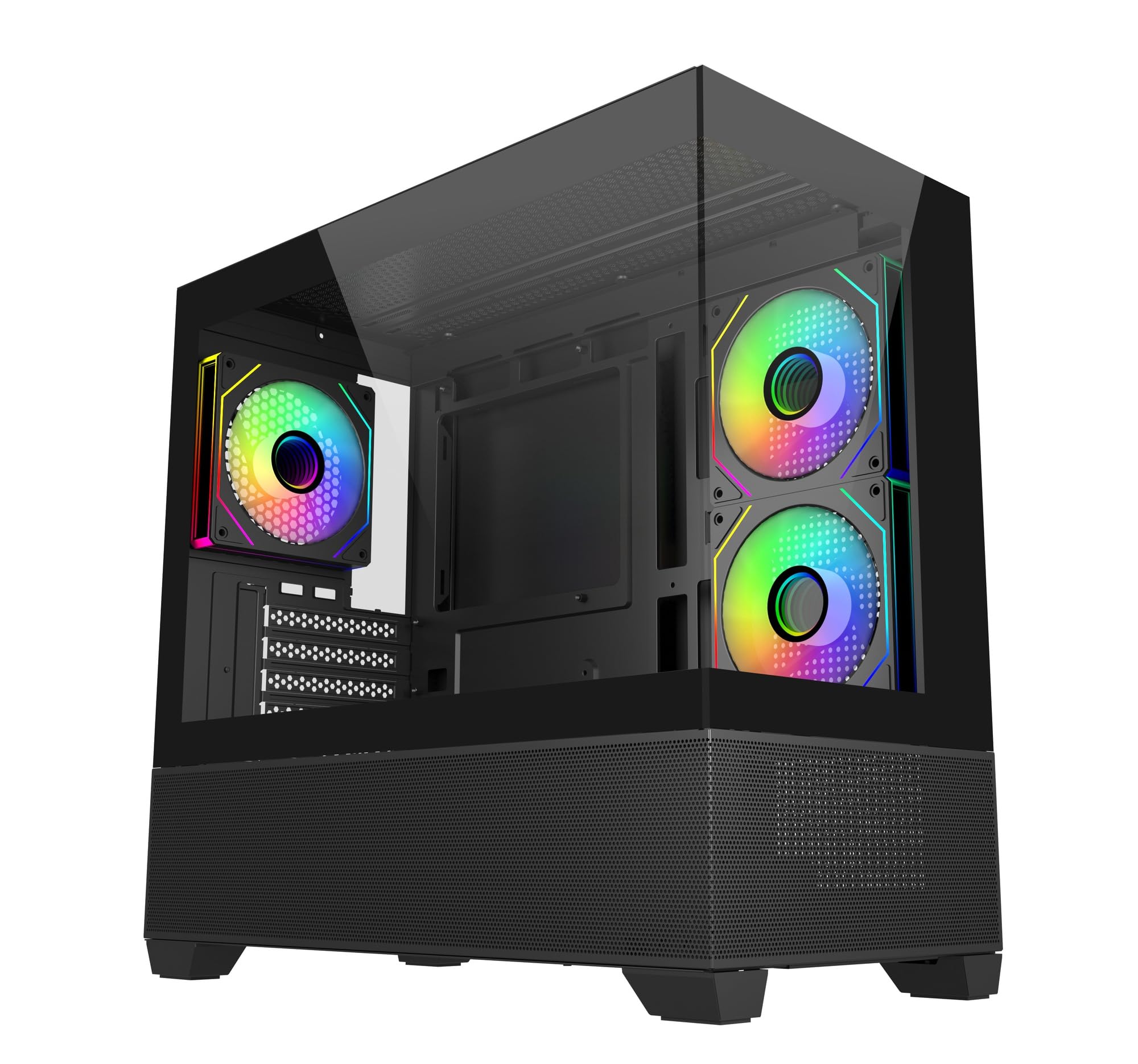
Сүрөт: бурчтуу view of the Cooler Master Elite 490 computer case, showcasing its tempered glass panels and internal components with ARGB lighting.
Негизги өзгөчөлүктөрү:
- 270° Tempered Glass Panels: Dual tempered glass panels with seamless beveled edges provide a wide-angle view сиздин системаңыздан.
- Compact mATX Form Factor: Designed for desks or tight spaces without compromising on cooling or GPU compatibility.
- High-End Radiator Support: Supports up to a 360mm radiator for advanced liquid cooling solutions.
- Вертикалдык муздатуунун конфигурациясы: Accommodates up to 9 fans with a bottom-to-top airflow layout for efficient heat dissipation.
- Алдын ала орнотулган ARGB желдеткичтери: Includes 3 ARGB fans (2 reverse-blade side intake, 1 rear exhaust) with daisy-chain connectors and motherboard sync support.
- Top and Bottom Mesh Ventilation: Large mesh zones ensure unobstructed airflow.
- RTX 50 Series Graphics Card Support: GPU clearance up to 410mm for next-generation graphics cards.
- Жаңыртылган жогорку ылдамдыктагы киргизүү/чыгаруу панели: Features dual USB 3.0 Type-A ports and a USB 3.2 Gen 2x2 Type-C port (up to 20Gbps).
2. Орнотуу жана орнотуу
This section provides general guidelines for assembling your computer components within the Cooler Master Elite 490 case. Always refer to your component manuals for specific installation instructions.
2.1 Таңгактан чыгаруу жана текшерүү
- Кутучаны таңгагынан этияттык менен чыгарыңыз.
- Ташуу учурунда корпустун бузулуу белгилерин текшериңиз. Эгерде кандайдыр бир бузулуу табылса, дароо сатуучуга кайрылыңыз.
- Чыңалган айнек панелдерден бардык коргоочу пленкаларды алып салыңыз.
- Identify the accessory box, which typically contains screws, zip ties, and other mounting hardware.

Сүрөт: алдыңкы view of the Cooler Master Elite 490 case, showing the tempered glass and mesh bottom panel.
2.2 Motherboard орнотуу
- Lay the case on its side.
- Install the I/O shield (if not pre-installed on your motherboard).
- Align your mATX motherboard with the standoffs inside the case. Ensure all standoffs match the motherboard's mounting holes.
- Secure the motherboard with the appropriate screws provided in the accessory kit.

Сүрөт: Ички view of the Elite 490 case highlighting motherboard support for ITX/Micro ATX form factors.
2.3 Электр менен камсыздоо блогун (PSU) орнотуу
- Mount your PSU in the designated bottom compartment.
- PSUну корпустун артындагы бурамалар менен бекитиңиз.
- Route the necessary power cables through the cable management cutouts to the motherboard and other components.
2.4 Видеокартаны жана кеңейтүү картасын орнотуу
- Керектүү PCIe уячасынын капкактарын корпустун арткы бөлүгүнөн алып салыңыз.
- Графикалык картаңызды же башка кеңейтүү карталарын энелик платадагы тиешелүү PCIe уячаларына салыңыз.
- Secure the cards with screws. The Elite 490 supports GPUs up to 410mm in length.

Сүрөт: Ички view of the Elite 490 case demonstrating compatibility with large graphics cards, indicating it is ready for RTX 50 Series GPUs.
2.5 Сактоочу дискти орнотуу
The case provides internal bays for storage drives. Refer to the case diagram for specific mounting locations for 2.5" SSDs and 3.5" HDDs.
2.6 Cooling System Installation (Optional)
The Elite 490 supports various cooling configurations:
- Күйөрмандар: Up to 9 fans can be installed for optimal airflow. The case comes with 3 pre-installed ARGB fans.
- Радиаторлор: 360 мм чейин радиаторлорду колдойт.

Сүрөт: Ички view of the Elite 490 case showing a liquid cooling radiator installed at the top, illustrating high-end radiator support.

Сүрөт: Ички view of the Elite 490 case demonstrating the vertical cooling layout with multiple fans for effective heat management.
2.7 Кабелди башкаруу
Кабелдерди уюштуруу үчүн энелик плата лотогунун артындагы кабелдерди өткөрүү каналдарын жана байлоочу чекиттерди колдонуңуз. Бул аба агымын жана эстетиканы жакшыртат.
3. Иштөө нускамалары
Бардык компоненттер орнотулуп, туташтырылгандан кийин, сиз тутумуңузду иштете аласыз.
3.1 Күйгүзүү
- Бардык тышкы кабелдердин (электр, монитор, перифериялык түзүлүштөр) бекем туташтырылганын текшериңиз.
- Press the power button located on the front I/O panel.
3.2 Front I/O Panel Usage
The front I/O panel provides convenient access to:
- Кубат баскычы: Системаны күйгүзүү же өчүрүү үчүн.
- Калыбына келтирүү баскычы: Системаны кайра иштетүү үчүн.
- USB 3.0 Type-A порттору (x2): USB түзмөктөрүн туташтыруу үчүн.
- USB 3.2 Gen 2x2 Type-C Port (x1): For high-speed data transfer (up to 20Gbps) with compatible devices.
- Аудио уячалары: Наушник жана микрофондор үчүн.

Сүрөт: Жакын план view of the Elite 490's top I/O panel, highlighting the USB 3.2 Gen 2x2 Type-C port and dual USB 3.0 ports.
3.3 ARGB Fan Control
The pre-installed ARGB fans can be controlled via your motherboard's ARGB software (e.g., ASUS Aura Sync, MSI Mystic Light, Gigabyte RGB Fusion, ASRock Polychrome Sync) if connected to a compatible ARGB header. Refer to your motherboard manual for specific software instructions.
4. Техникалык тейлөө
Компьютериңиздин компоненттеринин оптималдуу иштешин жана узак мөөнөттүү иштешин камсыз кылуу үчүн үзгүлтүксүз техникалык тейлөө жүргүзүү керек.
4.1 Чаң чыпкасын тазалоо
The Elite 490 features removable dust filters on the top and bottom panels. Regularly clean these filters to prevent dust buildup and maintain good airflow.
- Gently slide out the dust filters.
- Use compressed air or a soft brush to remove accumulated dust.
- Reinstall the filters securely.
4.2 Тышкы тазалоо
Сырткы беттерди, анын ичинде чыңалган айнек панелдерди жумшак, d менен сүртүңүзamp кездеме. Финишке зыян келтирүүчү абразивдүү тазалагычтардан же эриткичтерден качыңыз.
5. Кыйынчылыктарды
Бул бөлүм сиз кабылышы мүмкүн болгон жалпы көйгөйлөрдү карайт.
5.1 Система күйбөйт
- Check if the power cable is securely connected to both the PSU and the wall outlet.
- PSU которгучу "ON" абалында экенин текшериңиз.
- Алдыңкы панелдин кубат баскычынын кабели эне платасынын F_PANEL башына туура туташтырылганын текшериңиз.
- Confirm that all internal power cables (24-pin ATX, CPU, GPU) are properly seated.
5.2 Fans Are Not Spinning / ARGB Not Lighting Up
- Желдеткичтин кубат кабелдери энелик платанын желдеткич колонкаларына же желдеткич контроллерине бекем туташкандыгын текшериңиз.
- For ARGB lighting, ensure the ARGB cables are connected to a compatible motherboard ARGB header or a dedicated ARGB controller.
- Verify that your motherboard's ARGB software is installed and configured correctly.
5.3 Front I/O Ports Not Functioning
- Ensure the USB and audio cables from the front panel are correctly connected to the corresponding headers on your motherboard.
- Check your motherboard manual for the correct header locations.
6. Техникалык шарттар
Detailed technical specifications for the Cooler Master Elite 490 Computer Case.
| Өзгөчөлүк | Спецификация |
|---|---|
| Бренд | Cooler Master |
| Модель аты | E490 |
| Модель номери | E490-KHNN-S00 |
| Иштин түрү | Ара Tower |
| Motherboard шайкештиги | Micro ATX |
| Өлчөмдөр (D x W x H) | 53.1D x 54.4W x 26.1H Сантиметр |
| Элемент Салмагы | 5800 грамм |
| Коргоочу материал | Алюминий |
| Муздатуу ыкмасы | Аба |
| Алдын ала орнотулган күйөрмандар | 3 ARGB Fans (2 reverse-blade side intake, 1 rear exhaust) |
| Max Fan Support | 9 күйөрманга чейин |
| Max Radiator колдоо | 360 мм чейин |
| GPU тазалоо | 410 мм чейин |
| Total USB 3.0 Ports | 2 |
| USB 3.2 Gen 2x2 Type-C Port | 1 (20 Гбит/сек) |
| Internal Bays Quantity | 3 |
| Other Special Features | Customizable Inter-changeable Panels, 270° Tempered Glass |
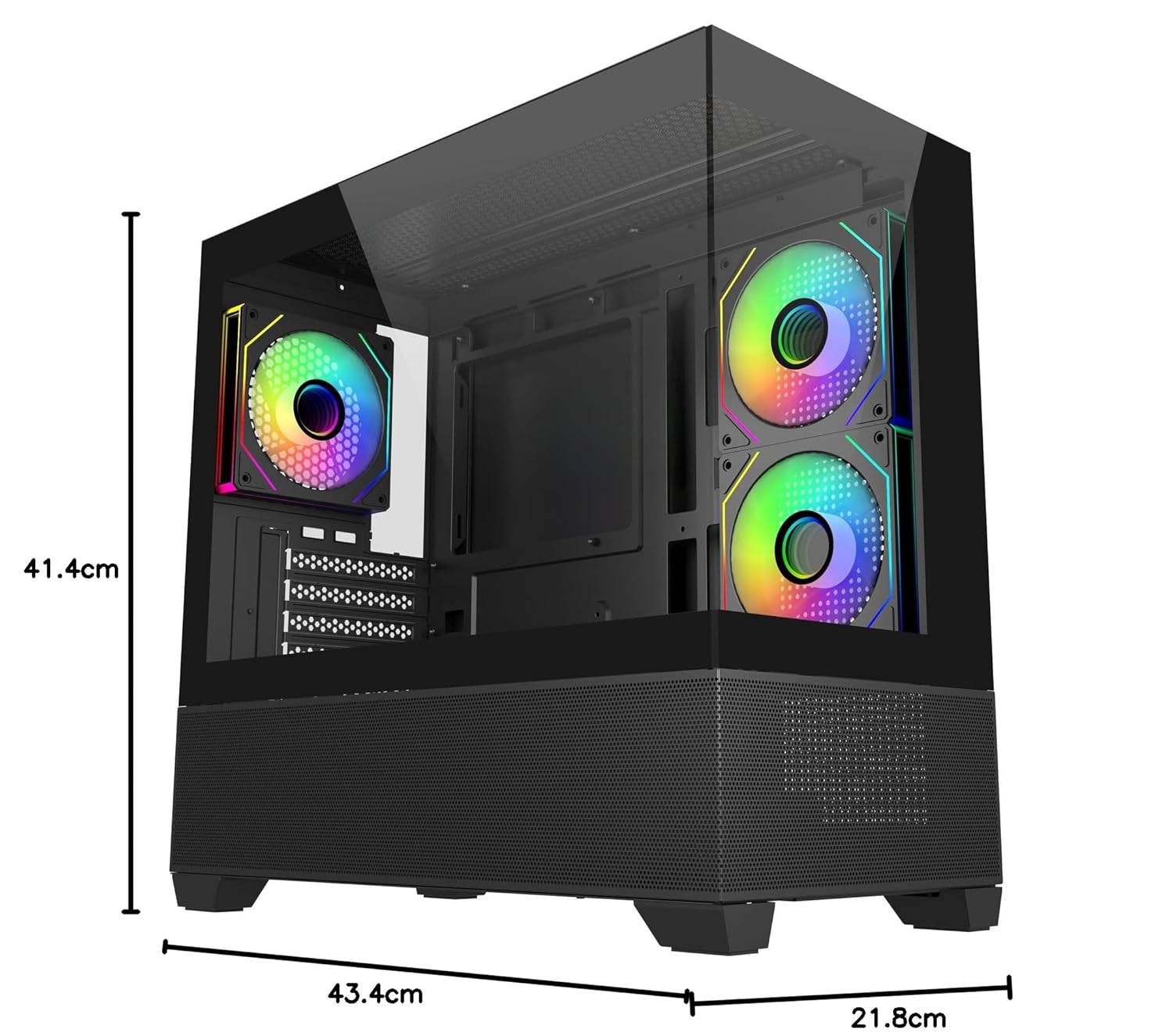
Image: Diagram showing the dimensions of the Cooler Master Elite 490 computer case: 41.4cm height, 43.4cm depth, and 21.8cm width.
7. Кепилдик жана колдоо
7.1 Кепилдик маалыматы
The Cooler Master Elite 490 Computer Case comes with a 2 жыл warranty from the date of purchase. Please retain your proof of purchase for warranty claims.
7.2 Техникалык колдоо
For technical assistance, troubleshooting, or warranty inquiries, please contact Cooler Master support:
- Өндүрүүчү: Cooler Master
- Импорттоочу: Creative New Tech
- Расмий Cooler Masterге барыңыз website for support resources and contact details: www.coolermaster.com