
Introduction
Welcome to your new NIMO 15.6" FHD Laptop N151. This manual provides essential information to help you get started, operate, maintain, and troubleshoot your device. Please read through these instructions carefully to ensure optimal performance and longevity of your laptop.
Жайгашуу
1. Кутудан чыгаруу жана алгачкы текшерүү
Таңгактан бардык буюмдарды этияттык менен алып салыңыз. Төмөнкү компоненттердин бар экенин текшериңиз:
- 1 x Nimo N151 Laptop
- 1 x Type-C 65W PD Fast Charger
- 1 х Колдонуучунун колдонмосу (бул документ)
- Windows 11 Home (pre-installed)
Inspect the laptop for any physical damage. If any components are missing or damaged, contact customer support immediately.
2. Charging the Laptop
Before first use, fully charge your laptop. Connect the provided Type-C 65W PD Fast Charger to the Type-C charging port on your laptop and then to a power outlet. The charge LED indicator will illuminate.

Image: The NIMO laptop connected to its Type-C PD fast charger, illustrating the charging process.
3. Күйгүзүү жана баштапкы орнотуу
Press the power button located on the keyboard. The laptop will boot up and guide you through the initial Windows 11 Home setup process. Follow the on-screen instructions to configure your language, region, network, and user account.
Ноутбугуңузду иштетүү
Дисплей
Your NIMO laptop features a 15.6-inch Full HD (1920x1080) Anti-Glare IPS display. This display offers clear visuals and reduced eye strain, suitable for various tasks from work to entertainment.

Image: The NIMO laptop's 15.6-inch FHD IPS display, highlighting its narrow bezels and vibrant visual capabilities.
Keyboard and Fingerprint Sensor
The laptop is equipped with a backlit keyboard for comfortable typing in various lighting conditions and a numeric keypad for efficient data entry. A fingerprint sensor is integrated for secure and quick login.

Image: Close-up of the NIMO laptop's backlit keyboard, showcasing the fingerprint sensor and numeric keypad.
Webcam
A 2MP webcam is integrated for video calls and online meetings.
Порттор жана байланыш
The NIMO N151 offers a variety of ports for versatile connectivity:
- USB 3.0 порттору: жогорку ылдамдыктагы маалыматтарды берүү үчүн.
- USB 2.0 порт: Перифериялык түзүлүштөрдү туташтыруу үчүн.
- HDMI порту: Тышкы дисплейлерге туташуу үчүн.
- Type-C порттору: One for charging (PD Fast Charger) and one for multifunction use.
- Микро SD карта слоту: Сактагычты кеңейтүү же өткөрүп берүү үчүн files.
- Headphone Combo Jack: Аудио киргизүү/чыгаруу үчүн.
- Kensington Lock Slot: Физикалык коопсуздук үчүн.
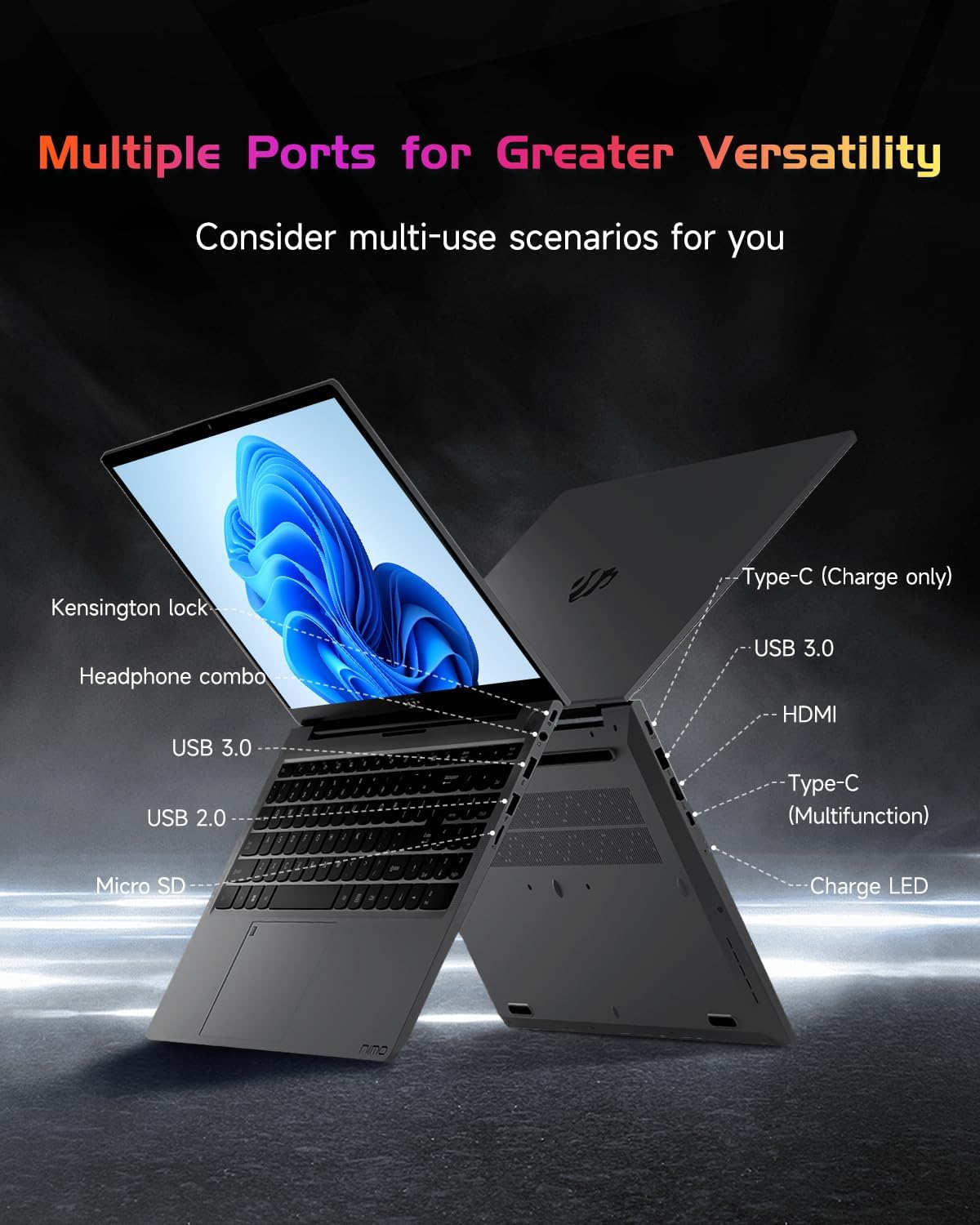
Сүрөт: Капталдагы профессионалfile of the NIMO laptop, displaying its array of ports for diverse connectivity needs.
Stay connected with integrated Wi-Fi 6 for fast wireless internet and Bluetooth 5.2 for connecting wireless accessories.
Процессор жана аткаруу
Powered by the Intel Alder Lake-N100 12th Gen processor, the NIMO N151 delivers reliable performance for multitasking, streaming, and everyday computing tasks. It comes with 16GB DDR4 RAM and a 256GB PCIe SSD for fast startups and seamless operation.

Image: A visual representation of the Intel Alder Lake-N100 12th Gen processor, highlighting its role in the laptop's performance.
Операция системасы
The laptop comes pre-installed with Windows 11 Home, offering a modern and intuitive user experience.
Техникалык тейлөө
Жалпы кам көрүү
- Ноутбукту таза, кургак чөйрөдө, өтө жогорку температурадан алыс кармаңыз.
- Avoid spilling liquids on the keyboard or screen.
- Экранды жана сыртын тазалоо үчүн жумшак, мамыксыз чүпүрөктү колдонуңуз. Күчтүү химиялык заттарды колдонбоңуз.
- Аба желдеткичтерин тоспостон, туура вентиляцияны камсыз кылыңыз.
Батареяга кам көрүү
Батареянын иштөө мөөнөтүн узартуу үчүн, батареянын тез-тез толук зарядын жоготуп алуудан алыс болуңуз. Мүмкүн болсо, батареянын зарядын 20% жана 80% ортосунда кармоо сунушталат.
Проблемаларды чечүү
Жалпы маселелер жана чечимдер
- Ноутбук күйбөйт: Ensure the charger is properly connected and the battery has sufficient charge. Try holding the power button for 10-15 seconds to perform a hard reset.
- Экран бош: Көйгөй дисплейде экенин текшерүү үчүн тышкы мониторду туташтырыңыз. Ноутбукту өчүрүп-күйгүзүңүз.
- Wi-Fi туташуу көйгөйлөрү: Windows жөндөөлөрүндө Wi-Fi иштетилгенин текшериңиз. Роутериңизди жана ноутбукту өчүрүп күйгүзүңүз.
- Жай аткаруу: Close unnecessary applications, check for malware, and ensure Windows is up to date.
For persistent issues, refer to the online support resources or contact NIMO customer service.
Техникалык шарттар
| Өзгөчөлүк | Деталь |
|---|---|
| Бренд | NIMO |
| Модель аты | Nimo N151 |
| Screen Size | 15.6 дюйм |
| Screen Resolution | 1920 x 1080 пиксел (FHD) |
| Процессор | Intel Pentium Quad Core N100 (up to 3.4 GHz) |
| RAM | 16 ГБ DDR4 |
| Memory Speed | 3200 МГц |
| Катуу диск | 256 ГБ SSD (PCIe) |
| Графикалык сопроцессор | Интегралдык графика |
| Операция системасы | Windows 11 Home |
| Зымсыз түрү | 802.11a/b/g/n/ac (Wi-Fi 6) |
| Bluetooth | Bluetooth 5.2 |
| USB 2.0 порттору | 1 |
| USB 3.0 порттору | 3 |
| Батареянын орточо иштөө мөөнөтү | 5 саат |
| Элемент Салмагы | 3.8 фунт |
| Продукциянын өлчөмдөрү | 14.07 x 8.98 x 0.76 дюйм |
| Өзгөчөлүктөр | Backlit Keyboard, Fingerprint Reader, HD Audio, Memory Card Slot, Numeric Keypad |
Кепилдик жана колдоо
Your NIMO laptop is covered by a 2 жылдык Өндүрүүчүнүн Кепилдиги, ensuring peace of mind for your purchase. Additionally, NIMO offers a 90-Day Hassle-Free Return Policy.
For technical assistance, warranty claims, or returns, please contact NIMO customer support through their official channels. Refer to the contact information provided with your product or on the NIMO webсайт.
Продукт видеолору
Watch these official videos for a comprehensive overview and demonstration of your NIMO laptop's features.
NIMO 15.6 Laptop Comprehensive Introduction
Video: A detailed introduction to the NIMO 15.6" FHD Laptop, showcasinанын дизайны жана негизги функциялары.
NIMO Laptop: Perfect for Work and Study, Anytime, Anywhere
Video: This video highlights the NIMO laptop's versatility for both work and study environments, emphasizing its portability.
NIMO 15.6 FHD Laptop for Students Home Work
Video: A demonstration of the NIMO 15.6" FHD Laptop's suitability for students and home-based work tasks.
Efficiency Meets Convenience: Nimo Laptop
Video: This video showcases the NIMO laptop's efficiency and convenient features for daily use.
NIMO Laptop UGC
Video: User-generated content featuring the NIMO laptop, demonstrating real-world usage scenarios.
NIMO 15.6 FHD Laptop Promotion Video
Video: A promotional video for the NIMO 15.6" FHD Laptop, showcasing анын өзгөчөлүктөрү жана артыкчылыктары.