
bemi KIX-M
bemi Smartwatch Fitness Tracker User Manual
Model: KIX-M (B0FCYD6VV2)
Introduction
This manual provides detailed instructions for the setup, operation, and maintenance of your bemi Smartwatch Fitness Tracker. Please read this manual thoroughly before using the device to ensure proper functionality and to maximize your user experience.
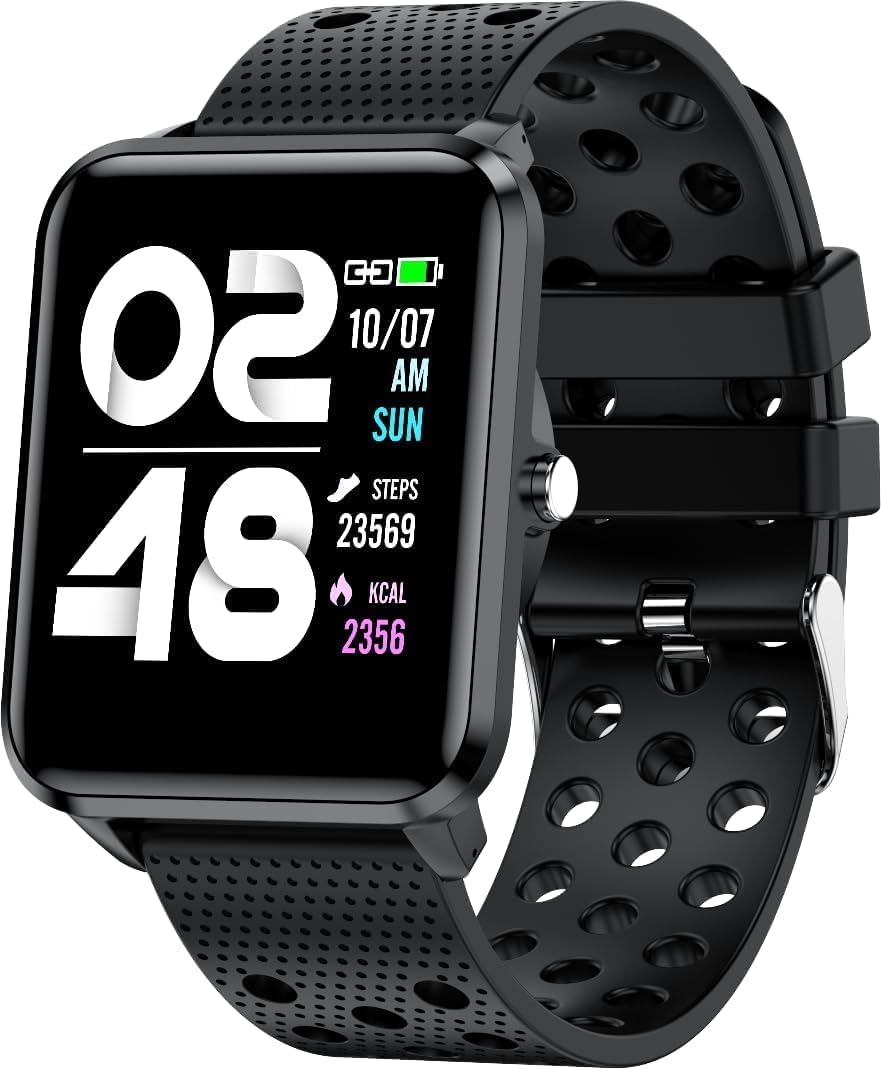
Сүрөт: алдыңкы view of the bemi Smartwatch, showing the digital display with time, date, steps, and calories burned. The watch has a black perforated silicone band.
Кутуда эмне бар
- Kix-m Smartwatch
- USB Cable (Charging Cable)
- Колдонуучунун колдонмосу
- Белек куту
Жайгашуу
1. Акылдуу саатты заряддоо
Before first use, fully charge your smartwatch. Connect the provided USB charging cable to the magnetic charging points on the back of the watch and to a USB power source. The watch display will indicate charging status.

Сүрөт: Арткы view of the bemi Smartwatch, highlighting the magnetic charging contacts and the optical heart rate sensor.
2. Companion колдонмосун орнотуу
The smartwatch operates with the "H Band" application. Download the app from the App Store (for iOS devices) or Google Play Store (for Android devices).
- Издөө "H Band" in your device's app store.
- Тиркемени жүктөп алып, орнотуңуз.
- Смартфонуңуздун Bluetooth иштетилгенин текшериңиз.
3. Pairing the Smartwatch with Your Phone
- Open the "H Band" app on your smartphone.
- Аккаунт түзүү же кирүү үчүн экрандагы көрсөтмөлөрдү аткарыңыз.
- Колдонмонун ичиндеги түзмөктү жупташтыруу бөлүмүнө өтүңүз.
- Select your bemi Smartwatch from the list of available devices. The app will guide you through the pairing process.
- Суралса, телефонуңузда да, акылдуу саатыңызда да жупташтыруу өтүнүчүн ырастаңыз.
Note: The smartwatch is compatible with Android (4.4 or newer) and iOS (8.0 or newer) operating systems.
Иштөө нускамалары
Негизги навигация
- Сенсордук экран: Менюларды жана функцияларды чабыттоо үчүн солго/оңго, өйдө/ылдый сүрүңүз. Тандоо үчүн таптаңыз.
- Каптал баскычы: Press to wake the screen, return to the home screen, or confirm selections.
Негизги өзгөчөлүктөрү жана функциялары
Ыңгайлаштырылган саат жүздөрү
Choose from 24 clock faces available in the "H Band" application. You can also set a photo from your phone as the watch face.

Image: The smartwatch screen showing different digital and analog watch face designs, indicating customization options available through the app.
Активдүүлүккө көз салуу
The smartwatch monitors your steps, distance, and calories burned. All activity data is recorded and can be viewed in the "H Band" app.

Image: A person running outdoors with the bemi Smartwatch visible on their wrist, showing the step tracking interface with current steps, distance, and calories.
Жүрөктүн кагышын жана кандагы кычкылтектин мониторинги
The watch provides 24-hour monitoring of pulse and blood oxygen levels. View саат боюнча реалдуу убакыт дайындары же колдонмодогу деталдуу тарыхый маалыматтар.

Image: A close-up of the smartwatch screen showing heart rate (BPM) and blood pressure (mmHg) readings with a graph of historical data.
Уйкунун мониторинги
Track your sleep patterns, including deep sleep, light sleep, and awake times. The app provides detailed analysis of your sleep quality.

Image: The "H Band" app interface displaying sleep quality data, including total sleep duration, deep sleep, light sleep, and awake times, with a corresponding graph.
Музыканы ойнотуу
The KIX-M features a built-in audio player with 512MB of internal memory. You can store music directly on the watch and connect Bluetooth headphones or speakers for wireless listening.

Image: The bemi Smartwatch showing its music player interface with play/pause and skip controls, alongside a pair of wireless earbuds, demonstrating its audio capabilities.
Эскертмелер
Receive notifications for calls, messages, and various applications directly on your smartwatch. Configure notification settings within the "H Band" app.

Image: The smartwatch screen showing an incoming message notification, with icons for various social media and communication apps like SMS, Twitter, WeChat, Skype, YouTube, Facebook, Google+, Instagram жана LinkedIn.
Башка акылдуу өзгөчөлүктөр
- 10 Спорт режимдери: Track specific workouts like running, cycling, and more.
- Кыймыл эстеткич: Get alerts to move if you've been sedentary for too long.
- Special Mode for Women: Track menstrual cycles and ovulation.
- Камераны башкаруу: Телефонуңуздун камерасын алыстан башкарыңыз.
- Ойготкуч: Ойготкучтарды түздөн-түз сааттан же колдонмодон орнотуңуз.
- Секундомер жана таймер: Убакытты эсептөөнүн негизги функциялары.
- Телефонду табуу: Жупташкан смартфонуңузду табыңыз.
- GPS Position Tracking: Requires carrying your phone with you for GPS data.

Image: The "H Band" app interface displaying the female health tracking calendar, allowing users to log menstrual periods and predict ovulation.
Техникалык тейлөө
Акылдуу саатыңызды тазалоо
Regularly clean your smartwatch and band to prevent skin irritation and maintain device performance.
- Сааттын экранын жана корпусун жумшак, түксүз чүпүрөк менен сүртүңүз.
- Кежир тактар үчүн, гampчүпүрөктү бир аз суу менен. Катуу химиялык заттарды же абразивдүү материалдарды колдонуудан алыс болуңуз.
- Туташуунун жакшы болушун камсыз кылуу үчүн заряддоочу контакттарды мезгил-мезгили менен тазалап туруңуз.
Сууга туруктуулук (IP68)
The smartwatch is IP68 waterproof, meaning it is resistant to dust and can withstand immersion in water up to 1.5 meters for up to 30 minutes. It is suitable for daily use, hand washing, and light rain. Avoid hot water, steam, or prolonged immersion in water, especially saltwater.

Image: The bemi Smartwatch with water splashing over its screen and band, illustrating its IP68 water resistance rating.
Батареяга кам көрүү
- Биринчи жолу колдонуудан мурун батарейканы толук кубаттаңыз.
- Батареяны бат-баттан толук түгөтүп коюудан алыс болуңуз.
- Эгерде түзмөк көпкө колдонулбаса, аны салкын, кургак жерде сактаңыз.
Проблемаларды чечүү
| Көйгөй | Мүмкүн себеп | Чечим |
|---|---|---|
| Саат күйбөй жатат | Батарея аз | Саатты жок дегенде 30 мүнөткө заряддаңыз. |
| Телефон менен жупташтыруу мүмкүн эмес | Bluetooth off, app not open, watch not discoverable, phone OS not compatible | Ensure Bluetooth is on. Open "H Band" app. Restart watch and phone. Check OS compatibility (Android 4.4+/iOS 8.0+). |
| Inaccurate health data (HR, SpO2) | Improper fit, sensor obstruction, movement during measurement | Ensure watch is snug but comfortable on wrist. Clean sensor. Remain still during measurement. |
| Билдирмелер алынган жок | App permissions, notification settings, Bluetooth disconnected | Check app permissions for notifications. Verify notification settings in "H Band" app. Ensure watch is connected via Bluetooth. |
| Экран жооп бербейт | Software glitch, low battery | Restart the watch (if possible). Charge the watch. |
Техникалык шарттар
| Өзгөчөлүк | Деталь |
|---|---|
| Модел | KIX-M |
| Screen Size | 1.5 дюйм |
| Дисплей түрү | Сенсордук экран |
| Суу каршылык | IP68 |
| Байланыш | Bluetooth (Dual Bluetooth module) |
| Ички эс тутум | 512 MB (for music storage) |
| Батарея сыйымдуулугу | 200 миллионamp Саат (мАч) |
| Операция системасы | ROTS |
| Шайкеш OS | Android 4.4+ / iOS 8.0+ |
| Сенсорлор | Heart Rate Monitor, Blood Oxygen Sensor, Accelerometer |
| Өзгөчөлүктөрү | Activity Tracker, Sleep Tracking, Pedometer, Calorie Tracker, Music Player, Notifications, Gesture Control, 10 Sport Modes, Female Health Tracking, Camera Control, Alarm, Stopwatch, Timer, Find Phone, GPS via Smartphone |
| Элемент Салмагы | 4.4 унция |
| Өлчөмдөр | 5.35 x 2.64 x 2.44 дюйм (Пакеттин өлчөмдөрү) |
Кепилдик жана колдоо
For warranty information and technical support, please refer to the contact details provided with your purchase or visit the official bemi webсайт. Ар кандай кепилдик дооматтары үчүн сатып алганыңыздын далилин сактаңыз.
Note: The manufacturer is Minrek.
Ask a question about this manual
Ask about setup, troubleshooting, compatibility, parts, safety, or missing instructions. Manuals+ will review the question and use this page’s manual context to help answer it.