
1. Киришүү
This manual provides essential information for the safe operation and maintenance of your SuperRC V666 Drone with Camera. Please read it thoroughly before first use to ensure proper setup and to maximize your flying experience. The V666 drone features a brushless motor, optical flow positioning, and an HD 180° adjustable camera, designed for both beginner and adult users.
2. Коопсуздук чаралары
- Учуу чөйрөсү: Ачык жерлерде, адамдардан, жаныбарлардан, имараттардан жана электр зымдарынан алыс учуңуз. Катуу шамалда же жагымсыз аба ырайында учуудан алыс болуңуз.
- Батареянын коопсуздугу: Use only the provided batteries and charging cable. Do not overcharge or puncture batteries. Discontinue use if batteries show signs of damage or swelling.
- Пропеллердин коопсуздугу: Колдоруңузду, бетиңизди жана кенен кийимдериңизди айлануучу пропеллерлерден алыс кармаңыз. Учуудан мурун пропеллерлердин бекем бекитилгенин текшериңиз.
- Көрүү сызыгы: Учуу учурунда дрондун көрүү сызыгын дайыма сактаңыз.
- Жашы боюнча сунуш: Бул продукт 14 жаштан жогорку колдонуучулар үчүн ылайыктуу.
- Интерференция: Avoid flying near strong electromagnetic interference sources.
- Бир нече дрондор: When operating multiple drones simultaneously, power on and pair each drone and its remote control separately to prevent frequency conflicts.
3. Пакеттин мазмуну
Төмөндө тизмеленген нерселердин баары пакетиңизге камтылганын текшериңиз:
Сүрөт: бүттүview of the SuperRC V666 Drone package contents, showing the drone, remote control with screen, two batteries, spare propellers, screwdriver, USB charging cable, card reader, and memory card.
- SuperRC V666 Drone
- Remote Control with Integrated Screen
- 2 x Lithium Ion Batteries (1000mAh each)
- Запастык пропеллер
- Пропеллердин сакчылары
- Кол сумка
- Микро-USB Cable
- Screwdriver
- Card Reader
- Эстутум картасы
4. Компонентти идентификациялоо
4.1 Дрондун үстүнөн учууview
Сүрөт: деталдуу view of the SuperRC V666 Drone, showing the main body, camera, and protected propellers.
Familiarize yourself with the drone's key components:
- Камера: Front-mounted, 180° manually adjustable HD camera.
- Пропеллер: Four propellers with protective guards.
- Brushless Motors: Provide stable and powerful flight.
- Батарея бөлүмү: Located on the drone's body.
- Кубат баскычы: For turning the drone on/off.
- Body Light: Integrated lighting for visibility.
4.2 Алыстан башкарууview
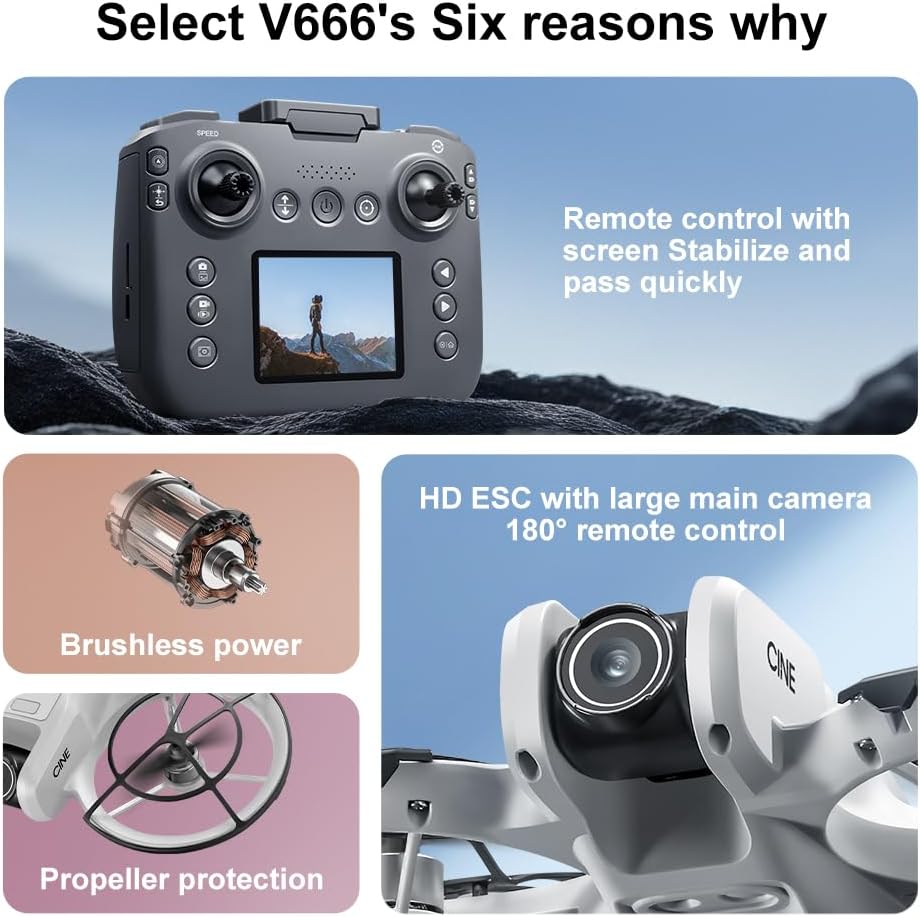
Image: The remote control for the SuperRC V666 Drone, featuring a central display screen, dual joysticks, and multiple control buttons.
алыстан башкаруу өзгөчөлүктөрү:
- Джойстиктер: Left for throttle/yaw, right for pitch/roll.
- Интеграцияланган экран: Displays flight information and live camera feed.
- Кубат баскычы: Алыстан башкаруу пультун күйгүзүү/өчүрүү үчүн.
- Бир баскычтуу учуп-конуу баскычы: Автоматтык түрдө учууну же конууну баштайт.
- Ылдамдыкты жөндөө баскычы: Ар кандай учуу ылдамдыктарынын ортосунда которулат.
- Сүрөт/Видео баскычтары: For capturing images and recording video.
- Кесүү баскычтары: For fine-tuning drone stability.
5. Орнотуу
5.1 Батареяны орнотуу жана заряддоо
- Insert the fully charged Lithium Ion battery into the drone's battery compartment. Ensure it clicks into place securely.
- To charge the battery, connect it to the Micro-USB cable and then to a USB power source (e.g., computer, USB wall adapter). The charging indicator will show the charging status.
- Charge the remote control battery using its dedicated charging port and cable.
5.2 Пропеллерди орнотуу
The drone comes with propeller guards pre-installed. If you need to replace propellers:
- Identify the correct propeller type (A or B) for each motor. Propellers are typically marked.
- Align the propeller with the motor shaft and press down firmly until it is secure.
- Ensure all propellers rotate freely without obstruction.
5.3 Дронду жана пультту жупташтыруу

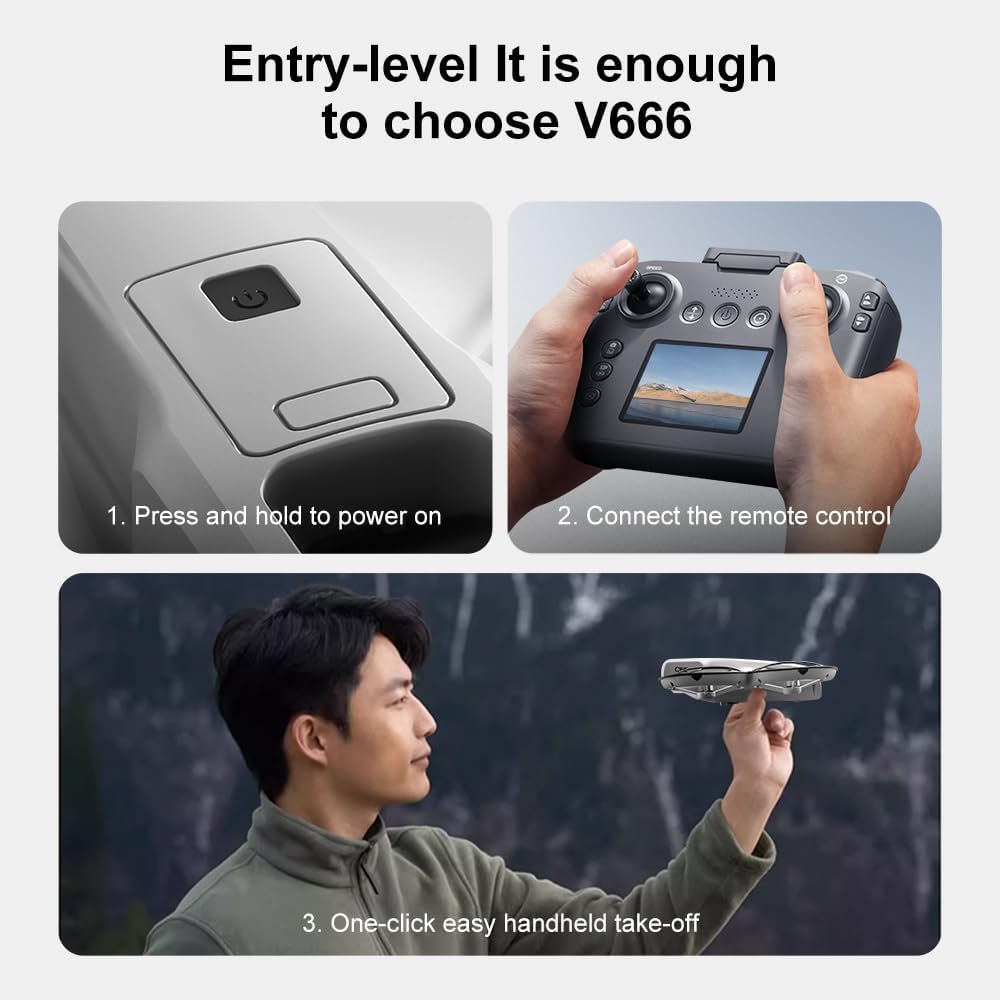
Image: Visual guide demonstrating the steps for powering on the drone, connecting the remote control, and initiating a one-click handheld take-off.
- Дронду тегиз, тегиз жерге орнотуңуз.
- Press and hold the power button on the drone until its indicator lights turn on.
- Алыстан башкарууну күйгүзүңүз.
- The drone and remote control will automatically attempt to pair. Once paired, the drone's indicator lights will become solid.
- Эскертүү: If operating multiple drones, power on and pair each drone and its remote control individually to avoid signal interference.
6. Иштөө нускамалары
6.1 Учууну башкаруунун негизги каражаттары
- Сол жактагы джойстик (дроссель/жаңылоо):
- Push up/down: Increase/decrease altitude (Throttle).
- Push left/right: Rotate drone left/right (Yaw).
- Оң джойстик (Тепкич/Толкун):
- Push up/down: Move drone forward/backward (Pitch).
- Push left/right: Move drone left/right (Roll).
- Ылдамдыкты жөндөө: Press the speed button on the remote to cycle through different flight speeds (e.g., low, medium, high).
6.2 One-Key Functions
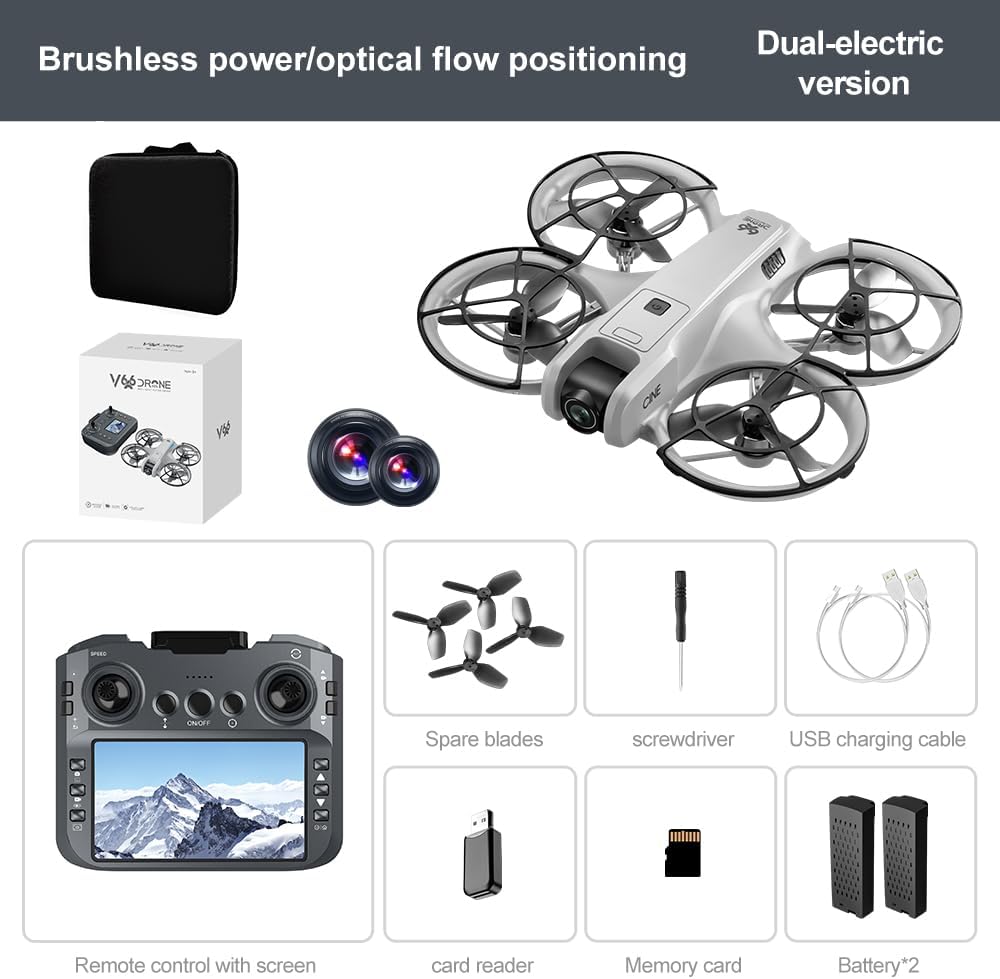
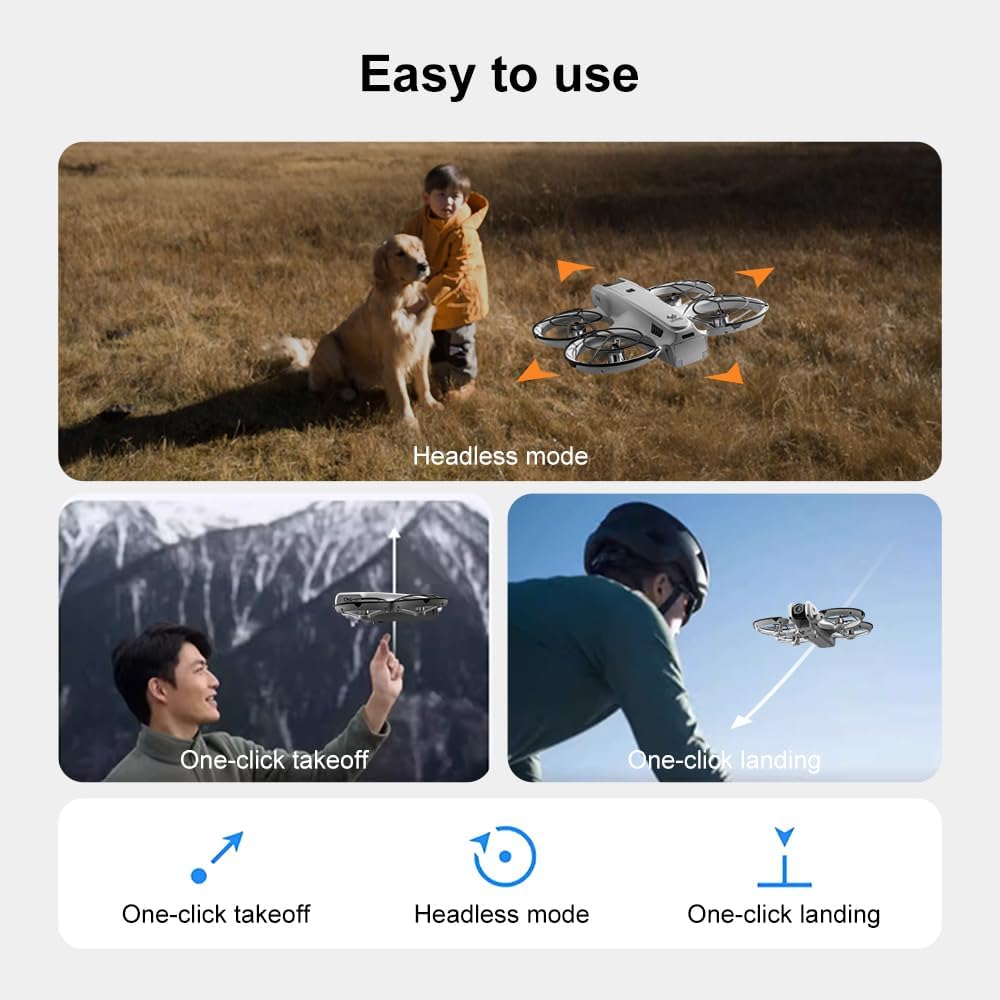
Image: Visual representation of the drone's Headless Mode, One-Click Take-off, and One-Click Landing functionalities.
- Бир баскычтуу учуу: Press the designated button once, and the drone will automatically ascend to a stable hovering height.
- Бир ачкыч конуу: Press the designated button once, and the drone will automatically descend and land gently.
- Бир ачкыч менен кайтаруу: Activates the drone's return-to-home function. The drone will attempt to return to its take-off point.
6.3 Башсыз режим
In Headless Mode, the drone's orientation is relative to the pilot, regardless of which way the drone's front is facing. This simplifies control for beginners.
6.4 Жаңсоолорду башкаруу
The drone supports gesture-based photo and video capture. Perform specific hand gestures in front of the camera to trigger these functions during flight.
6.5 Камеранын иштеши
- Камеранын бурчун тууралоо: The camera lens can be manually adjusted 180° before flight to achieve the desired viewбурч.
- Сүрөт/Видео тартуу: Сүрөткө тартуу же видео жаздырууну баштоо/токтотуу үчүн алыстан башкаруу пультундагы атайын баскычтарды колдонуңуз.
- Тирүү жем: The integrated screen on the remote control provides a real-time view from the drone's camera via Wi-Fi connectivity.
- Сактагыч: Captured photos and videos are saved to the inserted memory card.
7. Техникалык тейлөө
- Тазалоо: Use a soft, dry cloth to clean the drone and remote control. Avoid using solvents or harsh chemicals.
- Пропеллерди алмаштыруу: If propellers are damaged, replace them with spare parts using the provided screwdriver. Ensure correct propeller type (A or B) is used for each motor.
- Сактагыч: Store the drone and its components in a cool, dry place, away from direct sunlight and extreme temperatures. Remove batteries if storing for extended periods.
8. Кыйынчылыктарды
| Көйгөй | Мүмкүн себеп | Чечим |
|---|---|---|
| Дрон күйбөйт | Батарея заряддалган эмес же туура эмес орнотулган. | Батарея толук заряддалганын жана туура салынганын текшериңиз. |
| Drone fails to pair with remote control | Remote control not powered on, or pairing sequence incorrect. | Ensure both devices are powered on. Follow pairing steps (Section 5.3). Avoid multiple drones pairing simultaneously. |
| Учуу учурунда учкучсуз учат | Not calibrated on a flat surface, or environmental factors. | Ensure drone is placed on a flat surface before take-off. Perform calibration if available (refer to remote control instructions). Avoid strong winds. |
| Poor camera image quality or no live feed | Weak Wi-Fi signal, camera lens dirty, or memory card issue. | Ensure drone is within Wi-Fi range. Clean camera lens. Check memory card for proper insertion and sufficient space. |
| Кыска учуу убактысы | Battery not fully charged, or battery degradation. | Fully charge batteries before each flight. Consider replacing old batteries if performance significantly degrades. |
9. Техникалык шарттар
| Өзгөчөлүк | Деталь |
|---|---|
| Бренд | SuperRC |
| Модель аты | V666 |
| Түс | Боз |
| Элемент Салмагы | 0.2 килограмм (болжол менен 7 унция) |
| Продукциянын өлчөмдөрү | 7"L x 6"W x 2"H |
| Skill Level | Beginner |
| Мотор түрү | Brushless Motor |
| Камера | HD 180° Manually Adjustable |
| Видео тартуунун резолюциясы | 720p |
| Видео тартуу форматы | MP4 |
| Байланыш технологиясы | Wi-Fi, Radio Frequency |
| Оптикалык сенсор технологиясы | Оптикалык агым, CMOS |
| Батарея түрү | Литий ион |
| Батарея сыйымдуулугу | 1000 мАч |
| Башкаруу түрү | Алыстан башкаруу |
| Өзгөчөлүктөр | Adjustable Camera, One Button Return, One Key Rotation, Rechargeable, Speed Adjustment, Optical Flow Positioning |
10. Кепилдик жана колдоо
For warranty information or technical support, please refer to the documentation included with your purchase or contact SuperRC customer service directly. Keep your proof of purchase for any warranty claims.
Кошумча жардам алуу үчүн, сиз иш сапары менен болот SuperRC Store on Amazon.