
KOFIRE UG-09
KOFIRE UG-09 зымсыз оюн гарнитурасы
User Manual
Introduction
This manual provides detailed instructions for the setup, operation, maintenance, and troubleshooting of your KOFIRE UG-09 Wireless Gaming Headset. Please read this manual thoroughly before using the product to ensure optimal performance and longevity.

Image: The KOFIRE UG-09 Wireless Gaming Headset displayed with its charging cable, detachable microphone, and USB/Type-C 2-in-1 transmitter.
Пакеттин мазмуну
Пакетиңизде бардык буюмдар бар экенин текшериңиз:
- 1 x KOFIRE Wireless Gaming Headset (Model: UG-09)
- 1 x USB & Type-C 2-in-1 Transmitter
- 1 x Type-C заряддоо кабели
- 1 ырдыбандарды Наушник х
- 1 x 3.5 мм аудио кабель
- 1 х Колдонуучунун колдонмосу (бул документ)
Продукт бүттүview
Гарнитураңыздын компоненттери жана башкаруу элементтери менен таанышыңыз.
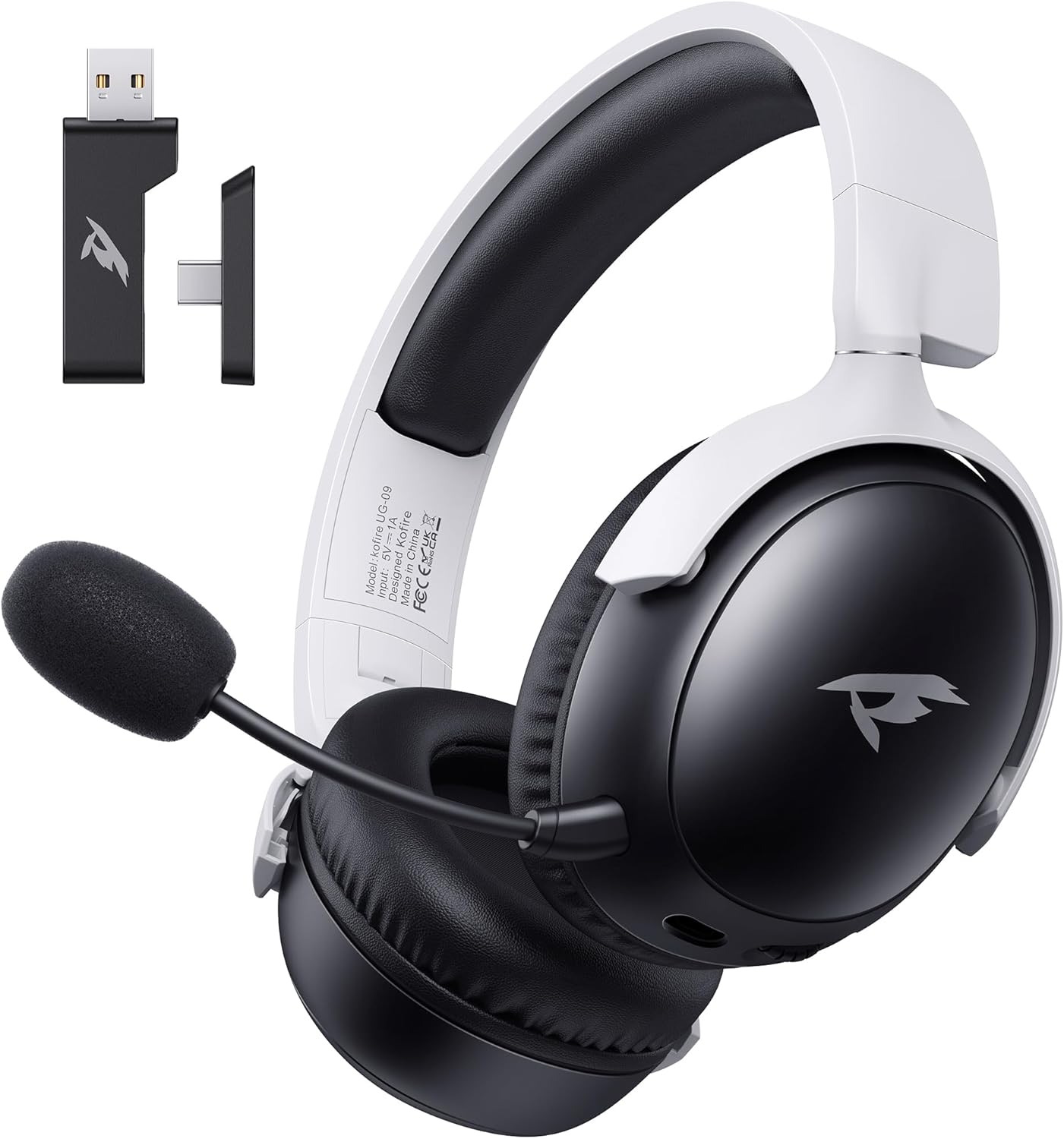
Сүрөт: алдыңкы view of the KOFIRE UG-09 Wireless Gaming Headset in black and white, showing the detachable microphone and the USB/Type-C 2-in-1 transmitter.
Негизги өзгөчөлүктөрү:
- Көп режимдүү байланыш: 2.4GHz Wireless, Bluetooth 5.4, and 3.5mm Wired options.
- Батареянын узак иштөө мөөнөтү: 65 саат ойноо убактысына чейин.
- 53 мм динамикалык драйверлер: For immersive 3D stereo sound.
- ENC Noise-Canceling Microphone: Detachable and omnidirectional for clear communication.
- Эргономикалык дизайн: Lightweight with rotatable ear cups, adjustable headband, and soft memory foam cushions for comfort.
Орнотуу нускамалары
1. Гарнитураны заряддоо
Before first use, fully charge the headset. Connect the supplied Type-C charging cable to the headset's charging port and the other end to a USB power source (e.g., computer USB port, USB wall adapter). The LED indicator will show charging status. A full charge takes approximately 2-2.5 hours. The headset supports simultaneous charging and use.
2. 2.4 ГГц зымсыз (USB Dongle) аркылуу туташууда
This mode offers ultra-low latency (≤20ms) for gaming on compatible devices like PC, Mac, PS4, PS5, and Nintendo Switch (audio only).
- Insert the USB & Type-C 2-in-1 transmitter into an available USB-A or USB-C port on your device.
- Гарнитурадагы кубаттуулук.
- Press and hold the microphone button on the headset to switch to 2.4G mode. You will hear an audio prompt "dongle mode."
- On your connected device, navigate to sound settings and select "Kofire UG-09" as the audio output/input device to complete pairing.

Image: Illustration of the 2.4GHz wireless connection, showing the USB dongle plugged into a gaming handheld device, emphasizing stable and low-latency performance.
3. Bluetooth 5.4 аркылуу туташуу
Use Bluetooth for mobile devices such as phones, tablets, and Nintendo Switch (audio only).
- Гарнитурадагы кубаттуулук.
- Press and hold the microphone button for 3 seconds to switch to Bluetooth mode. You will hear an audio prompt "Bluetooth mode." The LED indicator will flash, indicating pairing mode.
- On your mobile device, go to Bluetooth settings and search for "Kofire UG-09." Select it to complete the pairing process.

Image: Depicts the versatility of the headset, showing one user connected via Bluetooth to a phone and another connected wirelessly to a PC, highlighting dual connectivity options.
4. 3.5 мм зым аркылуу туташуу
For universal compatibility or when the battery is depleted, use the 3.5mm audio cable.
- 3.5 мм аудио кабелдин бир учун гарнитуранын 3.5 мм уячасына туташтырыңыз.
- Connect the other end to the 3.5mm audio port on your gaming device or console.
- Гарнитура автоматтык түрдө зымдуу режимге өтөт.
Эскертүү: The microphone function is not supported on Nintendo Switch when using any wireless mode. For Xbox, only wired mode is supported.
Иштөө нускамалары
Күйгүзүү/өчүрүү
- Күйгүзүү: LED индикатору күйгүчө Power баскычын басып, кармап туруңуз.
- Өчүрүү: LED индикатору өчмөйүнчө Кубат баскычын басып, кармап туруңуз.
Үндү көзөмөлдөө
- Көлөмүн жогорулатуу: Rotate the volume wheel upwards.
- Көлөмдү азайтуу: Rotate the volume wheel downwards.
Микрофонду колдонуу
The headset features a detachable ENC (Environmental Noise Canceling) omnidirectional microphone.
- Attach/Detach: Insert the microphone into the dedicated port on the left earcup or remove it when not needed.
- Үнсүз/Ачуу: Press the dedicated microphone mute button for one-touch muting. The LED indicator on the microphone will show its status.

Сүрөт: деталдуу view of the ENC noise reduction microphone, highlighting its internal components and detachable design for clear voice transmission.
Mode Switching
To switch between 2.4GHz wireless and Bluetooth modes, press and hold the microphone button for approximately 3 seconds until you hear the corresponding audio prompt ("dongle mode" or "Bluetooth mode").
Батареянын иштөө мөөнөтү жана эскертүүлөр
The headset provides up to 65 hours of playtime in Bluetooth mode (microphone off) and 50 hours in 2.4GHz dongle mode (microphone on). A low battery alert will notify you when recharging is needed.
Техникалык тейлөө
Тазалоо
- Гарнитураны жумшак, кургак чүпүрөк менен сүртүңүз.
- Катуу химиялык заттарды, тазалоочу эриткичтерди же күчтүү жуучу каражаттарды колдонбоңуз.
- Ensure no moisture enters the earcups or control buttons.
Сактагыч
- Гарнитураны күн нурунан жана экстремалдык температурадан алыс салкын, кургак жерде сактаңыз.
- When storing for extended periods, ensure the headset is partially charged (around 50%) to preserve battery health.
- The rotatable and foldable ear cups allow for compact storage.

Image: Illustrates the ergonomic design elements of the headset, including rotatable earcups, soft sponge cushioning, adjustable angle, and a retractable headband for comfortable wear and storage.
Батареяга кам көрүү
- Батареяны бат-баттан толук кубаттап калуудан алыс болуңуз.
- Батареяны жогорку температурага калтырбаңыз.
- Берилген заряддоо кабелин же тастыкталган эквивалентти гана колдонуңуз.
Проблемаларды чечүү
| Көйгөй | Мүмкүн себеп | Чечим |
|---|---|---|
| Гарнитурадан үн жок. |
|
|
| Микрофон иштебей жатат. |
|
|
| Зымсыз туташуу мүмкүн эмес. |
|
|
| Гарнитура кубатталбай жатат. |
|
|

Image: Illustrates the universal compatibility of the headset with a range of gaming and mobile devices, including PlayStation consoles, PC, Mac, Nintendo Switch, and smartphones.
Техникалык шарттар
| Өзгөчөлүк | Деталь |
|---|---|
| Модель аты | УГ-09 |
| Байланыш технологиясы | 2.4 ГГц зымсыз, Bluetooth 5.4, 3.5 мм зымдуу |
| Зымсыз байланыш технологиясы | 2.4GHz USB-A & Type-C 2-in-1 Dongle, Bluetooth 5.4 |
| Аудио драйвер түрү | 53мм динамикалык драйвер |
| Frequency Response | 20 кГц (макс.) |
| Импеданс | 32 Ом |
| Bluetooth диапазону | 10 метр |
| Аудио кечигүүсү (2.4 ГГц) | ≤20 Milliseconds |
| Батареянын иштөө мөөнөтү | Up to 65 hours (Bluetooth, mic off); 50 hours (2.4GHz, mic on) |
| Заряддоо убактысы | 2-2.5 саат |
| Микрофон | Detachable ENC Noise-Canceling Omnidirectional |
| Салмагы | 14.4 унция (0.41 килограмм) |
| Материал | ABS, Faux Leather, PC, Soft Memory Sponge Cushions |
| Шайкеш түзмөктөр | PC, Mac, Laptop, Desktop, Phone, Pad, Tablet, PlayStation 5/4/Pro/Slim, Gaming Consoles, Switch (audio only), Xbox (wired only) |
Кепилдик жана колдоо
KOFIRE is committed to providing professional service and expert support for your wireless gaming headset. If you encounter any issues or have questions regarding your product, please do not hesitate to contact us.
- Кардарларды тейлөө: Our team of experienced engineers and support staff are available to assist you.
- Жооп убактысы: We aim to respond to all inquiries within 0-24 hours.
- Байланыш маалыматы: Please refer to the contact details provided on the product packaging or the official KOFIRE webжардам үчүн сайт.
Ask a question about this manual
Ask about setup, troubleshooting, compatibility, parts, safety, or missing instructions. Manuals+ will review the question and use this page’s manual context to help answer it.