
B123965897
User Manual
Full XL Size Loft Bed with L-Shaped Desk and USB, Metal Loft Bed with Stairs, Wardrobe and Adjustable Shelf
Model: B123965897 | Brand: Generic
Продукт бүттүview
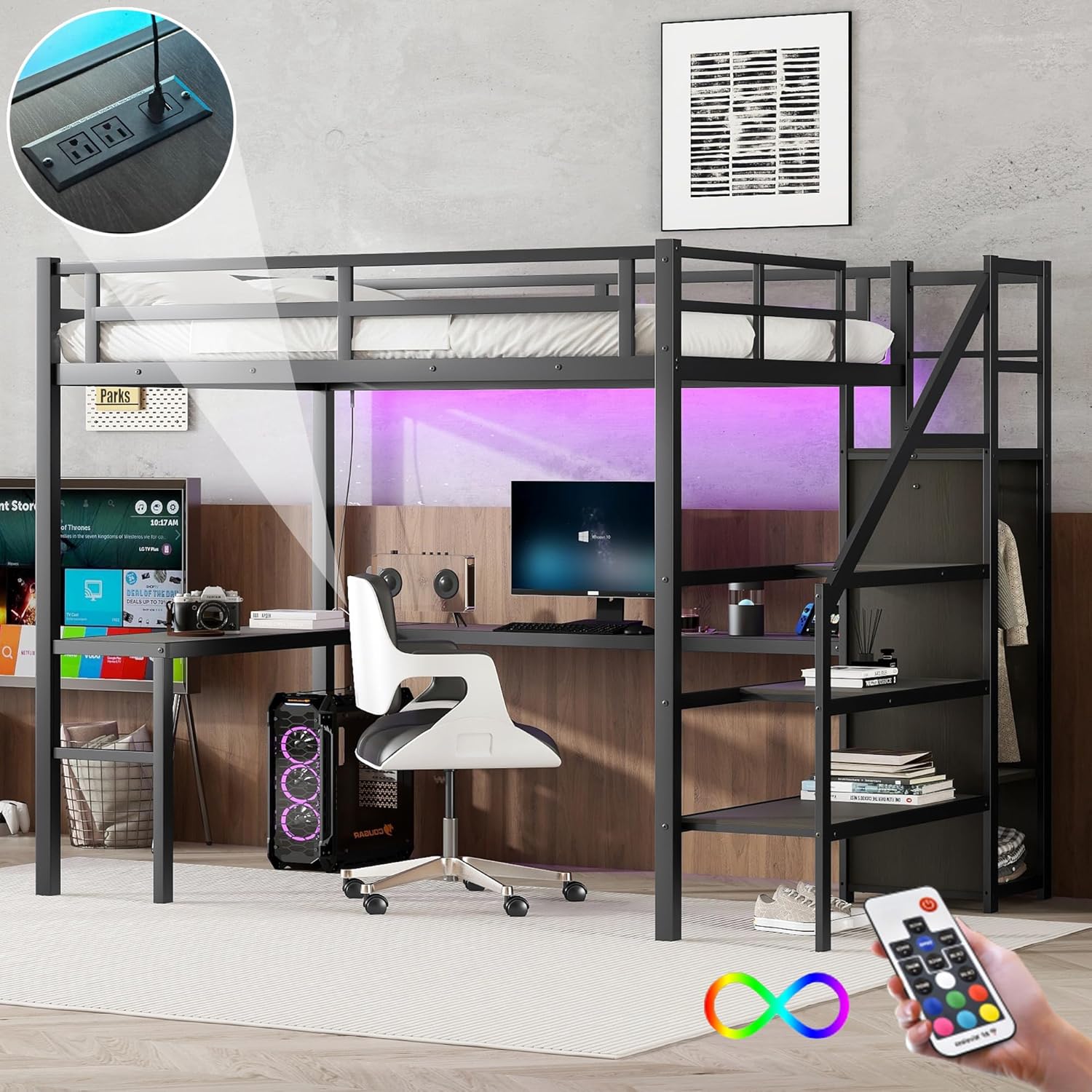
This Full XL size metal loft bed is designed to maximize space efficiency, offering a comfortable sleeping area above and a functional L-shaped desk below. It features integrated storage solutions including a wardrobe with a hanging rod and adjustable divider, and versatile built-in staircases that also provide storage. For added convenience, the desk is equipped with a USB charging station and LED lighting.

Сүрөт 1: Бүттүview of the Full XL Loft Bed, showcasing the L-shaped desk, integrated wardrobe, and stairs. The bed is black metal with a modern design.
Коопсуздук маалыматы
Бул продуктуну чогултуудан жана колдонуудан мурун бардык көрсөтмөлөрдү окуп чыгып, түшүнүп алыңыз. Бул көрсөтмөлөрдү аткарбоо олуттуу жаракатка алып келиши мүмкүн.
- Ensure all connections are securely fastened before use. Periodically check and tighten all bolts and screws.
- The upper bunk is designed to support a maximum weight of 350 pounds. Do not exceed this weight limit.
- Always use the provided full-length guardrails on the upper bunk to prevent falls.
- Only use a mattress with a thickness of 6 inches on the upper bunk.
- Do not allow children under 6 years of age on the upper bunk.
- Do not attach or hang items on any part of the bed that are not designed for use with the bed.
- Чогуу учурунда муунуп калуу коркунучун болтурбоо үчүн кичинекей бөлүктөрүн балдардан алыс кармаңыз.
Жыйноо боюнча нускамалар (орнотуу)
This loft bed requires assembly. It is recommended that two adults assemble this product. All necessary tools and numbered parts are included. Please refer to the detailed instructions provided in the packaging for step-by-step guidance.
Баштоодон мурун:
- Бардык компоненттерди таңгактан чыгарып, бөлүктөрдүн тизмесине каршы текшериңиз.
- Чогулуш үчүн кенен аянтты тазалаңыз.
- Keep all hardware organized.
Негизги Ассамблея кадамдары:
- Assemble the main bed frame structure.
- Attach the L-shaped desk components.
- Install the wardrobe and its internal components (hanging rod, adjustable divider).
- Assemble and attach the staircase, noting its interchangeable left/right orientation.
- Connect the USB charging station and LED light strip according to the wiring diagram.
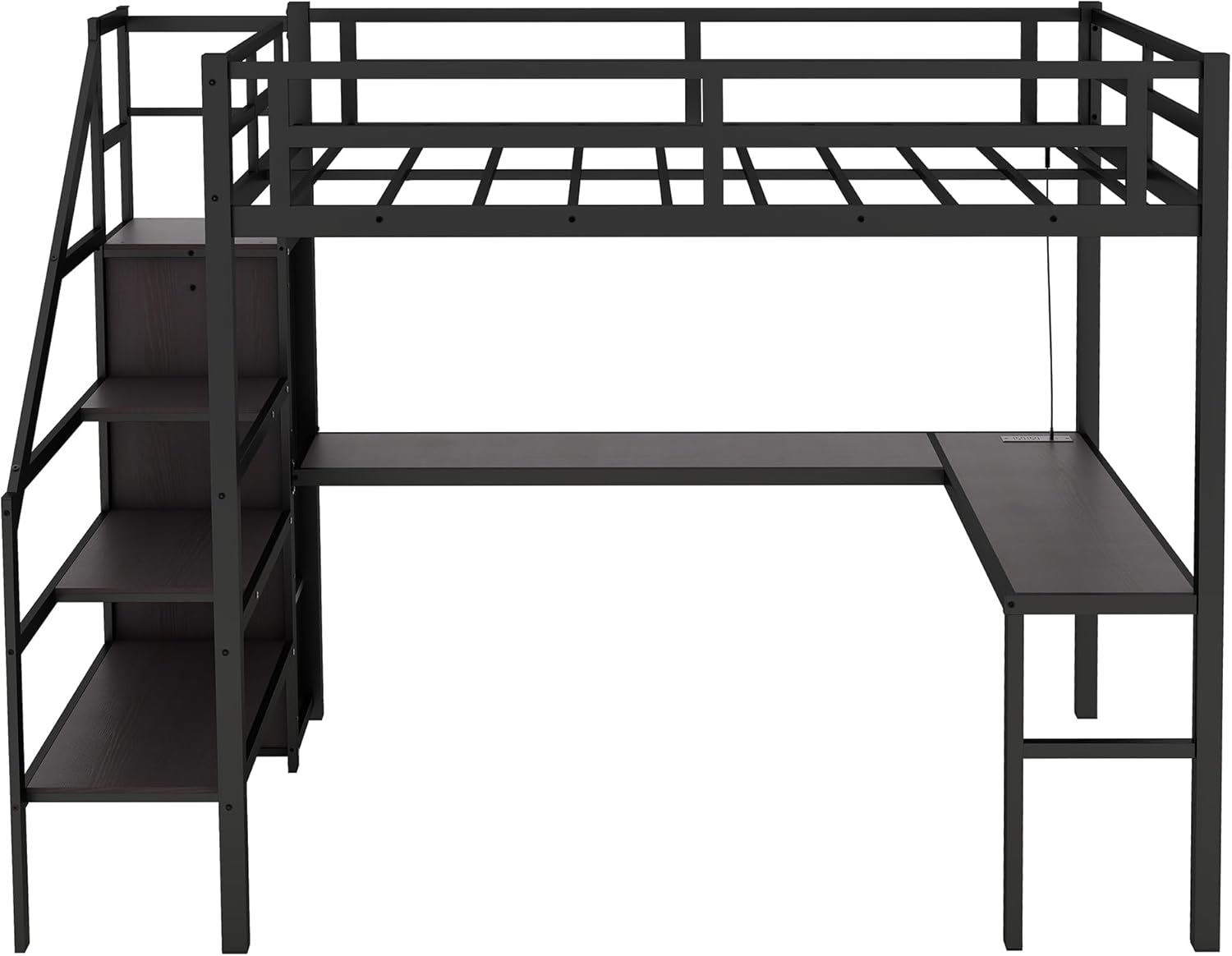
Сүрөт 2: Жарылып кеткен view diagram illustrating the various components of the loft bed and their relative positions for assembly.

Сүрөт 3: А view of the loft bed frame from the side, showing the metal structure and the L-shaped desk layout, prior to full assembly of all components.
Иштөө нускамалары
Using the USB Charging Station:
The L-shaped desk is equipped with a built-in USB charging station. Simply plug your USB compatible devices into the available ports to charge them. Ensure the bed's power cable is connected to a functional wall outlet.

Сүрөт 4: Жакын пландан view of the integrated USB charging station and power outlets on the desk surface, highlighting its convenient placement.
LED чырактарын башкаруу:
The integrated LED light strip provides ambient lighting. Use the included remote control to turn the lights on/off, change colors, and adjust brightness. Point the remote directly at the LED receiver for optimal functionality.

Image 5: The loft bed with its LED lights illuminated, showing the remote control for adjusting light settings. The lights add an ambient glow to the workspace.
Wardrobe and Staircase Storage:
The built-in wardrobe includes a hanging rod for clothes and an adjustable shelf for folded items or storage boxes. The staircase steps also feature integrated storage compartments. Utilize these spaces to keep your room organized.
Сүрөт 6: деталдуу view of the integrated wardrobe and the storage compartments within the staircase, demonstrating their functionality.
Техникалык тейлөө
- Тазалоо: Wipe down metal and wood surfaces with a soft, damp кездеме. Катуу химиялык заттардан же абразивдүү тазалагычтардан алыс болуңуз.
- Аппараттык камсыздоону текшерүү: Periodically (e.g., every 3-6 months) inspect all bolts, screws, and connections to ensure they are tight. Re-tighten as necessary to maintain stability and safety.
- LED жарыктары: If LED lights malfunction, check the power connection and remote control battery. Do not attempt to repair the LED strip yourself; contact customer support.
- USB порт: Keep the USB ports free of dust and debris. Use a soft brush or compressed air if needed.
Проблемаларды чечүү
| Көйгөй | Мүмкүн себеп | Чечим |
|---|---|---|
| Төшөк солкулдап же туруксуз сезилет. | Бош болттор же бурамалар. | Inspect all connections and tighten any loose hardware. Ensure the bed is on a level surface. |
| LED жарыктары күйбөйт. | Power cable disconnected, remote battery dead, or LED receiver obstructed. | Check if the bed is plugged into a working outlet. Replace remote battery. Ensure no objects block the LED receiver. |
| USB charging station not working. | Bed not powered, or device cable issue. | Verify the bed is plugged in. Try a different USB cable or device to rule out cable/device issues. |
| Чогултуу учурунда жок болуп кеткен бөлүктөр. | Packaging not fully checked, or manufacturing error. | Carefully re-check all packaging materials. Contact customer support with the part number from the manual. |
Техникалык шарттар
| Өзгөчөлүк | Деталь |
|---|---|
| Продукт түрү | Металл керебет |
| Материал | Металл |
| Өлчөмү | Толук XL |
| Түс | Black+desk+wardrobe |
| Продукциянын жалпы өлчөмдөрү (У x Т x Б) | 98.62'' x 57.48'' x 69.13'' |
| Продукциянын жалпы салмагы | 181.88 LBS |
| Weight Capacity (Upper Bunk) | 350 LBS |
| Сунушталган матрастын калыңдыгы | 6'' |
| Келип чыккан өлкө | Кытай |
| Өзгөчөлүктөр | L-Shaped Desk, Integrated Wardrobe, USB Charging Station, LED Lights, Storage Stairs |

Image 7: A detailed diagram showing the precise dimensions of the Full XL Loft Bed, including height, length, width, and specific measurements for the desk and wardrobe components.
Кепилдик жана колдоо
For any questions regarding assembly, missing parts, or product functionality, please contact our customer support. While specific warranty details are not provided in this manual, please refer to your purchase documentation or contact the seller for warranty information.
Өндүрүүчү: Жалпы
Модель номери: B123965897
Биринчи жеткиликтүү болгон күнү: 14-июнь, 2025-жыл
For support, please visit the seller's page on Amazon or contact them directly through the platform.
тиешелүү документтер жок
Ask a question about this manual
Ask about setup, troubleshooting, compatibility, parts, safety, or missing instructions. Manuals+ will review the question and use this page’s manual context to help answer it.