
1. Киришүү
This manual provides detailed instructions for the safe and efficient assembly, operation, and maintenance of your SpeaKa Professional SP-TVS-600 TV Floor Stand. Please read this manual thoroughly before installation and retain it for future reference.
The SP-TVS-600 is designed to support televisions and monitors ranging from 37 to 86 inches, with a maximum load capacity of 45 kg. It features tool-free tilt adjustment, adjustable height for the screen (900 to 1100 mm), and an integrated cable management system. An additional height-adjustable storage shelf (200 to 910 mm) is included for media devices.
2. Коопсуздук маалыматы
ЭСКЕРТҮҮ: Failure to read, understand, and follow all instructions can result in serious personal injury, property damage, or voiding of your warranty.
- Ensure the floor stand is placed on a stable, level surface.
- 45 кг (99 фунт) жүк көтөрүмдүүлүгүнөн ашпаңыз.
- Verify that your TV's VESA mounting pattern is compatible with the stand (100x100 to 600x400 mm).
- Always use two people for lifting and positioning the TV onto the stand.
- Чогултуу жана иштетүү учурунда балдарды жана үй жаныбарларын стендден алыс кармаңыз.
- Do not hang on the stand or TV.
- Бардык бурамалар менен туташуулардын бекем экенине ынануу үчүн аларды үзгүлтүксүз текшерип туруңуз.
- Таңгактоочу материалдарды жоопкерчилик менен таштаңыз.
3. Пакеттин мазмуну
Please check that all components are present and undamaged before beginning assembly. If any parts are missing or damaged, contact your retailer.
- TV Floor Stand (disassembled components)
- Көрсөтмө (бул документ)
- Коопсуздук маалымат баракчасы
- Hardware Kit (screws, washers, spacers, tools for assembly)

Сүрөт 1: Алдыңкы view of the SpeaKa Professional SP-TVS-600 TV Floor Stand.
4. Орнотуу жана чогултуу
Follow these steps carefully to assemble your TV floor stand. It is recommended to have a second person assist with assembly, especially when mounting the television.
- Компоненттерди таңгактан чыгаруу: Таңгактан кылдаттык менен бардык бөлүктөрүн алып салыңыз жана чийилбестен жумшак, таза бетке жаткызыңыз.
- Базаны чогултуу: Attach the main support column to the base plate using the provided screws and tools. Ensure all connections are tight and secure.
- Install TV Brackets: Attach the VESA mounting brackets to the back of your television using the appropriate screws, washers, and spacers from the hardware kit. Refer to your TV's manual for specific screw requirements. Ensure the brackets are level and securely fastened.
- Телевизорду орнотуу: With assistance, carefully lift the television and hook the TV brackets onto the main support column's mounting plate. Secure the TV in place using the safety screws or locking mechanisms provided.
- Текчени тиркөө: Install the media shelf onto the main support column at your desired height. Secure it with the designated fasteners.
- Кабелдик башкаруу: Route all TV and device cables through the integrated cable management system within the stand's column for a tidy appearance.
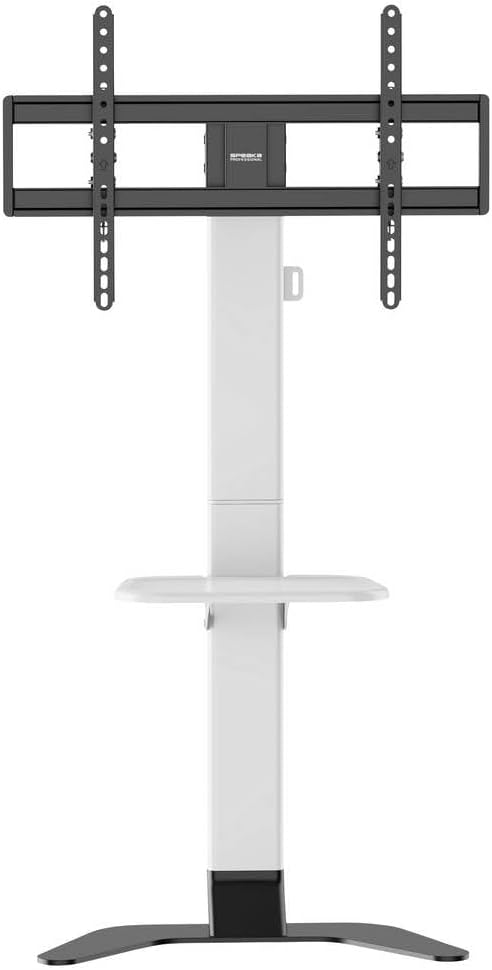
Сүрөт 2: Алдыңкы view of the stand showing the adjustable shelf.

3-сүрөт: Каптал view of the stand, illustrating the profile жана туруктуулук.
5. Иштөө нускамалары
5.1 Телевизордун бийиктигин тууралоо
The TV mounting plate can be adjusted in height from 900 mm to 1100 mm. To adjust, loosen the height adjustment screws on the main column, carefully slide the TV to the desired height (with assistance), and then securely tighten the screws.
5.2 Сыналгынын эңкейишин тууралоо
The stand features tool-free tilt adjustment. Gently push or pull the top or bottom of the TV to achieve your desired viewing angle. The mechanism will hold the TV in place.
5.3 Текченин бийиктигин тууралоо
The media shelf can be adjusted in height from 200 mm to 910 mm. Loosen the shelf adjustment screws, move the shelf to the preferred height, and then re-tighten the screws firmly.
6. Техникалык тейлөө
- Тазалоо: Тирөөчтү тазалоо үчүн жумшак, кургак чүпүрөктү колдонуңуз. Өжөр тактар үчүн бир аз сүртүңүзamp cloth with mild detergent can be used, followed by drying. Avoid abrasive cleaners or solvents.
- Мезгилдүү текшерүүлөр: Regularly inspect all screws, bolts, and connections to ensure they are tight and secure. Re-tighten if necessary.
- Зыян: If any part of the stand becomes damaged, discontinue use immediately and contact customer support for replacement parts or advice.
7. Кыйынчылыктарды
| Көйгөй | Мүмкүн себеп | Чечим |
|---|---|---|
| Туруктуу же туруксуз. | Бурамалар бош; стенд тегиз эмес бетинде турат; салмактан ашты. | Ensure all assembly screws are tightened. Move stand to a level surface. Verify TV weight is within 45 kg limit. |
| TV does not tilt smoothly or stays in position. | Tilt mechanism needs adjustment or is obstructed. | Check for any obstructions. Ensure the tilt mechanism is clean. |
| Кабельдер тыкан башкарылбайт. | Cables not routed through the designated channels. | Re-route cables through the integrated cable management system in the main column. |
8. Техникалык шарттар
- Модел: SP-TVS-600
- Бөлүмдүн номери: SP-13382656
- Бренд: SPEAKA PROFESSIONAL
- Монтаж түрү: Пол стенд
- Кыймыл түрү: Эңкейтүүчү
- Материал: Эритме болот
- Түсү: Ак/Кара
- Шайкеш сыналгы өлчөмдөрү: 37 - 86 дюйм (94.0 см - 218.4 см)
- VESA шайкештиги: 100x100, 200x100, 200x200, 300x200, 400x200, 300x300, 400x300, 400x400, 600x400 mm
- Максималдуу жүктөө жөндөмдүүлүгү: 45 кг (99 фунт)
- TV Height Adjustment: 900 - 1100 мм
- Текченин бийиктигин тууралоо: 200 - 910 мм
- Шайкеш түзмөктөр: Телевизор, Монитор
- Элемент Салмагы: 12.505 кг (12505 грамм)
- Келип чыккан өлкө: Кытай
9. Кепилдик жана колдоо
9.1 Кепилдик маалыматы
This SpeaKa Professional product comes with a 2-year manufacturer's warranty. Please refer to the terms and conditions provided with your purchase or visit the official SpeaKa Professional website for full details. Keep your proof of purchase for warranty claims.
9.2 Кардарларды колдоо
For technical assistance, missing parts, or warranty inquiries, please contact your retailer or SpeaKa Professional customer support. Contact information can typically be found on the product packaging or the official brand webсайт.