XMSJSIY AV RCA Switch 4-in-1 Out

XMSJSIY AV RCA Switch 4-in-1 Out Instruction Manual

Model: AV RCA Switch 4-in-1 Out

Introduction

This manual provides detailed instructions for the setup, operation, and maintenance of your XMSJSIY AV RCA Switch 4-in-1 Out. Please read this manual thoroughly before using the device to ensure proper functionality and to prevent damage.

Продукт өзгөчөлүктөрү

  • 4-Input, 1-Output Design: Connects up to four RCA audio/video sources to a single display or audio system.
  • Plug and Play: Requires no external power supply or software installation.
  • Бир убактагы туташуу: All input devices can remain connected, with easy switching between them.
  • High-Quality Signal Transmission: Ensures clear video images and pure audio without lagging or noise.
  • Туруктуу курулуш: Features a metal shell with a frosted finish for enhanced durability and heat dissipation.
  • Кеңири шайкештик: Works with most devices equipped with RCA L/R interfaces, including DVD/DVR/VCR players, gaming consoles (PS2, PS3), cameras, HDTVs, and monitors.
Жакын план view of the XMSJSIY AV RCA Switch showing nickel-plated AV interfaces, the device switching button, and the durable metal shell.
Figure 1: Key features of the AV RCA Switch, including nickel-plated interfaces, selection buttons, and robust metal casing.

Орнотуу нускамалары

  1. Портторду аныктоо: Locate the "IN" ports (1-4) and the "OUT" port on the AV RCA Switch. Each port consists of three RCA jacks: yellow for video, white for left audio, and red for right audio.
  2. Киргизүү түзмөктөрүн туташтыруу: Connect your audio/video source devices (e.g., DVD player, PS2/PS3, camera) to the "IN" ports (1, 2, 3, or 4) on the switch using RCA cables. Ensure that the yellow, white, and red cables are connected to their corresponding colored jacks.
  3. Чыгаруу түзмөгүн туташтырыңыз: Connect the "OUT" port of the AV RCA Switch to your display device (e.g., TV, monitor, projector) using another set of RCA cables. Match the yellow, white, and red cables to the corresponding input jacks on your display.
  4. Түзмөктөрдү күйгүзүү: Ensure all connected devices (source devices and display) are powered on.
Diagram showing how to connect audio input devices like a CD player and DVD player to the 'IN' ports of the 4-in-1 out RCA audio switch, and how to connect audio output devices like active speakers and an amplifier to the 'OUT' port.
Figure 2: Connection diagram for audio input and output devices.
Connection diagram illustrating how to connect various devices such as PS3, set-top box, DVD player, and monitor to the RCA switch, and then connect the switch to a TV, projector, or LCD display for AV output.
Figure 3: Comprehensive connection diagram for video and audio devices.

Иштөө нускамалары

  1. Киргизүүнү тандоо: Once all devices are connected and powered on, press the corresponding numbered button (1, 2, 3, or 4) on the front panel of the AV RCA Switch to select the desired input source.
  2. Сигналдын текшерүүсү: Check your display device to ensure the audio and video signal from the selected source is being received correctly.
  3. Которуу булактары: To switch to a different input source, simply press the button corresponding to that source on the switch. The switch operates mechanically, providing instant signal transfer.
Image showing a hand pressing one of the input selection buttons on the XMSJSIY AV RCA Switch, with a speaker and laptop in the background, illustrating the 'Plug and Play' functionality and ease of use.
Figure 4: Operating the input selection button.

Техникалык тейлөө

  • Тазалоо: Use a soft, dry cloth to clean the exterior of the switch. Avoid using liquid cleaners or solvents, as they may damage the finish or internal components.
  • Сактагыч: Түзмөктү узак убакыт бою колдонбогон учурда, аны салкын, кургак жерде, күндүн түз нурунан жана өтө жогорку температурадан алыс сактаңыз.
  • Кабелдик башкаруу: Ensure RCA cables are not excessively bent or strained to prevent damage to the cables and the switch's ports.

Проблемаларды чечүү

Көйгөй Мүмкүн себеп Чечим
Видео же аудио чыгаруу жок.
  • Туура эмес киргизүү тандалды.
  • Бошоң же туура эмес кабелдик байланыштар.
  • Source device or display device is off.
  • Press the correct input button on the switch.
  • Check all RCA cable connections to ensure they are secure and correctly matched (yellow to yellow, red to red, white to white).
  • Бардык туташкан түзмөктөр күйгүзүлгөнүн текшериңиз.
Poor video quality or distorted audio.
  • Damaged RCA cables.
  • Башка электрондук түзүлүштөрдүн кийлигишүүсү.
  • Try replacing RCA cables with new ones.
  • Move the switch and cables away from other electronic devices that might cause interference.
Input button not responding.
  • Mechanical issue with the button.
  • Ensure the button is fully depressed. If the issue persists, contact customer support.

Техникалык шарттар

Өзгөчөлүк Деталь
Модел AV RCA Switch 4-in-1 Out
Бренд XMSJSIY
Киргизүү порттору 4 x RCA (Video, Audio L/R)
Output Ports 1 x RCA (Video, Audio L/R)
Туташтыргыч түрү RCA
Түс Кара
Power талап Тышкы кубат талап кылынбайт (пассивдүү)
Шайкеш түзмөктөр Camera, DVD Player, Gaming Console (PS2, PS3), Monitor, Television, VCR, DVR, STB
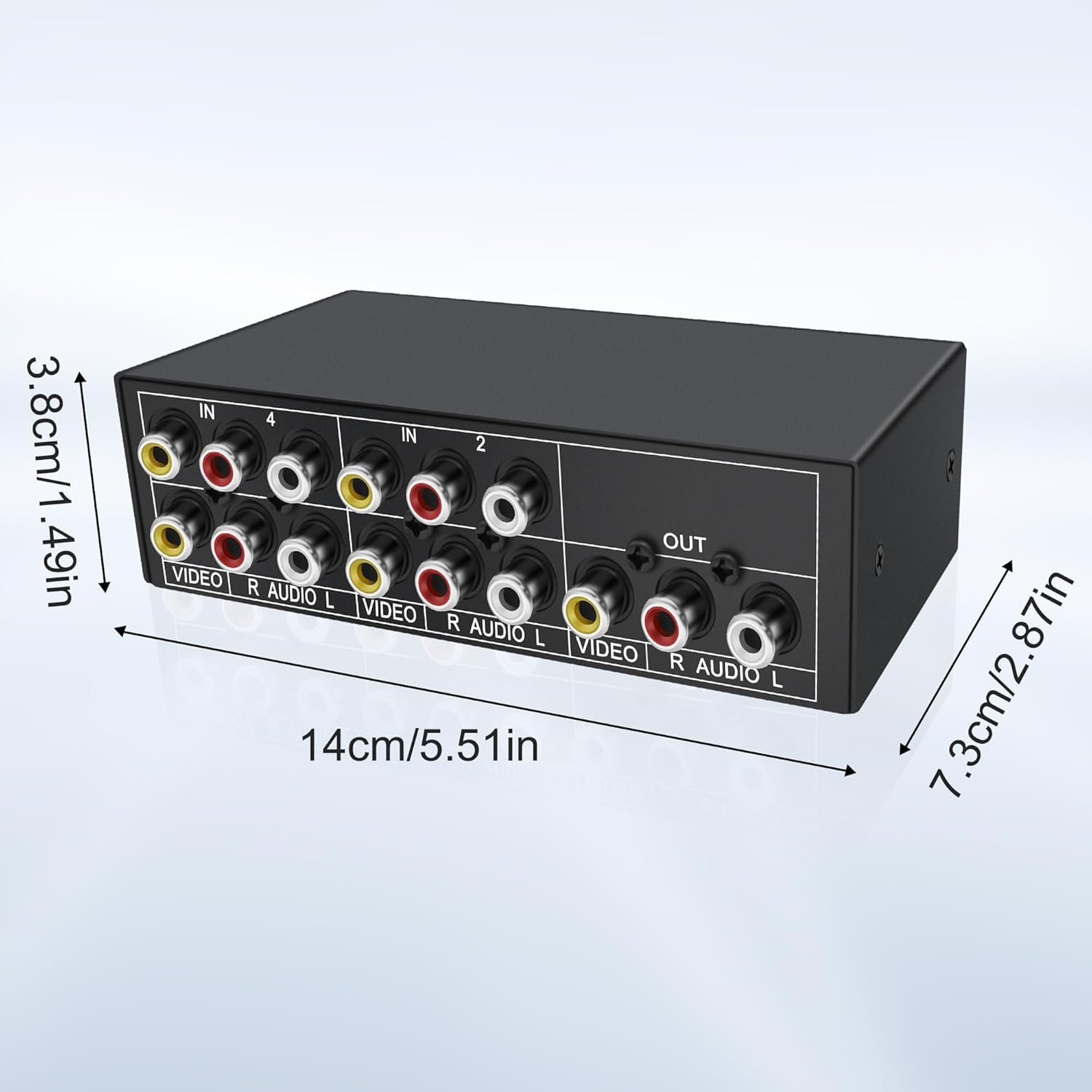
Өлчөмдөрү (болжол менен) 14cm (L) x 7.3cm (W) x 3.8cm (H) / 5.51in (L) x 2.87in (W) x 1.49in (H)
Жогорудан төмөн view of the XMSJSIY AV RCA Switch with dimensions labeled: 14cm (5.51in) length, 7.3cm (2.87in) width, and 3.8cm (1.49in) height.
Figure 5: Product dimensions and port layout.

Кепилдик жана колдоо

For warranty information or technical support, please refer to the product packaging or contact XMSJSIY customer service directly. Contact details are typically available on the manufacturer's official webсайт же сатуучу аркылуу.

© 2026 XMSJSIY. All rights reserved.

Тектеш документтер - AV RCA Switch 4-in-1 Out

Preview Shinybow SB-5430 4x2 Композиттик/S-Видео/Аудио маршруттоо которгучун тандоочу (ИК) колдонуу боюнча колдонмо
Shinybow SB-5430 үчүн кеңири колдонуу боюнча колдонмо, IR алыстан башкаруу пульту бар 4x2 Composite/S-Video/Audio маршруттоочу которгуч. Коопсуздук жөнүндө маалыматты, функцияларды, мүнөздөмөлөрдү, иштөөнү, типтүү туташууну, шайкештик отчетторун жана чектелген кепилдикти камтыйт.
Preview SC&T HUS03-4K6G 4K60 3x1 HDMI/USB-C Presentation Switcher User Manual
Comprehensive user manual for the SC&T HUS03-4K6G 4K60 3x1 HDMI/USB-C Presentation Switcher. Details features, panel layout, connection guides, EDID settings, audio configurations, relay and contact closure functions, RS232 commands, troubleshooting, specifications, and installation instructions.
Preview Panasonic AV-HS6000 Сериялар: 2ME Live Switcher иштетүү боюнча колдонмо
Panasonic AV-HS6000 Series 2ME Live Switcher үчүн комплекстүү иштетүү жана орнотуу көрсөтмөсү, анын өзгөчөлүктөрүн, орнотууларын жана профессионалдуу видео өндүрүү үчүн иштөө мүмкүнчүлүктөрүн деталдаштырат.
Preview AVMATRIX HVS0402U Колдонуучунун колдонмосу: 4-канал HDMI Live Stream Video Switcher
Бул колдонуучу колдонмосу AVMATRIX HVS0402U үчүн комплекстүү нускамаларды жана спецификацияларды камтыйт, 4 каналдуу HDMI көп форматтуу видео которгуч түз агым жана видео чыгаруу үчүн иштелип чыккан. Анын өзгөчөлүктөрү, интерфейстери, иштеши жана системанын жөндөөлөрү жөнүндө билип алыңыз.
Preview Panasonic AV-UHS500P/E 4K Live Switcher Operating Instructions
Comprehensive operating instructions for the Panasonic AV-UHS500P and AV-UHS500E 4K Live Switcher. This manual covers setup, operation, features, and safety precautions for professional video production and live events.
Preview PIXELHUE P80 Presentation Switcher Specifications
Detailed specifications for the PIXELHUE P80 Presentation Switcher, covering features, input/output capabilities, functionality, control options, reliability, video sources, appearance, dimensions, and certifications.

Ask a question about this manual

Ask about setup, troubleshooting, compatibility, parts, safety, or missing instructions. Manuals+ will review the question and use this page’s manual context to help answer it.