
1. Киришүү
Thank you for choosing the Mistral MTF1697DR 16-inch DC Table Fan. This manual provides essential information for the safe and efficient operation, maintenance, and troubleshooting of your new fan. Please read these instructions thoroughly before use and retain them for future reference.
2. Продукт бүтүп калдыview
The Mistral MTF1697DR is a 16-inch DC table fan designed for optimal air circulation. It features a durable construction and advanced functionalities for enhanced user comfort.
Негизги өзгөчөлүктөрү:
- 9 Speed Settings with 3 Mode Selection
- Energy-efficient BLDC Motor
- Up to 9 Hours Timer Function
- Күчтүү аба жеткирүү
- Front & Rear Durable Plastic Fan Guard
- Алыстан башкаруу операциясы
Компоненттери:
Familiarize yourself with the main components of your fan:
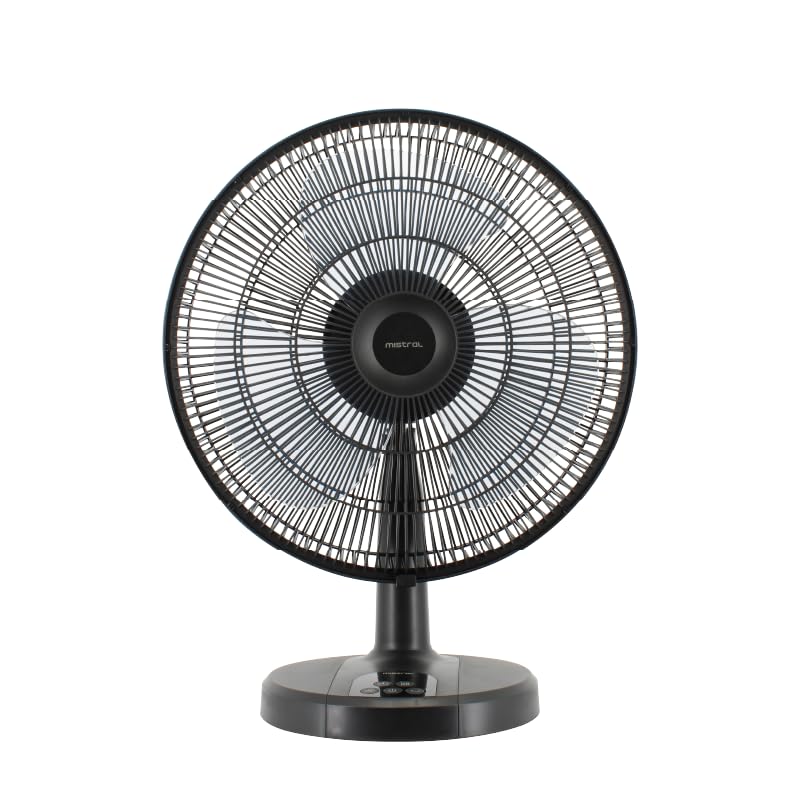
Сүрөт 1: Алдыңкы view of the Mistral MTF1697DR fan, showing the fan head, guard, stand, and base with control panel.

2-сүрөт: Каптал view of the Mistral MTF1697DR fan, illustrating the fan head's tilt mechanism and the fan's profile.
3. Орнотуу
Follow these steps to set up your fan:
- Пакеттен чыгаруу: Бардык таңгактоочу материалдарды этияттык менен алып салыңыз. Бардык компоненттердин бар экенин жана бузулбаганын текшериңиз.
- Ассамблея: The fan typically comes partially assembled. If the fan guard or base requires attachment, follow the diagrams provided in the separate assembly guide (if applicable) or ensure the fan head is securely fastened to the stand and the stand to the base. Ensure the front and rear fan guards are properly aligned and secured.
- Жайгашкан жери: Place the fan on a stable, flat surface. Ensure there is adequate space around the fan for proper air circulation and to prevent obstruction of the air intake/outlet. Keep the fan away from curtains, drapes, or any objects that could be drawn into the fan blades.
- Кубат туташуу: Plug the power cord into a standard electrical outlet (220-240V ~ 50/60Hz).
4. Иштөө нускамалары
Your Mistral MTF1697DR fan can be operated using the control panel on the base or the included remote control.
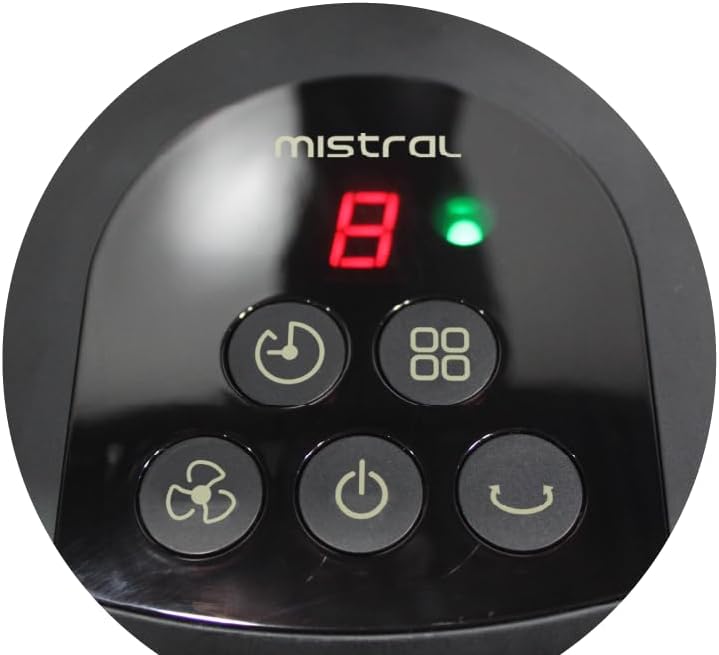
Figure 3: Close-up of the fan's control panel on the base, showing buttons for power, speed, mode, timer, and oscillation.
Башкаруу панелинин функциялары:
- Кубат баскычы (U): Желдеткичти КҮЙГҮЗҮҮ же ӨЧҮРҮҮ үчүн басыңыз.
- Ылдамдык баскычы (Fan icon): Press repeatedly to cycle through 9 speed settings. The current speed will be displayed on the LED screen.
- Режим баскычы (Squares Icon): Press to select from 3 operating modes (e.g., Normal, Natural, Sleep). Each press changes the mode.
- Таймер баскычы (Сааттын сүрөтчөсү): Press to set the fan to turn off automatically after a set period, up to 9 hours. Each press increases the timer duration.
- Термелүү баскычы (Curved Arrow Icon): Press to start or stop the fan's oscillation function, which sweeps the airflow from side to side.
Алыстан башкаруу:
The remote control duplicates all functions available on the fan's control panel, allowing for convenient operation from a distance. Ensure the remote control has working batteries and is pointed towards the fan's receiver.
5. Техникалык тейлөө
Regular cleaning and proper care will ensure the longevity and optimal performance of your fan.
Тазалоо:
- Ар дайым желдеткичти сууруп туруңуз тазалоодон мурун электр розеткасынан.
- Сырткы: Желдеткичтин сырткы беттерин жумшак, г менен сүртүңүзamp кездеме. Абразивдүү тазалагычтарды, эриткичтерди же катуу химиялык заттарды колдонбоңуз, анткени алар финишке зыян келтириши мүмкүн.
- Fan Guards and Blades: To clean the fan blades, you may need to carefully remove the front fan guard. Refer to the assembly instructions for guard removal. Use a soft cloth or a vacuum cleaner with a brush attachment to remove dust from the blades and guards. Ensure all parts are completely dry before reassembling and operating the fan.
- Do not immerse the fan in water or allow water to drip into the motor housing.
Сактагыч:
Вентилятор көпкө чейин колдонулбаган учурда, аны чаңдан жана бузулуудан коргоо үчүн салкын, кургак жерде, мүмкүн болсо, баштапкы таңгагында сактаңыз.
6. Кыйынчылыктарды
Эгер күйөрманыңызда көйгөйлөргө туш болсоңуз, төмөнкү жалпы көйгөйлөрдү жана чечимдерди караңыз:
- Желдеткич күйбөйт:
- Электр шнурунун иштеген электр розеткасына бекем сайылганын текшериңиз.
- Кубат баскычы басылганын текшериңиз.
- Үй тиричилигиндеги автоматтык өчүргүч иштебей калганын текшериңиз.
- Weak or no airflow:
- Check for obstructions around the fan guards.
- Clean any dust or debris from the fan blades and guards (refer to Maintenance section).
- Желдетүүчү ылдамдык жөндөөсүн жогорулатыңыз.
- Пульт иштебей жатат:
- Алыстан башкаруу пульту менен желдеткичтин кабыл алгычынын ортосунда эч кандай тоскоолдуктар жок экенин текшериңиз.
- Пульттагы батарейкаларды алмаштырыңыз.
- Алыстан башкаруу пультунун натыйжалуу диапазонунда экениңизди текшериңиз.
Бул чечимдерди колдонуу аракетинен кийин көйгөй чечилбесе, кардарларды колдоо кызматына кайрылыңыз.
7. Техникалык шарттар
| Спецификация | Деталь |
|---|---|
| Модел | MTF1697DR |
| Тtage | 220-240V ~ 50/60Hz |
| Ватtage | 36 Вт |
| Аба көлөмү | 3600 м³/саат |
| Макс аба агымы | 4.73 м/с |
| Продукциянын өлчөмдөрү (L*W*H) | 455 * 280 * 600 mm (45.5D x 28W x 60H cm) |
| Таза Салмак | 2.6 сом |
| Жалпы салмак | 3.8 сом |
| Коопсуздук белгиси | 250177-11 |
| Түс | Кара |
| Электр желдеткич дизайн | Стол желдеткичи |
| Power Source | Электр зымдары |
| Ылдамдыктын саны | 9 |
| Башкаруу ыкмасы | Алыстан |
| Мотор түрү | Brushless (BLDC) |
| Материал | Пластик |
| Камтылган компоненттер | Алыстан |
8. Кепилдик жана колдоо
Кепилдик маалыматы:
This Mistral MTF1697DR fan comes with a 2 жылдык кепилдик on the product, and an extended 8 жылдык кепилдик specifically for the motor. Please retain your proof of purchase for warranty claims.
Кардарларды колдоо:
For technical assistance, warranty claims, or any questions not covered in this manual, please contact your retailer or the Mistral customer service department. Contact details can typically be found on the product packaging or the official Mistral webсайт.