
MOBAPAD Huben2 H6
MOBAPAD Huben2 Wireless Switch Controller Pro Instruction Manual
Model: Huben2 H6 | Brand: MOBAPAD
1. Киришүү
This manual provides detailed instructions for the setup, operation, and maintenance of your MOBAPAD Huben2 Wireless Switch Controller Pro. Please read this manual thoroughly before using the product to ensure optimal performance and longevity.
2. Коопсуздук маалыматы
- Контроллерди суудан жана башка суюктуктардан алыс кармаңыз.
- Контроллерди экстремалдык температурага дуушар кылбаңыз.
- Көзөмөлдөгүчтү кулап же катуу таасирлерге дуушар кылуудан качыңыз.
- Do not attempt to disassemble or repair the controller yourself. Contact customer support for assistance.
- Заряддоо үчүн берилген кубаттоо кабелин же тастыкталган USB-C кабелин гана колдонуңуз.
3. Пакеттин мазмуну
Пакетиңизде бардык буюмдар бар экенин текшериңиз:
- MOBAPAD Huben2 Wireless Controller Pro
- USB-C заряддоо кабели
- Wireless Dongle (2.4G)
- PU Travel Case
- Replaceable D-pad (Cross/Circle)
- Көрсөтмө (бул документ)
4. Controller Layout
Familiarize yourself with the buttons and features of your Huben2 controller.

Сүрөт 4.1: Алдыңкы view of the MOBAPAD Huben2 Wireless Controller Pro. Shows the joysticks, face buttons (A, B, X, Y), D-pad, and central function buttons.
- Сол/оң аналогдук таякчалар: Capacitive joysticks with 4,096-step precision.
- A/B/X/Y баскычтары: Omron mechanical face buttons.
- D-под: Replaceable cross or circle D-pad.
- L1/R1 (Ийин баскычтары): Standard shoulder buttons.
- L2/R2 (Триггерлер): Dual-mode triggers (Hall Effect and Microswitch).
- M1/M2/M3/M4 баскычтары: Four programmable back buttons.
- Үй баскычы: Powers on/off and returns to system home screen.
- Скриншот баскычы: Скриншотторду тартат.
- Plus/Minus Buttons: Standard system menu buttons.
- Турбо баскычы: Турбо функциясын иштетет/өчүрөт.
- USB-C порту: Заряддоо жана зымдуу туташуу үчүн.

4.2-сүрөт: Арткы view showing the four programmable M1, M2, M3, M4 back buttons.
5. Орнотуу
5.1 Контроллерди заряддоо
Before first use, fully charge the controller. Connect the provided USB-C cable to the controller's USB-C port and the other end to a USB power source (e.g., console, PC, or USB wall adapter). The charging indicator will show the charging status.
- A full charge provides approximately 15 hours of gameplay.

Figure 5.1: The controller features a 1000mAh battery for extended gameplay.
5.2 Туташуу режимдери
The Huben2 controller supports three connection methods:

Figure 5.2: The controller supports 2.4G wireless, Bluetooth, and wired connections across various platforms.
- 2.4G Wireless (via Dongle):
- Compatible with Windows PC, Steam, and Android TV.
- Insert the 2.4G wireless dongle into a USB port on your device.
- Контроллерди күйгүзүңүз. Ал автоматтык түрдө донглго туташышы керек.
- Bluetooth зымсыз:
- Compatible with Nintendo Switch, Nintendo Switch 2, Android, and iOS devices.
- On your device, navigate to Bluetooth settings and enable Bluetooth.
- On the controller, press and hold the Bluetooth pairing button (refer to controller layout for exact location) until the indicator lights flash rapidly.
- Select "MOBAPAD Huben2" from the list of available devices on your system to pair.
- For Nintendo Switch, the controller can wake the console from sleep mode after initial pairing and firmware update via the Mobapad app.
- Зымдуу туташуу:
- Compatible with Windows PC and Android TV.
- Connect the controller to your device using the USB-C cable. The controller will be recognized automatically.
6. Иштөө нускамалары
6.1 Күйгүзүү/өчүрүү
- Күйгүзүү: Башкы бет баскычын басыңыз.
- Өчүрүү: Press and hold the Home button for 3-5 seconds. The controller will also power off automatically after a period of inactivity.
6.2 Dual Trigger Modes
The L2 and R2 triggers feature dual modes for different gaming experiences:

Figure 6.1: Visual representation of the 2mm Microswitch Trigger and 10mm Hall Linear Trigger modes.
- Microswitch Trigger (2mm): Provides a short, tactile click for rapid input, ideal for FPS games.
- Hall Effect Linear Trigger (10mm): Offers analog input with a longer travel distance, suitable for racing or simulation games.
- Которуу режимдери: Use the physical switches located near the L2/R2 triggers to toggle between modes.
6.3 Customizable Features (Back Buttons, Macros, App Support)
The Huben2 controller offers extensive customization options:
- Программалануучу артка баскычтар (M1-M4): Assign single button presses or complex macros to the four back buttons using the dedicated Mobapad PC/mobile application.
- Rapid-Fire Turbo Mode: Activate turbo functionality for any button. Refer to the Mobapad app or controller manual for specific button combinations to enable/disable.
- Mobapad App: Download the official Mobapad application for Windows or mobile devices to:
- Adjust joystick dead zones and response curves.
- Термелүүнүн интенсивдүүлүгүн ыңгайлаштырыңыз.
- Макросторду түзүү жана башкаруу.
- Контроллердин микропрограммасын жаңыртуу.
6.4 HD Rumble and ALPS Linear Motors
The controller features dual ALPS linear motors for precise HD Rumble feedback, reacting to in-game sound and motion with 0ms startup time.
6.5 6-Axis Motion Control
The integrated 6-axis motion sensor provides precise motion control for compatible games.

Figure 6.2: The controller's internal 6-axis sensing motors enable precise motion control.
6.6 Replaceable D-pad and Faceplate
The controller allows for customization of the D-pad and faceplate.
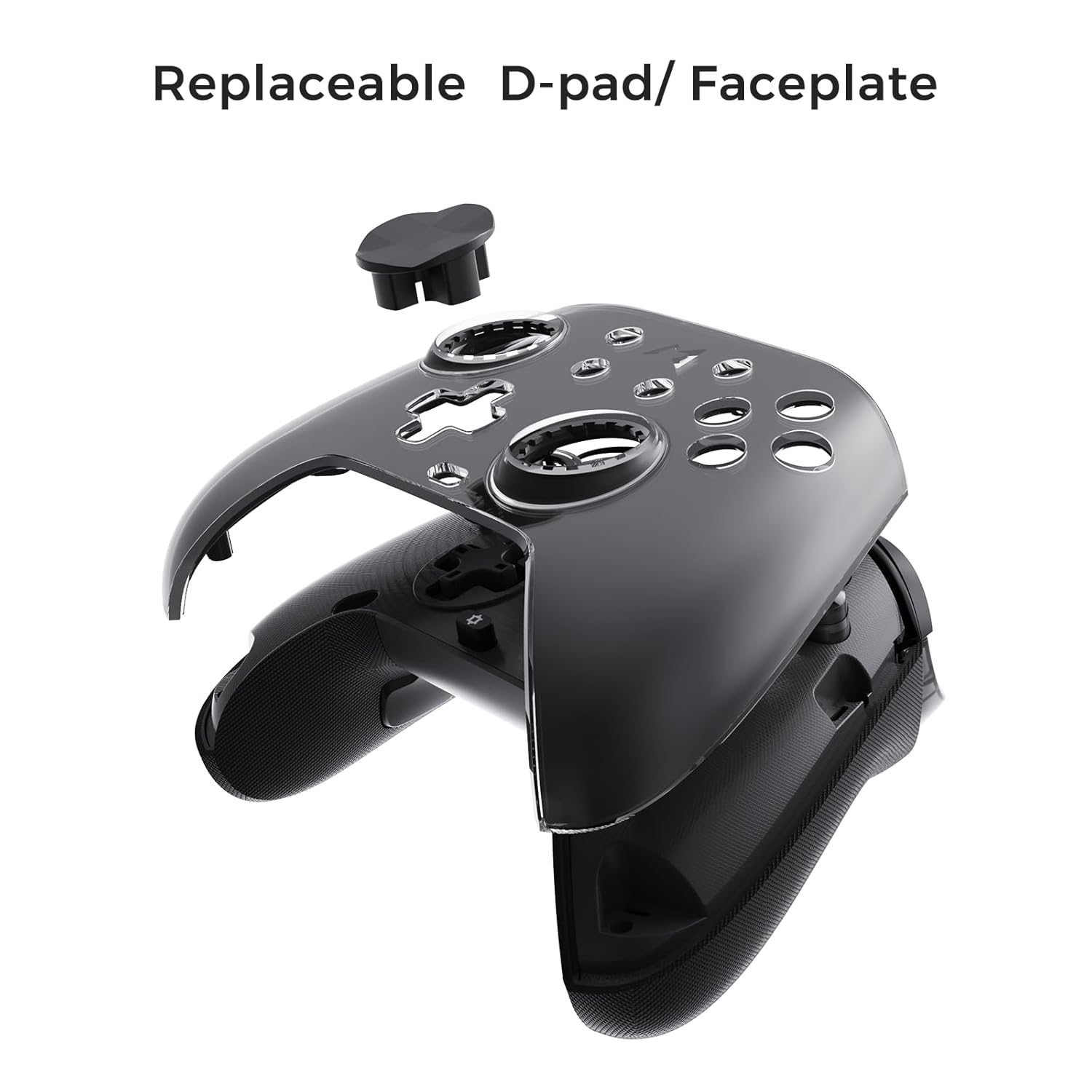
Figure 6.3: The D-pad and faceplate can be replaced for customization or preference.
- To replace the D-pad, gently remove the magnetic faceplate and then lift out the D-pad. Insert the desired D-pad (cross or circle) and reattach the faceplate.
7. Техникалык тейлөө
- Тазалоо: Башкаргычты тазалоо үчүн жумшак, кургак чүпүрөктү колдонуңуз. Өтө кир болсо, бир аз сүртүңүзampчүпүрөктү суу менен. Катуу химиялык заттарды же абразивдүү тазалагычтарды колдонбоңуз.
- Сактагыч: Store the controller in a cool, dry place, away from direct sunlight and extreme temperatures. When not in use for extended periods, store it in the provided PU travel case.
- Батареяга кам көрүү: Батареянын иштөө мөөнөтүн узартуу үчүн, контроллерди тез-тез толук зарядсыздандырбаңыз. Аны үзгүлтүксүз колдонбосоңуз да, үзгүлтүксүз кубаттап туруңуз.
8. Кыйынчылыктарды
| Көйгөй | Мүмкүн себеп | Чечим |
|---|---|---|
| Контроллер күйбөйт. | Батарея аз. | Контроллерди жок дегенде 30 мүнөткө заряддаңыз. |
| Контроллер зымсыз туташпайт. | Not in pairing mode; out of range; interference; incorrect mode selected. | Ensure controller is in pairing mode. Move closer to the device. Check for other wireless devices causing interference. Verify correct connection mode (2.4G or Bluetooth). |
| Input lag or dropped connections. | Wireless interference; low battery; outdated firmware. | Reduce distance to device. Charge controller. Update firmware via Mobapad app. Try wired connection. |
| Баскычтар же джойстиктер жооп бербейт. | Software glitch; physical obstruction; calibration issue. | Restart the controller and the connected device. Check for physical debris. Calibrate joysticks via Mobapad app. |
| HD Rumble not working. | Feature disabled in game/system settings; low battery. | Ensure rumble is enabled in game and system settings. Charge controller. |
If you encounter issues not listed here, please refer to the official MOBAPAD support webсайтка же кардарларды тейлөөгө кайрылыңыз.
9. Техникалык шарттар
| Өзгөчөлүк | Деталь |
|---|---|
| Модель номери | Mobapad Huben2 H6 |
| Байланыш | 2.4G зымсыз, Bluetooth, зымдуу (USB-C) |
| Шайкештик | Nintendo Switch, Nintendo Switch 2, Windows, Steam, Android, iOS |
| Джойстиктер | Capacitive, 4,096-step precision, 1000Hz polling rate |
| Триггерлер | Dual Mode: 2mm Omron Microswitch, 10mm Hall Effect Linear |
| Buttons | Omron Mechanical Face Buttons, Programmable Back Buttons (M1-M4) |
| Вибрация | Dual ALPS Linear Motors (HD Rumble) |
| Motion Control | 6-ок гироскоп |
| Батарея сыйымдуулугу | 1000mAh литий-ион |
| Батареянын иштөө мөөнөтү | 15 саатка чейин (болжол менен) |
| Өлчөмдөр | 6.3 x 4.13 x 2.76 дюйм |
| Салмагы | 1.87 фунт |
10. Кепилдик жана колдоо
MOBAPAD products are designed and manufactured to the highest quality standards. For warranty information, technical support, or customer service inquiries, please visit the official MOBAPAD website or contact their authorized support channels. Please retain your proof of purchase for warranty claims.
Webсайт: Visit the MOBAPAD Store on Amazon
Ask a question about this manual
Ask about setup, troubleshooting, compatibility, parts, safety, or missing instructions. Manuals+ will review the question and use this page’s manual context to help answer it.