
1. Киришүү
This manual provides comprehensive instructions for the artfone G3 Flip Cell Phone. Designed for ease of use, this device features large buttons, a clear display, and essential communication functions. Please read this manual thoroughly to understand the phone's operation and ensure proper use.
2. Пакеттин мазмуну
Төмөндө тизмеленген нерселердин баары сиздин продукт таңгагыңызда бар экенин текшериңиз:
- artfone G3 Flip Cell Phone
- Заряддалуучу батарея (1300mAh)
- USB кабели
- Заряддоо бешиги
- User Manual

Image: The complete package contents of the artfone G3 Flip Cell Phone, showing the phone, charging accessories, and documentation.
3. Телефон аркылуу сүйлөшүүview
The artfone G3 features a clamshell design with a 2.4-inch color display and a large, easy-to-use keypad.
3.1 Front and Keypad

Image: The artfone G3 flip phone in red, opened to display its large, well-spaced keypad and internal screen.
The keypad includes 21 large, distinct buttons for dialing and navigation. Green and red buttons are dedicated for answering and ending calls, respectively. The 2.4-inch display provides clear icons and supports large font sizes for improved visibility.

Сүрөт: деталдуу view of the phone's screen and keypad, highlighting the SOS function, large buttons, and large font option for enhanced readability.
3.2 Side Buttons and SOS Function
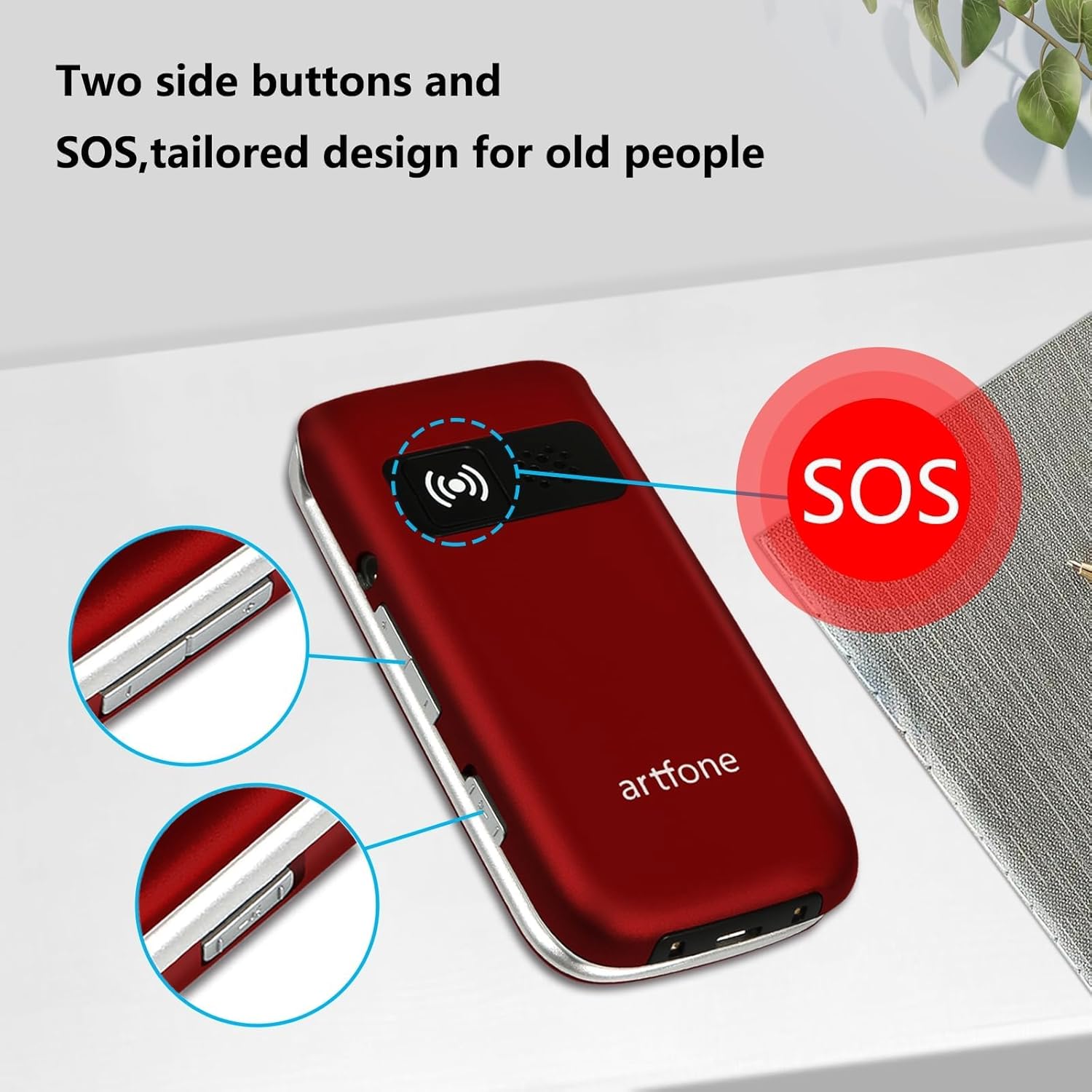
Сүрөт: Капталдагы профессионалfile of the artfone G3, illustrating the location of the SOS emergency button and additional side controls.
The phone features dedicated side buttons for volume control and a prominent SOS button on the back for emergency situations.
4. Орнотуу
4.1 Батареяны орнотуу
- Телефондун арткы капкагын алып салыңыз.
- Insert the 1300mAh battery into the battery compartment, ensuring the gold contacts align.
- Арткы капкакты чыкылдатмайынча ордуна коюңуз.
4.2 SIM картаны орнотуу
The artfone G3 supports 4G, 3G, and 2G networks. It is compatible with T-Mobile, MetroPCS, SpeedTalk, Tello, and RedPocket GSMT SIM cards. This phone is not compatible with AT&T, Cricket, or any CDMA networks such as Verizon, Sprint, and Boost Mobile.
- Телефондун өчүк экенин жана батарейкасынын алынып салынганын текшериңиз.
- Locate the SIM card slot(s) beneath the battery compartment.
- Carefully insert your compatible SIM card(s) into the slot(s) as indicated by the diagram.
- Батареяны жана арткы капкакты кайра орнотуңуз.
4.3 Алгачкы заряддоо
Биринчи жолу колдонуудан мурун, телефондун батарейкасын толугу менен заряддаңыз.
- Connect the USB cable to the charging cradle and a power adapter (not included).
- Place the artfone G3 into the charging cradle, ensuring it is seated correctly. The phone will indicate charging status on its screen.
- Батареянын индикатору толук заряддалганын көрсөткөнгө чейин телефонду заряддап коюңуз.
5. Иштөө нускамалары
5.1 Күйгүзүү/өчүрүү
- Күйгүзүү үчүн: Press and hold the red 'End Call' button until the screen lights up.
- Өчүрүү үчүн: Press and hold the red 'End Call' button until the power-off option appears, then confirm.
5.2 Чалууларды жасоо
- Айланма телефонду ачыңыз.
- Ариптакта аркылуу каалаган телефон номерин териңиз.
- Press the green 'Call' button to initiate the call.
5.3 Чалууларды кабыл алуу
- When the phone rings, open the flip to answer, or press the green 'Call' button.
- To end a call, press the red 'End Call' button or close the flip.
5.4 Тез терүү
The phone supports speed dial for quick access to favorite contacts.
- Dedicated A/B Keys: Assign frequently called numbers to the 'A' and 'B' buttons. Refer to the phone's menu for setup instructions.
- Number Keys 1-9: Assign contacts to number keys 1 through 9. Long-press the assigned number key to dial the contact.
5.5 SOS өзгөчө кырдаал баскычы
The SOS function allows programming up to five emergency contacts. In a crisis, a single press of the SOS button triggers the phone to call each contact sequentially until someone answers.
- Жайгашуу: Navigate to the SOS settings in the phone's menu to add up to five emergency contact numbers.
- Жандандыруу: In an emergency, press and hold the SOS button on the back of the phone. The phone will automatically dial the programmed contacts.
5.6 Photo Contacts
The phone supports assigning photos to contacts, making it easier to identify callers or dial frequently used numbers visually.

Image: The artfone G3 in hand, illustrating the large keypad and the photo contact feature on the display.
5.7 Talking Numbers
For users with visual impairments, the phone offers a real-time voice broadcast function that reads out the time and dialed numbers.
- Time Broadcast: Long-press the volume button to hear the current time announced.
- Dialed Number Announcement: This feature can be enabled in the phone's settings to audibly announce each number as it is pressed on the keypad.
5.8 Үндү тууралоо
Use the dedicated volume buttons on the side of the phone to adjust the call volume during a conversation or the ringtone volume when idle.
6. Техникалык тейлөө
- Тазалоо: Use a soft, dry cloth to clean the phone's exterior. Avoid liquid cleaners.
- Батареяга кам көрүү: To prolong battery life, avoid extreme temperatures. Charge the phone regularly, but do not leave it fully discharged for extended periods.
- Сактагыч: Телефонду салкын, кургак жерде, күн нуру түз тийбеген жана нымдуулуктан алыс сактаңыз.
- Ишенимдүүлүк: The phone is designed for durability, tested to withstand frequent opening and closing.

Image: The artfone G3 flip phone demonstrating its durability through a reliability test of its hinge mechanism.
7. Кыйынчылыктарды
| Көйгөй | Мүмкүн чечим |
|---|---|
| Телефон күйбөйт | Ensure the battery is correctly installed and fully charged. Connect to the charging cradle to check if the charging indicator appears. |
| Тармак сигналы жок | Verify that a compatible SIM card is correctly inserted. Check your location for network coverage. Restart the phone. |
| Чалууларды жасоо/кабыл алуу мүмкүн эмес | Check network signal strength. Ensure your SIM card is active and has sufficient credit/plan. Verify the number dialed is correct. |
| Заряддоо маселелери | Ensure the charging cradle and USB cable are properly connected. Check for debris in the charging port. Ensure the phone is correctly seated in the cradle. |
| Баскычтоп жооп бербейт | Restart the phone. Ensure no physical obstruction is preventing button presses. |
8. Техникалык шарттар
| Өзгөчөлүк | Деталь |
|---|---|
| Модель аты | ARF-G3+001 |
| Бренд | artfone |
| Операция системасы | Nucleus OS |
| Connectivity Technologies | 4G LTE, 3G, 2G |
| Screen Size | 2.4 дюйм |
| Резолюция | 320 x 240 |
| Батарея сыйымдуулугу | 1300 миллионamp Саат |
| Телефон менен сүйлөшүү убактысы | 6 саатка чейин |
| Эстутум сактоо сыйымдуулугу | 1 ГБ |
| RAM эстутум орнотулган өлчөмү | 48 MB |
| Өзгөчөлүктөр | Time reporting function, 4G unlocked, SOS button, Speed Dial, Photo Contact, Talking Numbers |
| Элемент Салмагы | 10.4 унция |
| Түс | Кызыл |
9. Кепилдик жана колдоо
For warranty information or technical support, please refer to the documentation included with your purchase or contact artfone customer service. Specific warranty terms and support channels may vary by region and retailer.