
Introduction
This manual provides essential information for setting up, operating, maintaining, and troubleshooting your NIMO 15.6" FHD IPS Student-Laptop-Computer. Please read this guide thoroughly to ensure optimal performance and longevity of your device.

The NIMO 15.6" FHD IPS Student-Laptop-Computer, featuring a vibrant display and sleek design.
Эмне камтылган
Таңгакта бардык буюмдар бар экенин текшериңиз:
- 1 x Nimo N157 Laptop
- 1 x Type-C 65W GaN PD Fast Charger
- 1 x User Manual
- Windows 11 Home (Pre-installed)
- 2 Years Warranty, 90 Days Return Information
Негизги өзгөчөлүктөрү
Your NIMO laptop is equipped with advanced features designed for productivity and convenience:
Vibrant FHD IPS Display
Experience stunning visuals on the 15.6" FHD IPS (1920x1080) Anti-Glare Display. With an 85% screen-to-body ratio and 16:9 aspect ratio, enjoy precise color accuracy and sharp detail for all your tasks.

The 15.6-inch FHD IPS display provides a bright and clear visual experience.
Күчтүү аткаруу
Equipped with a 13th Gen Intel N150 processor (up to 3.6GHz), 16GB DDR4 RAM, and a 512GB PCIe SSD, this laptop delivers lightning-fast performance, rapid startup times, and accelerated data transfer for seamless multitasking and storage.
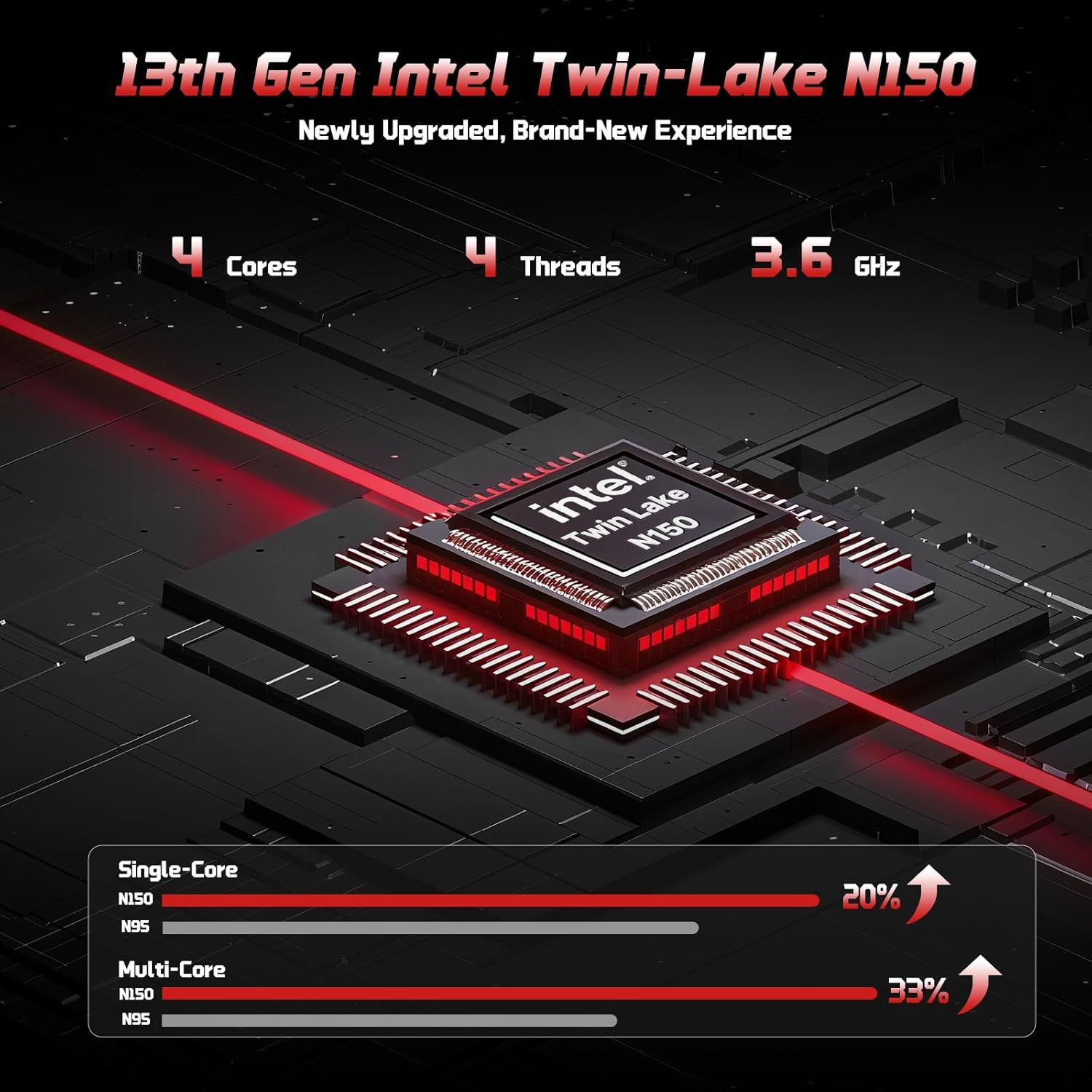
The 13th Gen Intel Twin-Lake N150 processor ensures efficient performance.

The laptop supports user-upgradable RAM and SSD for future expansion.
Fast Charging with GaN PD Charger
The included 65W GaN PD fast charger and 6.56ft USB-C to USB-C cable allow for quick power-ups. Charge for 15 minutes to get 2 hours of standby time. This versatile charger can also power your iPad, phone, and other compatible devices.

The 65W GaN PD charger provides fast and convenient charging for multiple devices.
Humanized Design & Security
Features a built-in fingerprint reader on the touchpad for secure, one-touch login. The backlit keyboard allows for easy typing in dim or dark environments, with adjustable brightness. The touchpad supports scroll and multi-touch gestures.

Secure fingerprint login and a comfortable backlit keyboard enhance usability.
Комплекстүү байланыш
The laptop includes a variety of ports for all your peripheral needs, including USB 3.0, USB 2.0, HDMI, and multiple Type-C ports (one for PD Charge Only, one for Multifunction). It also features Wi-Fi 6 and Bluetooth 5.2 for robust wireless connections.

Деталдаштырылган view ноутбуктун ample ports for various connections.
Купуялык Webcam
A 720p HD camera with a physical privacy switch ensures your personal space is always secure. Easily slide the switch to cover the camera when not in use.

The physical privacy switch on the webcam provides enhanced security.
Орнотуу колдонмосу
1. Баштапкы күйгүзүү
- Unpack your NIMO laptop and all accessories.
- Connect the Type-C 65W GaN PD Fast Charger to the laptop's Type-C PD Charge Only port and plug it into a power outlet.
- Open the laptop lid. The laptop may power on automatically, or you may need to press the power button (located on the top-right of the keyboard).
- Windows 11 Home орнотуусун аяктоо үчүн экрандагы нускамаларды аткарыңыз, анын ичинде тил, аймак, тармак туташуусу жана колдонуучу каттоо эсебин түзүү.
2. Перифериялык түзүлүштөрдү туташтыруу
Тышкы түзмөктөрдү туташтыруу үчүн жеткиликтүү портторду колдонуңуз:
- USB түзмөктөрү: Connect USB drives, external keyboards, or mice to the USB 3.0 or USB 2.0 ports.
- Тышкы дисплей: Use an HDMI cable to connect to an external monitor or projector via the HDMI port.
- Аудио түзмөктөр: Plug in headphones or external speakers into the 3.5mm headphone jack.
- MicroSD картасы: Insert a MicroSD card into the dedicated slot for expanded storage.
Иштөө нускамалары
Баскычтопту жана сенсордук тактаны колдонуу
- Арткы жарык клавиатура: Басыңыз Fn + F10 (or the key with the keyboard backlight icon) to cycle through backlight brightness levels or turn it off.
- Сандык баскычтоп: The integrated numeric keypad provides convenient data entry.
- Сенсордук такта: Supports standard Windows gestures, including two-finger scroll, pinch-to-zoom, and multi-finger taps for various functions.
Манжа изи менен кирүү
To set up fingerprint login for enhanced security:
- Windows Орнотуулар > Каттоо эсептери > Кирүү параметрлерине өтүңүз.
- Select "Fingerprint Recognition (Windows Hello)" and follow the on-screen prompts to register your fingerprint.
- Once registered, you can simply touch the fingerprint sensor on the touchpad to log in.
Дисплей орнотуулары
Оптималдуу үчүн дисплей орнотууларын тууралаңыз viewing:
- Чечим: Right-click on the desktop, select "Display settings", and choose "1920 x 1080" for the best resolution.
- Жарыктык: Adjust screen brightness using the function keys (Fn + F5/F6) or through Display settings.
Аудио жана видео
- Үндү көзөмөлдөө: Use the function keys (Fn + F2/F3/F4) or the Windows volume mixer to adjust audio levels.
- Webкамеранын купуялыгы: Slide the physical switch next to the webcam to cover or uncover the camera lens for privacy.
Техникалык тейлөө
Ноутбугуңузду тазалоо
- Бир аз жумшак, түксүз кездемени колдонуңуз dampдисплейди тазалоо үчүн суу же экран тазалагыч менен иштетиңиз.
- Баскычтоп жана шасси үчүн жумшак, кургак чүпүрөктү колдонуңуз. Катуу химиялык заттардан же абразивдүү материалдардан алыс болуңуз.
- Periodically use compressed air to clear dust from the vents to ensure proper heat dissipation.
Батареяга кам көрүү
To maximize your laptop's battery life and health:
- Батареяны бат-баттан толук кубаттап калуудан алыс болуңуз.
- Ноутбукту узак убакытка колдонбогондо салкын, кургак жерде сактаңыз.
- Use the provided NIMO 65W GaN PD Fast Charger for optimal charging performance.

The laptop features smart battery optimization for extended lifespan and safe charging.
RAM and SSD Upgrades
Your NIMO laptop supports detachable RAM and SSD, allowing for user upgrades. Consult a qualified technician or refer to detailed upgrade guides on the NIMO support website before attempting any internal component changes.
Жалпы көйгөйлөрдү чечүү
If you encounter problems with your laptop, try the following solutions:
- Кубат жок: Ensure the charger is securely connected to both the laptop and a working power outlet. Try a different outlet. If the battery is completely drained, allow it to charge for at least 30 minutes before attempting to power on.
- Дисплей маселелери: Экран бош болсо, басып көрүңүз Fn + F7 (or the display toggle key) to switch display outputs. Check external monitor connections if applicable.
- Жай аткаруу: Close unnecessary applications. Check for Windows updates. Ensure sufficient free space on the SSD. Restarting the laptop can often resolve temporary slowdowns.
- Wi-Fi/Bluetooth байланышы: Ensure Wi-Fi and Bluetooth are enabled in Windows settings. Restart your router/modem. Update network drivers if necessary.
- Keyboard/Touchpad Unresponsive: Ноутбукту өчүрүп-күйгүзүңүз. Түзмөк башкаргычында драйвер жаңыртууларын текшериңиз.
If problems persist, please contact NIMO customer support for further assistance.
Техникалык мүнөздөмөлөр
| Өзгөчөлүк | Спецификация |
|---|---|
| Бренд | NIMO |
| Модель аты | Nimo N157 |
| Screen Size | 15.6 дюйм |
| Screen Resolution | 1920 x 1080 пиксел (FHD IPS) |
| Процессор | 13th Gen Intel N150 (up to 3.6 GHz) |
| RAM | 16 ГБ DDR4 (3200 МГц) |
| Катуу диск | 512 ГБ PCIe SSD |
| Графикалык сопроцессор | Интеграцияланган графика (Intel) |
| Операция системасы | Windows 11 Home |
| Зымсыз түрү | 802.11a/b/g/n/ac (Wi-Fi 6), Bluetooth 5.2 |
| USB порттору | 3 x USB 3.0, 1 x USB 2.0, 2 x Type-C (1 PD Charge Only, 1 Multifunction) |
| HDMI порту | Ооба |
| Батареянын орточо иштөө мөөнөтү | 5 саат |
| Элемент Салмагы | 3.8 фунт |
| Продукциянын өлчөмдөрү | 14.07 x 8.98 x 0.76 дюйм |
| Өзгөчөлүктөр | Backlit Keyboard, Fingerprint Reader, HD Audio, Numeric Keypad, Privacy Webcam |
Кепилдик жана колдоо
NIMO is committed to providing excellent customer service and support for your product.
Өндүрүүчүнүн Кепилдиги
Your NIMO laptop is covered by a comprehensive 2 жылдык өндүрүүчүнүн кепилдиги. This warranty ensures that your device is free from defects in materials and workmanship under normal use.

NIMO products are covered by a 2-year support period.
90-Day Hassle-Free Returns
NIMO offers a 90-day hassle-free return and exchange service. If you have any concerns or are not satisfied with your product within 90 days of purchase, you may return it for any reason.

You may return any NIMO product for any reason within 90 days of purchase.
Колдоо кызматы менен байланышуу
Our dedicated support team is ready to assist you. If any concerns arise or you have product-related questions, you can contact us through our official website, email, or telephone. We strive to swiftly resolve issues or facilitate replacements.

Contact our professional after-sales team via phone and live chat.
NIMO Direct Inc. is a family-owned small business founded in New Castle DE. We are committed to providing affordable, high-quality, and innovative products, while also supporting US manufacturing and local employment.