
1. Киришүү
Сатып алганыңыз үчүн рахматasing the 7artisans 10mm F3.5 Ultra Wide Angle APS-C Mirrorless Lens. This manual provides essential information for the proper use, maintenance, and care of your new lens. Please read it thoroughly before use to ensure optimal performance and longevity of the product.

Image 1.1: 7artisans 10mm F3.5 Lens Overview
2. Пакеттин мазмуну
Төмөндө тизмеленген нерселердин баары пакетиңизге камтылганын текшериңиз:
- 7artisans 10mm F3.5 Lens x1
- Lens Front Cover x1
- Lens Back Cover x1
- Колдонуучунун колдонмосу x1
- Lens Packaging Box x1

2.1-сүрөт: Таңгактын мазмуну
3. Lens Components
Familiarize yourself with the main components of your 7artisans 10mm F3.5 lens:
- Filter Installation Latch: Фильтрлерди бекитүү үчүн.
- Focusing Ring: Used to manually adjust the focus.
- Диафрагма шакеги: Used to manually set the aperture (F3.5 to F16/F22).
- Линзаны орнотуу: Линзаны камеранын корпусуна туташтырат.
- Depth of Field Scale: Provides a visual guide for depth of field at various apertures.

Image 3.1: Lens Structure and Components
4. Орнотуу жана орнотуу
To attach the 7artisans 10mm F3.5 lens to your Fuji X-mount camera:
- Камераңыз өчүк экенин текшериңиз.
- Remove the rear lens cap from the 7artisans lens and the body cap from your camera.
- Align the red dot on the lens mount with the corresponding mark on your camera's lens mount.
- Линзаны камеранын бекиткичине акырын салып, ордуна чыкылдаган үн чыкканча саат жебеси боюнча айландырыңыз. Линзаны күч менен баспаңыз.
- Колдонулбай турган учурда алдыңкы линза капкагын жабыңыз.
Compatible Fuji X-Mount Camera Models:
- X-H series: X-H1, X-H2, X-H2S, X-T5
- X-T series: X-T5, X-T4, X-T3, X-T2, X-T1, X-T50, X-T30, X-T30 II, X-T20, X-T200, X-T100
- X-S series: X-S10, X-S20
- X-PRO series: X-PRO2, X-Pro3
- X-E series: X-E4, X-E3, X-E2, X-E1
- X-A series: X-A1, X-A2, X-A3, X-A5, X-A7, X-A10, X-A20, X-M5
Video 4.1: Demonstrates the mounting of the 7artisans 10mm F3.5 lens onto various mirrorless camera bodies, showcasing its compact size and ease of attachment.
5. Объективди иштетүү
5.1 Кол менен фокустоо
This is a manual focus lens. Rotate the focusing ring to achieve sharp focus. Utilize your camera's focus peaking or magnification features for precise focusing, especially at wider apertures.
5.2 Диафрагманы башкаруу
The lens features a variable aperture from F3.5 to F22. Rotate the aperture ring to select your desired f-stop. A wider aperture (smaller f-number like F3.5) allows more light and creates a shallower depth of field, while a narrower aperture (larger f-number like F16/F22) allows less light, increases depth of field, and can produce a distinct 10-point starburst effect from bright light sources.
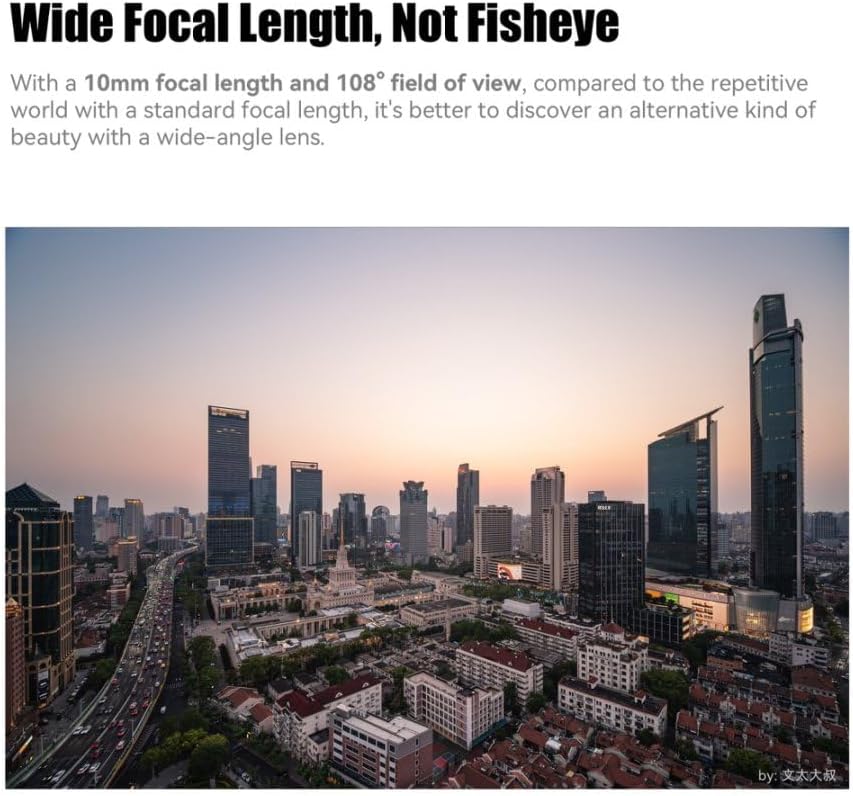
Image 5.1: Wide Focal Length, Not Fisheye

Image 5.2: Wide-angle Style Portrait

Image 5.3: Ten Needles of Brilliant Starlight
5.3 Non-Fisheye Wide-Angle Perspective
The 10mm focal length provides an ultra-wide field of view (109.5 degrees) without the typical distortion of a fisheye lens. This makes it suitable for architectural photography, landscapes, and creative portraits where straight lines and natural perspectives are desired.

Image 5.4: Straight Out Aesthetics
6. Техникалык тейлөө жана кам көрүү
Туура кам көрүү линзаңыздын иштөө мөөнөтүн жана иштешин узартат:
- Тазалоо: Use a soft, clean microfiber cloth specifically designed for optics to clean the lens elements. For stubborn smudges, use a small amount of lens cleaning fluid applied to the cloth, not directly to the lens.
- Чаң: Use a blower brush to remove dust from the lens surface before wiping.
- Сактагыч: Store the lens in a dry, cool place away from direct sunlight and extreme temperatures. Always attach the front and rear lens caps when not in use.
- Нымдуулуктан качыңыз: The lens is not water-resistant. Avoid exposure to rain, splashes, or high humidity.
7. Кыйынчылыктарды
If you encounter issues with your lens, consider the following:
- Soft Images: Ensure accurate manual focus. At wider apertures (e.g., F3.5), corners may exhibit some softness, which is common for ultra-wide lenses. Stopping down the aperture (e.g., to F5.6 or F8) can improve corner sharpness.
- Lens Flare/Ghosting: When shooting directly into strong light sources, some lens flare or ghosting may occur. This can be used creatively or minimized by adjusting your shooting angle or using a lens hood (if compatible).
- Бурмалоону оңдоо: While designed to be non-fisheye, minor optical distortions can be further corrected in post-processing using a lens correction profile.
Линзаны оңдоо File Колдонуу:
For optimal results, a lens correction file can be applied in post-processing software like Adobe Camera Raw or Lightroom. This helps to correct any minor optical distortions and chromatic aberrations.
- Windows Storage Path: C:Users\Administrator\AppData\Roaming\Adobe\CameraRaw\LensProfiles\1.0
- Mac OS Storage Path: Macintosh HD/Library/Application Support/Adobe/CameraRaw/LensProfiles/1.0
In CameraRaw, select "7artisans" for creation and "7artisans 10mm F3.5" for the model.

Image 7.1: Lens Correction Example
8. Техникалык шарттар
| Өзгөчөлүк | Description |
|---|---|
| Бренд | 7 кол өнөрчүлөр |
| Модель аты | 7artisans 10mm F3.5 |
| Фокустун узундугу | 10 миллиметр |
| Максималдуу диафрагма | F3.5 |
| Минималдуу диафрагма | F22 |
| Линзанын түрү | Wide Angle, Prime |
| Шайкеш орнотуулар | FUJIFILM X MOUNT APS-C |
| Фокус түрү | Manual Focus |
| Image Stabilization | Сүрөттү турукташтыруу жок |
| Real Angle Of View | 109.5 градус |
| Сууга туруктуулук деңгээли | Сууга чыдамдуу эмес |
| Салмагы (болжол менен) | 130 grams (from product description) |
9. Кепилдик жана колдоо
The 7artisans 10mm F3.5 lens comes with a 1 жылдык кепилдик сатып алынган күндөн тартып. Кепилдик дооматтары үчүн сатып алганыңыздын далилин сактап коюңуз.
For further assistance, technical support, or warranty inquiries, please visit the official 7artisans store or contact their customer service: