1. Киришүү
Thank you for choosing the HUTACT Portable Digital Microscope. This device is designed to introduce young explorers to the fascinating microscopic world with its 100-1000X magnification, 2.0-inch IPS screen, and versatile 2-in-1 handheld and desktop functionality. This manual provides essential information for safe and effective use, setup, operation, maintenance, and troubleshooting.
Сураныч, продуктуну колдонуудан мурун бул колдонмону кылдат окуп чыгыңыз жана аны келечекте маалымат үчүн сактап коюңуз.
2. Коопсуздук боюнча маанилүү маалымат
- Чоңдордун көзөмөлү: This product is recommended for children aged 5 and above and should always be used under adult supervision.
- Батареянын коопсуздугу: The device contains a rechargeable lithium-polymer battery. Do not attempt to replace the battery. Do not expose the device to extreme temperatures, direct sunlight, or fire.
- Заряддоо: Use only the provided Type-C charging cable. Ensure the charging port is dry before connecting.
- Тазалоо: Clean the lens and screen with a soft, dry cloth. Avoid using abrasive cleaners or solvents.
- Колдонуу: Handle the microscope with care. Avoid dropping or subjecting it to strong impacts.
- Чакан бөлүктөр: The kit contains small parts that may pose a choking hazard for young children. Keep out of reach of children under 3 years old.
3. Пакеттин мазмуну
Төмөндө тизмеленген нерселердин баары пакетиңизде бар экенин текшериңиз:
- Portable Digital Microscope with integrated screen
- Microscope Holder (for desktop use)
- USB Type-C кубаттоочу кабель
- Lanyard
- 5 даярдалган үлгү слайддары
- 5 Бош слайд
- Collection Bottles (2)
- Collection Boxes (2)
- Blenders (2)
- Пластик аралаштыргыч
- Пинцет
- Instruction Manual
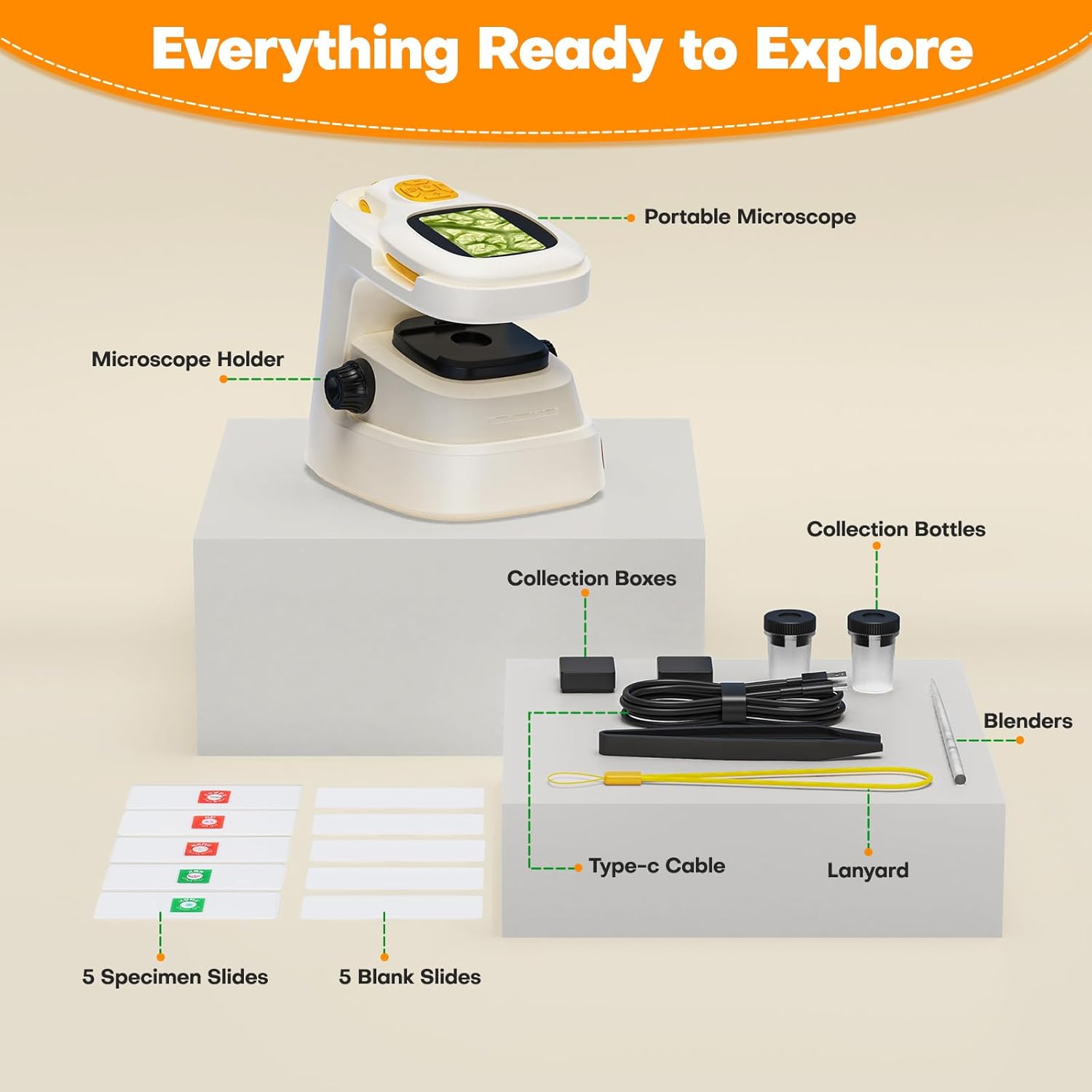
3.1-сүрөт: All components included in the HUTACT Portable Digital Microscope kit, neatly arranged. This image displays the portable microscope unit, the desktop stand, various tools like tweezers and stirrers, collection bottles, a Type-C cable, a lanyard, and both prepared and blank specimen slides.
4. Продукт бүтүп калдыview
The HUTACT Digital Microscope offers a versatile design for both handheld and desktop observation. Familiarize yourself with its main components:
- 2.0 дюймдук IPS экран: Displays real-time magnified images and videos.
- Фокус баскычы: Сүрөттүн ачыктыгын тууралайт.
- Чоңойтуу баскычтары: Cycles through 10 levels of digital zoom (100X-1000X).
- Тартуу баскычы: Сүрөткө тартат же видео жазууну баштайт/токтот.
- LED жарыктандыруу: Provides light for observing specimens.
- Тип-C Port: Заряддоо жана компьютерге туташтыруу үчүн.
- TF карта уячасы: For optional external storage (TF card not included).

4.1-сүрөт: The HUTACT Digital Microscope demonstrating its 2-in-1 functionality. The image shows the main microscope unit being used in handheld mode by a child, and also placed into its stable desktop stand for more detailed observation. This highlights the flexibility of the device for various exploration scenarios.

4.2-сүрөт: Жакын план view of the HUTACT Digital Microscope's screen and focus knob, illustrating the 10 levels of adjustable magnification. The image displays examples of a ladybug at 100X, a leaf vein at 500X, and a detailed cellular structure at 1000X, demonstrating the clarity and range of magnification.
5. Орнотуу
5.1 Аппаратты заряддоо
- Connect the provided Type-C USB cable to the microscope's charging port.
- Кабелдин экинчи учун стандарттуу USB кубат адаптерине (кошумча эмес) же компьютердин USB портуна сайыңыз.
- The charging indicator light will illuminate. A full charge takes approximately 1.5 hours and provides up to 1.5 hours of continuous use.
5.2 Assembling the Microscope (Desktop Mode)
- Take the portable microscope unit and the microscope holder.
- Gently slide the portable microscope into the designated slot on the holder until it is securely seated.
- Ensure the microscope is stable on a flat surface before use.
5.3 TF картасын салуу (милдеттүү эмес)
The microscope has 16 internal storage slots for photos. For extended storage of photos and videos, a TF (MicroSD) card (up to 64GB, not included) can be inserted.
- Locate the TF card slot on the side of the microscope.
- Insert the TF card with the metal contacts facing down until it clicks into place.
- Алып салуу үчүн, картаны кайра акырын түртүп, ал чыгып кеткенге чейин.
6. Иштөө нускамалары
6.1 Күйгүзүү/өчүрүү
- Күйгүзүү: Экран жарыктанганга чейин Кубат баскычын бир нече секунд басып туруңуз.
- Өчүрүү: Экран өчкөнгө чейин Кубат баскычын кайра басып, кармап туруңуз.
6.2 Чоңойтууну тууралоо
The microscope offers 10 levels of digital magnification, ranging from 100X to 1000X.
- Use the magnification buttons (usually marked with '+' and '-') to cycle through the different zoom levels.
- Observe the change in magnification on the 2.0" IPS screen.
6.3 Фокустоо
Таза сүрөткө жетүү үчүн:
- Place your specimen directly under the microscope lens.
- Slowly rotate the focus knob until the image on the screen becomes sharp and clear.
6.4 Кол режими
For outdoor exploration or examining larger objects:
- Remove the microscope unit from its desktop holder.
- Hold the microscope firmly and position the lens over the object you wish to observe.
- Adjust the focus knob for clarity.
6.5 Иш такта режими
For detailed observation of slides or stationary objects:
- Ensure the microscope unit is securely placed in its holder.
- Place a specimen slide or object on the stage directly under the lens.
- Adjust the focus knob and magnification as needed.
6.6 Сүрөттөрдү жана видеолорду тартуу
The microscope features a 100W pixel camera for documenting your discoveries.
- Сүрөткө тартуу үчүн: Press the Capture button once. The image will be saved to internal memory or the TF card if inserted.
- Видео жаздыруу үчүн: Press and hold the Capture button to start recording. Press and hold again to stop. Videos require a TF card for storage.

6.1-сүрөт: The microscope's screen displaying both photo and video recording functions. The top image shows a still capture of red cup fungi, while the bottom image shows a video recording in progress of an insect, indicating the device's capability to document observations.
6.7 Компьютерге туташуу
For larger screen viewing or sharing, connect the microscope to a Windows or Mac computer:
- Ensure the microscope is powered on.
- Connect the microscope to your computer using the Type-C USB cable.
- Микроскоп төмөнкүдөй деп таанылышы керек webcam or storage device. You may need to select the appropriate mode on the microscope's menu or use a standard webcam application on your computer.
6.8 Using Specimen Slides
The kit includes both prepared and blank slides for diverse experiments.
- Prepared Slides: Place a prepared slide directly onto the microscope stage for immediate observation.
- Blank Slides: Use the provided laboratory gadgets (tweezers, stirrers, collection bottles) to collect and prepare your own specimens on the blank slides.

6.2-сүрөт: Two children, wearing safety glasses, engaged in scientific exploration using the HUTACT Digital Microscope. One child uses the microscope in desktop mode to examine a slide, while the other holds a blank slide, demonstrating the process of preparing and observing specimens.
7. Техникалык тейлөө
- Тазалоо: Use a soft, lint-free cloth to clean the microscope body. For the lens and screen, use a specialized lens cleaning cloth. Do not use liquid cleaners directly on the device.
- Сактагыч: Store the microscope and its accessories in a cool, dry place, away from direct sunlight and extreme temperatures. Keep it in its original packaging or a protective case when not in use.
- Батареяга кам көрүү: Батареянын иштөө мөөнөтүн узартуу үчүн, бат-баттан батарейканы толук зарядсыздандырбаңыз. Аппаратты узак убакыт бою колдонбосо дагы, үзгүлтүксүз заряддаңыз.
8. Кыйынчылыктарды
If you encounter any issues, refer to the following table for common problems and solutions:
| Көйгөй | Мүмкүн себеп | Чечим |
|---|---|---|
| Микроскоп күйбөйт. | Батареянын заряды аз же түзмөк өчүк. | Charge the microscope fully. Press and hold the Power button for a few seconds. |
| Сүрөт бүдөмүк. | Out of focus or lens is dirty. | Rotate the focus knob until the image is clear. Clean the lens with a soft cloth. |
| Cannot record videos. | No TF card inserted or TF card is full. | Insert a TF card. Ensure the TF card has sufficient free space. |
| Компьютерге туташуу мүмкүн эмес. | Incorrect cable, port, or software. | Ensure you are using the correct Type-C cable. Try a different USB port on your computer. Check computer settings for webcam or storage device recognition. |
9. Техникалык шарттар
| Өзгөчөлүк | Деталь |
|---|---|
| Бренд | HUTACT |
| Модел | NHKJ-TV3-927 |
| Чоңойтуу | 100X - 1000X |
| Screen Size | 2.0 дюймдук IPS |
| Камеранын чечилиши | 100W pixels (for photos/videos) |
| Ички сактагыч | 16 photo slots |
| Тышкы сактагыч | TF Card (up to 64GB, not included) |
| Батарея | 450mAh Lithium-polymer (included) |
| Батареянын иштөө мөөнөтү | Болжол менен 1.5 саат |
| Заряддоо порту | C түрүндөгү USB |
| Байланыш | USB to Windows/Mac PC |
| Материал | ABS |
| Элемент Салмагы | 290 грамм |
| Продукциянын өлчөмдөрү (L x W x Y) | 12.5 x 11 x 9 см |
10. Кепилдик жана колдоо
HUTACT is committed to providing quality products. For any questions, concerns, or technical support regarding your Portable Digital Microscope, please contact our customer service. Please refer to your purchase documentation for specific warranty details and contact information.
We encourage you to register your product on our official webжаңыртууларды жана колдоолорду алуу үчүн сайт.