
Introduction
This manual provides comprehensive instructions for the safe and efficient operation of your STF Allure Portable Speaker, model ST-S12629. Please read this manual thoroughly before using the device and retain it for future reference.
Коопсуздук маалыматы
- Динамикти сууга же ашыкча нымдуулукка дуушар кылбаңыз.
- Ашыкча температурадан сактаныңыз.
- Динамикти өз алдынча ажыратпаңыз же оңдоого аракет кылбаңыз. Бул кепилдикти жокко чыгарат.
- Балдар жетпеген жерде сактаңыз.
- Берилген заряддоо кабелин гана колдонуңуз.
Пакеттин мазмуну
Сураныч, пакетте төмөнкү нерселерди текшериңиз:
- STF Allure Portable Speaker (ST-S12629)
- USB заряддоо кабели
- Колдонуучунун Колдонмосу (бул документ)
Note: No additional components are included beyond the speaker, charging cable, and manual.
Продукт бүттүview
The STF Allure Portable Speaker (ST-S12629) features powerful audio output, versatile connectivity, and dynamic RGB lighting. Below are key components and controls.
Фронт View

Сүрөт: алдыңкы view of the STF Allure Portable Speaker, showcasing the dual 5-inch speakers with RGB lighting and the included USB charging cable.
Жогорку панелдин башкаруу элементтери
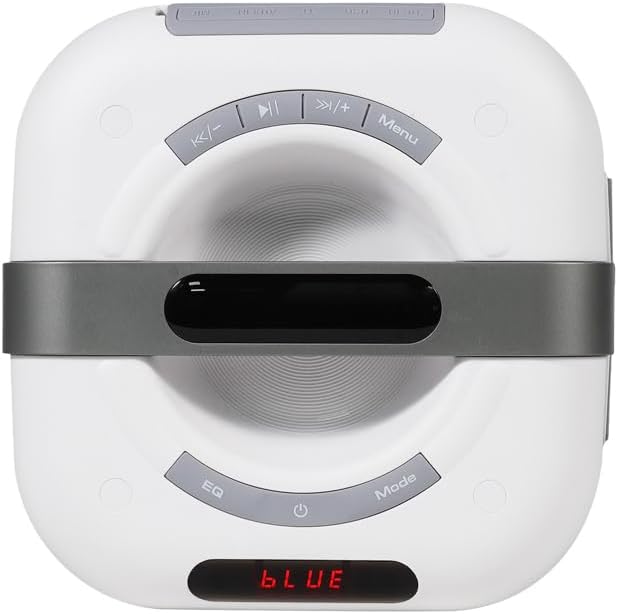
Image: Close-up of the top panel of the STF Allure Portable Speaker, showing control buttons for playback, volume, EQ, mode selection, and power.
- Кубат баскычы: Press and hold to turn on/off. Short press to toggle LED lights.
- Режим баскычы: Bluetooth, FM Radio, USB, Micro SD жана AUX режимдеринин ортосунда которулуу үчүн кыска басыңыз.
- EQ баскычы: Short press to cycle through equalizer presets.
- Ойнотуу/тындыруу баскычы: Play or pause audio. In FM mode, short press to auto-scan.
- Мурунку/Үндү азайтуу баскычы: Мурунку трекке кыска басыңыз. Үнүн азайтуу үчүн көпкө басыңыз.
- Кийинки/Үндү катуулатуу баскычы: Кийинки трекке кыска басыңыз. Үнүн жогорулатуу үчүн көпкө басыңыз.
- Меню баскычы: (Functionality may vary by mode, typically for settings or TWS pairing).
Арткы панелдин порттору
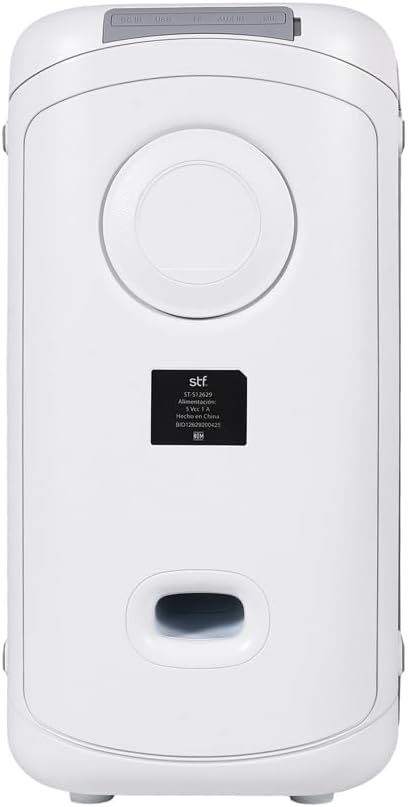
Сүрөт: Арткы view of the STF Allure Portable Speaker, highlighting the various input ports including DC IN, USB, Micro SD, AUX, and Microphone.
- DC IN порту: Берилген USB кабелин колдонуп, динамикти кубаттоо үчүн.
- USB порт: For playing audio from a USB flash drive (up to 32 GB).
- Микро SD карта слоту: For playing audio from a Micro SD card (up to 32 GB).
- AUX киргизүү (3.5 мм): For connecting external audio devices via an auxiliary cable.
- Микрофон киргизүү (6.3 мм): Микрофонду туташтыруу үчүн.
Жайгашуу
- Динамикти заряддоо:
Before first use, fully charge the speaker. Connect the provided USB charging cable to the DC IN port on the speaker and the other end to a USB power adapter (not included) or a computer's USB port. The charging indicator will illuminate. A full charge takes approximately 3 hours.
- Күйгүзүү/өчүрүү:
Press and hold the Power button on the top panel for a few seconds to turn the speaker on or off.
Иштөө нускамалары
Bluetooth режими
- Turn on the speaker. It will automatically enter Bluetooth pairing mode, indicated by a flashing "BLUE" on the display and an audible prompt.
- Түзмөгүңүздө Bluetooth'ду иштетиңиз (смартфон, планшет ж.б.).
- Издөө "STF Allure" in your device's Bluetooth list and select it to pair.
- Once paired, the speaker will emit an audible confirmation, and "BLUE" will stop flashing. You can now play audio from your device.
- Use the Play/Pause, Previous/Volume Down, and Next/Volume Up buttons on the speaker or your device to control playback.
Чыныгы зымсыз стерео (TWS) функциясы
The TWS function allows you to connect two STF Allure speakers for a stereo sound experience.
- Ensure both STF Allure speakers are turned on and in Bluetooth mode, but not connected to any device.
- On one of the speakers (this will be the primary speaker), press and hold the "Menu" button (or the designated TWS button if available, refer to specific model markings) until you hear a pairing tone.
- Эки динамик автоматтык түрдө бири-бирине туташат. Туташтырылгандан кийин, сиз ырастоо сигналын угасыз.
- Now, connect your Bluetooth device to the primary speaker as described in the "Bluetooth Mode" section. Both speakers will play audio in stereo.
FM радио режими
- Дисплейде "FM" пайда болгонго чейин "Режим" баскычын кайра-кайра басыңыз.
- Press the "Play/Pause" button once to start an automatic scan for available FM stations. The speaker will save the found stations.
- Use the "Previous/Volume Down" and "Next/Volume Up" buttons to navigate between saved stations.
USB / Micro SD Card Mode
- Insert a USB flash drive or a Micro SD card (up to 32 GB, formatted to FAT32) containing MP3 audio fileарткы панелдеги тиешелүү портко киргизиңиз.
- The speaker will automatically switch to USB or Micro SD mode and begin playing audio. If not, press the "Mode" button until the correct mode is selected.
- Use the Play/Pause, Previous/Volume Down, and Next/Volume Up buttons to control playback.
AUX киргизүү режими
- Connect one end of a 3.5mm auxiliary cable (not included) to the AUX input port on the speaker.
- Connect the other end of the auxiliary cable to the audio output jack of your external device.
- Press the "Mode" button repeatedly until "AUX" appears on the display.
- Control audio playback directly from your connected external device.
Микрофон киргизүү
- Connect a 6.3mm microphone (not included) to the Microphone input port on the rear panel.
- Adjust the microphone volume using the controls on the microphone itself or the speaker's main volume control.
LED RGB Lighting
The speaker features dynamic RGB lighting. Short press the Power button to cycle through different lighting modes or turn the lights off.
Техникалык тейлөө
- Динамикти жумшак, кургак чүпүрөк менен тазалаңыз. Абразивдүү тазалагычтарды же эриткичтерди колдонбоңуз.
- Колдонулбаганда динамикти салкын, кургак жерде сактаңыз.
- Динамикти түшүрүүдөн же катуу таасирлерден сактаныңыз.
- If the speaker will not be used for an extended period, charge it periodically to maintain battery health.
Проблемаларды чечүү
| Көйгөй | Мүмкүн себеп | Чечим |
|---|---|---|
| Динамик күйбөйт. | Батарея аз. | Динамикти толук заряддаңыз. |
| Үн жок. | Volume too low; incorrect mode selected; device not paired. | Үндү катуулатыңыз; туура киргизүүнү тандоо үчүн "Режим" баскычын басыңыз; Bluetooth түзмөгүн кайра жупташтырыңыз. |
| Bluetooth жупташуусу болбой жатат. | Speaker too far from device; other devices connected; speaker not in pairing mode. | Ensure speaker and device are within 10 meters; disconnect from other devices; ensure speaker is flashing "BLUE". |
| TWS жупташтыруу ишке ашпай калды. | Speakers not in Bluetooth mode; one speaker already paired to a device. | TWS жупташтырууну баштоодон мурун, эки динамик тең Bluetooth режиминде экенин жана эч кандай түзмөккө туташпаганын текшериңиз. |
| USB/Micro SD ойнотулбай жатат. | Туура эмес file format; card/drive not formatted correctly; card/drive capacity too large. | камсыз кылуу files are MP3; format to FAT32; use cards/drives up to 32 GB. |
Техникалык шарттар
| Өзгөчөлүк | Деталь |
|---|---|
| Модель аты | ST-S12629 |
| Динамик түрү | Portable with Bluetooth |
| Динамик өлчөмү | Кош 5 дюймдук динамиктер |
| Чыгуу күчү | 20 Вт |
| Үн басымы | 86 дБ |
| Bluetooth версиясы | 5.3 |
| Зымсыз диапазон | 10 метрге чейин (33 фут) |
| Батарея сыйымдуулугу | 3000 мАч |
| Ойнотуу убактысы | 3 саатка чейин |
| Заряддоо убактысы | Болжол менен 3 саат |
| Туташуу параметрлери | Bluetooth 5.3, USB, Micro SD, FM Radio, Aux 3.5mm, Microphone 6.3mm |
| Max USB/Micro SD Capacity | 32 ГБ |
| Башкаруу ыкмасы | Tactile Buttons |
| Түс | Ак |
Кепилдик жана колдоо
The STF Allure Portable Speaker (ST-S12629) comes with a 5-year warranty. For warranty claims or technical support, please contact STF customer service.
For further assistance, please visit the official STF website or contact their support channels. Keep your purchase receipt as proof of purchase for warranty purposes.
Note: Warranty terms and conditions may vary by region. Please refer to the official STF warranty policy for detailed information.