
1. Киришүү
Thank you for choosing the STF G Track Ultra Portable Speaker. This manual provides essential information for the safe and efficient operation of your device. Please read it thoroughly before use and retain it for future reference. This portable speaker features a 4-inch driver, 20W output, RGB LED lighting, True Wireless Stereo (TWS) functionality, Bluetooth 5 connectivity, and multiple playback options including USB, Micro SD, Aux, FM radio, and microphone input.
2. Пакеттин мазмуну
Пакетте бардык буюмдар бар экенин текшериңиз:
- STF G Track Ultra Portable Speaker
- USB Type-C кубаттоочу кабель
- Auxiliary 3.5mm Audio Cable
- User Manual
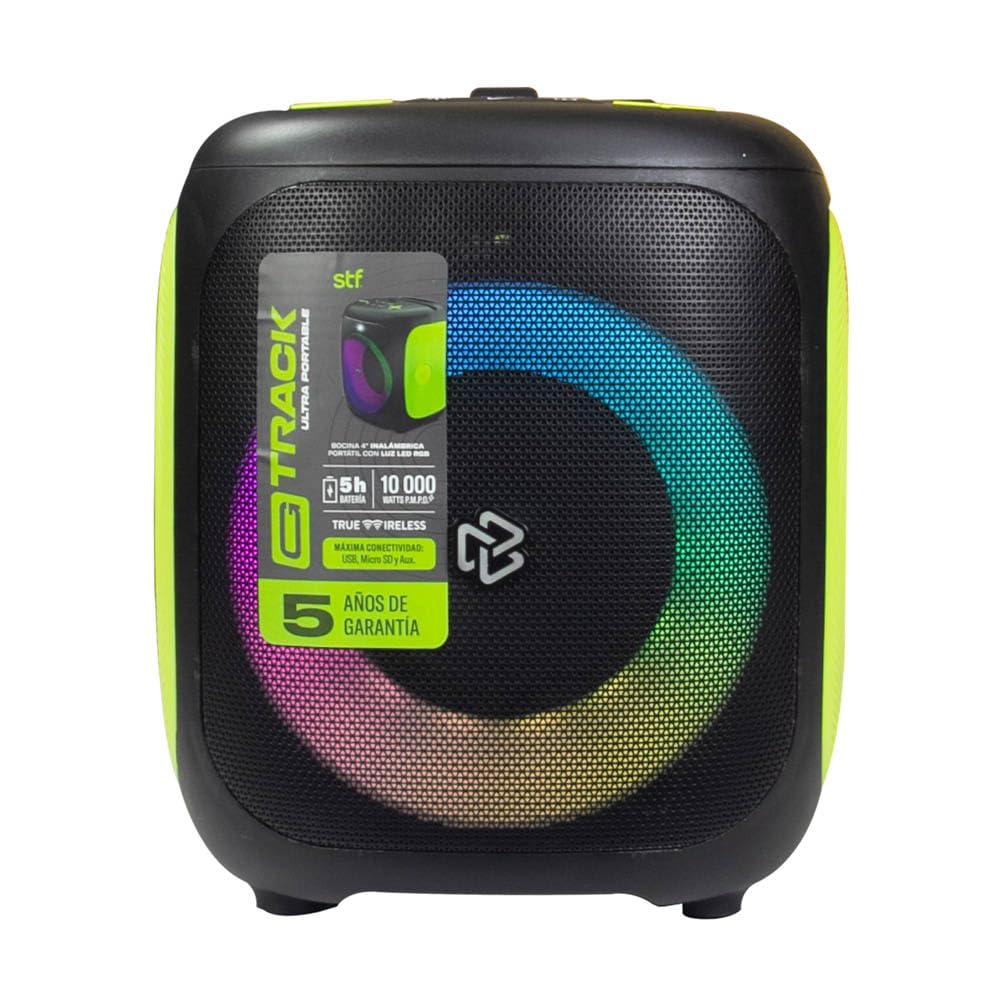
Image 2.1: STF G Track Ultra Portable Speaker with its charging cable, auxiliary cable, and user manual.
3. Продукт бүтүп калдыview
3.1 Башкаруу панели
The control panel is located on the top of the speaker and provides access to all primary functions.

Image 3.1: Top control panel with buttons for mode, menu, power, volume, LED, play/pause, and EQ.
- M (режим) баскычы: Switches between Bluetooth, USB, Micro SD, Aux, and FM radio modes.
- MENU баскычы: Accesses additional settings or functions depending on the mode.
- Күйгүзүү/өчүрүү баскычы (⑁): Press and hold to power on/off. Short press to play/pause in music modes.
- Үндү азайтуу (-) / Мурунку трек: Мурунку трек үчүн кыска басыңыз, үндү азайтуу үчүн көпкө басыңыз.
- Үндү катуулатуу (+) / Кийинки трек: Кийинки трек үчүн кыска басыңыз, үнүн катуулатуу үчүн көпкө басыңыз.
- LED Button (☀): RGB жарык эффекттерин көзөмөлдөйт.
- Play/Pause Button (▶): Аудиону ойнотот же тындырат.
- EQ Button (EQ 1.2.3): Эквалайзер алдын ала орнотуулары аркылуу айланышат.
3.2 Порттор жана туташуулар
The connection ports are typically located on the rear or side of the speaker.

Сүрөт 3.2: Арткы view of the speaker, highlighting the bass port and potential charging/input ports (not visible in this specific image, but typically located near the bottom or side).
- USB порт: USB флэш-дискти ойнотуу үчүн.
- Микро SD карта слоту: Micro SD карта ойнотуу үчүн.
- AUX киргизүү (3.5 мм): For connecting external audio devices via an auxiliary cable.
- Микрофон киргизүү: Зымдуу микрофонду туташтыруу үчүн.
- USB Type-C заряддоо порту: Динамиктин ички батареясын заряддоо үчүн.
4. Орнотуу
4.1 Динамикти заряддоо
- Берилген USB Type-C кабелин динамиктин заряддоо портуна туташтырыңыз.
- Connect the other end of the USB cable to a compatible USB power adapter (5V/1A recommended, not included) or a computer's USB port.
- Кубаттоо учурунда кубаттоо индикатору, адатта, кызыл түстө күйөт.
- Once fully charged, the indicator light will change color or turn off (refer to specific product LED behavior). A full charge provides approximately 5 hours of playback.
4.2 Күйгүзүү/өчүрүү
- To power on, press and hold the Power button (⑁) for approximately 2-3 seconds until you hear an audible prompt or see the LED lights activate.
- To power off, press and hold the Power button (⑁) again for approximately 2-3 seconds.
4.3 Bluetooth жупташтыруу
- Ensure the speaker is powered on and in Bluetooth mode. If not, press the 'M' (Mode) button until you hear the Bluetooth prompt. The LED indicator will typically flash, indicating it's in pairing mode.
- Мобилдик түзмөгүңүздө (смартфон, планшет, компьютер) Bluetooth'ду күйгүзүп, жеткиликтүү түзмөктөрдү издеңиз.
- Select "STF G Track" from the list of found devices.
- Жупташтырылгандан кийин, сиз ырастоо үнүн угасыз жана LED индикатору күйүп-өчүүнү токтотуп, туруктуу бойдон калат.
- Эгерде түзмөктүн Bluetooth функциясы активдүү болсо жана анын диапазонунда болсо, динамик күйүп турганда акыркы жупташтырылган түзмөккө автоматтык түрдө кайра туташат.
4.4 Чыныгы зымсыз стерео (TWS) жупташтыруу
TWS allows you to connect two STF G Track speakers for a stereo sound experience.
- Ensure both STF G Track speakers are powered on and in Bluetooth mode, but not yet connected to any device.
- On one of the speakers (this will be the primary speaker), press and hold the 'M' (Mode) button for approximately 3-5 seconds. You should hear a pairing tone.
- Эки динамик автоматтык түрдө бири-бирин издеп, туташат. Туташтырылгандан кийин, сиз ырастоо үнүн угасыз.
- Now, on your mobile device, search for Bluetooth devices and connect to the primary speaker (e.g., "STF G Track"). Both speakers will now play audio in stereo.
5. Иштөө нускамалары
5.1 Music Playback (USB, Micro SD, Aux)
- USB/микро SD: USB флеш-дискти же Micro SD картаны салыңыз (колдоого алынган аудио менен) files) into the corresponding port. The speaker will automatically switch to USB/Micro SD mode and begin playback. Use the Play/Pause, Next, and Previous buttons to control playback.
- Көмөкчү киргизүү: Connect an external audio device (e.g., MP3 player, smartphone) to the speaker's 3.5mm AUX input using the provided auxiliary cable. Press the 'M' (Mode) button until you select AUX mode. Control playback from your connected device.
5.2 FM радиосу
- Press the 'M' (Mode) button repeatedly until you select FM radio mode.
- To automatically scan and save available stations, press and hold the Play/Pause button (▶). The speaker will scan and store stations.
- Use the Next (+) and Previous (-) buttons to navigate between saved FM stations.
5.3 Микрофонду колдонуу
- Connect a wired microphone (not included) to the microphone input port on the speaker.
- Adjust the microphone volume using the speaker's volume controls or any dedicated microphone volume knob if available.
5.4 LED жарыгын башкаруу
- Press the LED button (☀) to cycle through different RGB lighting modes or to turn the lights off.
5.5 Эквалайзер (EQ)
- Press the EQ button (EQ 1.2.3) to switch between available equalizer presets (e.g., Pop, Rock, Jazz, Classic, Flat) to optimize the sound for different music genres.
6. Техникалык тейлөө
- Тазалоо: Динамиктин сыртын тазалоо үчүн жумшак, кургак чүпүрөктү колдонуңуз. Абразивдүү тазалоочу каражаттарды, момдорду же эриткичтерди колдонбоңуз.
- Сактагыч: Динамикти түз күн нурунан жана өтө температурадан алыс салкын, кургак жерде сактаңыз.
- Батареяга кам көрүү: Батареянын иштөө мөөнөтүн узартуу үчүн, бат-баттан батарейканы толук зарядсыздандырбаңыз. Узак убакыт колдонулбаса да, динамикти үзгүлтүксүз заряддап туруңуз.
- Суу каршылык: Бул динамик суу өткөрбөйт. Суунун же ашыкча нымдуулуктун таасиринен алыс болуңуз.
7. Кыйынчылыктарды
| Көйгөй | Мүмкүн себеп | Чечим |
|---|---|---|
| Динамик күйбөйт. | Батарея аз. | Берилген USB Type-C кабелин колдонуп, динамикти кубаттаңыз. |
| Үн жок. | Үнү өтө төмөн; туура эмес режим тандалды; түзмөк туташкан эмес. | Increase volume; press 'M' to select correct input mode; ensure Bluetooth device is paired or AUX cable is fully inserted. |
| Bluetooth жупташуусу болбой жатат. | Динамик жупташтыруу режиминде эмес; түзмөк өтө алыс; тоскоолдук бар. | Ensure speaker is in Bluetooth pairing mode (flashing LED); move device closer to speaker; turn off other Bluetooth devices. |
| TWS жупташтыруу ишке ашпай калды. | Динамиктер түзмөккө мурунтан эле туташкан; жупташтыруу процедурасы туура эмес. | Disconnect both speakers from any Bluetooth devices. Follow TWS pairing steps carefully. |
| FM радиосун кабыл алуу начар. | Алсыз сигнал; экологиялык кийлигишүү. | Динамикти кабыл алуу жакшыраак аймакка көчүрүңүз. |
8. Техникалык шарттар
| Модель аты | ST-S49667 |
| Динамик түрү | Portable |
| Динамик өлчөмү | 4 дюйм |
| Максималдуу чыгаруу күчү | 20 Ватт |
| Frequency Response | 100Гц - 20кГц |
| Үн басымынын деңгээли (SPL) | 95 dBSPL |
| Bluetooth версиясы | Bluetooth 5 |
| Зымсыз диапазон | 10 метрге чейин (33 фут) |
| Батарея сыйымдуулугу | 3000 мАч |
| Батареянын орточо иштөө мөөнөтү | 5 саатка чейин (орточо көлөмдө) |
| Заряддоо порту | USB Type-C |
| Туташуу параметрлери | Bluetooth, USB, Micro SD, Aux 3.5mm, FM Radio, Microphone Input |
| Башкаруу ыкмасы | Tactile Buttons |
| Өзгөчөлүктөр | RGB LED Lighting, True Wireless Stereo (TWS) |
9. Кепилдик жана колдоо
This product comes with a standard warranty. Please refer to the warranty card included in your package for detailed terms and conditions. For technical support, troubleshooting assistance, or warranty claims, please contact STF customer service through their official website or the contact information provided on your warranty documentation.
Кепилдик түрү: Стандарт
10. Продукт видеосу бүттүview
Video 10.1: An official product video providing a general overview of the STF G Track Ultra Portable Speaker's features and design.


