
1. Киришүү
Thank you for choosing the PUTORSEN Triple Monitor Mount EMPT09-C036P-35B. This heavy-duty monitor mount is designed to provide a stable and adjustable solution for multi-screen workstations, supporting up to three monitors, each up to 35 inches in size and weighing up to 12 kg (26.4 lbs). It features fully articulating gas spring arms for precise positioning and includes options for both desk clamp жана монтаждоо.
2. Коопсуздук маалыматы
- Бардык нускамаларды кунт коюп окуңуз: Ensure you understand all assembly and installation steps before proceeding.
- Салмак сыйымдуулугу: Do not exceed the maximum weight capacity of 12 kg (26.4 lbs) per arm. Exceeding this limit may result in instability and potential damage.
- Монитордун өлчөмү: This mount is designed for monitors between 17 and 35 inches.
- Үстөлдүн калыңдыгы: Ensure your desk meets the required thickness for the chosen mounting method (Clamp: 10-45mm; Grommet: 10-40mm).
- VESA шайкештиги: Verify your monitors have VESA mounting patterns of 75x75mm or 100x100mm.
- Ассамблея: Чийилбеш үчүн продуктту жумшак, таза бетке чогултуңуз.
- Газ булагы жөндөө: Adjust the gas spring tension only after the monitor is mounted to prevent the arm from springing up or down unexpectedly.
- Балдар: кичинекей бөлүктөрүн балдардан алыс кармаңыз.
3. Пакеттин мазмуну
Please verify that all components are present before beginning assembly. Refer to the parts list in your physical manual for detailed identification.

3.1-сүрөт: All components included in the package. This diagram illustrates the various parts such as the main pole, gas spring arms, VESA plates, desk clamp, grommet base, and hardware.
4. Техникалык шарттар
| Бренд | ПУТОРЛОР |
| Модель номери | EMPT09-C036P-35B |
| Монтаж түрү | Үстөлгө орнотуу (Cl)amp же Громмет) |
| Кыймыл түрү | Артикуляция, айлануу, жантайтуу, айлануу |
| Материал | Акрилонитрил бутадиен стиролу (ABS), болоттон жасалган эритме |
| Түс | Кара |
| Minimum Supported Screen Size | 17 дюйм |
| Maximum Supported Screen Size | 35 Inches (each) |
| Салмак сыйымдуулугу | Ар бир колго 12 кг (26.4 фунт) |
| VESA шайкештиги | 75x75мм, 100x100мм |
| Desk Clamp Калыңдыгы | 0.39"-1.77" (10мм-45мм) |
| Громмет тоосунун калыңдыгы | 0.39"-1.57" (10мм-40мм) |
| Grommet тешик диаметри | 0.39"-2.36" (10мм-60мм) |
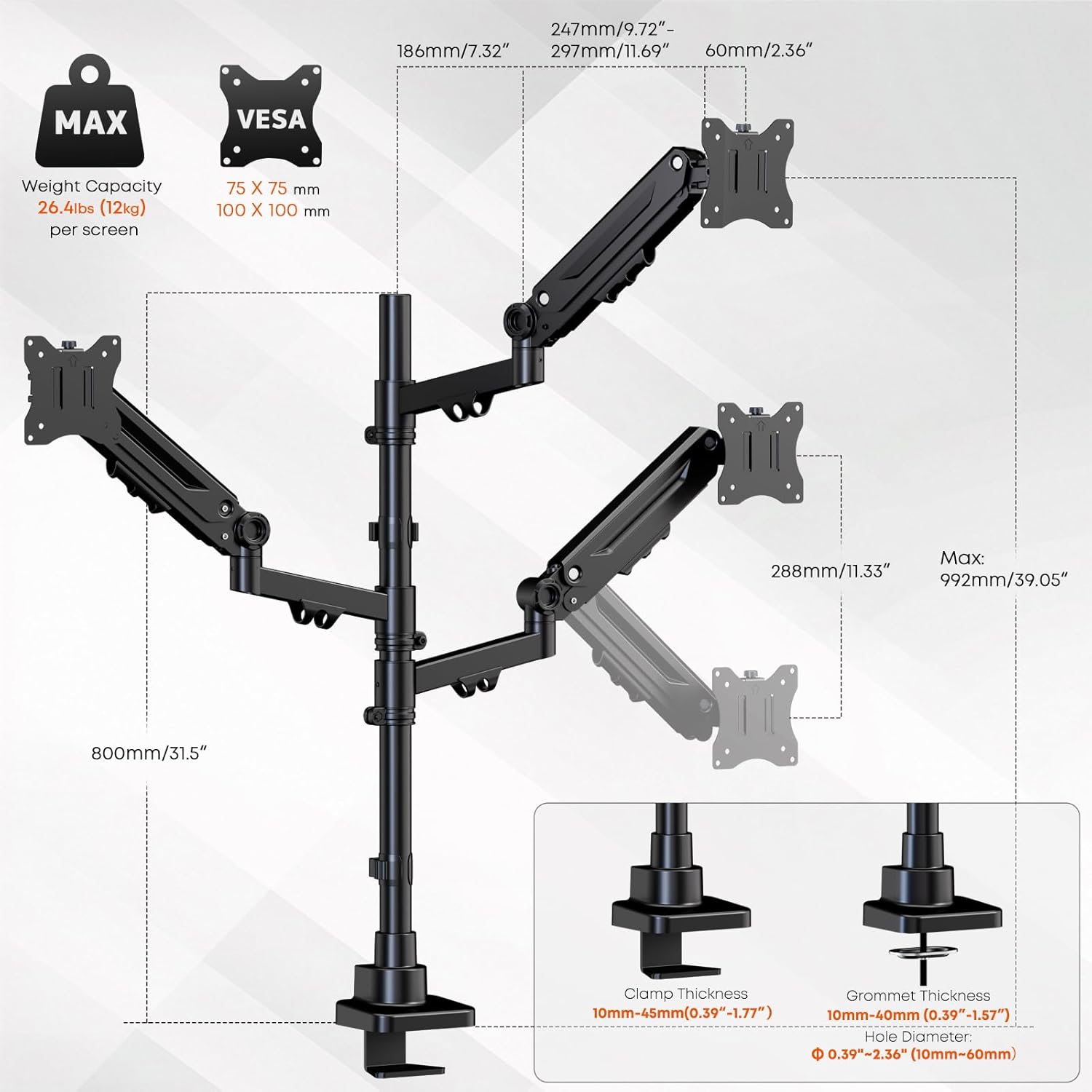
4.1-сүрөт: Detailed specifications and dimensions of the monitor mount, including VESA patterns, weight capacity, and desk compatibility for clamp жана монтаждоо.
5. Орнотуу жана орнотуу
Follow these steps to properly install your PUTORSEN Triple Monitor Mount.
5.1 Монтаждоо ыкмасын тандаңыз
The mount supports two installation methods: C-clamp же рычагды бекитүү. Үстөлүңүзгө ылайыктуу ыкманы тандаңыз.
- C-Clamp Орнотуу: C-cl тиркеңизamp to the edge of your desk. Ensure the desk thickness is between 10mm and 45mm. Tighten the clamp securely to prevent movement.
- Громмет орнотуу: If your desk has a grommet hole (10mm-60mm diameter) and a thickness between 10mm and 40mm, use the grommet base. Secure the base through the hole using the provided hardware.
5.2 Штанганы жана жебелерди чогултуу
- Attach the main pole to your chosen desk base (C-clamp же тромб).
- Slide the gas spring arms onto the main pole. The arms can be positioned at desired heights. Secure them using the provided collars and screws.
5.3 Мониторлорду тиркөө
- Attach the VESA plates to the back of each monitor using the appropriate screws (M4x12, M4x30, M5x12, M5x30). Ensure the screws are tightened securely but do not overtighten.
- Carefully slide the monitors (with VESA plates attached) onto the gas spring arms. Ensure they click into place or are secured with the locking mechanism.

5.1-сүрөт: The triple monitor mount with monitors installed, demonstrating the gas spring arms and support for up to 35-inch screens.
6. Иштөө жана тууралоо
The PUTORSEN Triple Monitor Mount offers extensive adjustability for optimal viewсооронуч.
6.1 Газ пружинанын чыңалуусун жөндөө
After mounting your monitors, you may need to adjust the gas spring tension to ensure the arms hold the monitors in place without sagging or floating. Use the included Allen key to turn the adjustment screw on each arm:
- Бурул саат жебеси боюнча (-) жеңилирээк мониторлор үчүн чыңалууну азайтуу үчүн.
- Бурул саат жебесине каршы (+) оор мониторлор үчүн чыңалууну жогорулатуу.
Adjust gradually until the monitor stays at the desired height when released.
6.2 Монитордун жайгашуусу
Each arm allows for independent adjustment:
- Бийиктигин тууралоо: Move the arms up or down along the main pole, or use the gas spring mechanism for vertical movement.
- Россия: Adjust the monitor screen vertically by tilting it up or down (±35°).
- Айлануучу: Rotate the monitor horizontally left or right (±90°).
- Айлануу: Мониторду тигинен же туурасынан багыттоо үчүн 360° буруңуз.

6.1-сүрөт: Demonstrating the full range of motion including tilt, swivel, and 360-degree rotation for optimal monitor positioning.
6.3 Кабелди башкаруу
Utilize the integrated cable management clips along the arms and pole to route and organize your monitor cables. This helps maintain a clean and clutter-free workspace.

6.2-сүрөт: Integrated cable management system for a tidy setup.
7. Техникалык тейлөө
Үзгүлтүксүз техникалык тейлөө мониторуңуздун узак мөөнөттүү иштешин жана коопсуз иштешин камсыз кылат.
- Тазалоо: монтажды жумшак менен сүртүңүз, гamp кездеме. Абразивдүү тазалагычтардан же эриткичтерден качыңыз.
- Мезгилдүү текшерүү: Мезгил-мезгили менен бардык бурамалар менен байланыштарды текшерип туруңуз, алар бекем бойдон калууда. Керек болсо кайра тартыңыз.
- Gas Spring Check: If monitors begin to sag or drift over time, re-adjust the gas spring tension as described in Section 6.1.
8. Кыйынчылыктарды
Эгерде сиз мониторуңузду орнотууда көйгөйлөргө туш болсоңуз, төмөнкү кеңири таралган көйгөйлөрдү жана чечимдерди караңыз:
| Көйгөй | Мүмкүн себеп | Чечим |
|---|---|---|
| Monitor sags or drifts down | Газ пружинанын чыңалуусу монитордун салмагы үчүн өтө төмөн. | Жөндөө бурамасын саат жебесине каршы (+) бурап, газ пружинанын чыңалуусун жогорулатыңыз. |
| Монитор өйдө көтөрүлөт же ылдый түртүү кыйын | Газ пружинанын чыңалуусу монитордун салмагы үчүн өтө жогору. | Жөндөө бурамасын саат жебеси боюнча (-) буруп, газ пружинанын чыңалуусун азайтыңыз. |
| Mount feels unstable or wobbles | Үстөл clamp же рычагдын негизи бекем тартылган эмес. | Үстөлдүн clamp or grommet base is fully tightened to the desk. Check all arm connections. |
| Мониторлор түз эмес | Minor variations in arm height or VESA plate alignment. | Adjust individual monitor tilt and rotation. Ensure arms are at the same height on the pole. |
| Cables do not fit into management clips | Өтө көп кабельдер же кабелдер өтө калың. | Reduce the number of cables or use thinner cables if possible. Use external cable ties if clips are insufficient. |
9. Кепилдик жана колдоо
9.1 Кепилдик маалыматы
This PUTORSEN Triple Monitor Mount is covered by a 10 жылдык кепилдик from the date of purchase. This warranty covers manufacturing defects and material flaws under normal use. It does not cover damage caused by improper installation, misuse, accidents, or unauthorized modifications.
9.2 Кардарларды колдоо
For technical assistance, warranty claims, or any questions regarding your PUTORSEN product, please contact our customer support team. Refer to the contact information provided in your product packaging or visit the official PUTORSEN webколдоо чоо-жайы үчүн сайт.
Онлайн ресурстар: For additional information, FAQs, and video tutorials, please visit the Amazon'догу PUTORSEN дүкөнү.