
1. Киришүү
The NGTeco NG-MB1 4-in-1 APP-Based Time Clock is a versatile attendance management system designed for small businesses. It offers multiple verification methods including facial recognition, fingerprint scanning, RFID card, and PIN entry to accurately track employee work hours. This manual provides detailed instructions for setting up, operating, maintaining, and troubleshooting your device.
2. Коопсуздук маалыматы
- Ensure the device is installed indoors and away from direct sunlight, heat sources, and moisture.
- Зыяндын алдын алуу үчүн берилген кубат адаптерин гана колдонуңуз.
- Аппаратты өз алдынча бөлүүгө же оңдоого аракет кылбаңыз. Жардам алуу үчүн кардарларды колдоо бөлүмүнө кайрылыңыз.
- Аппаратты чаңдан жана таштандылардан таза жана таза кармаңыз.
3. Пакеттин мазмуну
Пакетте бардык буюмдар бар экенин текшериңиз:
- NGTeco NG-MB1 Time Clock Unit
- Кубаттуу адаптер
- Дубалга орнотуу кашаасы
- Монтаждоочу жабдуулар (буроолор, анкерлер)
- RFID Cards (multiple)
- USB Drive (for data transfer)
- Quick Start Guide
- Contact Information Card
4. Продукт бүтүп калдыview
The NGTeco NG-MB1 Time Clock features a compact design with multiple input options for employee verification.
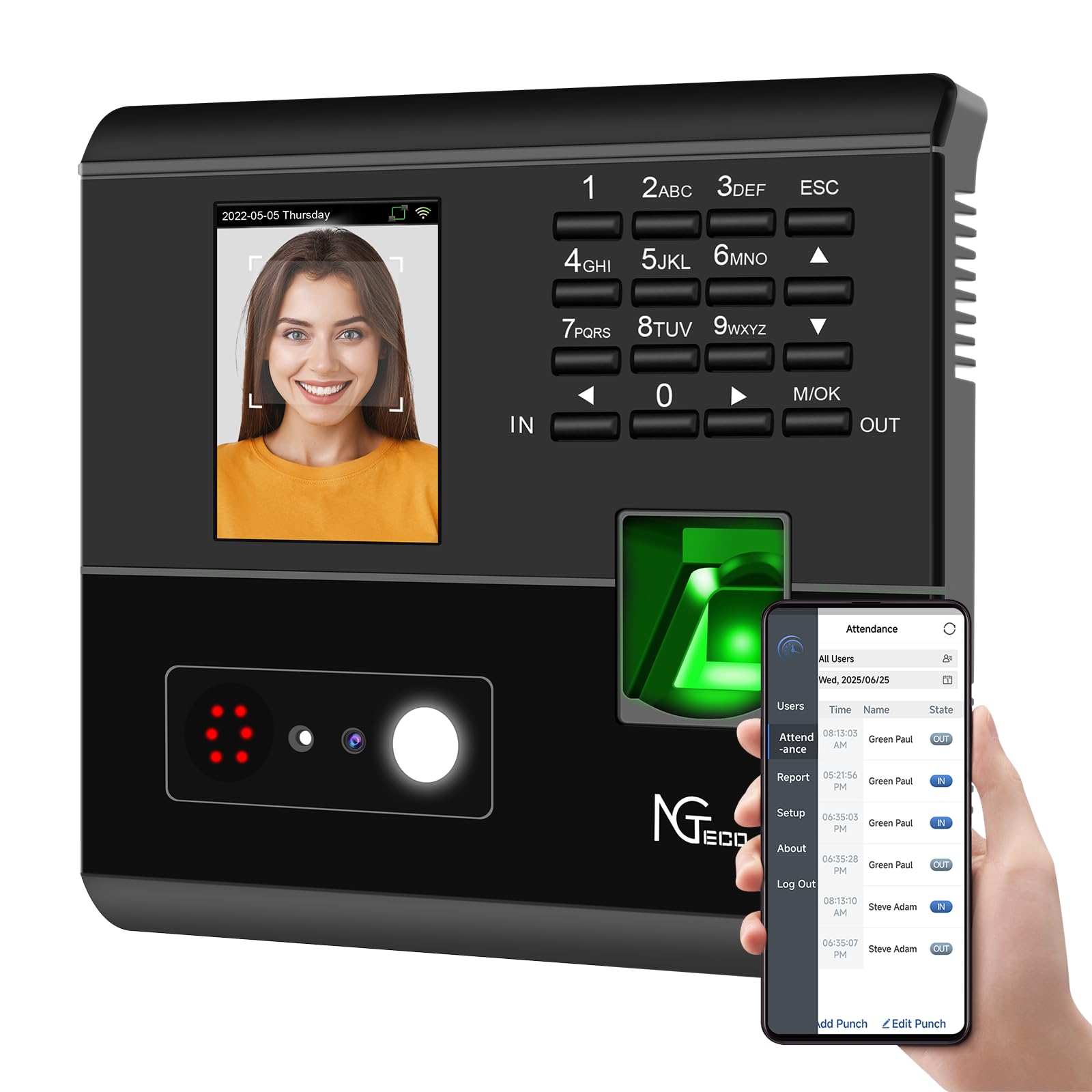
1-сүрөт: Фронт view of the NGTeco NG-MB1 Time Clock highlighting its four verification methods: Face Scan, Fingerprint, RFID Card, and Password.
Алдыңкы панелдин өзгөчөлүктөрү:
- Дисплей экраны: Shows time, date, user information, and menu options.
- Баскычтоп: Numeric keys for PIN entry and navigation.
- Манжа изин окугуч: For biometric fingerprint verification.
- Face Recognition Camera: For facial recognition verification.
- RFID/Card Reading Area: For scanning RFID cards.
Side and Back Panel Features:

2-сүрөт: Арткы view of the NGTeco NG-MB1 Time Clock, illustrating the power input, Ethernet port, and USB port for connectivity and data transfer.
- USB порт: For direct data transfer using a USB drive.
- Электр порту: Берилген кубат адаптерине туташат.
- Ethernet порту: Зымдуу тармак туташуусу үчүн.
5. Орнотуу
5.1 Аппаратты орнотуу
- Choose a suitable indoor location for mounting the time clock, ensuring it is at an appropriate height for all users.
- Use the provided mounting template to mark drill holes on the wall.
- Secure the wall mounting bracket using the supplied screws and anchors.
- Connect the power adapter and, if desired, an Ethernet cable to the device.
- Attach the time clock unit to the mounted bracket.
5.2 Колдонмону жүктөп алуу
жүктөп алыңыз NGTeco Time App from your mobile device's app store (Apple App Store for iOS or Google Play Store for Android). This app is essential for managing users, attendance records, and generating reports.
Видео 1: This video demonstrates the two methods for registering employee information on the NGTeco Time Clock, including using the device directly and through the NGTeco Time App.
5.3 Wi-Fi туташуусу
Түзмөгүңүздү Wi-Fi тармагына туташтыруу үчүн:
- On the device, navigate to the [Comm] меню.
- Тандоо [Зымсыз тармак].
- Тизмеден каалаган Wi-Fi тармагын тандаңыз.
- Wi-Fi сырсөзүн баскычтопту колдонуп киргизип, ырастаңыз.
- The device will attempt to connect to the network. A successful connection will be indicated on the screen.
Видео 2: This video provides a step-by-step guide on how to configure the Wi-Fi settings on your NGTeco Time Clock device.
6. Иштөө нускамалары
6.1 Колдонуучуларды кошуу
Employees can be added directly on the device or through the NGTeco Time App.
Adding Users via Device:
- басып, кармап туруңуз M/OK негизги менюга кирүү үчүн баскычты басыңыз.
- багыттоо [Колдонуучулар] жана тандаңыз [Колдонуучу Кош].
- киргизиңиз Колдонуучунун ID, Ысым, Акыркы аты, жана коюңуз Колдонуучунун ролу (e.g., Employee, Admin).
- а тандаңыз Текшерүү режими (Password, Fingerprint, Card, or Face).
- Follow the on-screen prompts to enroll the chosen verification method(s).
Adding Users via NGTeco Time App:
- Open the NGTeco Time App on your smartphone.
- дегенге өтүңүз Колдонуучулар section and tap Колдонуучу кошуу.
- Enter the employee's details including Ысым, Акыркы аты, PIN, жана Уруксат деңгээл.
- Save and sync the data with the device.
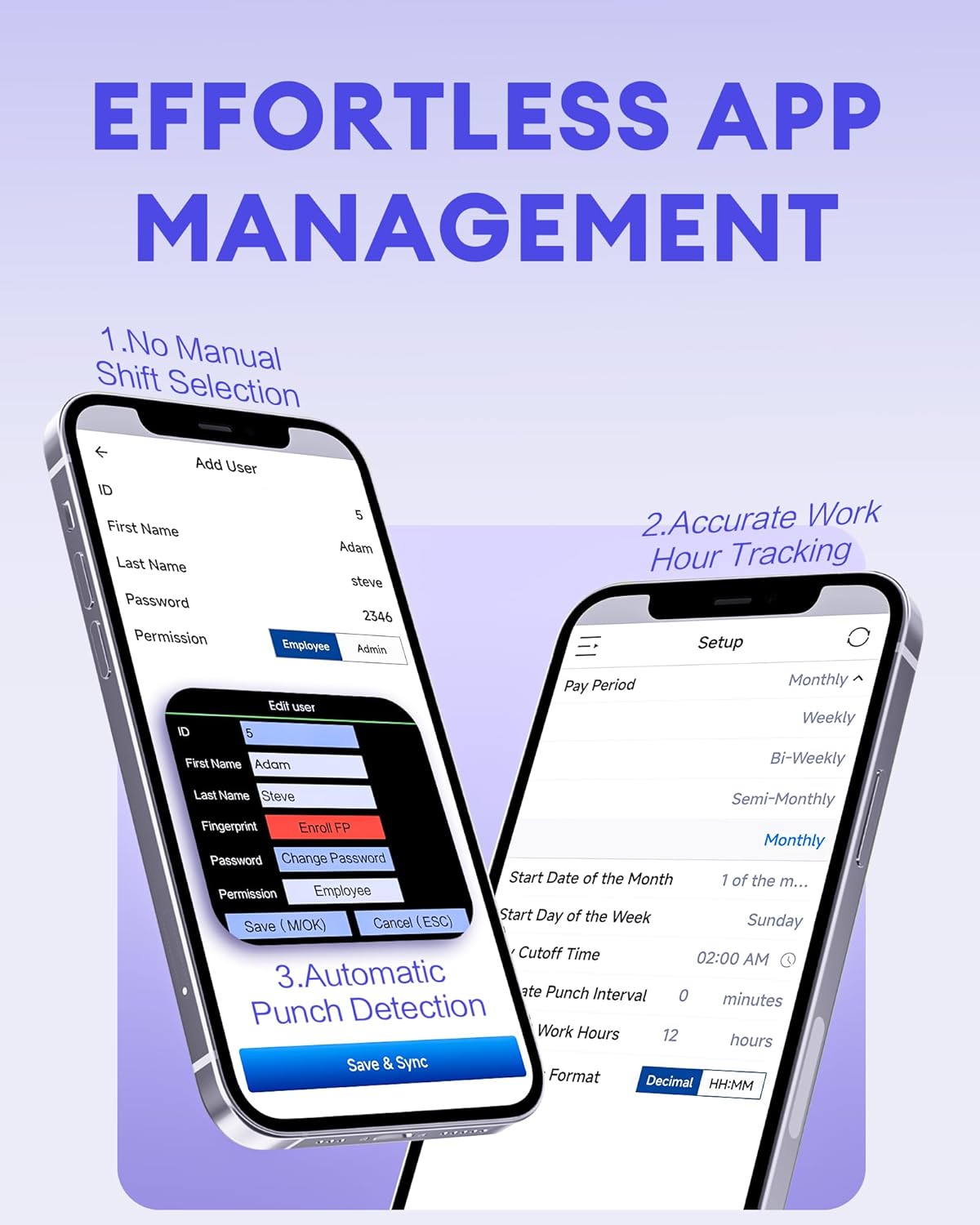
3-сүрөт: The NGTeco Time App interface for effortless management, including adding users, setting up work hour tracking, and automatic punch detection.
6.2 Enrolling Biometrics and Cards
Манжа изин каттоо:
For optimal fingerprint recognition:
- Always use clean fingers and avoid angled or tilted finger positions during enrollment.
- Place your finger belly completely in the middle of the reader.
- Do not slide the finger while enrolling. Apply some pressure for 1 second until the result is shown.
- If a finger is dry, gently breathe on it to moisten it before scanning.

4-сүрөт: Visual representation of the high-precision fingerprint module, emphasizing reliable, fast, and secure access.
Face Enrollment:
Follow the on-screen instructions to position your face correctly in front of the camera for enrollment.
RFID Card Enrollment:
When prompted, hold the RFID card near the designated reading area on the device until it is successfully registered.
6.3 Clocking In and Out
The NGTeco NG-MB1 supports automatic detection for clocking in and out, eliminating the need to press specific 'IN' or 'OUT' keys. Simply present your chosen verification method (face, fingerprint, RFID card, or enter your PIN) to the device.
Видео 3: This video demonstrates the four recognition methods (Face, Fingerprint, RFID, PIN) for clocking in on the NGTeco Time Clock.
6.4 Managing Attendance Records
Attendance records can be modified directly on the device or through the NGTeco Time App.
Adding/Editing Missing Punches:
- Түзмөк аркылуу: Access the menu, navigate to [Time Data], анда [Add Missing Punch]. Select the user, date, time, and punch state (Check In/Check Out).
- Колдонмо аркылуу: In the NGTeco Time App, go to the Катышуу section. You can add a new punch or edit an existing one by selecting the user, date, time, and punch state.

5-сүрөт: The NGTeco Time App's punch record correction feature, allowing easy fixes for errors or missing punches.
Видео 4: This video illustrates how to modify attendance records directly on the NGTeco Time Clock device and through the mobile application.
6.5 Отчетторду түзүү
The NGTeco Time Clock supports various payroll cycles and offers multiple ways to download attendance reports.

6-сүрөт: The NGTeco Time Clock supports various payroll cycles, including Monthly, Semi-Monthly, Bi-Weekly, and Weekly, for flexible attendance management.
Report Download Options:
- App Email Download: Use the NGTeco Time App to email detailed reports directly to your inbox.
- USB Drive Download: Insert the provided USB drive into the device's USB port to download attendance data.

7-сүрөт: Illustration of the two convenient methods for downloading attendance reports: directly to a USB drive or via email through the NGTeco Time App.
7. Техникалык тейлөө
- Тазалоо: Regularly wipe the device's screen, keypad, and fingerprint sensor with a soft, dry cloth. Avoid using abrasive cleaners or liquids.
- Программалык камсыздоо жаңыртуулары: Check the NGTeco Time App or website for any available firmware or software updates to ensure optimal performance and security.
- Маалыматтын камдык көчүрмөсү: Periodically back up your attendance data using the USB drive or through the app to prevent data loss.
8. Кыйынчылыктарды
- Түзмөк күйбөй жатат: Кубат адаптери аспапка да, иштеген электр розеткасына да бекем туташып турганын текшериңиз.
- Wi-Fi туташуу маселелери: Verify your Wi-Fi password and ensure the device is within range of your router. Restarting the device or router may help.
- Fingerprint/Face Recognition Failure: Ensure the sensor/camera is clean. For fingerprints, ensure fingers are clean and placed correctly with adequate pressure. Re-enrollment may be necessary if issues persist.
- Колдонмону синхрондоштуруу көйгөйлөрү: Check your device's internet connection and ensure the time clock is connected to the same Wi-Fi network as your phone.
- Жок болгон соккулар: Refer to Section 6.4 for instructions on adding or editing missing punches.
For further assistance, consult the Quick Start Guide or contact NGTeco customer support.
9. Техникалык шарттар
| Өзгөчөлүк | Деталь |
|---|---|
| Бренд | NGTeco |
| Модель номери | NG-MB1 |
| Түс | Кара |
| Дисплей түрү | Санарип |
| Өзгөчө өзгөчөлүк | Face/Fingerprint/Card/PIN |
| Продукциянын өлчөмдөрү | 5"W x 4"H |
| Power Source | Электр зымдары |
| Байланыш технологиясы | WiFi |
| Элемент Салмагы | 0.79 килограмм |
| Материалдын түрү | Premium ABS пластик |
10. Кепилдик жана колдоо
- Кепилдик: The NGTeco NG-MB1 comes with a 1-year manufacturer's warranty.
- Техникалык колдоо: Enjoy free lifetime technical support from NGTeco's U.S.-based service team. Support is available Monday to Friday, 6 AM to 6 PM EST.
- For support, refer to the contact information provided in your Quick Start Guide or visit the official NGTeco webсайт.