
BOAVISION QM1
BOAVISION QM1 Dual Lens WiFi Outdoor Security Camera User Manual
Модель: QM1
1. Киришүү
This manual provides detailed instructions for the installation, operation, and maintenance of your BOAVISION QM1 Dual Lens WiFi Outdoor Security Camera. Please read this manual thoroughly before using the product to ensure proper function and safety.
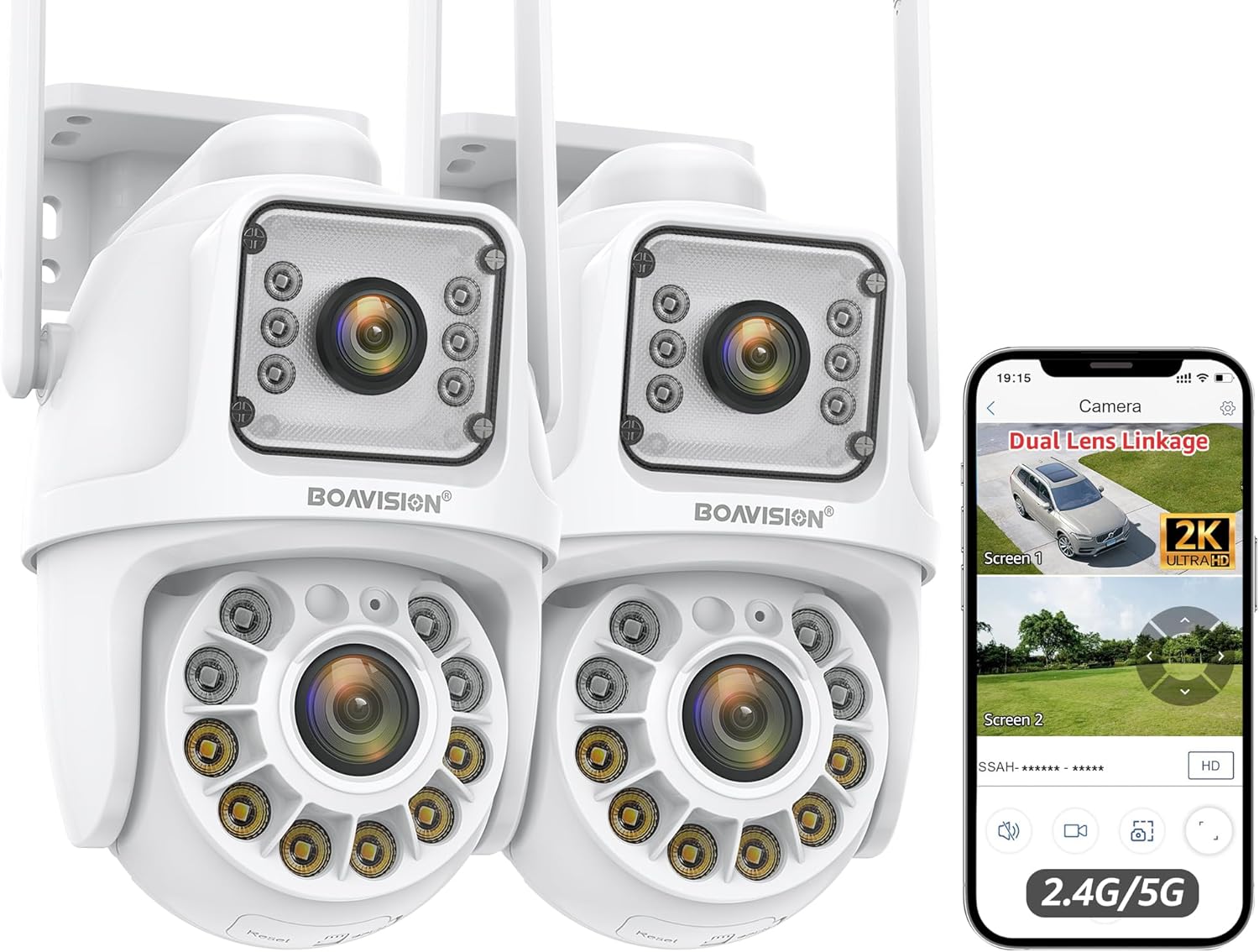
Image 1.1: BOAVISION QM1 Dual Lens WiFi Outdoor Security Camera (2-pack shown).
2. Кутуда эмне бар
Кутудан чыгарууда бардык компоненттер бар экенин текшериңиз:
- BOAVISION QM1 Dual Lens Security Camera(s)
- Кубаттуу адаптер(дер)
- Монтаждоо кронштейндери
- Монтаждоочу жабдуулар (буроолор, дубал анкерлери)
- Waterproof Cap for Ethernet Cable
- Quick Start Guide
- Кичинекей бурагыч
- Ethernet Cable (short)
- Power Extension Cable (optional, for longer reach)

Сүрөт 2.1: Бүттүview of included accessories, including power adapter, mounting bracket, and cables.
3. Орнотуу колдонмосу
3.1 Физикалык орнотуу
The camera supports both wall and ceiling mounting. Choose a location that provides optimal coverage and a stable surface for installation.
- Каалаган бетке бургулоочу тешиктерди белгилөө үчүн берилген шаблонду колдонуңуз.
- Эгерде гипсокартонго же кышка орнотуп жатсаңыз, тешиктерди бургулап, дубалга анкерлерди орнотуңуз.
- Берилген бурамалар аркылуу монтаждык кронштейнди бетке бекитиңиз.
- Attach the camera to the mounting bracket, ensuring it is firmly seated.

Сүрөт 3.1: Мисamples of wall-mounted and ceiling-mounted camera installations.
3.2 Кубат туташтыруу
Connect the camera to the power adapter. If needed, use the power extension cable for longer distances. Ensure the connection is secure and, if using Ethernet, apply the waterproof cap.
Video 3.2: Demonstrates connecting the power and Ethernet cables, including the waterproof cap, and initial setup steps for the BOAVISION Dual Lens Security Camera.
3.3 Тармакка туташуу (Wi-Fi / Ethernet)
The camera supports both 2.4GHz and 5GHz Wi-Fi bands for flexible network integration. For a wired connection, use an Ethernet cable.
- Wi-Fi: During app setup, select your Wi-Fi network and enter the password. Ensure the camera is within range of your router or Wi-Fi booster.
- Ethernet: Connect an Ethernet cable from your router or network switch to the camera's Ethernet port. Use the provided waterproof cap for outdoor installations.

Image 3.3: Illustration of 2.4GHz and 5GHz dual-band Wi-Fi connectivity for stronger and faster network signals.
3.4 Колдонмону орнотуу жана жупташтыруу
Download the "CamHipro" app from your device's app store (iOS/Android). Follow the in-app instructions to add and pair your camera. This typically involves scanning a QR code on the camera or manually entering its ID.
4. Иштөө нускамалары
4.1 Dual Lens Linkage and PTZ Control
The camera features two lenses: a fixed "bullet" lens (Screen 1) for key areas and a rotating "dome" lens (Screen 2) with 355° pan and 90° tilt. In the app, you can view both screens simultaneously. Clicking on the fixed bullet screen will automatically direct the dome camera to that area.

Image 4.1: The camera's dual lens system with pan and tilt capabilities, controlled via the mobile application.

Image 4.2: Demonstrates the dual lens linkage feature, where clicking on one screen automatically adjusts the other camera's view.
4.2 Адамды жасалма интеллект менен аныктоо жана автоматтык түрдө көзөмөлдөө
The built-in AI algorithm can distinguish human movement from other objects, reducing false alarms. When a human is detected, the camera will automatically track the subject and send notifications to your mobile phone. After the subject leaves the area, the camera returns to its preset guard position.

Image 4.3: Visual representation of AI human detection and automatic tracking functionality.

Image 4.4: The camera's human detection feature triggering a light and sound alarm, with a mobile notification example.
4.3 Түнкү көрүү режимдери
The camera offers three night vision modes for clear monitoring up to 60 feet in low-light conditions:
- Толук түстүү түнкү көрүнүш: Utilizes built-in lights to provide full-color images.
- Инфракызыл (ИК) түнкү көрүү: Стандарттуу ак-кара түнкү көрүү.
- Кош жарык эскертүүсү: Combines IR with white light activation upon motion detection.

Image 4.5: Comparison of daytime view, full-color night vision, and infrared night vision capabilities.
4.4 Эки тараптуу аудио
The integrated speaker and microphone allow for real-time two-way communication. You can speak to visitors or deter intruders directly through the app.
Image 4.6: The camera's two-way audio function allowing communication with individuals near the camera.
4.5 Жазуу жана сактоо
The camera supports 24/7 recording. Video footage can be stored locally or via cloud services:
- Micro SD картасы: Жергиликтүү сактагыч үчүн атайын уячага Micro SD картаны (128 ГБ чейин, кошулган эмес) салыңыз.
- Булуттагы сактагыч: Optional cloud storage services may be available through the CamHipro app (subscription may be required).
4.6 Көп түзмөктүү мүмкүндүк алуу
The CamHipro app allows simultaneous viewing on multiple devices (Android, iOS, Windows, Mac). You can share camera access with family members.
5. Техникалык тейлөө
- Тазалоо: Дайыма камеранын линзасын жана корпусун жумшак, гamp чаңды жана калдыктарды тазалоо үчүн кездеме. Катуу химиялык заттарды колдонбоңуз.
- Программалык камсыздоонун жаңыртуулары: Check the CamHipro app periodically for firmware updates to ensure optimal performance and security.
- Сактагычты башкаруу: If using an SD card, regularly review жана маанилүү азык-түлүктөрдүн камдык көчүрмөсүн сактооtage. Consider formatting the SD card periodically to maintain performance.
- Аба ырайын коргоо: While IP66 waterproof, ensure all cable connections are properly sealed, especially the Ethernet port with its waterproof cap, to prevent water ingress.
6. Кыйынчылыктарды
| Маселе | Мүмкүн чечим |
|---|---|
| Камера Wi-Fi'га туташпай жатат | Ensure the camera is within Wi-Fi range. Verify Wi-Fi password. Try restarting the camera and router. Confirm your router supports 2.4GHz or 5GHz. |
| Сүрөттүн сапаты начар | Clean the camera lens. Check network stability. Ensure sufficient lighting for optimal night vision. |
| Кыймылды аныктоо эскертүүлөрү жок | Check motion detection settings in the app. Ensure notifications are enabled on your phone. Verify AI human detection is active. |
| Эки тараптуу аудио иштебейт | Колдонмодон микрофондун жана динамиктин жөндөөлөрүн текшериңиз. Телефонуңуздун үнү жогору экенин текшериңиз. |
| SD карта жаздырылбай жатат | Ensure the SD card is inserted correctly and formatted within the app. Check if the SD card is full or corrupted. Replace if necessary. |
7. Техникалык шарттар
- Модел: QM1
- Бренд: BOAVISION
- Ички/тышкы колдонуу: Сыртта
- Байланыш: Wi-Fi (2.4G/5G), Wired Ethernet
- Панорама/Тилт: 355° Pan, 90° Tilt (Dome Lens)
- Видео тартуу токтому: 1080p (Full HD)
- Түнкү көрүнүш: Color Night Vision, IR Night Vision, Double Light Alert (up to 60 feet)
- Өзгөчөлүктөр: Dual Lens Linkage, AI Human Detection, Auto Tracking, Two-Way Audio, Motion Sensor
- Суу өткөрбөйт рейтинги: IP66
- Сактагыч: Micro SD картасы (128 ГБ чейин, кошулган эмес), булут сактагычы (милдеттүү эмес)
- Колдонмону башкаруу: CamHipro (iOS, Android, Windows, Mac)
- Кубат булагы: Электр зымдары (DC12V)
- Продукциянын өлчөмдөрү: 6.4 x 4.1 x 3.9 дюйм
- Элемент Салмагы: 2.75 фунт
8. Кепилдик жана колдоо
For warranty information, please refer to the documentation included with your purchase or contact BOAVISION customer support directly. Technical support is available through the contact information provided in the CamHipro app or on the official BOAVISION webсайт.
Кошумча коргоо пландарын өзүнчө сатып алууга болот. Чоо-жайын билүү үчүн сатуучуга кайрылыңыз.
Ask a question about this manual
Ask about setup, troubleshooting, compatibility, parts, safety, or missing instructions. Manuals+ will review the question and use this page’s manual context to help answer it.