
1. Киришүү
The Thunderobot L1 Computer Monitor Lamp is designed to provide optimal lighting for your workspace, focusing on eye comfort and visual clarity. It features an asymmetric light source, high color rendering (Ra≥95), flicker-free illumination, low blue light protection, and adjustable color temperature and brightness levels.
2. Коопсуздук маалыматы
- l камсыз кылууamp is securely placed on the monitor to prevent accidental falls.
- л-ды ачыкка чыгарбаamp сууга же ашыкча нымдуулукка.
- Avoid disassembling the product. Contact support for repairs.
- Кубат үчүн берилген USB кабелин гана колдонуңуз.
- Балдар жетпеген жерде сактаңыз.
3. Пакеттин мазмуну
Пакетте бардык буюмдар бар экенин текшериңиз:
- Thunderobot L1 Computer Monitor Lamp
- USB кубат кабели
- User Manual
4. Орнотуу нускамалары
- Позициялоо Лamp: Gently place the Thunderobot L1 Monitor Lamp on top of your computer monitor. The gravity-activated clamping mechanism and silicone anti-slip stabilizers will help secure it in place. Adjust the lamp's angle using the dual-pivot adjustment system to direct light onto your workspace without screen glare.
- Туташуу күчү: Connect the provided USB cable to the USB-C port on the lamp and plug the other end into an available USB port on your computer or a USB power adapter (not included). The lamp will power on.

Image: The Thunderobot L1 lamp features a gravity-activated clamp, silicone stabilizers, and a dual-pivot adjustment system for secure and flexible positioning.
Video: This video demonstrates the assembly and installation of the Thunderobot L1 Computer Monitor Lamp, showing how to attach it to a monitor and connect the power cable.
5. Иштөө нускамалары
The Thunderobot L1 Monitor Lamp features intuitive touch controls located on the top surface of the lamp.
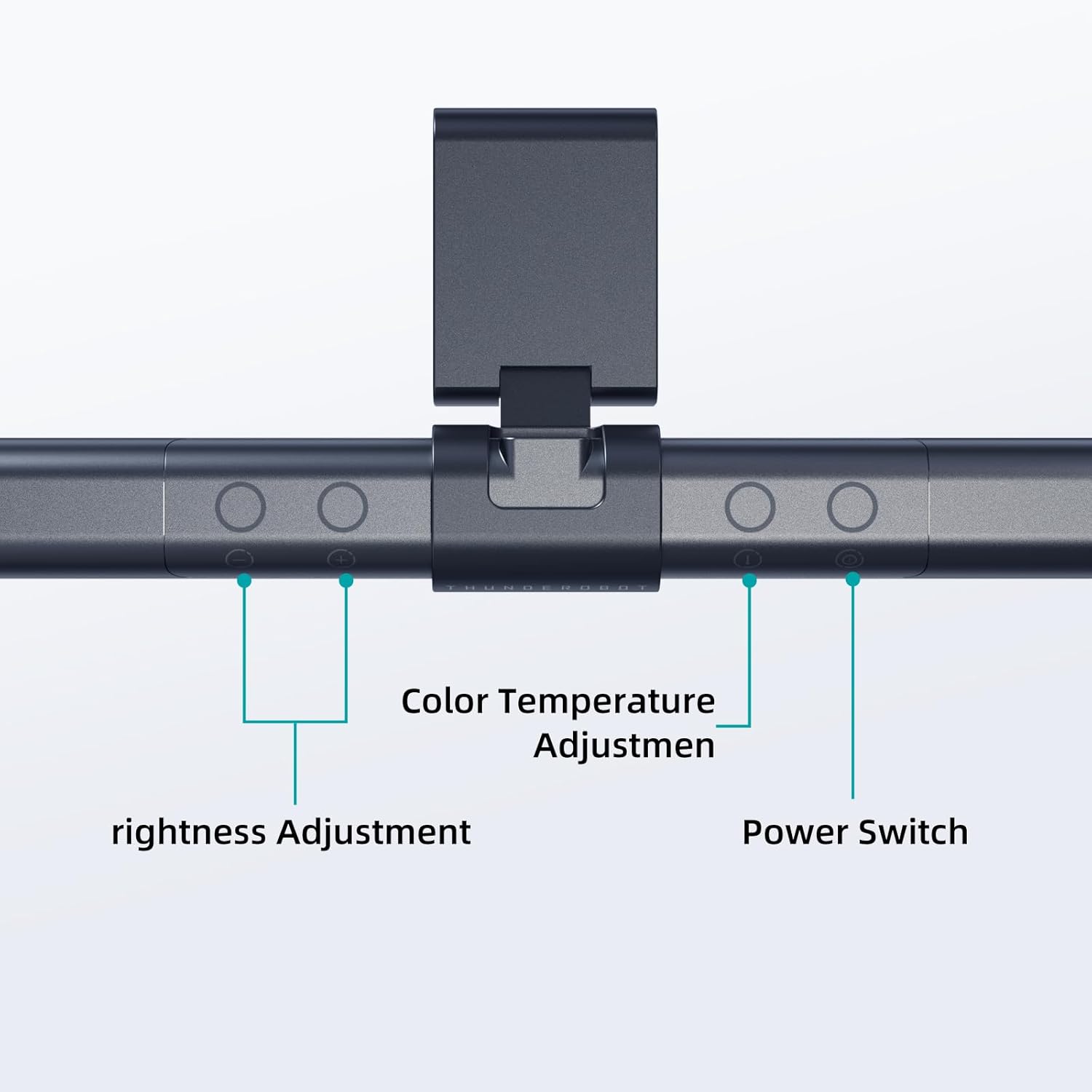
Image: The touch controls include buttons for brightness adjustment, color temperature adjustment, and power.
- Күйгүзүү/өчүрүү: Кубат баскычын басыңыз (O) буру лamp күйгүзүү же өчүрүү.
- Жарыктыкты жөндөө: Use the brightness adjustment buttons (+ жана -) to cycle through ten levels of brightness.
- Түс температурасын жөндөө: Press the color temperature button (i) to switch between six different color temperature settings.

Сүрөт: The lamp offers six adjustable color temperatures, ranging from 3000K (Warm Light) to 6000K (Cool White Light), suitable for various activities like movie viewing, reading, studying, and working.
6. Негизги өзгөчөлүктөрү
- Асимметриялык жарык булагы: The advanced asymmetric light design ensures uniform light distribution across the workspace, eliminating screen glare and shadows. This optimizes the light path for comfortable, prolonged use.
- Ra≥95 High Color Rendering: With a color rendering index of Ra≥95, the lamp accurately reproduces colors, providing a vivid and true-to-life visual experience for various tasks.
- Жарыксыз жарыктандыруу: Equipped with flicker-free technology, this lamp provides constant, stable illumination, reducing eye strain and headaches associated with traditional lighting.
- Low Blue Light Protection: Advanced low blue light technology reduces harmful blue wavelengths, alleviating eye strain, dryness, and fatigue, especially during extended screen time.
- Six Color Temperatures: Offers a versatile range of six color temperature options, from warm white to cool white, allowing users to customize the lighting atmosphere for different scenarios and preferences.
- Ten-Level Dimming: Provides ten adjustable brightness levels for precise control over illumination intensity.

Image: The Ra≥95 High CRI ensures colors are displayed accurately and vibrantly, as demonstrated by the fruit comparison.

Сүрөт: The lamp provides low blue light protection, reducing harmful blue light exposure for eye comfort.
7. Техникалык шарттар
| Өзгөчөлүк | Деталь |
|---|---|
| Продукциянын өлчөмдөрү | 3.5"D x 17.7"W x 3.85"H |
| Элемент Салмагы | 16 унция |
| Lamp Type | Үстөл Л.amp |
| Shade Color | Кара |
| Көлөкө материалы | Полиэстер |
| Которуу түрү | Push Button |
| Байланыш технологиясы | USB (кубат үчүн) |
| Тtage | 12 вольт |
| Түс | Кара |
| Форма | Жалпак |
| Материалдын түрү | Поликарбонат |
| Модель номери | TH-L1-B2 |
8. Техникалык тейлөө
- Тазалоо: Тазалоодон мурун электрди өчүрүңүз. л сүртүү үчүн жумшак, кургак чүпүрөктү колдонуңузamp. Абразивдүү тазалагычтарды же эриткичтерди колдонбоңуз.
- Сактагыч: Узак мөөнөткө колдонулбаганда, лamp салкын, кургак жерде.
9. Кыйынчылыктарды
- Lamp күйгүзбөйт:
- USB кабели l экөөнө тең бекем туташтырылганын текшериңизamp жана энергия булагы.
- Verify that the power source (USB port or adapter) is functional.
- Жарык жымыңдайт:
- Электр байланышын текшериңиз.
- Эгерде жылтылдап кете берсе, кардарларды колдоо кызматына кайрылыңыз.
- Controls are unresponsive:
- Disconnect and reconnect the power cable to reset the lamp.
- Сенсордук башкаруу элементтерин колдонууда манжаларыңыз таза жана кургак экенин текшериңиз.
10. Кепилдик жана колдоо
Thunderobot provides 1-year product quality support for the L1 Computer Monitor Lamp. For warranty claims or technical assistance, please contact Thunderobot customer service.