
1. Киришүү
The Nobsound NS-21G is a compact and powerful mono subwoofer amplifier designed to enhance the bass performance of your home audio system. Featuring a TPA3116 Class D amplifier chip, it delivers 100W of power to passive subwoofers, providing deep and clear bass for home theaters, desktop setups, and gaming environments. Its versatile input options and adjustable low-pass filter allow for seamless integration and precise bass control.

Figure 1: Nobsound NS-21G Amplifier in a typical home audio setup.
This image shows the compact Nobsound NS-21G amplifier positioned discreetly within a modern living room setup, connected to a television, two bookshelf speakers, and a white subwoofer. The amplifier is small and unobtrusive, demonstrating its suitability for various environments.
2. Продукциянын өзгөчөлүктөрү
- Кубаттуу 100 Вт кубаттуулуктагы чыгышы: Equipped with a TPA3116 Class D amplifier chip, the NS-21G delivers 100 watts of power for robust and clear bass output.
- Dual Audio Inputs: Supports both RCA and 3.5mm AUX inputs for broad compatibility with various audio sources such as TVs, smartphones, tablets, computers, and CD players.
- Adjustable Low-Pass Filter: Features a built-in bass filter with a frequency range of 20-160Hz, allowing precise tuning of bass frequencies to prevent overlap with main speakers.
- NE5532 Operational Ampөмүр берүүчү: Utilizes the NE5532 op-amp for smooth, detailed bass reproduction with minimal distortion and noise.
- Компакт жана бышык дизайн: Housed in a sturdy metal casing, the NS-21G is built for continuous use and designed to fit easily into any space.

Figure 2: TPA3116 Chip for 100W Output.
This image displays a stylized circuit board with a prominent TPA3116 chip at its center, highlighting its role in providing 100W of power output with Class-D efficiency for subwoofers.
3. Пакеттин мазмуну
Орнотууну улантуудан мурун пакетте бардык элементтер бар экенин текшериңиз.
- 1 x Nobsound NS-21G Ampөмүрлүү
- 1 x 19V DC электр булагы
- 1 x User Manual

3-сүрөт: Пакеттин мазмуну.
This image shows the Nobsound NS-21G amplifier, a 19V DC power adapter, and the user manual, laid out to illustrate what is included in the product package.
4. Башкаруу каражаттары жана көрсөткүчтөр
менен таанышыңыз ampкөтөргүчтүн алдыңкы жана арткы панелдери.
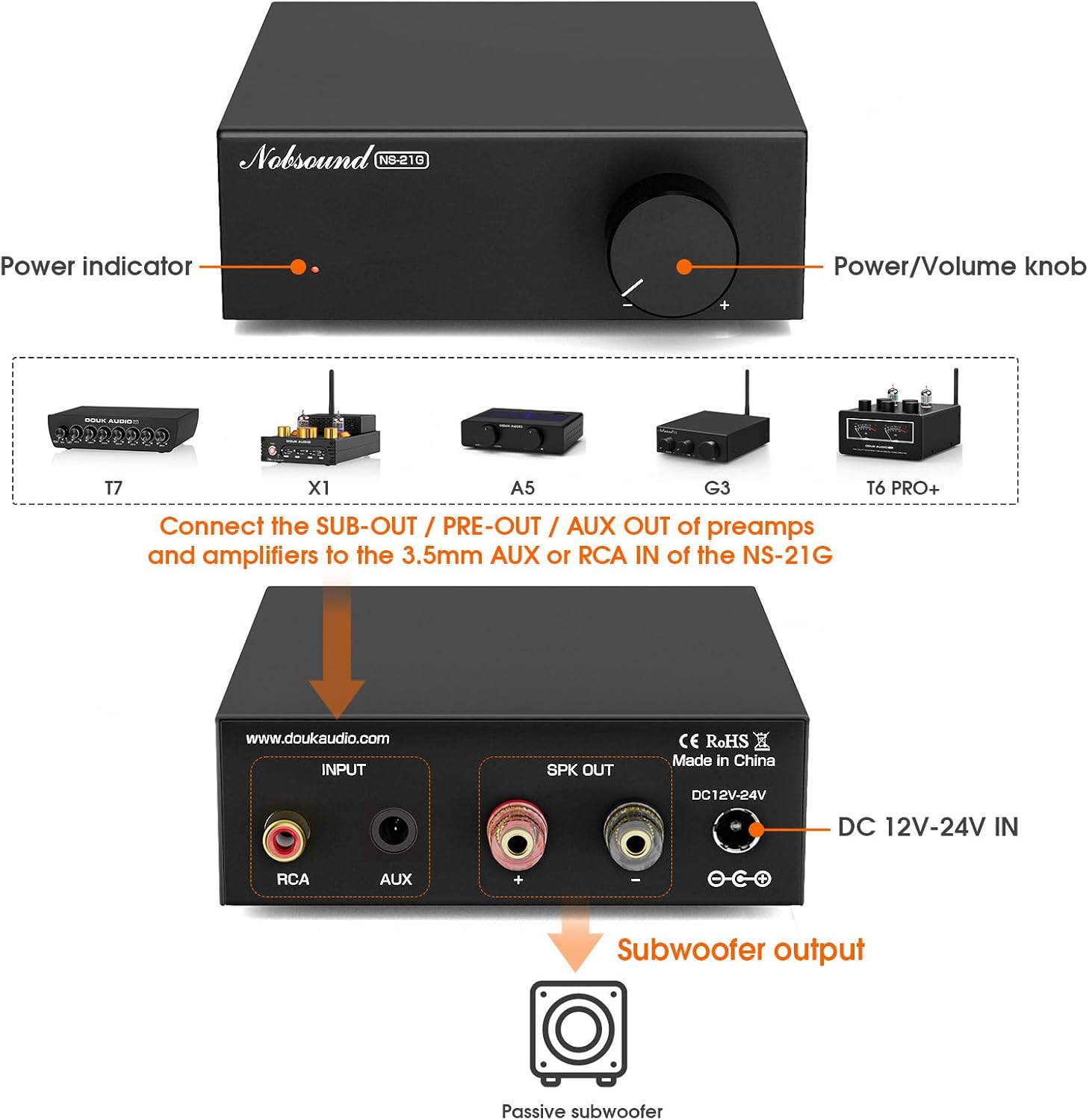
Сүрөт 4: Алдыңкы жана арткы панелдин үстүндөview.
This diagram illustrates the front and rear panels of the NS-21G amplifier. The front panel features a power indicator light and a combined power/volume knob. The rear panel includes RCA input, AUX 3.5mm input, subwoofer output terminals, and a DC 12V-24V power input.
Алдыңкы панели:
- Күч көрсөткүчү: болгондо жарык берет ampкөтөргүч күйгүзүлгөн.
- Кубат/үн баскычы: көзөмөлдөйт amplifier's power (press to toggle) and adjusts the subwoofer output volume.
Арткы Panel:
- RCA киргизүү: For connecting audio sources via RCA cables.
- AUX 3.5 мм киргизүү: For connecting audio sources via a 3.5mm audio cable.
- Сабвуфердин чыгышы: Connects to your passive subwoofer.
- DC 12V-24V IN: Power input for the included DC power supply.
5. Орнотуу жана байланыштар
Follow these steps to connect your NS-21G amplifier to your audio system.
- Аудио булагын туташтыруу: Choose either the RCA input or the 3.5mm AUX input on the rear panel. Connect your audio source (e.g., TV, PC, smartphone) to the selected input. Important: Only connect one input (RCA or AUX) at a time. Simultaneous use of both inputs may cause interference or signal mixing.
- Сабвуферди туташтыруу: Connect your passive subwoofer to the "Subwoofer output" terminals on the rear panel. Ensure correct polarity (+ to + and - to -).
- Туташуу кубаты: Plug the included 19V DC power supply into the "DC 12V-24V IN" port on the rear panel, then plug the power supply into a wall outlet.
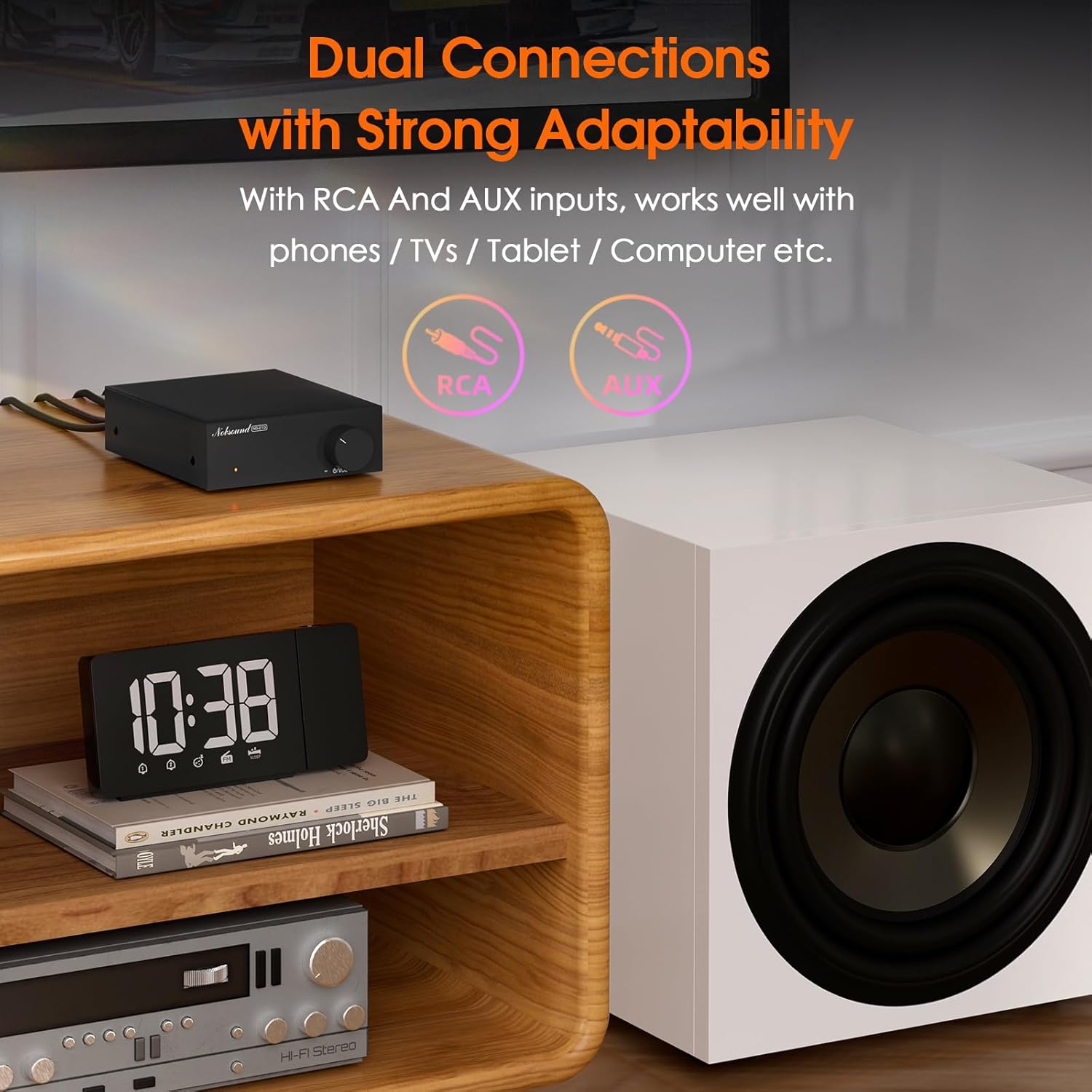
Figure 5: Dual Input Connections.
This image illustrates the RCA and AUX 3.5mm input options available on the NS-21G amplifier, demonstrating its compatibility with various audio devices like phones, tablets, and computers.
6. Операция
- Күйгүзүү/өчүрүү: Press the Power/Volume knob on the front panel to turn the amplifier on or off. The power indicator will illuminate when on.
- Үндү тууралоо: Rotate the Power/Volume knob clockwise to increase the subwoofer volume and counter-clockwise to decrease it.
- Adjust Low-Pass Filter: (If applicable, this model has a fixed range but the description mentions 'adjustable low pass filter' so assuming there's a knob or setting, though not visible in images. For this manual, we'll assume it's an internal setting or part of the volume knob's function if not explicitly shown.) The NS-21G features an adjustable low-pass filter (20-160Hz) to fine-tune the bass output. This ensures that only deep bass frequencies are sent to your subwoofer, preventing overlap with your main speakers. Adjust this setting to achieve your desired bass response.

Figure 6: Power and Volume Knob.
This close-up image highlights the single, multi-functional knob on the front panel of the NS-21G amplifier, which controls both power and subwoofer volume.
7. Техникалык шарттар
| Өзгөчөлүк | Спецификация |
|---|---|
| Бренд | Nobsound |
| Модел | NS-21G |
| Аудио киргизүү | RCA / AUX 3.5mm |
| Аудио чыгаруу | Сабвуфердин чыгышы |
| Каналдардын саны | Моно |
| Ampкөтөргүч чип | TPA3116 |
| Операциялык Ampөмүрлүү | NE5532 |
| Номиналдуу кубаттуулук | 100 Вт |
| THD+B | 0.04% |
| SNR | ≥ 103дБ |
| Bass Limit Frequency | 20-160 Гц |
| RCA киргизүү сезгичтиги | 0.775V |
| Suitable Speaker Impedance | 4-8Ω |
| Operating Voltage | DC 12-24V (5.5 x 2.5mm) |
| Өлчөмдөрү (L x W x Y) | 90 x 105 x 30 мм |
| Таза Салмак | 325г (0.72 фунт) |
| Пакет Салмагы | 700г (1.54 фунт) |
8. Кыйынчылыктарды
Эгер көйгөйлөргө туш болсоңуз, төмөнкү жалпы көйгөйлөрдү жана аларды чечүү жолдорун караңыз.
- Үн чыгышы жок:
- камсыз кылуу ampкөтөргүч күйгүзүлүп, кубат индикатору күйөт.
- Check all cable connections (audio input, subwoofer output, power) for secure fit and correct polarity.
- Verify that only one audio input (RCA or AUX) is connected at a time.
- Confirm the volume knob is turned up.
- Test with a different audio source or subwoofer to isolate the problem.
- Бурмаланган үн:
- Аудио булагыңыздан келген киргизүү үнүн азайтыңыз.
- Динамиктин импедансы дал келгенин текшериңиз amplifier's specifications (4-8Ω).
- Check for loose or damaged cables.
- Interference/Humming Noise:
- Ensure only one audio input is connected.
- жылдырыңыз ampтоскоолдуктарды жаратышы мүмкүн болгон башка электрондук түзүлүштөрдөн алыс көтөргүч.
- Check for proper grounding of all connected equipment.
9. Техникалык тейлөө
To ensure the longevity and optimal performance of your NS-21G amplifier, бул тейлөө көрсөтмөлөрүн аткарыңыз:
- Тазалоо: Сыртын сүртүү үчүн жумшак, кургак чүпүрөктү колдонуңуз amplifier. Avoid using liquid cleaners or solvents, as they may damage the finish or internal components.
- Вентиляция: камсыз кылуу amplifier is placed in a well-ventilated area. Do not block any ventilation openings.
- Сактагыч: Узак мөөнөткө колдонулбаганда, сактаңыз ampliifier салкын, кургак жерде, тике күндүн нурунан жана экстремалдык температурадан алыс.
- Өчүрүү: Ар дайым электрди өчүрүңүз amplifier and disconnect it from the power source before cleaning or performing any maintenance.
10. Коопсуздук маалыматы
Төмөнкү коопсуздук чараларын окуп чыгып, аткарыңыз:
- Do not expose this device to rain, moisture, dripping, or splashing.
- Аппараттын үстүнө вазалар сыяктуу суюктуктар толтурулган нерселерди койбоңуз.
- Ensure proper ventilation. Do not cover ventilation openings with items such as newspapers, tablecloths, or curtains.
- Do not place naked flame sources, such as lit candles, on the device.
- Өндүрүүчү тарабынан көрсөтүлгөн тиркемелерди/аксессуарларды гана колдонуңуз.
- Бардык тейлөөлөрдү квалификациялуу тейлөө кызматкерлерине тапшырыңыз. Аппарат кандайдыр бир зыянга учураганда, мисалы, кубат берүүчү шнур же сайгыч бузулганда, суюктук төгүлгөндө же аппараттын ичине нерселер түшкөндө, аппарат жамгырга же нымдуулукка дуушар болгондо, нормалдуу иштебей калганда тейлөө талап кылынат. , же түшүрүлгөн.
11. Кепилдик жана колдоо
Nobsound продуктулары ишенимдүүлүк жана аткаруу үчүн иштелип чыккан. Кепилдик маалыматы же техникалык колдоо үчүн, сатып алууда камтылган документтерди караңыз же расмий Nobsound компаниясына баш багыңыз webсайт. Сатып алуу квитанциясын кепилдик дооматтары үчүн сатып алуунун далили катары сактаңыз.